Block 1 - If
- Type / Role
- n8n-nodes-base.if - if
- Config choices
- Version 2.2


 Early Deal
This workflow is provided as-is. Please review and test before using in production.
Overview This n8n workflow template automatically parses incoming Telegram transaction messages and logs structured data into a Google Sheet. It’s designed to help individuals and small businesses ...
n8n-nodes-base.if, n8n-nodes-base.googlesheets, n8n-nodes-base.telegramtrigger, n8n-nodes-base.code, n8n-nodes-base.stickynote
This workflow is cataloged by N8N Workflows and links back to its original n8n.io source page by Mujtaba.
Original n8n.io sourceOverview
This n8n workflow template automatically parses incoming Telegram transaction messages and logs structured data into a Google Sheet. It’s designed to help individuals and small businesses track and record transactions shared via Telegram without manual data entry.
Target Audience
This template is ideal for:
Individuals, freelancers, and small businesses who receive transaction or payment notifications through Telegram and want to organize them in Google Sheets.
Anyone using self-hosted n8n (required due to custom community nodes).
Problem Solved
Manually copying transaction details from Telegram to Google Sheets is error-prone and time-consuming. This workflow automates the process by:
Monitoring a Telegram bot/chat for new messages.
Parsing transaction details (amount, sender, date, etc.).
Logging them in real-time into a Google Sheet for easy tracking.
Setup Instructions
Add the bot to the desired group/channel and grant admin permissions if needed.
Note down the bot token.
Set up Google Sheets credentials in n8n for access.
Update the Telegram node: Add your bot token and specify the chat/group ID.
Update the Google Sheets node: Link it to your created sheet and ensure column mapping matches your sheet structure.
Adjust parsing logic if your message format varies (see next section for examples).
[List your required community nodes here, e.g., n8n-nodes-telegram, n8n-nodes-gsheet, etc.]
Activate the Workflow Save and activate your workflow. Send a test transaction message to your Telegram group/chat and verify data appears in your Google Sheet.
Troubleshooting If messages are not being picked up, check bot permissions and the chat ID.
Ensure Google Sheets credentials are correct and the sheet is accessible.
Double-check that custom nodes are properly installed and up-to-date.
Example Telegram Message Formats
Received: $75 from @john_doe on 2024-05-29. Transaction ID: 12345XYZ. Paid $120 to @vendor on 2024-05-28. Ref: 67890ABC. You received ₹5,000 from @amit. ID: 54321PQR. Date: 29/05/2024 The workflow parses messages in the above formats and logs the following columns:
Date
Amount
Sender/Receiver
Transaction/Reference ID
If your message format differs, update the regex in the parsing node.
Disclaimer
This n8n workflow template uses custom community nodes and is only compatible with the self-hosted version of n8n.
'If' node → “Is Transaction Message?”
'Google Sheets' node → “Log to Google Sheet”
(Rename other generic nodes for clarity, e.g., 'Telegram' → “Listen for Telegram Messages”, 'Function' → “Parse Transaction Details”)
Sticky Note Improvement: (Edit the sticky note or add one if missing)
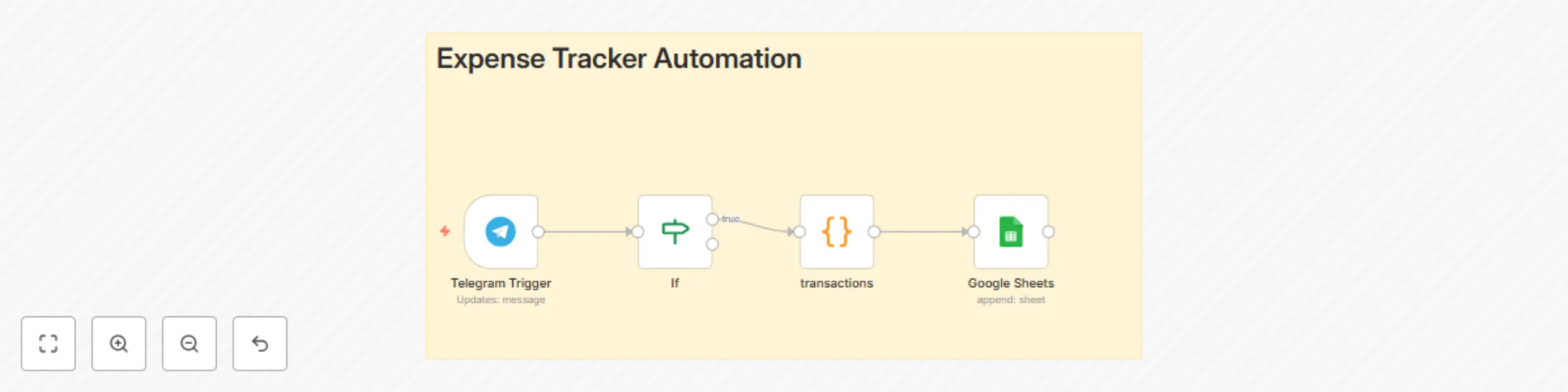
Workflow Steps:
Listen for Telegram Messages: This node receives new messages from the Telegram bot.
Is Transaction Message? Checks if the message matches known transaction patterns.
Parse Transaction Details: Extracts amount, sender, date, and transaction ID using regex.
Log to Google Sheet: Records the parsed transaction in the linked Google Sheet for easy tracking.
This catalog entry is organized from the workflow JSON. The node-level section below shows the executable blocks available for review before importing the template.
| Workflow | Track expenses by parsing Telegram transaction messages to Google Sheets |
|---|---|
| Complexity | intermediate |
| Nodes | 5 |
| Categories | Document Extraction |
| Author | Mujtaba |
| Published | 26 May 2025 |
Use the JSON export at /data/workflows/4395/4395.json as the source template for this automation.
Open n8n, import the downloaded JSON, and review each node before activating the workflow.
Replace placeholder credentials, API keys, webhook URLs, account IDs, and environment-specific values with your own settings.
Run the workflow manually or in a staging workspace, inspect node output, and confirm downstream systems receive the expected data.
Enable the workflow only after testing, then monitor executions, errors, and rate limits during the first production runs.
Review imported nodes carefully before activation. This catalog entry is intended to help you inspect the workflow structure, understand required services, and find related templates faster.
Node names, credentials, schedules, webhook paths, and external service limits may need adjustment for your workspace.
Overview This n8n workflow template automatically parses incoming Telegram transaction messages and logs structured data into a Google Sheet. It’s designed to help individuals and small businesses ...
Review the workflow JSON, configure any required credentials in n8n, and test the automation in a safe workspace before using it in production.
Yes. Use the block-by-block analysis and the downloadable JSON to inspect each node, then adjust credentials, prompts, schedules, filters, or destinations for your Document Extraction use case.