Track crypto prices & FX rates with CoinGecko & ExchangeRate-API to Notion

Workflow preview

Workflow preview
100%
Track crypto prices & FX rates with CoinGecko & ExchangeRate-API to Notion preview
Open on n8n.io

Important notice

This workflow is provided as-is. Please review and test before using in production.

1. Workflow Overview

Log BTC/ETH Prices and USD Exchange Rates to Notion (Hourly) Overview This workflow automatically logs live crypto prices (Bitcoin & Ethereum) and fiat exchange rates (USD→EUR / USD→NGN) into...

Best for

  • Crypto Trading automation workflows
  • intermediate n8n builders looking for reusable templates

Tools used

n8n-nodes-base.scheduletrigger, n8n-nodes-base.httprequest, n8n-nodes-base.merge, n8n-nodes-base.code, n8n-nodes-base.notion, n8n-nodes-base.stickynote

Source and attribution

This workflow is cataloged by N8N Workflows and links back to its original n8n.io source page by David Olusola.

Original n8n.io source

1.1 Workflow description

Title
Track crypto prices & FX rates with CoinGecko & ExchangeRate-API to Notion
Workflow name
Track crypto prices & FX rates with CoinGecko & ExchangeRate-API to Notion

📊 Log BTC/ETH Prices and USD Exchange Rates to Notion (Hourly)

📌 Overview

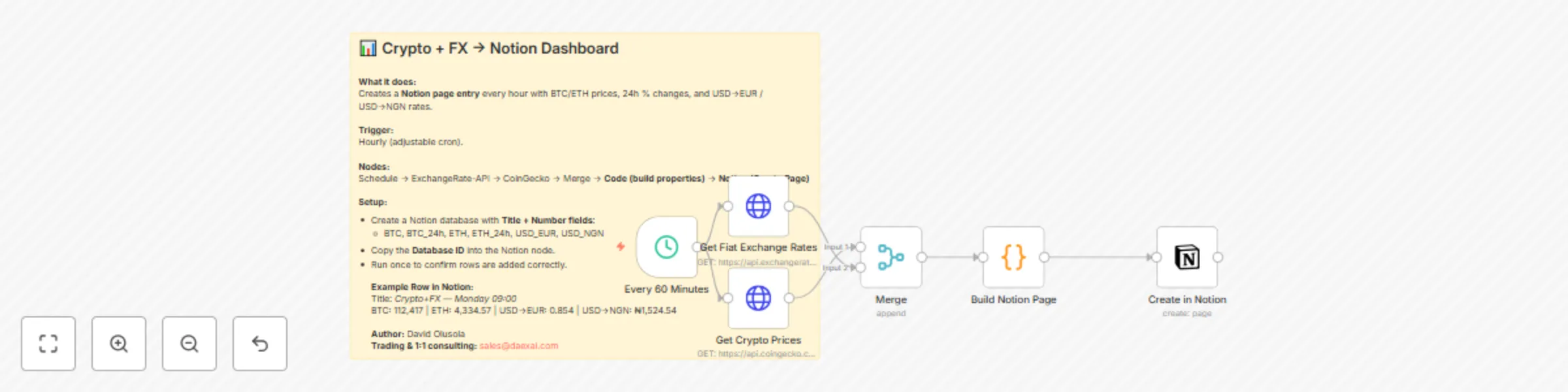
This workflow automatically logs live crypto prices (Bitcoin & Ethereum) and fiat exchange rates (USD→EUR / USD→NGN) into a Notion database every hour. Each entry becomes a new row in your Notion dashboard, letting you visualize currency and crypto trends side by side.

It’s perfect for traders, analysts, and anyone who wants a single source of truth in Notion without needing multiple apps open. With hourly updates, you’ll have a clean data history for building rollups, trend graphs, or financial dashboards.


⚙️ How it works

  1. Schedule Trigger — runs every hour (adjustable via cron).
  2. HTTP Request (ExchangeRate-API) — fetches USD-base FX rates (no API key required).
  3. HTTP Request (CoinGecko) — fetches BTC & ETH prices + 24h % change (no API key required).
  4. Merge — combines both payloads.
  5. Code (v2) — formats a Notion-ready JSON payload with the correct fields.
  6. Notion Node — creates a new page in your database with mapped properties.

Example Row in Notion:
Title: Crypto+FX — 2025-09-08 09:00
BTC: 112,417 | BTC_24h: +1.22%
ETH: 4,334.57 | ETH_24h: +1.33%
USD→EUR: 0.854 | USD→NGN: ₦1,524.54


🛠 Setup Guide

1) Create the Notion database

  • In Notion, create a new database (Table view).
  • Add these columns with matching property types:
Column Property Type
Title Title
BTC Number
BTC_24h Number
ETH Number
ETH_24h Number
USD_EUR Number
USD_NGN Number

2) Connect Notion in n8n

  • In the Notion “Create Page” node, connect with your Notion OAuth2 credentials.
  • On first use, you’ll be redirected to authorize n8n with your Notion workspace.
  • Copy your Database ID (from the Notion URL) and paste it into the node.

3) Map the Code output

  • The Code node outputs JSON fields: BTC, BTC_24h, ETH, ETH_24h, USD_EUR, USD_NGN.
  • In the Notion node, map each property:
    • BTC{{$json.BTC}}
    • BTC_24h{{$json.BTC_24h}}
    • ETH{{$json.ETH}}
    • ETH_24h{{$json.ETH_24h}}
    • USD_EUR{{$json.USD_EUR}}
    • USD_NGN{{$json.USD_NGN}}

4) Test

  • Run the workflow once.
  • Confirm that a new page is added to your Notion database with all values filled.

🎛 Customization

  • Cadence: change the schedule to 10 minutes, 4 hours, or daily depending on your needs.
  • Extra coins: add more IDs (e.g., solana, bnb) in the CoinGecko call and update the Code node.
  • Extra FX pairs: expand from ExchangeRate-API (e.g., USD→GBP, USD→ZAR).
  • Notion dashboards: use rollups, charts, and linked databases for trend visualization.
  • Formatting: add emojis, colors, or sections in your Notion view for clarity.

🧩 Troubleshooting

  • Page not created: verify Database ID and ensure the Notion API integration has access.
  • Empty fields: check that property names in Notion exactly match those used in the Code node.
  • Wrong data type: make sure properties are set as Number, not Text.
  • Rate limits: CoinGecko and ExchangeRate-API are free but may rate-limit if called too often; keep cadence reasonable (hourly recommended).

1.2 Logical Blocks

This catalog entry is organized from the workflow JSON. The node-level section below shows the executable blocks available for review before importing the template.

2. Block-by-Block Analysis

Block 1 - Every 60 Minutes

Type / Role
n8n-nodes-base.scheduleTrigger - scheduleTrigger
Config choices
Version 1.1

Block 2 - Get Fiat Exchange Rates

Type / Role
n8n-nodes-base.httpRequest - httpRequest
Config choices
Version 4.1

Block 3 - Get Crypto Prices

Type / Role
n8n-nodes-base.httpRequest - httpRequest
Config choices
Version 4.1

Block 4 - Merge

Type / Role
n8n-nodes-base.merge - merge
Config choices
Version 3.2

Block 5 - Build Notion Page

Type / Role
n8n-nodes-base.code - code
Config choices
Version 2

Block 6 - Create in Notion

Type / Role
n8n-nodes-base.notion - notion
Config choices
Version 2

Block 7 - Sticky Note

Type / Role
n8n-nodes-base.stickyNote - stickyNote
Config choices
Version 1

3. Summary Table

Workflow Track crypto prices & FX rates with CoinGecko & ExchangeRate-API to Notion
Complexity intermediate
Nodes 7
Categories Crypto Trading
Author David Olusola
Published 08 Sept 2025

4. Reproducing the Workflow from Scratch

  1. 1. Download the workflow JSON

    Use the JSON export at /data/workflows/8387/8387.json as the source template for this automation.

  2. 2. Import the template into n8n

    Open n8n, import the downloaded JSON, and review each node before activating the workflow.

  3. 3. Configure credentials and variables

    Replace placeholder credentials, API keys, webhook URLs, account IDs, and environment-specific values with your own settings.

  4. 4. Test with sample data

    Run the workflow manually or in a staging workspace, inspect node output, and confirm downstream systems receive the expected data.

  5. 5. Activate and monitor

    Enable the workflow only after testing, then monitor executions, errors, and rate limits during the first production runs.

5. General Notes & Resources

Review imported nodes carefully before activation. This catalog entry is intended to help you inspect the workflow structure, understand required services, and find related templates faster.

Node names, credentials, schedules, webhook paths, and external service limits may need adjustment for your workspace.

Frequently asked questions

What does Track crypto prices & FX rates with CoinGecko & ExchangeRate-API to Notion do?

Log BTC/ETH Prices and USD Exchange Rates to Notion (Hourly) Overview This workflow automatically logs live crypto prices (Bitcoin & Ethereum) and fiat exchange rates (USD→EUR / USD→NGN) into...

What do I need before importing this workflow?

Review the workflow JSON, configure any required credentials in n8n, and test the automation in a safe workspace before using it in production.

Can I customize this workflow?

Yes. Use the block-by-block analysis and the downloadable JSON to inspect each node, then adjust credentials, prompts, schedules, filters, or destinations for your Crypto Trading use case.