Block 1 - Upload file
- Type / Role
- n8n-nodes-base.googleDrive - googleDrive
- Config choices
- Version 3


 Early Deal
This workflow is provided as-is. Please review and test before using in production.
Simple Coupon Points Tracker with Google Sheets and Weekly Summary Email Take full control of your expected loyalty points. This workflow helps you log every coupon and the points you should receiv...
n8n-nodes-base.googledrive, n8n-nodes-base.scheduletrigger, n8n-nodes-base.code, n8n-nodes-base.googlesheets, n8n-nodes-base.gmail, n8n-nodes-base.merge, n8n-nodes-base.stickynote, n8n-nodes-base.formtrigger
This workflow is cataloged by N8N Workflows and links back to its original n8n.io source page by Remko Stas.
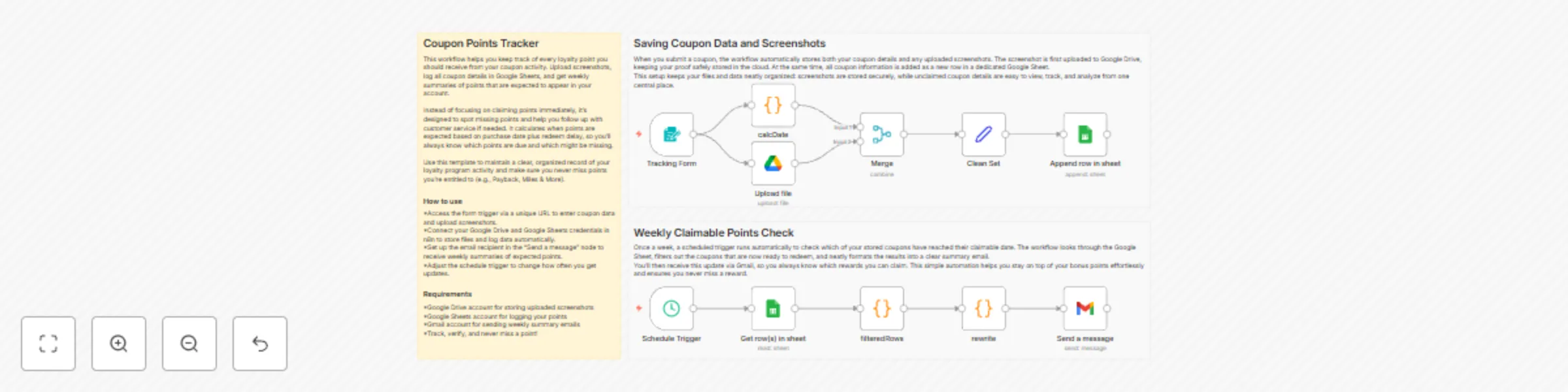
Original n8n.io sourceTake full control of your expected loyalty points. This workflow helps you log every coupon and the points you should receive, store proof of purchase, and get a weekly summary so you can quickly spot any points that haven’t been credited and follow up with the program if needed.
Ideal for frequent coupon users or anyone collecting loyalty points from programs like Payback, Miles & More, or similar reward systems. If you want a centralized, reliable way to track expected points, organize screenshots, and make sure nothing goes missing, this workflow is built for you.
Log coupon details and screenshots: Submit your coupon info via an n8n form. Screenshots are automatically saved in a Google Drive folder, and coupon data is appended to a Google Sheet. Weekly points summary: Every week, a scheduled trigger scans your sheet for coupons that are due to have points credited. It generates a clear summary email via Gmail so you can easily see which points are expected and follow up if the program hasn’t credited them.
Coupon Name | Account Used to Buy | Program | Points | Bonus Points | Purchase Date | Redeem Delay (days) | Claimable Date | Coupon Screen
Stay on top of your expected points, ensure no reward slips through the cracks, and keep proof safely stored automatically. Happy tracking!
This catalog entry is organized from the workflow JSON. The node-level section below shows the executable blocks available for review before importing the template.
| Workflow | Track coupon points with Google Sheets, Drive Storage, and Gmail weekly summary |
|---|---|
| Complexity | intermediate |
| Nodes | 14 |
| Categories | Personal Productivity |
| Author | Remko Stas |
| Published | 19 Oct 2025 |
Use the JSON export at /data/workflows/9900/9900.json as the source template for this automation.
Open n8n, import the downloaded JSON, and review each node before activating the workflow.
Replace placeholder credentials, API keys, webhook URLs, account IDs, and environment-specific values with your own settings.
Run the workflow manually or in a staging workspace, inspect node output, and confirm downstream systems receive the expected data.
Enable the workflow only after testing, then monitor executions, errors, and rate limits during the first production runs.
Review imported nodes carefully before activation. This catalog entry is intended to help you inspect the workflow structure, understand required services, and find related templates faster.
Node names, credentials, schedules, webhook paths, and external service limits may need adjustment for your workspace.
Simple Coupon Points Tracker with Google Sheets and Weekly Summary Email Take full control of your expected loyalty points. This workflow helps you log every coupon and the points you should receiv...
Review the workflow JSON, configure any required credentials in n8n, and test the automation in a safe workspace before using it in production.
Yes. Use the block-by-block analysis and the downloadable JSON to inspect each node, then adjust credentials, prompts, schedules, filters, or destinations for your Personal Productivity use case.