TinyURL shortener via webhook

Workflow preview

Workflow preview
100%
TinyURL shortener via webhook preview
Open on n8n.io

Important notice

This workflow is provided as-is. Please review and test before using in production.

1. Workflow Overview

This n8n template allows you to automatically create shortened URLs using the TinyURL API by simply sending a webhook request. It's a quick and efficient way to integrate URL shortening into your a...

Best for

  • Miscellaneous automation workflows
  • intermediate n8n builders looking for reusable templates

Tools used

n8n-nodes-base.stickynote, n8n-nodes-base.httprequest, n8n-nodes-base.webhook, n8n-nodes-base.respondtowebhook

Source and attribution

This workflow is cataloged by N8N Workflows and links back to its original n8n.io source page by ist00dent.

Original n8n.io source

1.1 Workflow description

Title
TinyURL shortener via webhook
Workflow name
TinyURL shortener via webhook

This n8n template allows you to automatically create shortened URLs using the TinyURL API by simply sending a webhook request. It's a quick and efficient way to integrate URL shortening into your automated workflows, ideal for sharing long links in social media, emails, or other applications.


πŸ”§ How it works

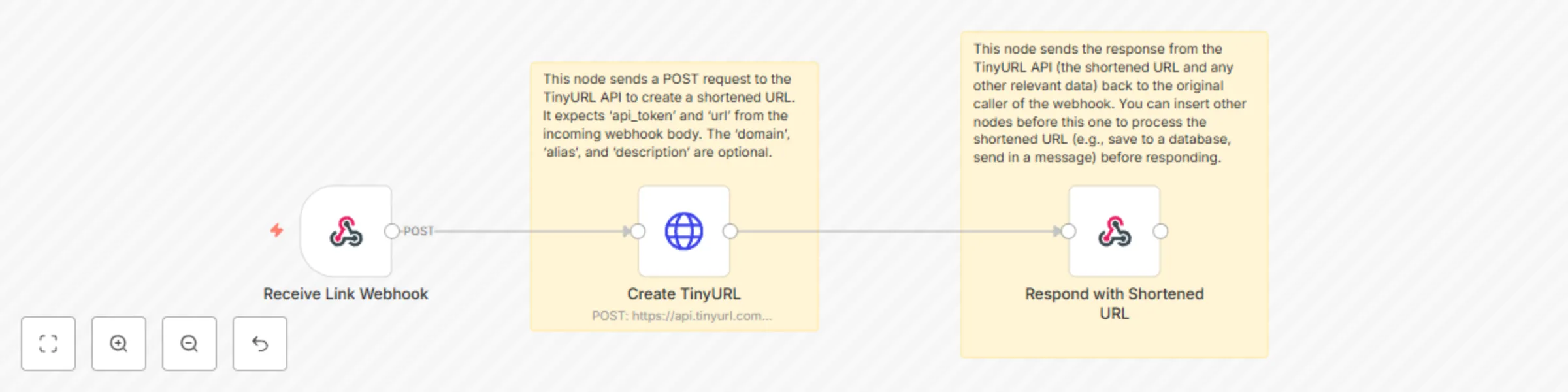
  • Receive Link Webhook: This node acts as the entry point for the workflow. It listens for incoming POST requests and expects a JSON body containing the url to be shortened and your api_key for TinyURL.
  • Create TinyURL: This node sends a POST request to the TinyURL API, passing the long URL and your API key. It can also accept optional parameters like domain, alias, and description to customize the shortened link.
  • Respond with Shortened URL: This node sends the response from the TinyURL API (which includes the new shortened URL) back to the service that initiated the webhook.

πŸ‘€ Who is it for?

This workflow is ideal for:

  • Content Managers & Marketers: Quickly shorten links for campaigns, social media posts, or tracking.
  • Developers: Automate the process of link shortening within applications or scripts.
  • Automation Enthusiasts: Integrate a URL shortener into various n8n workflows (e.g., after generating a report, before sending a notification).
  • Anyone needing on-demand short links: A flexible solution for ad-hoc link shortening.

πŸ“‘ Data Structure

When you trigger the webhook, send a POST request with a JSON body structured as follows:

{
  "api_key": "YOUR_TINYURL_API_KEY",
  "url": "https://www.verylongwebsite.com/path/to/specific/page?param1=value1&param2=value2",
  "domain": "tinyurl.com",      // Optional: defaults to tinyurl.com
  "alias": "myCustomAlias",    // Optional: desired custom alias for the link
  "description": "My project link" // Optional: description for the link
}

The workflow will return the JSON response directly from the TinyURL API, which will include the short_url and other details about the newly created link.


βš™οΈ Setup Instructions

  • Obtain TinyURL API Key: Before importing, make sure you have an API key from TinyURL. You can typically get this by signing up for an account on their website.
  • Import Workflow: In your n8n editor, click "Import from JSON" and paste the provided workflow JSON.
  • Configure Webhook Path:
    • Double-click the Receive Link Webhook node.
    • In the 'Path' field, set a unique and descriptive path (e.g., /shorten-link).
  • Activate Workflow: Save and activate the workflow.

πŸ“ Tips

  • Dynamic Inputs: The workflow is set up to dynamically use the url, api_key, alias, and description from the incoming webhook data. This makes it highly flexible.
  • Error Handling: You can add an Error Trigger node to catch any issues (e.g., invalid API key, malformed URL) during the TinyURL creation process. Configure it to send notifications or log errors for easy troubleshooting.
  • Post-Shortening Actions: After generating the shortened URL, you can insert additional nodes before the Respond with Shortened URL node to perform other actions. For example, you could:
    • Save to a Database: Store the original and shortened URLs in a database like Airtable, Google Sheets, or a PostgreSQL database.
    • Send a Message: Automatically send the shortened URL via Slack, Discord, email, or SMS.
    • Update a Record: Update a CRM record or project management task with the new shortened link.
  • Custom Domains: If you have a custom domain configured with your TinyURL account, you can change the domain parameter in the Create TinyURL node to use it.

1.2 Logical Blocks

This catalog entry is organized from the workflow JSON. The node-level section below shows the executable blocks available for review before importing the template.

2. Block-by-Block Analysis

Block 1 - Note for TinyURL API Request

Type / Role
n8n-nodes-base.stickyNote - stickyNote
Config choices
Version 1

Block 2 - Note for Respond to Webhook

Type / Role
n8n-nodes-base.stickyNote - stickyNote
Config choices
Version 1

Block 3 - Create TinyURL

Type / Role
n8n-nodes-base.httpRequest - httpRequest
Config choices
Version 4.2

Block 4 - Receive Link Webhook

Type / Role
n8n-nodes-base.webhook - webhook
Config choices
Version 2

Block 5 - Respond with Shortened URL

Type / Role
n8n-nodes-base.respondToWebhook - respondToWebhook
Config choices
Version 1.2

3. Summary Table

Workflow TinyURL shortener via webhook
Complexity intermediate
Nodes 5
Categories Miscellaneous
Author ist00dent
Published 02 Jun 2025

4. Reproducing the Workflow from Scratch

  1. 1. Download the workflow JSON

    Use the JSON export at /data/workflows/4595/4595.json as the source template for this automation.

  2. 2. Import the template into n8n

    Open n8n, import the downloaded JSON, and review each node before activating the workflow.

  3. 3. Configure credentials and variables

    Replace placeholder credentials, API keys, webhook URLs, account IDs, and environment-specific values with your own settings.

  4. 4. Test with sample data

    Run the workflow manually or in a staging workspace, inspect node output, and confirm downstream systems receive the expected data.

  5. 5. Activate and monitor

    Enable the workflow only after testing, then monitor executions, errors, and rate limits during the first production runs.

5. General Notes & Resources

Review imported nodes carefully before activation. This catalog entry is intended to help you inspect the workflow structure, understand required services, and find related templates faster.

Node names, credentials, schedules, webhook paths, and external service limits may need adjustment for your workspace.

Frequently asked questions

What does TinyURL shortener via webhook do?

This n8n template allows you to automatically create shortened URLs using the TinyURL API by simply sending a webhook request. It's a quick and efficient way to integrate URL shortening into your a...

What do I need before importing this workflow?

Review the workflow JSON, configure any required credentials in n8n, and test the automation in a safe workspace before using it in production.

Can I customize this workflow?

Yes. Use the block-by-block analysis and the downloadable JSON to inspect each node, then adjust credentials, prompts, schedules, filters, or destinations for your Miscellaneous use case.