Block 1 - Code17
- Type / Role
- n8n-nodes-base.code - code
- Config choices
- Version 2


 Early Deal
This workflow is provided as-is. Please review and test before using in production.
Shopify Order Data to Airtable This n8n template demonstrates how to capture incoming Shopify order webhooks, transform the data into a structured format, and insert each product line item as a sep...
n8n-nodes-base.code, n8n-nodes-base.set, n8n-nodes-base.if, n8n-nodes-base.splitinbatches, n8n-nodes-base.airtable, n8n-nodes-base.stickynote, n8n-nodes-base.webhook
This workflow is cataloged by N8N Workflows and links back to its original n8n.io source page by Mohammed Abid.
Original n8n.io sourceShopify Order Data to Airtable
This n8n template demonstrates how to capture incoming Shopify order webhooks, transform the data into a structured format, and insert each product line item as a separate record in an Airtable sheet. It provides both high-level order information and detailed product-level metrics, making it ideal for analytics, reporting, inventory management, and customer insights.
Good to Know
Airtable API Rate Limits: By default, Airtable allows 5 requests per second per base. Consider batching or adding delays if you process high volumes of orders.
Shopify Webhook Configuration: Ensure you have configured the orders/create webhook in your Shopify Admin to point to the n8n webhook node.
Field Mapping: The template maps standard Shopify fields; if your store uses custom order or line item properties, update the Function nodes accordingly.
How It Works
Webhook Trigger: A Shopify orders/create webhook fires when a new order is placed.
Normalize Order Data: The Function node extracts core order, customer, shipping, and billing details and computes financial totals (subtotal, tax, shipping, discounts).
Line Item Breakdown: A second Function node builds an array of objects—one per line item—calculating per-item totals, tax/shipping allocation, and product attributes (color, size, material).
Check Customer Record: Optionally check against an Airtable "Customers" sheet to flag new vs existing customers.
Auto-Increment Record ID: A Function node generates a running serial number for each Airtable record.
Insert Records: The Airtable node writes each line item object into the target base and table, creating rich records with both order-level and product-level details.
How to Use
Clone the Template: Click "Use Template" in your n8n instance to import this workflow.
Configure Credentials:
Shopify Trigger: Add your Shopify store domain and webhook secret.
Airtable Node: Set up your Airtable API key and select the base and table.
Review Field Names: Match the field names in the Function nodes to the columns in your Airtable table.
Activate Workflow: Turn on the workflow and place a test order in your Shopify store.
Verify Records: Check your Airtable sheet to see the new order and its line items.
Requirements
n8n@latest
Shopify Store with orders/create webhook configured
Airtable Account with a base and table ready to receive records
Customizing This Workflow
Add Custom Fields: Extend the Functions to include additional Shopify metafields, discounts, or customer tags.
Alternative Destinations: Replace the Airtable node with Google Sheets, Supabase, or another database by swapping in the corresponding node.
Error Handling: Insert If/Wait nodes to retry on API failures or send notifications on errors.
Multi-Currency Support: Adapt the currency logic to convert totals based on dynamic exchange rates.
Shopify Customer Append/Update to Airtable
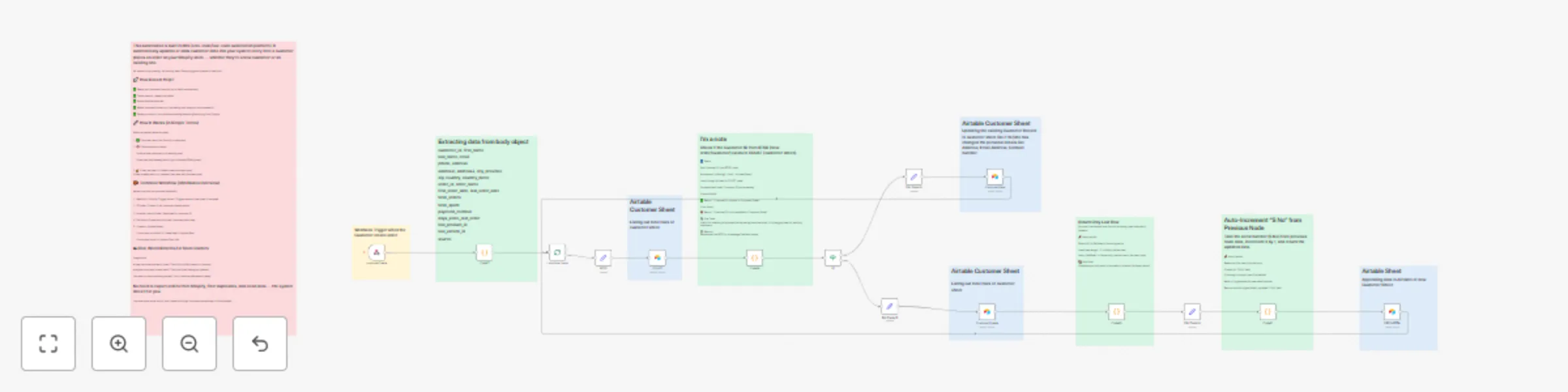
This n8n template shows how to take incoming Shopify customer webhooks (create or update), check if the customer exists in your Airtable "Customers" sheet, append new details or update existing records, and maintain a clean customer database.
Good to Know
Airtable API Rate Limits: Airtable limits to 5 requests per second. Use batch lookups or add delays for high throughput.
Shopify Webhook Events: Configure both customers/create and customers/update webhooks in Shopify Admin.
Unique Identifier: Ensure the "Customer ID" field in Airtable matches the Shopify customer.id for reliable updates.
How It Works
Webhook Trigger: Fires on Shopify customers/create or customers/update events.
Extract Customer Data: A Function node normalizes name, email, phone, and address fields from the webhook payload.
Fetch Existing Records: The Airtable node lists all records from the "Customers" table to find a matching Customer ID.
Identify Match: A Function node compares the incoming customer.id to existing records and flags found vs. not found.
Return Last Row: Ensures serial numbering continuity by grabbing the last record's serial in Airtable.
Auto-Increment Serial: A Function node increments the serial number (S No) for new records.
Upsert Record: Depending on match result, the Airtable node either updates the existing record or creates a new one with full details.
How to Use
Import the Workflow: Click "Use Template" in n8n.
Set Credentials:
Shopify: Add store domain and webhook secret.
Airtable: Provide API key and select base/table.
Ensure Field Alignment: The Airtable table must have fields: Customer ID, Name, Email, Phone, Address, and S No.
Activate: Enable the workflow and test by creating or updating a customer in Shopify.
Verify: Your Airtable sheet will show appended or updated customer records with correct serial numbering.
Requirements
n8n@latest
Shopify Store with customers/create and customers/update webhooks
Airtable Account with a "Customers" table
Customizing This Workflow
Extra Fields: Modify the Function nodes to include Shopify metafields or tags.
Alternative Databases: Swap in Google Sheets, Supabase, or SQL nodes.
Error Notification: Add a Slack or email node to alert on webhook or API errors.
Batch Processing: Use the SplitInBatches node to handle large customer syncs.
This catalog entry is organized from the workflow JSON. The node-level section below shows the executable blocks available for review before importing the template.
Showing the first 24 of 25 workflow blocks. Download the JSON for the full node graph.
| Workflow | Sync Shopify customer order data to Airtable with auto-updates |
|---|---|
| Complexity | advanced |
| Nodes | 25 |
| Categories | CRM |
| Author | Mohammed Abid |
| Published | 26 Jul 2025 |
Use the JSON export at /data/workflows/6495/6495.json as the source template for this automation.
Open n8n, import the downloaded JSON, and review each node before activating the workflow.
Replace placeholder credentials, API keys, webhook URLs, account IDs, and environment-specific values with your own settings.
Run the workflow manually or in a staging workspace, inspect node output, and confirm downstream systems receive the expected data.
Enable the workflow only after testing, then monitor executions, errors, and rate limits during the first production runs.
Review imported nodes carefully before activation. This catalog entry is intended to help you inspect the workflow structure, understand required services, and find related templates faster.
Node names, credentials, schedules, webhook paths, and external service limits may need adjustment for your workspace.
Shopify Order Data to Airtable This n8n template demonstrates how to capture incoming Shopify order webhooks, transform the data into a structured format, and insert each product line item as a sep...
Review the workflow JSON, configure any required credentials in n8n, and test the automation in a safe workspace before using it in production.
Yes. Use the block-by-block analysis and the downloadable JSON to inspect each node, then adjust credentials, prompts, schedules, filters, or destinations for your CRM use case.