Sync Salesforce leads and opportunities to PostgreSQL with backfill and incremental ETL

Workflow preview

Workflow preview
100%
Sync Salesforce leads and opportunities to PostgreSQL with backfill and incremental ETL preview
Open on n8n.io

1. Workflow Overview

Salesforce Leads & Opportunities to PostgreSQL (Backfill & Incremental Sync ETL) This workflow extracts Lead and Opportunity data from Salesforce, transforms and normalizes the data, and loads it i...

Best for

  • CRM automation workflows
  • advanced n8n builders looking for reusable templates

Tools used

n8n-nodes-base.stickynote, n8n-nodes-base.salesforce, n8n-nodes-base.code, n8n-nodes-base.merge, n8n-nodes-base.set, n8n-nodes-base.splitinbatches, n8n-nodes-base.postgres, n8n-nodes-base.scheduletrigger

Source and attribution

This workflow is cataloged by N8N Workflows and links back to its original n8n.io source page by Muh Resky Adiansyah.

Original n8n.io source

1.1 Workflow description

Title
Sync Salesforce leads and opportunities to PostgreSQL with backfill and incremental ETL
Workflow name
Sync Salesforce leads and opportunities to PostgreSQL with backfill and incremental ETL

Salesforce Leads & Opportunities to PostgreSQL (Backfill & Incremental Sync ETL)

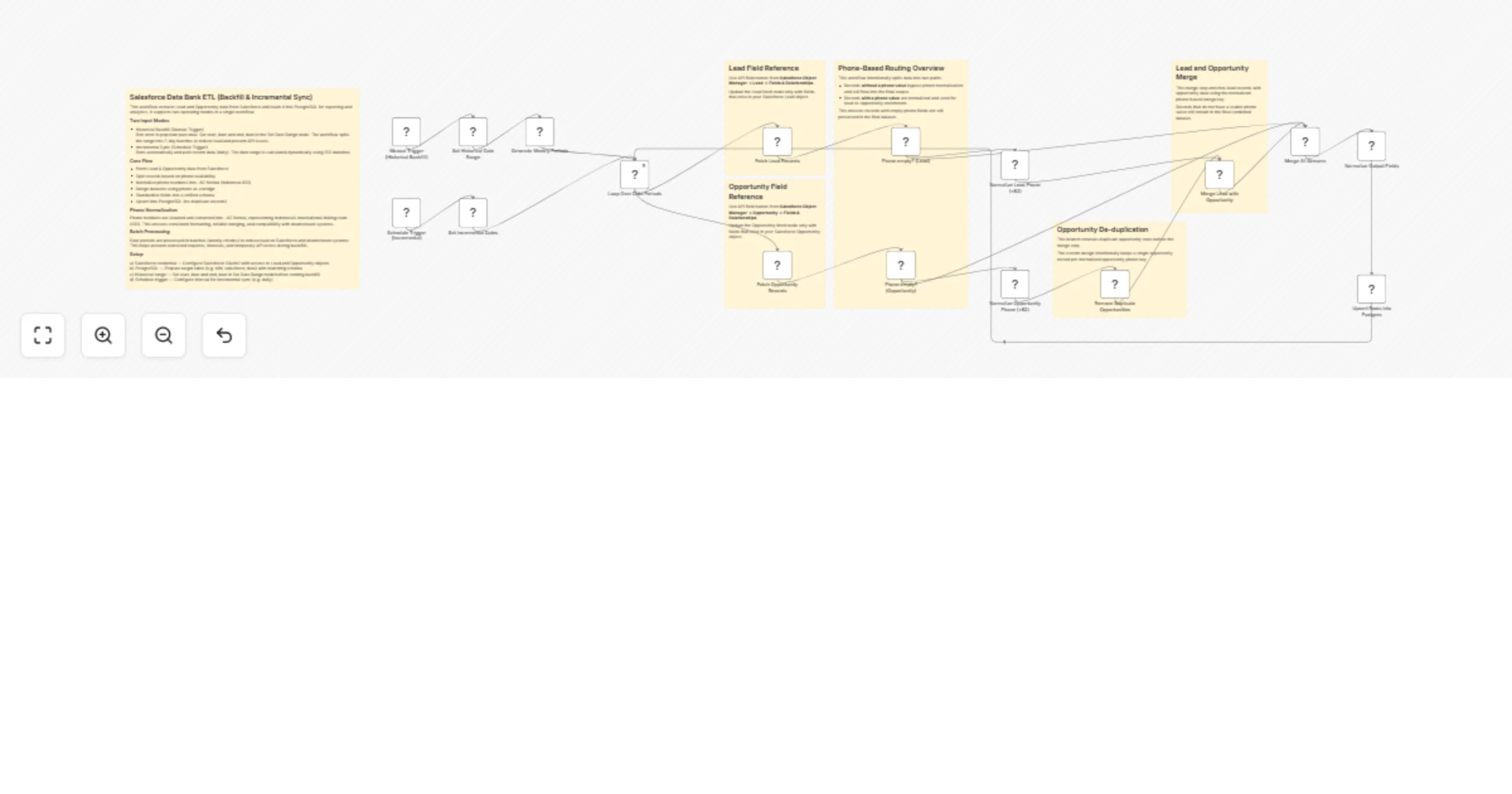
This workflow extracts Lead and Opportunity data from Salesforce, transforms and normalizes the data, and loads it into PostgreSQL as a structured data bank for reporting and analytics.

It is designed for scalable data ingestion and supports both historical backfill and incremental sync in a single workflow.


Use Case

This workflow is suitable when you need to:

  • Centralize Salesforce data into a database for reporting
  • Build a data warehouse for BI tools (Looker Studio, Metabase, etc.)
  • Track lead-to-opportunity lifecycle
  • Merge multiple Salesforce objects into a unified dataset
  • Maintain a clean and normalized CRM data layer

Two Input Modes

1. Historical Backfill (Manual Trigger)

Run once to populate historical data.

  • Set start_date and end_date in the "Set Historical Date Range" node
  • Data is split into 7-day batches
  • Each batch is processed sequentially to reduce API load

2. Incremental Sync (Schedule Trigger)

Runs automatically (e.g. daily).

  • Date range is generated dynamically using ISO datetime
  • Typically pulls data from yesterday until today
  • No manual input required

Batch Processing

Date ranges are processed in weekly batches.

This helps:

  • Prevent large API requests
  • Reduce timeout risk
  • Improve stability during backfill
  • Keep memory usage efficient

Core Workflow Logic

1. Data Extraction
  • Fetch Lead records from Salesforce
  • Fetch Opportunity records from Salesforce
  • Filter using CreatedDate (since_datetime and until_datetime)

2. Phone-Based Routing

Records are split into two paths:

  • Records without phone:

  • Skip normalization

  • Still included in final dataset

  • Records with phone:

  • Processed for normalization

  • Used for merging

This ensures no data is lost even if phone is missing.


3. Phone Normalization (+62)

Phone numbers are standardized into:

+62XXXXXXXXXX

Steps:

  • Remove spaces and symbols
  • Remove all non-digit characters
  • Convert 0xxxx → 62xxxx
  • Ensure no duplicated prefix (e.g. 6262)
  • Add "+" prefix

This uses Indonesia's International Direct Dialing (IDD) code: +62


4. Opportunity De-duplication
  • Duplicate opportunities are removed
  • Based on normalized phone key

This ensures clean merging and avoids duplicate enrichment.


5. Lead–Opportunity Merge

Merge is done using normalized phone fields:

  • body.nomorlead
  • body.nomoroppty

Behavior:

  • Lead is the primary dataset
  • Opportunity enriches lead

Records without phone:

  • Still preserved
  • Not removed

6. Data Standardization

All records are transformed into a unified schema:

  • Source_Object
  • SF_Id
  • CreatedDate
  • CreatedById
  • Name
  • Phone
  • Clean_Phone
  • Email
  • LeadSource
  • Status
  • StageName
  • OwnerId
  • AccountId
  • Amount

7. Upsert to PostgreSQL
  • Uses UPSERT (insert or update)
  • Matching key: sf_id

Behavior:

  • New data → insert
  • Existing data → update

Ensures:

  • No duplicate records
  • Idempotent execution

Data Flow Summary

Salesforce (Lead + Opportunity) → Date Filtering → Batch Processing (weekly) → Phone Routing → Phone Normalization (+62) → Opportunity Deduplication → Lead–Opportunity Merge → Data Standardization → PostgreSQL (Upsert)


Setup Requirements

Before using this workflow, prepare the following:

1. Salesforce
  • Salesforce OAuth2 credential
  • Access to:
  • Lead object
  • Opportunity object
  • Ensure API access is enabled

2. PostgreSQL
  • Active PostgreSQL database
  • Credentials configured in n8n
  • Table created (see schema below)

3. n8n Environment
  • n8n instance (cloud or self-hosted)
  • Salesforce node configured
  • PostgreSQL node configured

4. Date Configuration (Backfill)
  • Set start_date and end_date manually in: "Set Historical Date Range" node

5. Schedule Configuration (Incremental)
  • Configure Schedule Trigger
  • Recommended:
  • Daily execution
  • Off-peak hours

Minimal PostgreSQL Table Schema

CREATE TABLE n8n_salesforce_data ( sf_id TEXT PRIMARY KEY, Source_Object TEXT, CreatedDate TIMESTAMP, CreatedById TEXT, Name TEXT, Phone TEXT, Clean_Phone TEXT, Email TEXT, LeadSource TEXT, Status TEXT, StageName TEXT, OwnerId TEXT, AccountId TEXT, Amount NUMERIC, synced_at TIMESTAMP DEFAULT NOW() );


Important Notes

  • sf_id is used as the unique key for upsert
  • Clean_Phone is recommended for indexing if used in analytics
  • Data consistency depends on phone normalization quality
  • Schema must be updated manually if additional fields are added

Known Limitations

  • Phone-based matching may fail if:

  • Phone numbers are inconsistent

  • Phone is missing in both Lead and Opportunity

  • No deduplication for Leads (only Opportunities handled)

  • No retry logic for API failures (can be added)


Recommended Improvements

  • Add index on Clean_Phone for faster queries
  • Add logging table for monitoring ETL runs
  • Add retry and error handling nodes
  • Extend support for:
  • Contact
  • Account
  • Campaign data

Summary

This workflow provides a reliable and scalable way to:

  • Extract Salesforce data
  • Normalize and merge datasets
  • Store structured data in PostgreSQL
  • Enable analytics and reporting pipelines

It is best suited for teams building a lightweight data warehouse layer on top of Salesforce.

1.2 Logical Blocks

This catalog entry is organized from the workflow JSON. The node-level section below shows the executable blocks available for review before importing the template.

2. Block-by-Block Analysis

Block 1 - Lead Field Reference

Type / Role
n8n-nodes-base.stickyNote - stickyNote
Config choices
Version 1

Block 2 - Opportunity Field Reference

Type / Role
n8n-nodes-base.stickyNote - stickyNote
Config choices
Version 1

Block 3 - Fetch Opportunity Records

Type / Role
n8n-nodes-base.salesforce - salesforce
Config choices
Version 1

Block 4 - Opportunity De-duplication Note

Type / Role
n8n-nodes-base.stickyNote - stickyNote
Config choices
Version 1

Block 5 - Phone-Based Routing Overview

Type / Role
n8n-nodes-base.stickyNote - stickyNote
Config choices
Version 1

Block 6 - Normalize Output Fields

Type / Role
n8n-nodes-base.code - code
Config choices
Version 2

Block 7 - Batch Processing Note

Type / Role
n8n-nodes-base.stickyNote - stickyNote
Config choices
Version 1

Block 8 - Lead and Opportunity Merge Note

Type / Role
n8n-nodes-base.stickyNote - stickyNote
Config choices
Version 1

Block 9 - Merge All Streams

Type / Role
n8n-nodes-base.merge - merge
Config choices
Version 3.2

Block 10 - Set Historical Date Range

Type / Role
n8n-nodes-base.set - set
Config choices
Version 3.4

Block 11 - Generate Weekly Periods

Type / Role
n8n-nodes-base.code - code
Config choices
Version 2

Block 12 - Loop Over Date Periods

Type / Role
n8n-nodes-base.splitInBatches - splitInBatches
Config choices
Version 3

Block 13 - Normalize Lead Phone (+62)

Type / Role
n8n-nodes-base.set - set
Config choices
Version 3.4

Block 14 - Normalize Opportunity Phone (+62)

Type / Role
n8n-nodes-base.set - set
Config choices
Version 3.4

Block 15 - Fetch Lead Records

Type / Role
n8n-nodes-base.salesforce - salesforce
Config choices
Version 1

Block 16 - Upsert Rows into Postgres

Type / Role
n8n-nodes-base.postgres - postgres
Config choices
Version 2.6

Block 17 - Schedule Trigger (Incremental)

Type / Role
n8n-nodes-base.scheduleTrigger - scheduleTrigger
Config choices
Version 1.2

Block 18 - Manual Trigger (Historical Backfill)

Type / Role
n8n-nodes-base.manualTrigger - manualTrigger
Config choices
Version 1

Block 19 - Merge Lead with Opportunity

Type / Role
n8n-nodes-base.merge - merge
Config choices
Version 3.2

Block 20 - Set Incremental Dates

Type / Role
n8n-nodes-base.code - code
Config choices
Version 2

Block 21 - Remove Duplicate Opportunities

Type / Role
n8n-nodes-base.removeDuplicates - removeDuplicates
Config choices
Version 2

Block 22 - Phone empty? (Lead)

Type / Role
n8n-nodes-base.if - if
Config choices
Version 2.2

Block 23 - Phone empty? (Opportunity)

Type / Role
n8n-nodes-base.if - if
Config choices
Version 2.2

3. Summary Table

Workflow Sync Salesforce leads and opportunities to PostgreSQL with backfill and incremental ETL
Complexity advanced
Nodes 23
Categories CRM
Author Muh Resky Adiansyah
Published 12 Apr 2026

4. Reproducing the Workflow from Scratch

  1. 1. Download the workflow JSON

    Use the JSON export at /data/workflows/14993/14993.json as the source template for this automation.

  2. 2. Import the template into n8n

    Open n8n, import the downloaded JSON, and review each node before activating the workflow.

  3. 3. Configure credentials and variables

    Replace placeholder credentials, API keys, webhook URLs, account IDs, and environment-specific values with your own settings.

  4. 4. Test with sample data

    Run the workflow manually or in a staging workspace, inspect node output, and confirm downstream systems receive the expected data.

  5. 5. Activate and monitor

    Enable the workflow only after testing, then monitor executions, errors, and rate limits during the first production runs.

5. General Notes & Resources

Review imported nodes carefully before activation. This catalog entry is intended to help you inspect the workflow structure, understand required services, and find related templates faster.

Node names, credentials, schedules, webhook paths, and external service limits may need adjustment for your workspace.

Frequently asked questions

What does Sync Salesforce leads and opportunities to PostgreSQL with backfill and incremental ETL do?

Salesforce Leads & Opportunities to PostgreSQL (Backfill & Incremental Sync ETL) This workflow extracts Lead and Opportunity data from Salesforce, transforms and normalizes the data, and loads it i...

What do I need before importing this workflow?

Review the workflow JSON, configure any required credentials in n8n, and test the automation in a safe workspace before using it in production.

Can I customize this workflow?

Yes. Use the block-by-block analysis and the downloadable JSON to inspect each node, then adjust credentials, prompts, schedules, filters, or destinations for your CRM use case.