Summarize YouTube videos with Gemini AI and send via Telegram

Workflow preview

Workflow preview
100%
Summarize YouTube videos with Gemini AI and send via Telegram preview
Open on n8n.io

Important notice

This workflow is provided as-is. Please review and test before using in production.

1. Workflow Overview

This automated TLDW (Too Long; Didn't Watch) generator using Decodo's scraping API to extract complete video transcripts and metadata, then uses Google Gemini 3 to create intelligent summaries with...

Best for

  • Content Creation automation workflows
  • AI Summarization automation workflows
  • advanced n8n builders looking for reusable templates

Tools used

n8n-nodes-base.httprequest, n8n-nodes-base.code, n8n-nodes-base.if, n8n-nodes-base.telegram, n8n-nodes-base.telegramtrigger, n8n-nodes-base.set, @n8n/n8n-nodes-langchain.chainllm, @n8n/n8n-nodes-langchain.lmchatgooglegemini

Source and attribution

This workflow is cataloged by N8N Workflows and links back to its original n8n.io source page by Khairul Muhtadin.

Original n8n.io source

1.1 Workflow description

Title
Summarize YouTube videos with Gemini AI and send via Telegram
Workflow name
Summarize YouTube videos with Gemini AI and send via Telegram

This automated TLDW (Too Long; Didn't Watch) generator using Decodo's scraping API to extract complete video transcripts and metadata, then uses Google Gemini 3 to create intelligent summaries with key points, chapters breakdown, tools mentioned, and actionable takeaways—eliminating hours of manual note-taking and video watching.

Why Use This Workflow?

Time Savings: Convert a 2-hour video into a readable 5-minute summary, reducing research time by 95%
Comprehensive Coverage: Captures key points, chapters, tools, quotes, and actionable steps that manual notes often miss
Instant Accessibility: Receive structured summaries directly in Telegram within 30-60 seconds of sharing a link
Multi-Language Support: Process transcripts in multiple languages supported by YouTube's auto-caption system

Ideal For

  • Content Creators & Researchers: Quickly extract insights from competitor videos, educational content, or industry talks without watching hours of footage
  • Students & Educators: Generate study notes from lecture recordings, online courses, or tutorial videos with chapter-based breakdowns
  • Marketing Teams: Analyze competitor content strategies, extract tools and techniques mentioned, and identify trending topics across multiple videos
  • Busy Professionals: Stay updated with conference talks, webinars, or industry updates by reading summaries instead of watching full recordings

How It Works

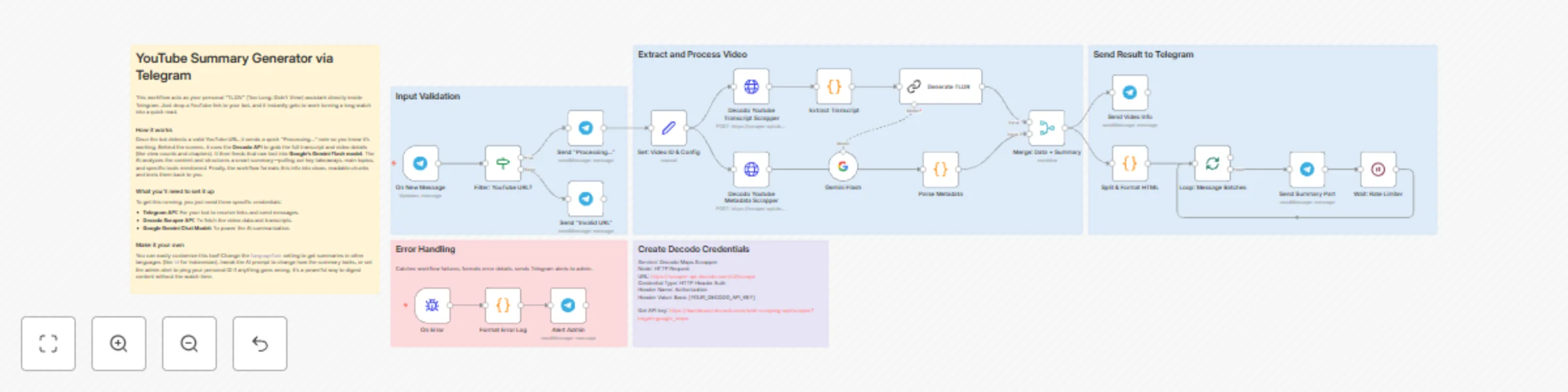
  1. Trigger: User sends any YouTube URL (youtube.com or youtu.be) to a configured Telegram bot
  2. Data Collection: Workflow extracts video ID and simultaneously fetches full transcript and metadata (title, channel, views, duration, chapters, tags) via Decodo API
  3. Processing: Raw transcript data is extracted and cleaned, while metadata is parsed into structured fields including formatted statistics and chapter timestamps
  4. AI Processing: Google Gemini Flash analyzes the transcript to generate a structured summary covering one-line overview, key points, main topics by chapter, tools mentioned, target audience, practical takeaways, and notable quotes

Setup Guide

Prerequisites

Requirement Type Purpose
n8n instance Essential Workflow execution platform
Telegram Bot API Essential Receives video links and delivers summaries
Decodo Scraper API Essential Extracts YouTube transcripts and metadata
Google Gemini API Essential AI-powered summary generation

Installation Steps

  1. Import the JSON file to your n8n instance
  2. Configure credentials:
    • Telegram Bot API: Create a bot via @BotFather on Telegram, obtain the API token, and configure in n8n Telegram credentials
    • Decodo API: Sign up at Decodo Dashboard, get your API key, create HTTP Header Auth credential with header name "Authorization" and value "Basic [YOUR_API_KEY]"
    • Google Gemini API: Obtain API key from Google AI Studio, configure in n8n Google Palm API credentials
  3. Update environment-specific values:
    • In the "Alert Admin" node, replace YOUR_CHAT_ID with your personal Telegram user ID for error notifications
    • Optionally adjust the languageCode in "Set: Video ID & Config" node (default: "en")
  4. Customize settings:
    • Modify the AI prompt in "Generate TLDR" node to adjust summary structure and depth
  5. Test execution:
    • Send a YouTube link to your Telegram bot
    • Verify you receive the "Processing..." notification, video info card, and formatted summary chunks

Technical Details

Workflow Logic

The workflow employs parallel processing for efficiency. Transcript and metadata are fetched simultaneously after video ID extraction.

Once both API calls complete, the transcript feeds directly into Gemini AI while metadata is parsed separately. The merge node combines AI output with structured metadata before splitting into Telegram-friendly chunks.

Error handling is isolated on a separate branch triggered by any node failure, formatting error details and alerting admins without disrupting the main flow.

Customization Options

Basic Adjustments:

  • Language Selection: Change languageCode from "en" to "id", "es", "fr", etc. to fetch transcripts in different languages (YouTube must have captions available)
  • Summary Style: Edit the prompt in "Generate TLDR" to focus on specific aspects (e.g., "focus only on technical tools mentioned" or "create a summary for beginners")
  • Message Length: Adjust maxCharsPerChunk (currently 4000) to create longer or shorter message splits based on preference

Advanced Enhancements:

  • Database Storage: Add a Postgres/Airtable node after "Merge: Data + Summary" to archive all summaries with timestamps and user IDs for searchable knowledge base (medium complexity)
  • Multi-Model Comparison: Duplicate the "Generate TLDR" chain and connect GPT-4 or Claude, merge results to show different AI perspectives on the same video (high complexity)
  • Auto-Translation: Insert a translation node after summary generation to deliver summaries in user's preferred language automatically (medium complexity)

Troubleshooting

Common Issues:

Problem Cause Solution
"Not a YouTube URL" error URL format not recognized Ensure UR sent contains youtube.com or youtu.be
No transcript available Video lacks captions or wrong language Check video has auto-generated or manual captions change languageCode to match available options
Decodo API 401/403 error Invalid or expired API key Verify API key in HTTP Header Auth credential. regenerate if needed from Decodo dashboard
Error notifications not received Wrong chat ID in Alert Admin node Get your Telegram user ID from @userinfobot and update the node

Use Case Examples

Scenario 1: Marketing Agency Competitive Analysis

Challenge: Agency needs to analyze 50+ competitor YouTube videos monthly to identify content strategies, tools used, and messaging angles—watching all videos would require 80+ hours
Solution: Drop youtube links into a shared Telegram group with the bot. Summaries are generated instantly, highlighting tools mentioned, key talking points, and target audience insights
Result: Research time reduced from 80 hours to 6 hours monthly (93% time savings), with searchable archive of all competitor content strategies


Created by: Khaisa Studio
Category: AI-Powered Automation Tags: YouTube, AI, Telegram, Summarization, Content Analysis, Decodo, Gemini
Need custom workflows? Contact us

Connect with the creator:
PortfolioWorkflowsLinkedInMediumThreads

1.2 Logical Blocks

This catalog entry is organized from the workflow JSON. The node-level section below shows the executable blocks available for review before importing the template.

2. Block-by-Block Analysis

Block 1 - Decodo Youtube Transcript Scrapper

Type / Role
n8n-nodes-base.httpRequest - httpRequest
Config choices
Version 4.2

Block 2 - Extract Transcript

Type / Role
n8n-nodes-base.code - code
Config choices
Version 2

Block 3 - Decodo Youtube Metadata Scrapper

Type / Role
n8n-nodes-base.httpRequest - httpRequest
Config choices
Version 4.2

Block 4 - Parse Metadata

Type / Role
n8n-nodes-base.code - code
Config choices
Version 2

Block 5 - Filter: YouTube URL?

Type / Role
n8n-nodes-base.if - if
Config choices
Version 2.2

Block 6 - Send "Invalid URL"

Type / Role
n8n-nodes-base.telegram - telegram
Config choices
Version 1.2

Block 7 - Send "Processing..."

Type / Role
n8n-nodes-base.telegram - telegram
Config choices
Version 1.2

Block 8 - On New Message

Type / Role
n8n-nodes-base.telegramTrigger - telegramTrigger
Config choices
Version 1.2

Block 9 - Set: Video ID & Config

Type / Role
n8n-nodes-base.set - set
Config choices
Version 3.4

Block 10 - Generate TLDR

Type / Role
@n8n/n8n-nodes-langchain.chainLlm - chainLlm
Config choices
Version 1.7

Block 11 - Gemini Flash

Type / Role
@n8n/n8n-nodes-langchain.lmChatGoogleGemini - lmChatGoogleGemini
Config choices
Version 1

Block 12 - Merge: Data + Summary

Type / Role
n8n-nodes-base.merge - merge
Config choices
Version 3.2

Block 13 - Alert Admin

Type / Role
n8n-nodes-base.telegram - telegram
Config choices
Version 1

Block 14 - Format Error Log

Type / Role
n8n-nodes-base.code - code
Config choices
Version 2

Block 15 - On Error

Type / Role
n8n-nodes-base.errorTrigger - errorTrigger
Config choices
Version 1

Block 16 - Split & Format HTML

Type / Role
n8n-nodes-base.code - code
Config choices
Version 2

Block 17 - Loop: Message Batches

Type / Role
n8n-nodes-base.splitInBatches - splitInBatches
Config choices
Version 3

Block 18 - Send Summary Part

Type / Role
n8n-nodes-base.telegram - telegram
Config choices
Version 1.2

Block 19 - Wait: Rate Limiter

Type / Role
n8n-nodes-base.wait - wait
Config choices
Version 1.1

Block 20 - Send Video Info

Type / Role
n8n-nodes-base.telegram - telegram
Config choices
Version 1.2

Block 21 - Sticky Note

Type / Role
n8n-nodes-base.stickyNote - stickyNote
Config choices
Version 1

Block 22 - Sticky Note3

Type / Role
n8n-nodes-base.stickyNote - stickyNote
Config choices
Version 1

Block 23 - Sticky Note9

Type / Role
n8n-nodes-base.stickyNote - stickyNote
Config choices
Version 1

Block 24 - Sticky Note4

Type / Role
n8n-nodes-base.stickyNote - stickyNote
Config choices
Version 1

Showing the first 24 of 26 workflow blocks. Download the JSON for the full node graph.

3. Summary Table

Workflow Summarize YouTube videos with Gemini AI and send via Telegram
Complexity advanced
Nodes 26
Categories Content Creation, AI Summarization
Author Khairul Muhtadin
Published 19 Nov 2025

4. Reproducing the Workflow from Scratch

  1. 1. Download the workflow JSON

    Use the JSON export at /data/workflows/11000/11000.json as the source template for this automation.

  2. 2. Import the template into n8n

    Open n8n, import the downloaded JSON, and review each node before activating the workflow.

  3. 3. Configure credentials and variables

    Replace placeholder credentials, API keys, webhook URLs, account IDs, and environment-specific values with your own settings.

  4. 4. Test with sample data

    Run the workflow manually or in a staging workspace, inspect node output, and confirm downstream systems receive the expected data.

  5. 5. Activate and monitor

    Enable the workflow only after testing, then monitor executions, errors, and rate limits during the first production runs.

5. General Notes & Resources

Review imported nodes carefully before activation. This catalog entry is intended to help you inspect the workflow structure, understand required services, and find related templates faster.

Node names, credentials, schedules, webhook paths, and external service limits may need adjustment for your workspace.

Frequently asked questions

What does Summarize YouTube videos with Gemini AI and send via Telegram do?

This automated TLDW (Too Long; Didn't Watch) generator using Decodo's scraping API to extract complete video transcripts and metadata, then uses Google Gemini 3 to create intelligent summaries with...

What do I need before importing this workflow?

Review the workflow JSON, configure any required credentials in n8n, and test the automation in a safe workspace before using it in production.

Can I customize this workflow?

Yes. Use the block-by-block analysis and the downloadable JSON to inspect each node, then adjust credentials, prompts, schedules, filters, or destinations for your Content Creation, AI Summarization use case.