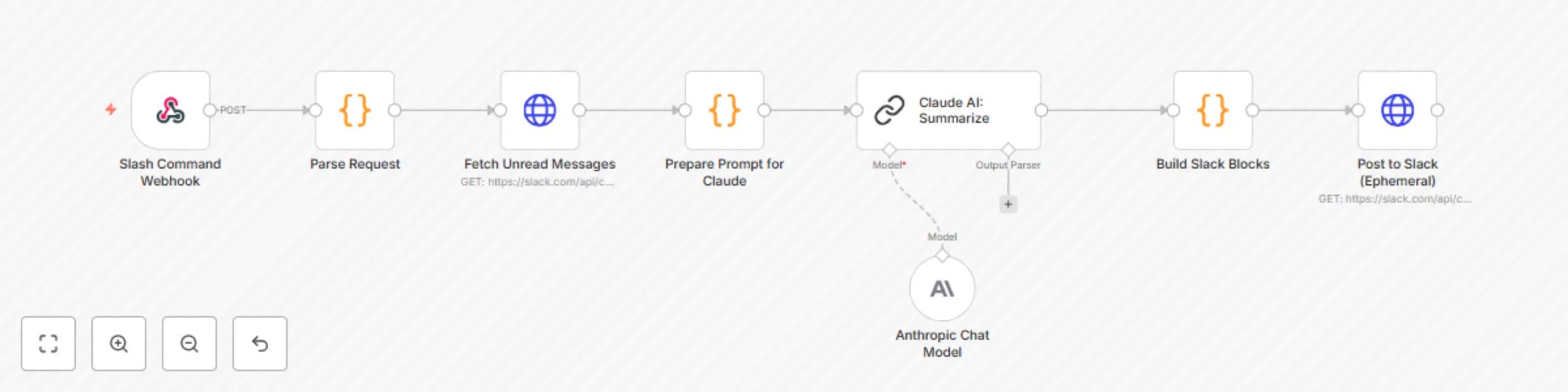
Summarize & reply to Slack channel messages with Claude AI assistant

Workflow preview

Workflow preview
100%
Summarize & reply to Slack channel messages with Claude AI assistant preview
Open on n8n.io

Important notice

This workflow is provided as-is. Please review and test before using in production.

1. Workflow Overview

What It Does Mello is a Claude powered Slack assistant that helps you stay on top of unread messages across all your channels. It: Summarizes conversations contextually using Claude AI. Generates...

Best for

  • Personal Productivity automation workflows
  • AI Summarization automation workflows
  • intermediate n8n builders looking for reusable templates

Tools used

n8n-nodes-base.webhook, n8n-nodes-base.code, n8n-nodes-base.httprequest, @n8n/n8n-nodes-langchain.chainllm, @n8n/n8n-nodes-langchain.lmchatanthropic

Source and attribution

This workflow is cataloged by N8N Workflows and links back to its original n8n.io source page by Ankur Pata.

Original n8n.io source

1.1 Workflow description

Title
Summarize & reply to Slack channel messages with Claude AI assistant
Workflow name
Summarize & reply to Slack channel messages with Claude AI assistant

✨ What It Does

Mello is a Claude-powered Slack assistant that helps you stay on top of unread messages across all your channels.

It:

  • Summarizes conversations contextually using Claude AI.
  • Generates reply suggestions and sends them as private (ephemeral) Slack messages.
  • Lets you respond instantly with one-click AI-suggested replies.

Perfect for busy teams, founders, and anyone looking to reduce Slack noise and save hours each week.


🔧 Setup Instructions

  1. Create a Slack App

    • Go to Slack API → Your Apps
    • Click Create New App and set it up for your workspace
    • Under OAuth & Permissions, add:
      • Bot Token Scopes: commands, chat:write, channels:history, users:read
      • User Token Scopes: channels:history, chat:write
    • Enable Interactivity, and point the Request URL to your n8n webhook (e.g. /slash-summarize)
  2. Add Claude API

    • Get an API key from Claude (Anthropic)
    • In n8n, set up the Claude API credential (or switch to OpenAI)
  3. Import This Workflow

    • Go to your n8n instance, click Import, and paste this template
    • Update any placeholders (Slack app, Claude key, webhook URLs)
    • Follow the inline sticky notes for guidance
  4. Test It

    • Type /summarize in any Slack channel
    • Mello will fetch unread messages, summarize them, and show reply buttons in a private message

⏱ Setup time: ~10 minutes


🛠 Workflow Highlights

  • Slash command trigger (/summarize)
  • Slack API integration to fetch messages
  • Claude AI for contextual summaries
  • Reply suggestions with smart buttons
  • Private Slack delivery (ephemeral messages)
  • Designed to be easily extended (e.g. add support for OpenAI, custom storage)

🔒 Note

This is a lite preview of the full Mello workflow.

✅ The full version includes:

  • Slack reply buttons with thread context
  • Full OAuth flow with token storage
  • MongoDB integration
  • Custom Claude/OpenAI configuration
  • Hosted version with onboarding, branding & support

💡 Want access to the complete version?
📩 Email [email protected]

1.2 Logical Blocks

This catalog entry is organized from the workflow JSON. The node-level section below shows the executable blocks available for review before importing the template.

2. Block-by-Block Analysis

Block 1 - Slash Command Webhook

Type / Role
n8n-nodes-base.webhook - webhook
Config choices
Version 1

Block 2 - Parse Request

Type / Role
n8n-nodes-base.code - code
Config choices
Version 2

Block 3 - Fetch Unread Messages

Type / Role
n8n-nodes-base.httpRequest - httpRequest
Config choices
Version 1

Block 4 - Prepare Prompt for Claude

Type / Role
n8n-nodes-base.code - code
Config choices
Version 2

Block 5 - Claude AI: Summarize

Type / Role
@n8n/n8n-nodes-langchain.chainLlm - chainLlm
Config choices
Version 1

Block 6 - Build Slack Blocks

Type / Role
n8n-nodes-base.code - code
Config choices
Version 2

Block 7 - Post to Slack (Ephemeral)

Type / Role
n8n-nodes-base.httpRequest - httpRequest
Config choices
Version 1

Block 8 - Anthropic Chat Model

Type / Role
@n8n/n8n-nodes-langchain.lmChatAnthropic - lmChatAnthropic
Config choices
Version 1.3

3. Summary Table

Workflow Summarize & reply to Slack channel messages with Claude AI assistant
Complexity intermediate
Nodes 8
Categories Personal Productivity, AI Summarization
Author Ankur Pata
Published 10 Jul 2025

4. Reproducing the Workflow from Scratch

  1. 1. Download the workflow JSON

    Use the JSON export at /data/workflows/5846/5846.json as the source template for this automation.

  2. 2. Import the template into n8n

    Open n8n, import the downloaded JSON, and review each node before activating the workflow.

  3. 3. Configure credentials and variables

    Replace placeholder credentials, API keys, webhook URLs, account IDs, and environment-specific values with your own settings.

  4. 4. Test with sample data

    Run the workflow manually or in a staging workspace, inspect node output, and confirm downstream systems receive the expected data.

  5. 5. Activate and monitor

    Enable the workflow only after testing, then monitor executions, errors, and rate limits during the first production runs.

5. General Notes & Resources

Review imported nodes carefully before activation. This catalog entry is intended to help you inspect the workflow structure, understand required services, and find related templates faster.

Node names, credentials, schedules, webhook paths, and external service limits may need adjustment for your workspace.

Frequently asked questions

What does Summarize & reply to Slack channel messages with Claude AI assistant do?

What It Does Mello is a Claude powered Slack assistant that helps you stay on top of unread messages across all your channels. It: Summarizes conversations contextually using Claude AI. Generates...

What do I need before importing this workflow?

Review the workflow JSON, configure any required credentials in n8n, and test the automation in a safe workspace before using it in production.

Can I customize this workflow?

Yes. Use the block-by-block analysis and the downloadable JSON to inspect each node, then adjust credentials, prompts, schedules, filters, or destinations for your Personal Productivity, AI Summarization use case.