Block 1 - Run every 6 hours
- Type / Role
- n8n-nodes-base.scheduleTrigger - scheduleTrigger
- Config choices
- Version 1.2


 Early Deal
Automate your Bitcoin content pipeline by turning the latest CoinDesk headlines into structured Japanese summaries posted to Discord every six hours — completely hands free. Who is this for Crypto ...
n8n-nodes-base.scheduletrigger, n8n-nodes-base.rssfeedread, n8n-nodes-base.itemlists, n8n-nodes-base.set, n8n-nodes-base.googlesheets, n8n-nodes-base.slack, n8n-nodes-base.stickynote, @n8n/n8n-nodes-langchain.chainllm
This workflow is cataloged by N8N Workflows and links back to its original n8n.io source page by Ryo Sayama.
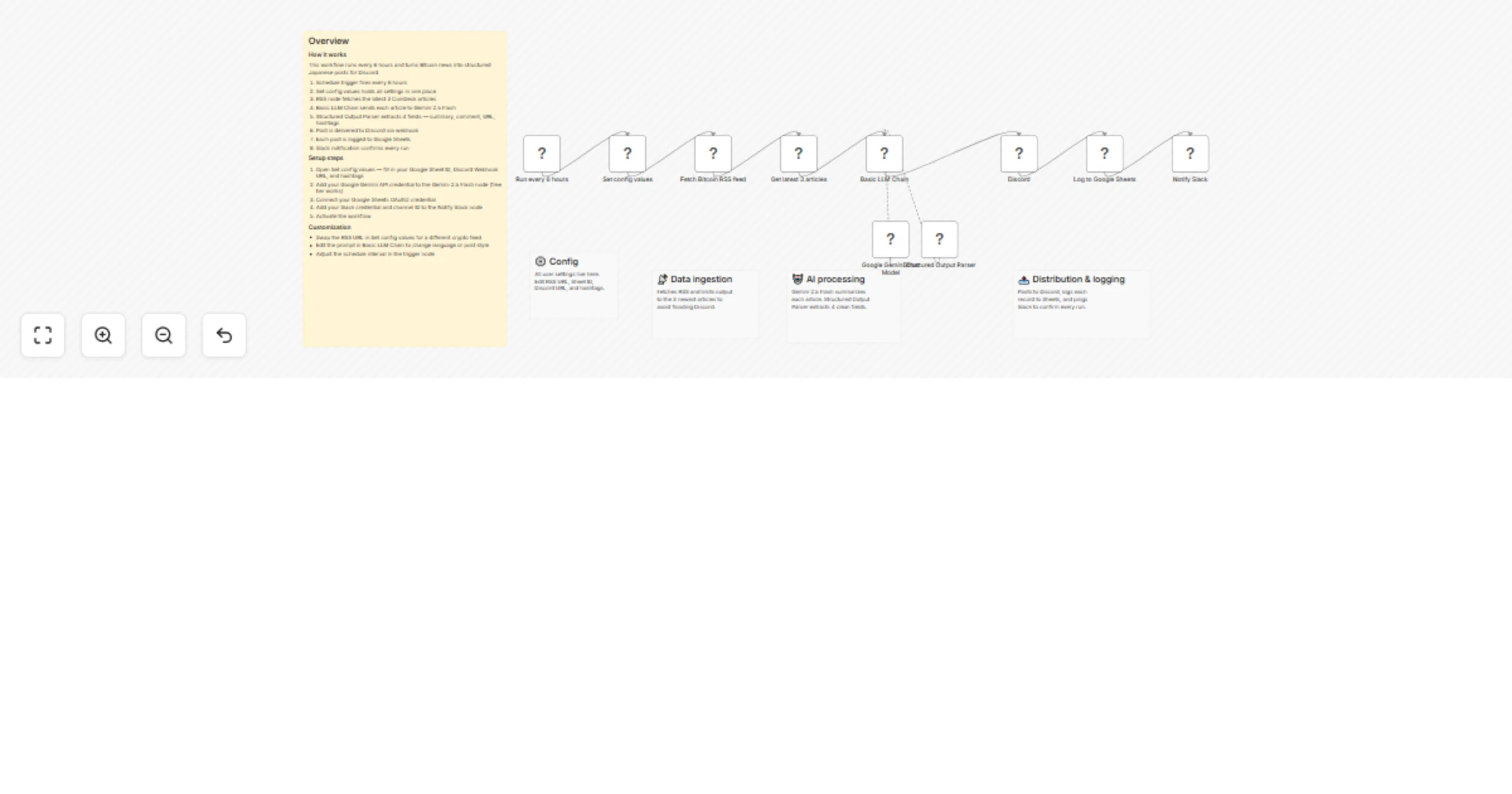
Original n8n.io sourceAutomate your Bitcoin content pipeline by turning the latest CoinDesk headlines into structured Japanese summaries posted to Discord every six hours — completely hands-free. Who is this for Crypto traders, Discord community managers, and content creators who want to keep their audience updated on Bitcoin news without writing posts manually. No coding required. What this workflow does On a six-hour schedule, the workflow fetches the three newest articles from the CoinDesk RSS feed. Each article is sent to Google Gemini 2.5 Flash via a Basic LLM Chain node. A Structured Output Parser then extracts the AI response into four clean fields: a one-line Japanese summary, a brief AI commentary, the article URL, and hashtags. The structured post is delivered to a Discord channel via webhook. Each post is also saved to Google Sheets for auditing, and a Slack notification confirms every successful run. How to set up
Open the Set config values node and fill in your Google Sheet ID, Discord Webhook URL, and hashtags. Add your Google Gemini API credential to the Gemini 2.5 Flash node (free tier works). In Discord, go to your channel settings → Integrations → Webhooks, create a new webhook, and paste the URL into Set config values. Connect your Google Sheets OAuth2 credential and set the target sheet name. Add your Slack credential and update the channel ID in the Notify Slack node. Activate the workflow — it will run automatically every six hours.
Requirements
Google Gemini API key (free tier works) Discord server with webhook permission Google Sheets OAuth2 credential Slack API credential
How to customize
Swap the RSS URL in Set config values to follow Ethereum, Solana, or any crypto feed. Edit the prompt inside Basic LLM Chain to change language or post style. Update the hashtags in Set config values. Adjust the posting interval in the Schedule Trigger node (default: every 6 hours). Add a Filter node between RSS and LLM to post only articles matching specific keywords.
This catalog entry is organized from the workflow JSON. The node-level section below shows the executable blocks available for review before importing the template.
| Workflow | Summarize Bitcoin news in Japanese and post to Discord with Gemini AI |
|---|---|
| Complexity | advanced |
| Nodes | 15 |
| Categories | Content Creation, AI Summarization |
| Author | Ryo Sayama |
| Published | 21 Mar 2026 |
Use the JSON export at /data/workflows/14213/14213.json as the source template for this automation.
Open n8n, import the downloaded JSON, and review each node before activating the workflow.
Replace placeholder credentials, API keys, webhook URLs, account IDs, and environment-specific values with your own settings.
Run the workflow manually or in a staging workspace, inspect node output, and confirm downstream systems receive the expected data.
Enable the workflow only after testing, then monitor executions, errors, and rate limits during the first production runs.
Review imported nodes carefully before activation. This catalog entry is intended to help you inspect the workflow structure, understand required services, and find related templates faster.
Node names, credentials, schedules, webhook paths, and external service limits may need adjustment for your workspace.
Automate your Bitcoin content pipeline by turning the latest CoinDesk headlines into structured Japanese summaries posted to Discord every six hours — completely hands free. Who is this for Crypto ...
Review the workflow JSON, configure any required credentials in n8n, and test the automation in a safe workspace before using it in production.
Yes. Use the block-by-block analysis and the downloadable JSON to inspect each node, then adjust credentials, prompts, schedules, filters, or destinations for your Content Creation, AI Summarization use case.