Stock market technical analysis alerts with Alpha Vantage & Discord

Workflow preview

Workflow preview
100%
Stock market technical analysis alerts with Alpha Vantage & Discord preview
Open on n8n.io

Important notice

This workflow is provided as-is. Please review and test before using in production.

1. Workflow Overview

This n8n template demonstrates how to automate stock market technical analysis to detect key trading signals and send real time alerts to Discord. It's built to monitor for the Golden Cross (a bull...

Best for

  • Crypto Trading automation workflows
  • advanced n8n builders looking for reusable templates

Tools used

n8n-nodes-base.stickynote, n8n-nodes-base.scheduletrigger, n8n-nodes-base.code, n8n-nodes-base.splitout, n8n-nodes-base.httprequest, n8n-nodes-base.set, n8n-nodes-base.postgres, n8n-nodes-base.if

Source and attribution

This workflow is cataloged by N8N Workflows and links back to its original n8n.io source page by Raz Hadas.

Original n8n.io source

1.1 Workflow description

Title
Stock market technical analysis alerts with Alpha Vantage & Discord
Workflow name
Stock market technical analysis alerts with Alpha Vantage & Discord

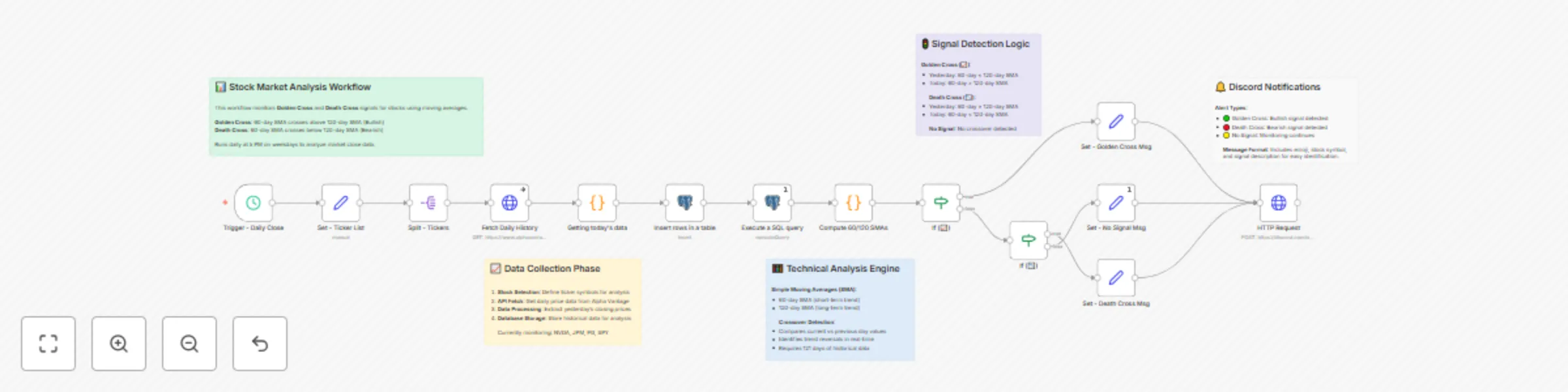
This n8n template demonstrates how to automate stock market technical analysis to detect key trading signals and send real-time alerts to Discord. It's built to monitor for the Golden Cross (a bullish signal) and the Death Cross (a bearish signal) using simple moving averages.

Use cases are many: Automate your personal trading strategy, monitor a portfolio for significant trend changes, or provide automated analysis highlights for a trading community or client group.


πŸ’‘ Good to know

  • This template relies on the Alpha Vantage API, which has a free tier with usage limits (e.g., API calls per minute and per day). Be mindful of these limits, especially if monitoring many tickers.
  • The data provided by free APIs may have a slight delay and is intended for informational and analysis purposes.
  • Disclaimer: This workflow is an informational tool and does not constitute financial advice. Always do your own research before making any investment decisions.

βš™οΈ How it works

  • The workflow triggers automatically every weekday at 5 PM, after the typical market close.
  • It fetches a list of user-defined stock tickers from the Set node.
  • For each stock, it gets the latest daily price data from Alpha Vantage via an HTTP Request and stores the new data in a PostgreSQL database to maintain a history.
  • The workflow then queries the database for the last 121 days of data for each stock.
  • A Code node calculates two Simple Moving Averages (SMAs): a short-term (60-day) and a long-term (120-day) average for both today and the previous day.
  • Using If nodes, it compares the SMAs to see if a Golden Cross (short-term crosses above long-term) or a Death Cross (short-term crosses below long-term) has just occurred.
  • Finally, a formatted alert message is sent to a specified Discord channel via a webhook.

πŸš€ How to use

  • Configure your credentials for PostgreSQL and select them in the two database nodes.
  • Get a free Alpha Vantage API Key and add it to the "Fetch Daily History" node. For best practice, create a Header Auth credential for it.
  • Paste your Discord Webhook URL into the final "HTTP Request" node.
  • Update the list of stock symbols in the "Set - Ticker List" node to monitor the assets you care about.
  • The workflow is set to run on a schedule, but you can press "Test workflow" to trigger it manually at any time.

βœ… Requirements

  • An Alpha Vantage account for an API key.
  • A PostgreSQL database to store historical price data.
  • A Discord account and a server where you can create a webhook.

🎨 Customising this workflow

  • Easily change the moving average periods (e.g., from 60/120 to 50/200) by adjusting the SMA_SHORT and SMA_LONG variables in the "Compute 60/120 SMAs" Code node.
  • Modify the alert messages in the "Set - Golden Cross Msg" and "Set - Death Cross Msg" nodes.
  • Swap out Discord for another notification service like Slack or Telegram by replacing the final HTTP Request node.

1.2 Logical Blocks

This catalog entry is organized from the workflow JSON. The node-level section below shows the executable blocks available for review before importing the template.

2. Block-by-Block Analysis

Block 1 - Sticky Note

Type / Role
n8n-nodes-base.stickyNote - stickyNote
Config choices
Version 1

Block 2 - Trigger - Daily Close

Type / Role
n8n-nodes-base.scheduleTrigger - scheduleTrigger
Config choices
Version 1.2

Block 3 - Sticky Note1

Type / Role
n8n-nodes-base.stickyNote - stickyNote
Config choices
Version 1

Block 4 - Compute 60/120 SMAs

Type / Role
n8n-nodes-base.code - code
Config choices
Version 2

Block 5 - Sticky Note2

Type / Role
n8n-nodes-base.stickyNote - stickyNote
Config choices
Version 1

Block 6 - Split - Tickers

Type / Role
n8n-nodes-base.splitOut - splitOut
Config choices
Version 1

Block 7 - Fetch Daily History

Type / Role
n8n-nodes-base.httpRequest - httpRequest
Config choices
Version 4.2

Block 8 - Set - Ticker List

Type / Role
n8n-nodes-base.set - set
Config choices
Version 3.4

Block 9 - Getting today's data

Type / Role
n8n-nodes-base.code - code
Config choices
Version 2

Block 10 - Insert rows in a table

Type / Role
n8n-nodes-base.postgres - postgres
Config choices
Version 2.6

Block 11 - HTTP Request

Type / Role
n8n-nodes-base.httpRequest - httpRequest
Config choices
Version 4.2

Block 12 - Sticky Note3

Type / Role
n8n-nodes-base.stickyNote - stickyNote
Config choices
Version 1

Block 13 - If (πŸ“ˆ)

Type / Role
n8n-nodes-base.if - if
Config choices
Version 2.2

Block 14 - Sticky Note4

Type / Role
n8n-nodes-base.stickyNote - stickyNote
Config choices
Version 1

Block 15 - If (πŸ“‰)

Type / Role
n8n-nodes-base.if - if
Config choices
Version 2.2

Block 16 - Set - No Signal Msg

Type / Role
n8n-nodes-base.set - set
Config choices
Version 2

Block 17 - Set - Death Cross Msg

Type / Role
n8n-nodes-base.set - set
Config choices
Version 2

Block 18 - Set - Golden Cross Msg

Type / Role
n8n-nodes-base.set - set
Config choices
Version 2

Block 19 - Execute a SQL query

Type / Role
n8n-nodes-base.postgres - postgres
Config choices
Version 2.6

3. Summary Table

Workflow Stock market technical analysis alerts with Alpha Vantage & Discord
Complexity advanced
Nodes 19
Categories Crypto Trading
Author Raz Hadas
Published 30 Jul 2025

4. Reproducing the Workflow from Scratch

  1. 1. Download the workflow JSON

    Use the JSON export at /data/workflows/6692/6692.json as the source template for this automation.

  2. 2. Import the template into n8n

    Open n8n, import the downloaded JSON, and review each node before activating the workflow.

  3. 3. Configure credentials and variables

    Replace placeholder credentials, API keys, webhook URLs, account IDs, and environment-specific values with your own settings.

  4. 4. Test with sample data

    Run the workflow manually or in a staging workspace, inspect node output, and confirm downstream systems receive the expected data.

  5. 5. Activate and monitor

    Enable the workflow only after testing, then monitor executions, errors, and rate limits during the first production runs.

5. General Notes & Resources

Review imported nodes carefully before activation. This catalog entry is intended to help you inspect the workflow structure, understand required services, and find related templates faster.

Node names, credentials, schedules, webhook paths, and external service limits may need adjustment for your workspace.

Frequently asked questions

What does Stock market technical analysis alerts with Alpha Vantage & Discord do?

This n8n template demonstrates how to automate stock market technical analysis to detect key trading signals and send real time alerts to Discord. It's built to monitor for the Golden Cross (a bull...

What do I need before importing this workflow?

Review the workflow JSON, configure any required credentials in n8n, and test the automation in a safe workspace before using it in production.

Can I customize this workflow?

Yes. Use the block-by-block analysis and the downloadable JSON to inspect each node, then adjust credentials, prompts, schedules, filters, or destinations for your Crypto Trading use case.