Block 1 - When Executed by Another Workflow
- Type / Role
- n8n-nodes-base.executeWorkflowTrigger - executeWorkflowTrigger
- Config choices
- Version 1.1


 Early Deal
This workflow is provided as-is. Please review and test before using in production.
: This n8n workflow template takes a US phone number as input, validates it, and returns it in multiple standard formats, including handling extensions. It's designed to streamline the process of s...
n8n-nodes-base.executeworkflowtrigger, n8n-nodes-base.if, n8n-nodes-base.set, n8n-nodes-base.switch
This workflow is cataloged by N8N Workflows and links back to its original n8n.io source page by Sunny Thaper.
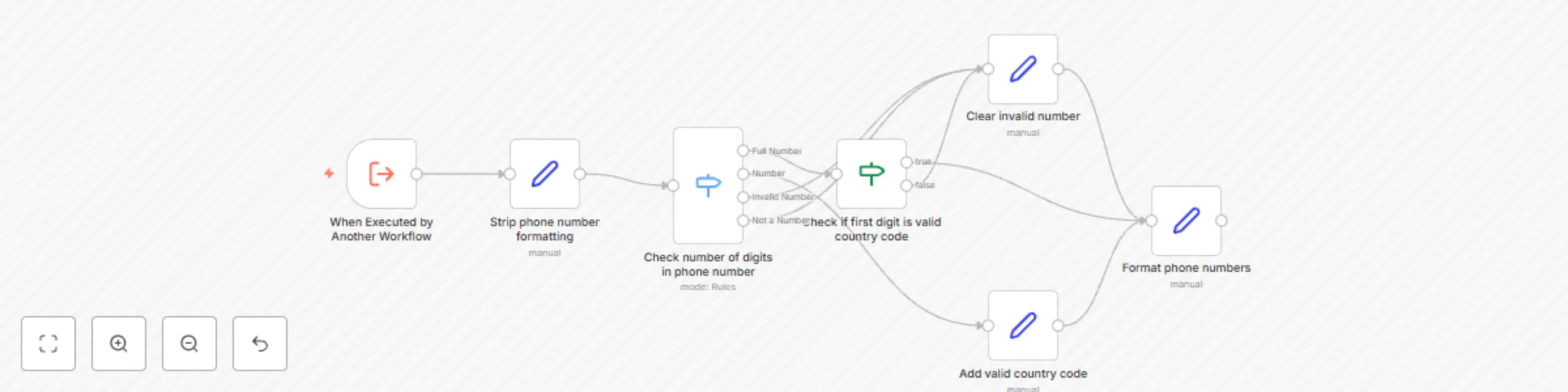
Original n8n.io sourceThis n8n workflow template takes a US phone number as input, validates it, and returns it in multiple standard formats, including handling extensions. It's designed to streamline the process of standardizing phone number data within your automations.
Input: Accepts a phone number string as input. This number can be in various common formats (e.g., (555) 123-4567, 555.123.4567, +15551234567, 5551234567x890).
Formatting Removal: Strips all non-numeric characters to isolate the core number and any potential extension.
Validation:
Country Code Check: Verifies if the number starts with the US country code (+1 or 1) or assumes US if no country code is present and the length is correct.
Length Check: Ensures the main number component consists of exactly 10 digits after stripping formatting and the country code.
Output Generation (if valid): If the number passes validation, the workflow outputs the phone number in several standardized formats:
Number Only: 5551234567
E.164 Standard: +15551234567
National Standard: (555) 123-4567
Full National Standard: 1 (555) 123-4567
International Standard: 00-1-555-123-4567
Extension Handling: If an extension is detected in the input, it is separated and provided as:
Extension (Number): 890
Extension (String): "890"
Use Cases:
Cleaning and standardizing phone number data in CRM systems.
Formatting numbers before sending SMS messages via APIs.
Validating user input from forms.
Ensuring consistent phone number representation across different applications.
This catalog entry is organized from the workflow JSON. The node-level section below shows the executable blocks available for review before importing the template.
| Workflow | Standardize US phone numbers with multiple format options and validation |
|---|---|
| Complexity | intermediate |
| Nodes | 7 |
| Categories | Engineering |
| Author | Sunny Thaper |
| Published | 01 May 2025 |
Use the JSON export at /data/workflows/3812/3812.json as the source template for this automation.
Open n8n, import the downloaded JSON, and review each node before activating the workflow.
Replace placeholder credentials, API keys, webhook URLs, account IDs, and environment-specific values with your own settings.
Run the workflow manually or in a staging workspace, inspect node output, and confirm downstream systems receive the expected data.
Enable the workflow only after testing, then monitor executions, errors, and rate limits during the first production runs.
Review imported nodes carefully before activation. This catalog entry is intended to help you inspect the workflow structure, understand required services, and find related templates faster.
Node names, credentials, schedules, webhook paths, and external service limits may need adjustment for your workspace.
: This n8n workflow template takes a US phone number as input, validates it, and returns it in multiple standard formats, including handling extensions. It's designed to streamline the process of s...
Review the workflow JSON, configure any required credentials in n8n, and test the automation in a safe workspace before using it in production.
Yes. Use the block-by-block analysis and the downloadable JSON to inspect each node, then adjust credentials, prompts, schedules, filters, or destinations for your Engineering use case.