Block 1 - Content Creator Agent
- Type / Role
- @n8n/n8n-nodes-langchain.toolWorkflow - toolWorkflow
- Config choices
- Version 2


 Early Deal
This workflow is provided as-is. Please review and test before using in production.
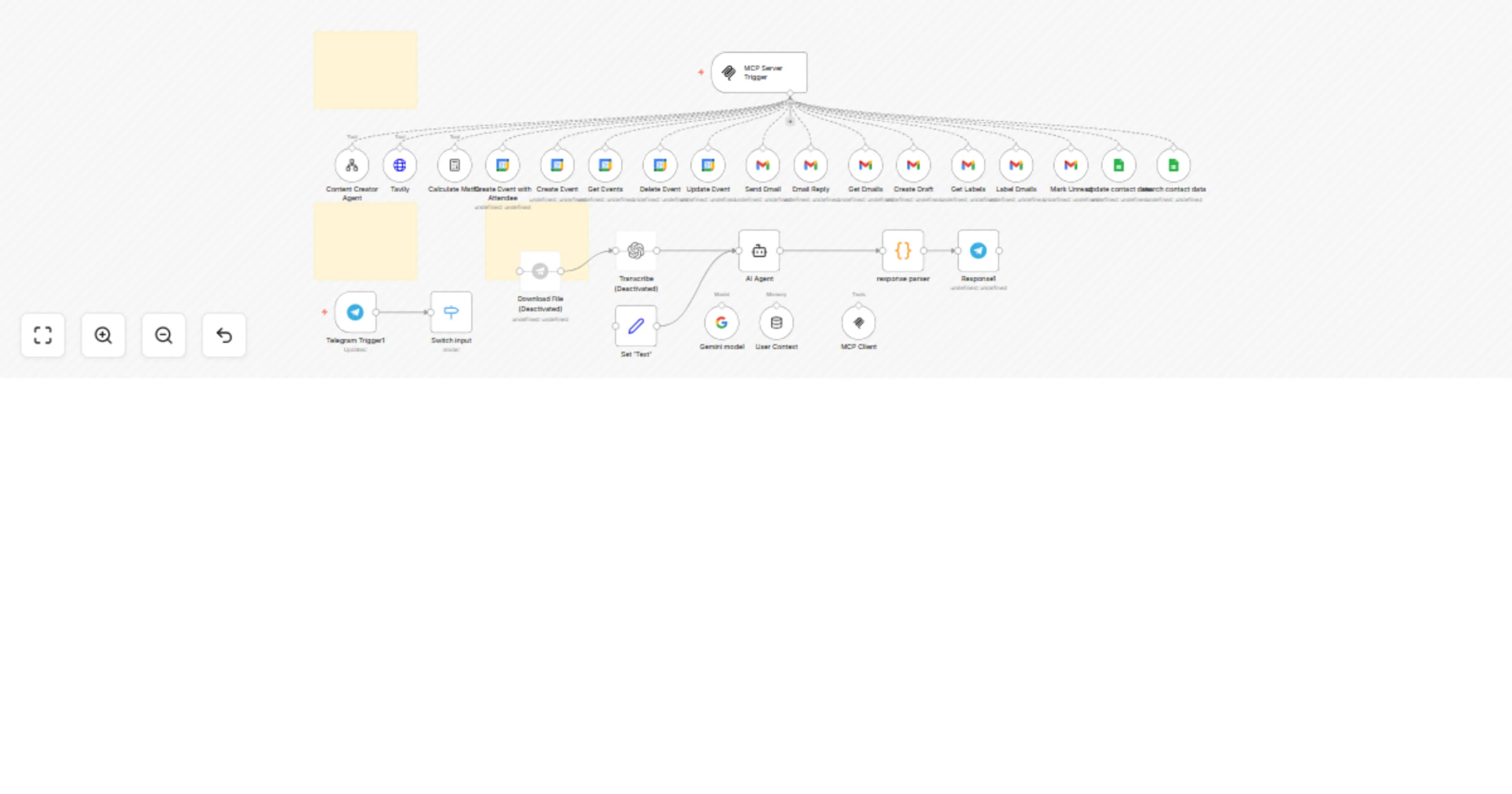
This n8n template builds Stacey , an AI assistant that runs inside Telegram. Stacey listens to your messages, understands what you want using AI, and intelligently routes commands to MCP conne...
@n8n/n8n-nodes-langchain.toolworkflow, @n8n/n8n-nodes-langchain.toolhttprequest, n8n-nodes-base.stickynote, n8n-nodes-base.set, n8n-nodes-base.telegram, @n8n/n8n-nodes-langchain.openai, n8n-nodes-base.telegramtrigger, @n8n/n8n-nodes-langchain.agent
This workflow is cataloged by N8N Workflows and links back to its original n8n.io source page by David Olusola.
Original n8n.io source> This n8n template builds Stacey, an AI assistant that runs inside Telegram. Stacey listens to your messages, understands what you want using AI, and intelligently routes commands to MCP-connected tools — like Gmail, Google Calendar, a blog writer, and more. > > For optimal performance, we recommend using OpenAI’s GPT-4o model. In this template, Google Gemini is used as a free alternative.
This workflow is designed for:
Listens to Telegram messages (text and voice)
Transcribes audio using Whisper (optional)
Uses Stacey, an AI agent powered by Gemini (or GPT-4o if you upgrade), to:
Responds to the user naturally with confirmations and outputs
Before using this workflow, make sure you have:
A self-hosted or cloud-based n8n instance
A Telegram Bot Token from @BotFather
Google OAuth2 credentials for:
Optional: OpenAI or Whisper API key for voice transcription
Optional: Tavily API key for live web search
Gemini (Google AI) is preconfigured in the template but can be swapped
Go to Settings → Credentials and add:
Telegram API: Your bot token from BotFather
Google OAuth2:
https://www.googleapis.com/auth/gmail.modifyhttps://www.googleapis.com/auth/calendarGemini / Palm API: Used for the language model
(Optional) OpenAI Whisper: For voice transcription
(Optional) Tavily: For real-time internet searches
Go to n8n
Click Workflows → Import from File
Upload ai_assistant.json
Connect your saved credentials to the correct nodes:
✅ Step 2.5: Import the Content Creator Sub-Workflow
The Content Creator is implemented as a modular sub-workflow and invoked through the Map Server as part of the MCP logic.
To set it up:
Go to Workflows → Import from File Upload content_creator_tool.json (provided in your files) Save it with a name like “Content Creator Tool” 🔗 Integration with MCP:
This tool is triggered via the MCP Map Server using an Execute Workflow node The AI agent chooses this tool when the user request involves writing blog posts, emails, product descriptions, etc. Make sure the tool ID or name in the Map Server matches what the AI agent uses in its logic You can customize this sub-workflow to:
Talk to @BotFather
Use /newbot to create a bot and get your token
Paste this token into:
Telegram Trigger node (Telegram Trigger1)Telegram Send Message node (Response1)Make sure your bot’s privacy is set correctly (use /setprivacy)
Open the “AI Agent” node
In the systemMessage field, you'll find a prompt that defines Stacey:
You can customize Stacey’s:
This template includes:
Send EmailReply to EmailGet EmailsLabel EmailsCreate/Update/Delete EventsContent CreatorSearch Web with TavilyCalculatorTo extend:
MCP Server TriggerAI Agent nodeOpen Telegram and message your bot:
The bot will:
Download File and Transcribe nodesTelegram not responding?
Gmail actions not working?
AI not responding or behaving poorly?
Created by David Olusola Free to use, modify, and resell with attribution. If this helped you, please rate the template or follow me on the n8n Creator Page.
This catalog entry is organized from the workflow JSON. The node-level section below shows the executable blocks available for review before importing the template.
Showing the first 24 of 32 workflow blocks. Download the JSON for the full node graph.
| Workflow | Stacey – your Telegram AI assistant (powered by MCP, Gemini & Google tools) |
|---|---|
| Complexity | advanced |
| Nodes | 32 |
| Categories | Personal Productivity, AI Chatbot |
| Author | David Olusola |
| Published | 13 May 2025 |
Use the JSON export at /data/workflows/4025/4025.json as the source template for this automation.
Open n8n, import the downloaded JSON, and review each node before activating the workflow.
Replace placeholder credentials, API keys, webhook URLs, account IDs, and environment-specific values with your own settings.
Run the workflow manually or in a staging workspace, inspect node output, and confirm downstream systems receive the expected data.
Enable the workflow only after testing, then monitor executions, errors, and rate limits during the first production runs.
Review imported nodes carefully before activation. This catalog entry is intended to help you inspect the workflow structure, understand required services, and find related templates faster.
Node names, credentials, schedules, webhook paths, and external service limits may need adjustment for your workspace.
This n8n template builds Stacey , an AI assistant that runs inside Telegram. Stacey listens to your messages, understands what you want using AI, and intelligently routes commands to MCP conne...
Review the workflow JSON, configure any required credentials in n8n, and test the automation in a safe workspace before using it in production.
Yes. Use the block-by-block analysis and the downloadable JSON to inspect each node, then adjust credentials, prompts, schedules, filters, or destinations for your Personal Productivity, AI Chatbot use case.