Block 1 - AI Agent
- Type / Role
- @n8n/n8n-nodes-langchain.agent - agent
- Config choices
- Version 2.2


 Early Deal
This workflow is provided as-is. Please review and test before using in production.
Try It Out! This workflow builds a Telegram based Solana (SOL/USDT) Multi Timeframe AI Market Analyzer that automatically pulls live candlestick data for SOL/USDT, runs structured multi timeframe t...
@n8n/n8n-nodes-langchain.agent, n8n-nodes-base.code, n8n-nodes-base.merge, n8n-nodes-base.httprequest, n8n-nodes-base.telegram, n8n-nodes-base.scheduletrigger, n8n-nodes-base.stickynote, @n8n/n8n-nodes-langchain.lmchatgooglegemini
This workflow is cataloged by N8N Workflows and links back to its original n8n.io source page by AFK Crypto.
Original n8n.io sourceThis workflow builds a Telegram-based Solana (SOL/USDT) Multi-Timeframe AI Market Analyzer that automatically pulls live candlestick data for SOL/USDT, runs structured multi-timeframe technical analysis (1-minute, 5-minute, 1-hour) through an AI Agent, and posts a professional, JSON-structured analysis + trading recommendation straight to your Telegram chat. It combines on-chain / market data aggregation, LLM-driven interpretation, and instant Telegram reporting — giving you concise, actionable market intelligence every hour.
How It Works
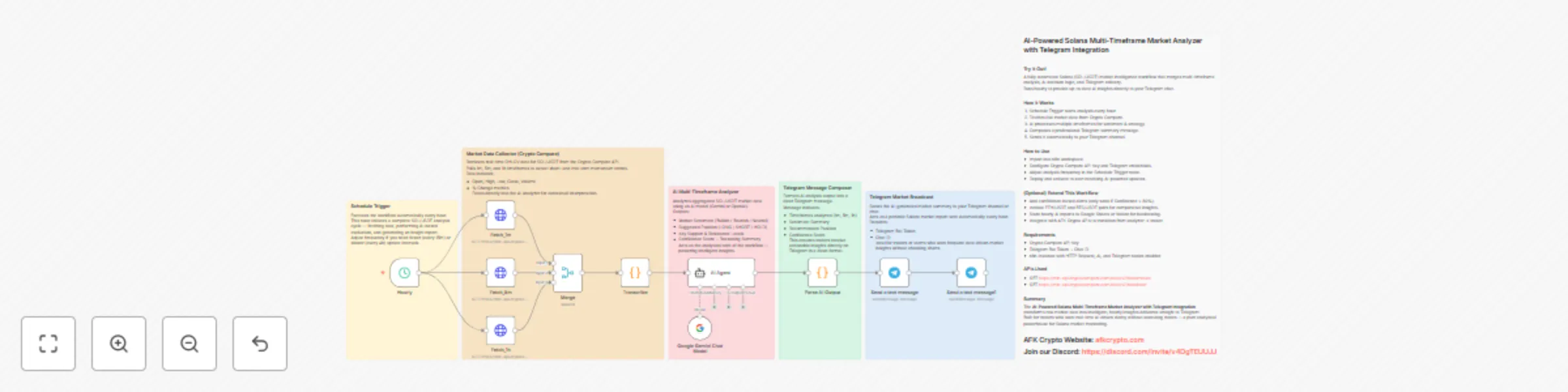
Hourly Trigger – The workflow runs once per hour to pull fresh market data.
Market Data Fetch – Three HTTP requests gather candlesticks from CryptoCompare:
1-minute (last 60 candles)
5-minute aggregate (last 60 aggregated candles)
1-hour (last 60 candles)
Merge & Transcribe – The three feeds are merged and a lightweight code node extracts:
symbol, current price, arrays for data_1m, data_5m, data_1h.
AI Agent Analysis – The LLM (configured via your model node) receives the merged payload and runs a structured multi-timeframe technical analysis, returning a strict JSON report containing:
Per-timeframe analysis (momentum, volume, S/R,MA, volatility)
Market structure / confluence findings
Trading recommendation (action, entry, stop, TPs, position sizing)
A final disclaimer
Parse AI Output – Extracts the JSON block from the agent’s reply and validates/parses it for downstream formatting.
Telegram Reporting – Sends two nicely formatted Telegram messages:
Multi-timeframe breakdown (1m / 5m / 1h)
Market structure + Trading Recommendation (TPs, SL, position size, disclaimer)
How to Use
Import the workflow into your n8n workspace (or replicate the nodes shown in the JSON).
Add credentials:
CryptoCompare API Key — for reliable candlestick data.
LLM model credentials — e.g., Google Gemini / OpenAI, configured in the LangChain/LM node.
Telegram Bot Token & Chat ID — to send messages.
(Optional) AFK Crypto API key if you want to enrich data with wallet info later.
Node mapping & endpoints:
Fetch_1m → GET https://min-api.cryptocompare.com/data/v2/histominute?fsym=SOL&tsym=USDT&limit=60
Fetch_5m → GET https://min-api.cryptocompare.com/data/v2/histominute?fsym=SOL&tsym=USDT&limit=60&aggregate=5
Fetch_1h → GET https://min-api.cryptocompare.com/data/v2/histohour?fsym=SOL&tsym=USDT&limit=60
Merge → combine the three responses into a single payload.
Transcribe (code) → extract last close as current price and attach the arrays.
AI Agent → pass the structured prompt (system message instructs exact JSON structure).
Parse AI Output → extract the json ... block and JSON.parse it.
Telegram nodes → format and send two messages (timeframes and recommendation).
Adjust analysis frequency: default is hourly — change the Schedule Trigger node as desired.
Deploy and activate: the workflow will post an AI-driven SOL/USDT market analysis to your Telegram hourly.
(Optional) Extend This Workflow
Add price / orderbook enrichment (e.g., AFK price endpoints or exchange orderbook) to improve context.
Add wallet exposure checks (AFK wallet balances) to tailor position sizing suggestions.
Store AI reports in Notion / Google Sheets for historical auditing and backtesting.
Add alert filtering to only post when the LLM flags high-confidence signals or confluence across timeframes.
Expose Telegram commands to request on-demand analysis (e.g., /analyze now 5m).
Add risk management logic to convert LLM recommendation into automated orders (careful — requires manual review and stronger safety controls).
Safety Mechanisms
Explicit system prompt — forces AI to output only the exact JSON structure to avoid free-form text parsing errors.
JSON parser node — validates the agent response and throws if malformed before any downstream action.
Read-only market analysis — the workflow only reports by default (no auto-trading), reducing operational risk.
Credentials gated — ensure LLM and Telegram credentials are stored securely in n8n.
Disclaimer — every report includes a legal/financial disclaimer from the agent.
Requirements
CryptoCompare API Key (for minute/hour candlesticks)
LLM model credentials (Google Gemini / OpenAI / other supported model in your LangChain node)
Telegram Bot Token + Chat ID (where analysis messages are posted)
Optional: AFK Crypto API key if you plan to add wallet/position context
n8n instance with: HTTP Request, Code, Merge, LangChain/Agent, and Telegram nodes enabled
AFK / External APIs Used
CryptoCompare Candles:
GET https://min-api.cryptocompare.com/data/v2/histominute?fsym=SOL&tsym=USDT&limit=60 (1m)
GET https://min-api.cryptocompare.com/data/v2/histominute?fsym=SOL&tsym=USDT&limit=60&aggregate=5 (5m)
GET https://min-api.cryptocompare.com/data/v2/histohour?fsym=SOL&tsym=USDT&limit=60 (1h)
Telegram Bot API – via n8n Telegram node.
LLM / LangChain – your chosen LLM provider (configured in the workflow).
Summary
The Solana (SOL/USDT) Multi-Timeframe AI Market Analyzer (Telegram) gives you hourly, professional multi-timeframe technical analysis generated by an LLM agent using real candlestick data from CryptoCompare. It combines the speed of automated data collection with the structure and reasoning of an AI analyst, delivering clear trading recommendations and a timestamped analysis to your Telegram chat — ideal for traders who want reliable, concise market intelligence without manual charting.
Our Website: https://afkcrypto.com/ Check our blogs: https://www.afkcrypto.com/blog
This catalog entry is organized from the workflow JSON. The node-level section below shows the executable blocks available for review before importing the template.
| Workflow | SOL trading recommendations w/ multi-timeframe analysis using Gemini & Telegram |
|---|---|
| Complexity | advanced |
| Nodes | 17 |
| Categories | Crypto Trading, AI Summarization |
| Author | AFK Crypto |
| Published | 15 Oct 2025 |
Use the JSON export at /data/workflows/9690/9690.json as the source template for this automation.
Open n8n, import the downloaded JSON, and review each node before activating the workflow.
Replace placeholder credentials, API keys, webhook URLs, account IDs, and environment-specific values with your own settings.
Run the workflow manually or in a staging workspace, inspect node output, and confirm downstream systems receive the expected data.
Enable the workflow only after testing, then monitor executions, errors, and rate limits during the first production runs.
Review imported nodes carefully before activation. This catalog entry is intended to help you inspect the workflow structure, understand required services, and find related templates faster.
Node names, credentials, schedules, webhook paths, and external service limits may need adjustment for your workspace.
Try It Out! This workflow builds a Telegram based Solana (SOL/USDT) Multi Timeframe AI Market Analyzer that automatically pulls live candlestick data for SOL/USDT, runs structured multi timeframe t...
Review the workflow JSON, configure any required credentials in n8n, and test the automation in a safe workspace before using it in production.
Yes. Use the block-by-block analysis and the downloadable JSON to inspect each node, then adjust credentials, prompts, schedules, filters, or destinations for your Crypto Trading, AI Summarization use case.