Smart irrigation scheduler with weather forecast and soil analysis

Workflow preview

Workflow preview
100%
Smart irrigation scheduler with weather forecast and soil analysis preview
Open on n8n.io

Important notice

This workflow is provided as-is. Please review and test before using in production.

1. Workflow Overview

Smart Irrigation Scheduler with Weather Forecast and Soil Analysis Summary Automated garden and farm irrigation system that uses weather forecasts and evapotranspiration calculations to determine o...

Best for

  • Miscellaneous automation workflows
  • AI Summarization automation workflows
  • advanced n8n builders looking for reusable templates

Tools used

n8n-nodes-base.scheduletrigger, n8n-nodes-base.webhook, n8n-nodes-base.merge, n8n-nodes-base.set, n8n-nodes-base.splitout, n8n-nodes-base.openweathermap, n8n-nodes-base.code, n8n-nodes-base.filter

Source and attribution

This workflow is cataloged by N8N Workflows and links back to its original n8n.io source page by 中崎功大.

Original n8n.io source

1.1 Workflow description

Title
Smart irrigation scheduler with weather forecast and soil analysis
Workflow name
Smart irrigation scheduler with weather forecast and soil analysis

Smart Irrigation Scheduler with Weather Forecast and Soil Analysis

Summary

Automated garden and farm irrigation system that uses weather forecasts and evapotranspiration calculations to determine optimal watering schedules, preventing water waste while maintaining healthy plants.

Detailed Description

A comprehensive irrigation management workflow that analyzes weather conditions, forecasts, soil types, and plant requirements to make intelligent watering decisions. The system considers multiple factors including expected rainfall, temperature, humidity, wind speed, and days since last watering to determine if irrigation is needed and how much.

Key Features

  • Multi-Zone Management: Support for multiple irrigation zones with different plant and soil types
  • Weather-Based Decisions: Uses OpenWeatherMap current conditions and 5-day forecast
  • Evapotranspiration Calculation: Simplified Penman method for accurate water loss estimation
  • Rain Forecast Skip: Automatically skips watering when significant rain is expected
  • Plant-Type Specific: Different requirements for flowers, vegetables, grass, and shrubs
  • Soil Type Consideration: Adjusts for clay, loam, and sandy soil characteristics
  • Urgency Classification: High/medium/low priority based on moisture levels
  • Optimal Timing: Adjusts watering time based on temperature and wind conditions
  • IoT Integration: Sends commands to smart irrigation controllers
  • Historical Logging: Tracks all decisions in Google Sheets

Use Cases

  • Home garden automation
  • Commercial greenhouse management
  • Agricultural operations
  • Landscaping company scheduling
  • Property management with large grounds
  • Water conservation projects

Required Credentials

  • OpenWeatherMap API key
  • Slack Bot Token
  • Google Sheets OAuth
  • IoT Hub API (optional)

Node Count: 24 (19 functional + 5 sticky notes)

Unique Aspects

  • Uses OpenWeatherMap node (rarely used in templates)
  • Uses Split Out node for loop-style processing of zones
  • Uses Filter node for conditional routing
  • Uses Aggregate node to collect results
  • Implements evapotranspiration calculation using Code node
  • Comprehensive multi-factor decision logic

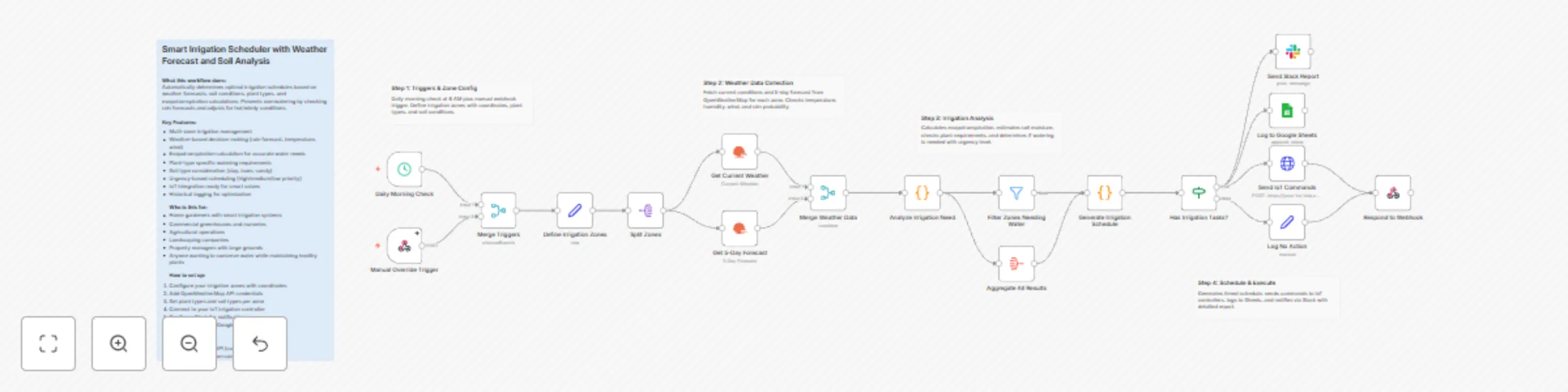
Workflow Architecture

[Daily Morning Check]    [Manual Override Trigger]
         |                        |
         +----------+-------------+
                    |
                    v
         [Define Irrigation Zones]
                    |
                    v
            [Split Zones] (Loop)
              /         \
             v           v
   [Get Current]   [Get 5-Day Forecast]
             \           /
              +----+----+
                   |
                   v
        [Merge Weather Data]
                   |
                   v
        [Analyze Irrigation Need]
              /         \
             v           v
   [Filter Needing]  [Aggregate All]
             \           /
              +----+----+
                   |
                   v
      [Generate Irrigation Schedule]
                   |
                   v
      [Has Irrigation Tasks?] (If)
           /              \
      Has Tasks         No Tasks
       /    |    \          |
  [Sheets][IoT][Slack]  [Log No Action]
       \    |    /          |
        +---+---+-----------+
                   |
                   v
        [Respond to Webhook]

Configuration Guide

  1. Irrigation Zones: Edit "Define Irrigation Zones" with your zone data (coordinates, plant/soil types)
  2. Water Thresholds: Adjust waterThreshold per zone based on plant needs
  3. OpenWeatherMap: Add API credentials in the weather nodes
  4. Slack Channel: Set to your garden/irrigation channel
  5. IoT Integration: Configure endpoint URL for your smart valve controller
  6. Google Sheets: Connect to your logging spreadsheet

Decision Logic

The system evaluates:

  1. Expected rainfall in next 24 hours (skip if >5mm expected)
  2. Soil moisture estimate based on days since watering + evapotranspiration
  3. Plant-specific minimum and ideal moisture levels
  4. Temperature adjustments for hot days
  5. Scheduled watering frequency by plant type
  6. Wind speed for optimal watering time

1.2 Logical Blocks

This catalog entry is organized from the workflow JSON. The node-level section below shows the executable blocks available for review before importing the template.

2. Block-by-Block Analysis

Block 1 - Daily Morning Check

Type / Role
n8n-nodes-base.scheduleTrigger - scheduleTrigger
Config choices
Version 1.2

Block 2 - Manual Override Trigger

Type / Role
n8n-nodes-base.webhook - webhook
Config choices
Version 2

Block 3 - Merge Triggers

Type / Role
n8n-nodes-base.merge - merge
Config choices
Version 3

Block 4 - Define Irrigation Zones

Type / Role
n8n-nodes-base.set - set
Config choices
Version 3.4

Block 5 - Split Zones

Type / Role
n8n-nodes-base.splitOut - splitOut
Config choices
Version 1

Block 6 - Get Current Weather

Type / Role
n8n-nodes-base.openWeatherMap - openWeatherMap
Config choices
Version 1

Block 7 - Get 5-Day Forecast

Type / Role
n8n-nodes-base.openWeatherMap - openWeatherMap
Config choices
Version 1

Block 8 - Merge Weather Data

Type / Role
n8n-nodes-base.merge - merge
Config choices
Version 3

Block 9 - Analyze Irrigation Need

Type / Role
n8n-nodes-base.code - code
Config choices
Version 2

Block 10 - Filter Zones Needing Water

Type / Role
n8n-nodes-base.filter - filter
Config choices
Version 2.2

Block 11 - Aggregate All Results

Type / Role
n8n-nodes-base.aggregate - aggregate
Config choices
Version 1

Block 12 - Generate Irrigation Schedule

Type / Role
n8n-nodes-base.code - code
Config choices
Version 2

Block 13 - Has Irrigation Tasks?

Type / Role
n8n-nodes-base.if - if
Config choices
Version 2

Block 14 - Log to Google Sheets

Type / Role
n8n-nodes-base.googleSheets - googleSheets
Config choices
Version 4.5

Block 15 - Send IoT Commands

Type / Role
n8n-nodes-base.httpRequest - httpRequest
Config choices
Version 4.2

Block 16 - Send Slack Report

Type / Role
n8n-nodes-base.slack - slack
Config choices
Version 2.3

Block 17 - Log No Action

Type / Role
n8n-nodes-base.set - set
Config choices
Version 3.4

Block 18 - Respond to Webhook

Type / Role
n8n-nodes-base.respondToWebhook - respondToWebhook
Config choices
Version 1.1

Block 19 - Workflow Overview

Type / Role
n8n-nodes-base.stickyNote - stickyNote
Config choices
Version 1

Block 20 - Step 1

Type / Role
n8n-nodes-base.stickyNote - stickyNote
Config choices
Version 1

Block 21 - Step 2

Type / Role
n8n-nodes-base.stickyNote - stickyNote
Config choices
Version 1

Block 22 - Step 3

Type / Role
n8n-nodes-base.stickyNote - stickyNote
Config choices
Version 1

Block 23 - Step 4

Type / Role
n8n-nodes-base.stickyNote - stickyNote
Config choices
Version 1

3. Summary Table

Workflow Smart irrigation scheduler with weather forecast and soil analysis
Complexity advanced
Nodes 23
Categories Miscellaneous, AI Summarization
Author 中崎功大
Published 19 Dec 2025

4. Reproducing the Workflow from Scratch

  1. 1. Download the workflow JSON

    Use the JSON export at /data/workflows/11939/11939.json as the source template for this automation.

  2. 2. Import the template into n8n

    Open n8n, import the downloaded JSON, and review each node before activating the workflow.

  3. 3. Configure credentials and variables

    Replace placeholder credentials, API keys, webhook URLs, account IDs, and environment-specific values with your own settings.

  4. 4. Test with sample data

    Run the workflow manually or in a staging workspace, inspect node output, and confirm downstream systems receive the expected data.

  5. 5. Activate and monitor

    Enable the workflow only after testing, then monitor executions, errors, and rate limits during the first production runs.

5. General Notes & Resources

Review imported nodes carefully before activation. This catalog entry is intended to help you inspect the workflow structure, understand required services, and find related templates faster.

Node names, credentials, schedules, webhook paths, and external service limits may need adjustment for your workspace.

Frequently asked questions

What does Smart irrigation scheduler with weather forecast and soil analysis do?

Smart Irrigation Scheduler with Weather Forecast and Soil Analysis Summary Automated garden and farm irrigation system that uses weather forecasts and evapotranspiration calculations to determine o...

What do I need before importing this workflow?

Review the workflow JSON, configure any required credentials in n8n, and test the automation in a safe workspace before using it in production.

Can I customize this workflow?

Yes. Use the block-by-block analysis and the downloadable JSON to inspect each node, then adjust credentials, prompts, schedules, filters, or destinations for your Miscellaneous, AI Summarization use case.