Block 1 - Sticky Note
- Type / Role
- n8n-nodes-base.stickyNote - stickyNote
- Config choices
- Version 1


 Early Deal
This workflow is provided as-is. Please review and test before using in production.
Who is this for This workflow is perfect for busy professionals, consultants, and anyone who frequently travels between meetings. If you want to make the most of your free time between appointments...
n8n-nodes-base.stickynote, n8n-nodes-base.scheduletrigger, n8n-nodes-base.set, n8n-nodes-base.googlecalendar, n8n-nodes-base.notion, n8n-nodes-base.openweathermap, n8n-nodes-base.httprequest, n8n-nodes-base.code
This workflow is cataloged by N8N Workflows and links back to its original n8n.io source page by 長谷 真宏.
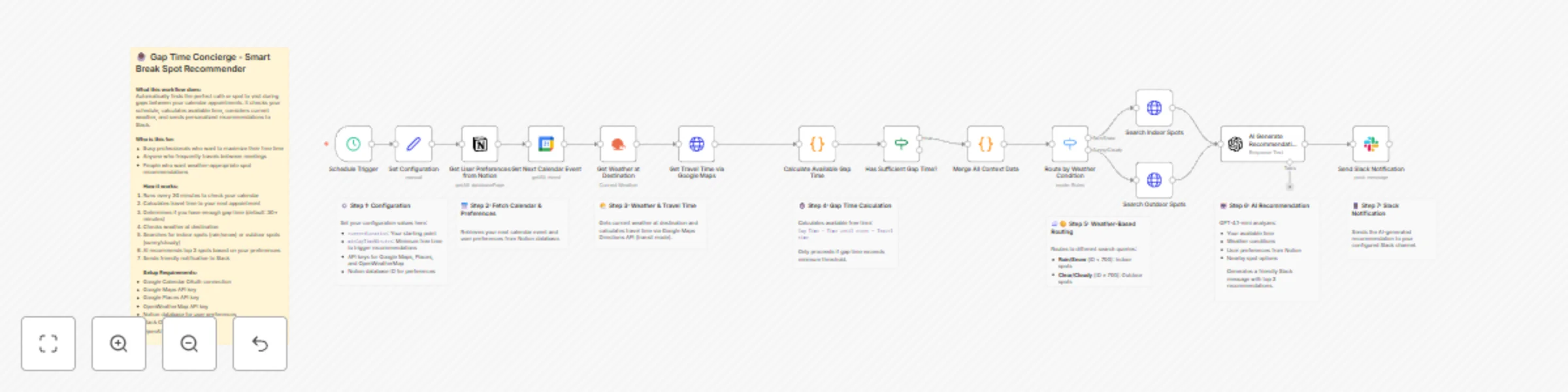
Original n8n.io sourceWho is this for This workflow is perfect for busy professionals, consultants, and anyone who frequently travels between meetings. If you want to make the most of your free time between appointments and discover great nearby spots without manual searching, this template is for you. What it does This workflow automatically monitors your Google Calendar and identifies gaps between appointments. When it detects sufficient free time (configurable, default 30+ minutes), it calculates travel time to your next destination, checks the weather, and uses AI to recommend the top 3 spots to visit during your break. Recommendations are weather-aware: indoor spots like cafés in malls or stations for rainy days, and outdoor terraces or open-air venues for nice weather. How it works
Schedule Trigger - Runs every 30 minutes to check your calendar Fetch Data - Gets your next calendar event and user preferences from Notion Calculate Gap Time - Determines available free time by subtracting travel time (via Google Maps) from time until your next appointment Weather Check - Gets current weather at your destination using OpenWeatherMap Smart Routing - Routes to indoor or outdoor spot search based on weather conditions AI Recommendations - GPT-4.1-mini analyzes spots and generates personalized top 3 recommendations Slack Notification - Sends a friendly message with recommendations to your Slack channel
Set up steps
Configure API Keys - Add your Google Maps, Google Places, and OpenWeatherMap API keys in the "Set Configuration" node Connect Google Calendar - Set up OAuth connection and select your calendar Set up Notion - Create a database for user preferences and add the database ID Connect Slack - Set up OAuth and specify your notification channel Connect OpenAI - Add your OpenAI API credentials Customize - Adjust currentLocation and minGapTimeMinutes to your needs
Requirements
Google Cloud account with Maps and Places APIs enabled OpenWeatherMap API key (free tier available) Notion account with a preferences database Slack workspace with bot permissions OpenAI API key
How to customize
Change trigger frequency: Modify the Schedule Trigger interval Adjust minimum gap time: Change minGapTimeMinutes in the configuration node Modify search radius: Edit the radius parameter in the Places API calls (default: 1000m) Customize spot types: Modify the type and keyword parameters in the HTTP Request nodes Change AI model: Switch to a different OpenAI model in the AI node Localize language: Update the AI prompt to generate responses in your preferred language
This catalog entry is organized from the workflow JSON. The node-level section below shows the executable blocks available for review before importing the template.
| Workflow | Smart break recommendation system using Google Calendar, weather data, and GPT-4 to Slack |
|---|---|
| Complexity | advanced |
| Nodes | 22 |
| Categories | Personal Productivity, AI Chatbot |
| Author | 長谷 真宏 |
| Published | 02 Dec 2025 |
Use the JSON export at /data/workflows/11432/11432.json as the source template for this automation.
Open n8n, import the downloaded JSON, and review each node before activating the workflow.
Replace placeholder credentials, API keys, webhook URLs, account IDs, and environment-specific values with your own settings.
Run the workflow manually or in a staging workspace, inspect node output, and confirm downstream systems receive the expected data.
Enable the workflow only after testing, then monitor executions, errors, and rate limits during the first production runs.
Review imported nodes carefully before activation. This catalog entry is intended to help you inspect the workflow structure, understand required services, and find related templates faster.
Node names, credentials, schedules, webhook paths, and external service limits may need adjustment for your workspace.
Who is this for This workflow is perfect for busy professionals, consultants, and anyone who frequently travels between meetings. If you want to make the most of your free time between appointments...
Review the workflow JSON, configure any required credentials in n8n, and test the automation in a safe workspace before using it in production.
Yes. Use the block-by-block analysis and the downloadable JSON to inspect each node, then adjust credentials, prompts, schedules, filters, or destinations for your Personal Productivity, AI Chatbot use case.