Set DevOps infrastructure with Docker, K3s, Jenkins & Grafana for Linux servers

Workflow preview

Workflow preview
100%
Set DevOps infrastructure with Docker, K3s, Jenkins & Grafana for Linux servers preview
Open on n8n.io

Important notice

This workflow is provided as-is. Please review and test before using in production.

1. Workflow Overview

This automated n8n workflow delivers an instant DevOps toolkit by installing Docker, K3s, Jenkins, Grafana, and more on a Linux server within 10 seconds. It optimizes performance, enhances security...

Best for

  • DevOps automation workflows
  • intermediate n8n builders looking for reusable templates

Tools used

n8n-nodes-base.manualtrigger, n8n-nodes-base.set, n8n-nodes-base.ssh, n8n-nodes-base.wait, n8n-nodes-base.stickynote

Source and attribution

This workflow is cataloged by N8N Workflows and links back to its original n8n.io source page by Oneclick AI Squad.

Original n8n.io source

1.1 Workflow description

Title
Set DevOps infrastructure with Docker, K3s, Jenkins & Grafana for Linux servers
Workflow name
Set DevOps infrastructure with Docker, K3s, Jenkins & Grafana for Linux servers

This automated n8n workflow delivers an instant DevOps toolkit by installing Docker, K3s, Jenkins, Grafana, and more on a Linux server within 10 seconds. It optimizes performance, enhances security, and provides ready-to-use templates for DevOps projects.

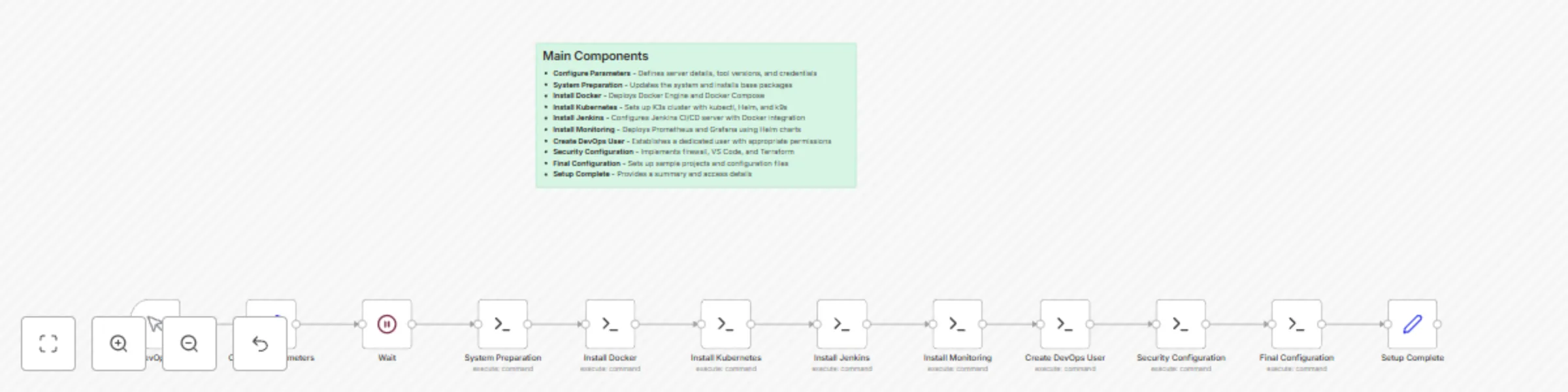
Main Components

  • Configure Parameters - Defines server details, tool versions, and credentials
  • System Preparation - Updates the system and installs base packages
  • Install Docker - Deploys Docker Engine and Docker Compose
  • Install Kubernetes - Sets up K3s cluster with kubectl, Helm, and k9s
  • Install Jenkins - Configures Jenkins CI/CD server with Docker integration
  • Install Monitoring - Deploys Prometheus and Grafana using Helm charts
  • Create DevOps User - Establishes a dedicated user with appropriate permissions
  • Security Configuration - Implements firewall, VS Code, and Terraform
  • Final Configuration - Sets up sample projects and configuration files
  • Setup Complete - Provides a summary and access details

Essential Prerequisites

  • Linux server with SSH access
  • Root-level administrative privileges

Customization Guide

  • Adjust tool versions or credentials in the Configure Parameters node
  • Modify the number of nodes or security settings as needed

Features

  • đź”§ Core DevOps Tools Installed:
    • Docker - Container platform with Docker Compose
    • Kubernetes - K3s (lightweight) with kubectl and Helm
    • Jenkins - CI/CD automation server
    • Prometheus - Monitoring and alerting
    • Grafana - Visualization and dashboards
  • ⚡ Optimizations Made:
    • Streamlined Commands - Combined multiple operations into single bash scripts
    • Reduced Nodes - 10 nodes vs 12 in original (more efficient)
    • Better Error Handling - Each step includes verification
    • Cloud-Ready - Includes AWS CLI, Azure CLI, and Google Cloud SDK
    • Security First - Proper firewall configuration and user permissions

Parameters to Configure

  • server_host: Your Linux server IP address
  • server_user: SSH username (typically 'root')
  • server_password: SSH password
  • docker_version: Docker version to install
  • k3s_version: K3s version to install
  • username: DevOps username
  • user_password: Password for the DevOps user

How to Use

  • Copy the JSON code from the artifact
  • Open your n8n workspace
  • Select "Import from JSON" or "+" → "From JSON"
  • Paste the JSON code
  • Configure parameters in the "Configure Parameters" node with your server details
  • Run the workflow

Workflow Actions

  • Install: Deploys Docker, K3s, Jenkins, Prometheus, and Grafana with optimizations
  • Create User: Sets up a DevOps user with necessary permissions
  • Configure: Applies security settings and provides templates

1.2 Logical Blocks

This catalog entry is organized from the workflow JSON. The node-level section below shows the executable blocks available for review before importing the template.

2. Block-by-Block Analysis

Block 1 - Start DevOps Setup

Type / Role
n8n-nodes-base.manualTrigger - manualTrigger
Config choices
Version 1

Block 2 - Configure Parameters

Type / Role
n8n-nodes-base.set - set
Config choices
Version 1

Block 3 - System Preparation

Type / Role
n8n-nodes-base.ssh - ssh
Config choices
Version 1

Block 4 - Install Docker

Type / Role
n8n-nodes-base.ssh - ssh
Config choices
Version 1

Block 5 - Install Kubernetes

Type / Role
n8n-nodes-base.ssh - ssh
Config choices
Version 1

Block 6 - Install Jenkins

Type / Role
n8n-nodes-base.ssh - ssh
Config choices
Version 1

Block 7 - Install Monitoring

Type / Role
n8n-nodes-base.ssh - ssh
Config choices
Version 1

Block 8 - Create DevOps User

Type / Role
n8n-nodes-base.ssh - ssh
Config choices
Version 1

Block 9 - Security Configuration

Type / Role
n8n-nodes-base.ssh - ssh
Config choices
Version 1

Block 10 - Final Configuration

Type / Role
n8n-nodes-base.ssh - ssh
Config choices
Version 1

Block 11 - Setup Complete

Type / Role
n8n-nodes-base.set - set
Config choices
Version 1

Block 12 - Wait

Type / Role
n8n-nodes-base.wait - wait
Config choices
Version 1.1

Block 13 - Sticky Note1

Type / Role
n8n-nodes-base.stickyNote - stickyNote
Config choices
Version 1

3. Summary Table

Workflow Set DevOps infrastructure with Docker, K3s, Jenkins & Grafana for Linux servers
Complexity intermediate
Nodes 13
Categories DevOps
Author Oneclick AI Squad
Published 18 Jul 2025

4. Reproducing the Workflow from Scratch

  1. 1. Download the workflow JSON

    Use the JSON export at /data/workflows/6140/6140.json as the source template for this automation.

  2. 2. Import the template into n8n

    Open n8n, import the downloaded JSON, and review each node before activating the workflow.

  3. 3. Configure credentials and variables

    Replace placeholder credentials, API keys, webhook URLs, account IDs, and environment-specific values with your own settings.

  4. 4. Test with sample data

    Run the workflow manually or in a staging workspace, inspect node output, and confirm downstream systems receive the expected data.

  5. 5. Activate and monitor

    Enable the workflow only after testing, then monitor executions, errors, and rate limits during the first production runs.

5. General Notes & Resources

Review imported nodes carefully before activation. This catalog entry is intended to help you inspect the workflow structure, understand required services, and find related templates faster.

Node names, credentials, schedules, webhook paths, and external service limits may need adjustment for your workspace.

Frequently asked questions

What does Set DevOps infrastructure with Docker, K3s, Jenkins & Grafana for Linux servers do?

This automated n8n workflow delivers an instant DevOps toolkit by installing Docker, K3s, Jenkins, Grafana, and more on a Linux server within 10 seconds. It optimizes performance, enhances security...

What do I need before importing this workflow?

Review the workflow JSON, configure any required credentials in n8n, and test the automation in a safe workspace before using it in production.

Can I customize this workflow?

Yes. Use the block-by-block analysis and the downloadable JSON to inspect each node, then adjust credentials, prompts, schedules, filters, or destinations for your DevOps use case.