Block 1 - Google Gemini Chat Model
- Type / Role
- @n8n/n8n-nodes-langchain.lmChatGoogleGemini - lmChatGoogleGemini
- Config choices
- Version 1


 Early Deal
This workflow is provided as-is. Please review and test before using in production.
Who's it for Business owners, freelancers, and professionals who use Cal.com or Calendly for scheduling and want instant WhatsApp notifications for all booking activities without constantly checkin...
@n8n/n8n-nodes-langchain.lmchatgooglegemini, @n8n/n8n-nodes-langchain.memorybufferwindow, n8n-nodes-base.caltrigger, n8n-nodes-base.calendlytrigger, n8n-nodes-base.aggregate, @n8n/n8n-nodes-langchain.agent, n8n-nodes-base.whatsapp, n8n-nodes-base.stickynote
This workflow is cataloged by N8N Workflows and links back to its original n8n.io source page by Roshan Ramani.
Original n8n.io sourceBusiness owners, freelancers, and professionals who use Cal.com or Calendly for scheduling and want instant WhatsApp notifications for all booking activities without constantly checking their email or calendar apps.
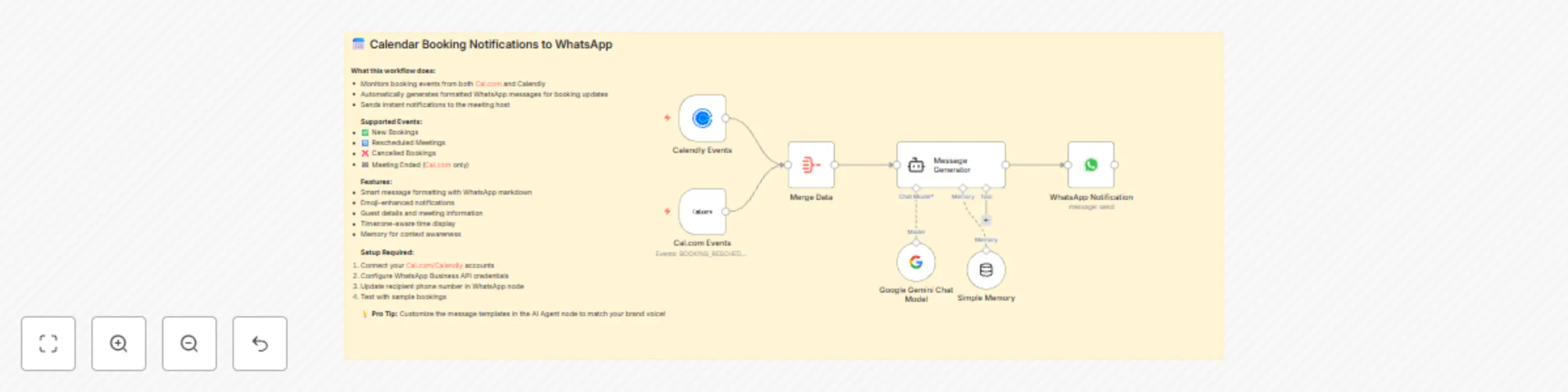
This workflow automatically monitors your calendar booking events from both Cal.com and Calendly, then sends beautifully formatted WhatsApp messages to notify you of:
The AI agent intelligently formats each message with emojis, proper spacing, and all relevant booking information including guest names, emails, dates, times, locations, and notes.
Stop checking multiple platforms: Instead of constantly monitoring email notifications, calendar apps, and booking dashboards, get everything instantly on WhatsApp - the app you're already using throughout the day.
Immediate awareness: Know about booking changes the moment they happen, not hours later when you finally check your email. This means you can quickly adjust your schedule, prepare for meetings, or reach out to clients if needed.
Mobile-first notifications: Since most people check WhatsApp more frequently than email, you'll never miss important booking updates again. Perfect for busy professionals who are often away from their desk.
When a booking event occurs on either platform, the workflow captures the data, merges it through an aggregator, then uses Google Gemini AI to generate a professionally formatted WhatsApp message that gets sent instantly to your phone.
This catalog entry is organized from the workflow JSON. The node-level section below shows the executable blocks available for review before importing the template.
| Workflow | Send WhatsApp notifications for Cal.com & Calendly bookings using Google Gemini |
|---|---|
| Complexity | intermediate |
| Nodes | 8 |
| Categories | Personal Productivity, Multimodal AI |
| Author | Roshan Ramani |
| Published | 14 Aug 2025 |
Use the JSON export at /data/workflows/7375/7375.json as the source template for this automation.
Open n8n, import the downloaded JSON, and review each node before activating the workflow.
Replace placeholder credentials, API keys, webhook URLs, account IDs, and environment-specific values with your own settings.
Run the workflow manually or in a staging workspace, inspect node output, and confirm downstream systems receive the expected data.
Enable the workflow only after testing, then monitor executions, errors, and rate limits during the first production runs.
Review imported nodes carefully before activation. This catalog entry is intended to help you inspect the workflow structure, understand required services, and find related templates faster.
Node names, credentials, schedules, webhook paths, and external service limits may need adjustment for your workspace.
Who's it for Business owners, freelancers, and professionals who use Cal.com or Calendly for scheduling and want instant WhatsApp notifications for all booking activities without constantly checkin...
Review the workflow JSON, configure any required credentials in n8n, and test the automation in a safe workspace before using it in production.
Yes. Use the block-by-block analysis and the downloadable JSON to inspect each node, then adjust credentials, prompts, schedules, filters, or destinations for your Personal Productivity, Multimodal AI use case.