Send AI sales proposals and Stripe payment links after Calendly calls

Workflow preview

Workflow preview
100%
Send AI sales proposals and Stripe payment links after Calendly calls preview
Open on n8n.io

Important notice

This workflow is provided as-is. Please review and test before using in production.

1. Workflow Overview

Meeting → Proposal → Payment → Follow up Automation Categories: Sales Automation, AI Proposals, Revenue Ops This workflow automatically turns a booked sales call into a customized proposal, a Strip...

Best for

  • CRM automation workflows
  • AI Summarization automation workflows
  • intermediate n8n builders looking for reusable templates

Tools used

n8n-nodes-base.stickynote, @n8n/n8n-nodes-langchain.openai, n8n-nodes-base.httprequest, n8n-nodes-base.googledrive, n8n-nodes-base.googleslides, n8n-nodes-base.googlesheets, n8n-nodes-base.calendlytrigger, n8n-nodes-base.gmail

Source and attribution

This workflow is cataloged by N8N Workflows and links back to its original n8n.io source page by Cliss Zhang.

Original n8n.io source

1.1 Workflow description

Title
Send AI sales proposals and Stripe payment links after Calendly calls
Workflow name
Send AI sales proposals and Stripe payment links after Calendly calls

Meeting → Proposal → Payment → Follow-up Automation

Categories: Sales Automation, AI Proposals, Revenue Ops

This workflow automatically turns a booked sales call into a customized proposal, a Stripe payment link, and a follow-up email — without manual work.

It’s designed to handle everything after a sales call so momentum doesn’t die.

Booked call → proposal → payment → done.


What This Workflow Does

This automation runs the moment a sales call is booked and executes a complete post-call sales flow:

  • Looks up the lead in a lightweight CRM
  • Generates a tailored proposal using AI
  • Creates a Google Slides proposal deck
  • Creates a unique Stripe checkout link
  • Sends a personalized follow-up email with proposal + payment

No manual copy-pasting. No delays. No forgotten follow-ups.


Why This Exists

Most deals are lost after the call — not during it.

This system removes:

  • Manual proposal writing
  • Post-call follow-up delays
  • Inconsistent sales ops
  • Awkward “just following up” emails

It replaces all of that with a single, reliable close flow.

Human on the outside. Fully automated underneath.


How It Works (High Level)

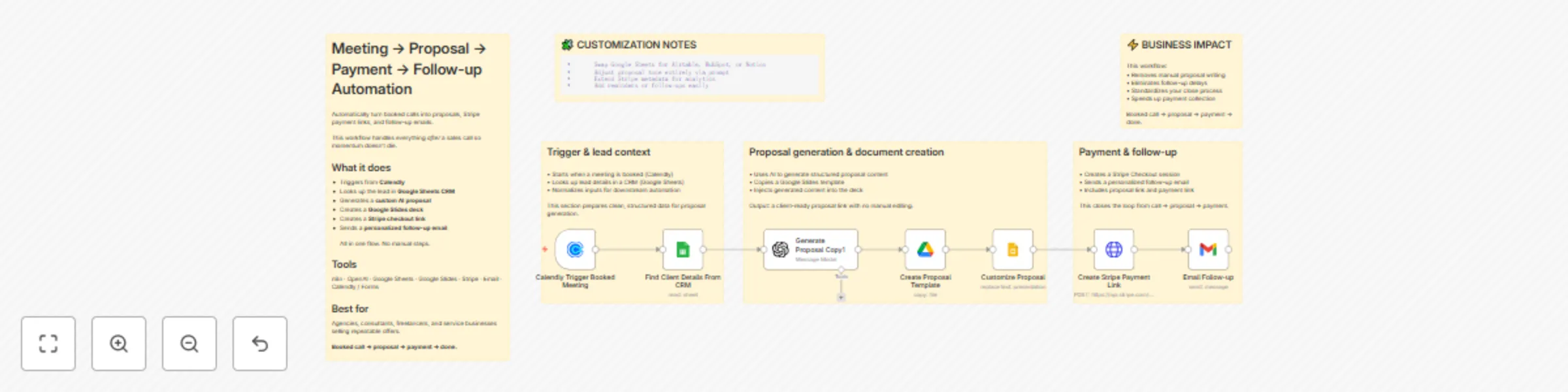
1. Calendly Trigger (Sales Call Booked)

  • Workflow starts immediately after a meeting is scheduled
  • Ensures proposals are sent while context is still fresh

2. CRM Lookup (Google Sheets)

  • Finds the lead using email or company name
  • Works even if the lead is unqualified or incomplete
  • Simple, transparent CRM (no heavy tooling required)

3. AI Proposal Generation

  • Uses structured inputs (problem, solution, scope, urgency, cost)
  • Outputs a complete proposal as strict JSON
  • Written in a clear, spartan, professional tone

4. Google Slides Proposal Creation

  • Copies a proposal template
  • Auto-fills all sections using AI output
  • Generates one unique proposal per lead
  • Shareable link created automatically

5. Stripe Checkout Session

  • Creates a unique payment link per lead
  • Attaches metadata (lead, company, package)
  • No manual invoicing required

6. Follow-up Email

  • Sends proposal + payment link immediately
  • Personalized with name and company
  • Keeps the close frictionless

Tools Used

  • n8n — workflow orchestration
  • OpenAI — proposal generation
  • Google Sheets — lightweight CRM
  • Google Slides — proposal delivery
  • Stripe — payment collection
  • Email (Gmail / SMTP) — follow-up delivery
  • Calendly — trigger source

Who This Is For

  • Automation & no-code agencies
  • Consultants and service businesses
  • Freelancers selling repeatable offers
  • Sales-led teams that want speed + consistency
  • Anyone tired of manual proposals and follow-ups

Customization Notes

  • Swap Google Sheets for Airtable, HubSpot, or Notion
  • Proposal tone and structure are fully prompt-driven
  • Stripe metadata can be extended for analytics or CRM sync
  • Can support multiple triggers (Calendly, forms, manual intake)

Difficulty & Cost

  • Difficulty: Intermediate (conceptually simple, operationally solid)
  • Estimated setup time: 30–45 minutes
  • Ongoing cost: OpenAI + Stripe fees only

Summary

This is not just a proposal generator.

It’s a post-call revenue system that turns intent into action automatically.

> Meeting → proposal → payment → follow-up
> No manual steps. No dropped balls.

1.2 Logical Blocks

This catalog entry is organized from the workflow JSON. The node-level section below shows the executable blocks available for review before importing the template.

2. Block-by-Block Analysis

Block 1 - Sticky Note

Type / Role
n8n-nodes-base.stickyNote - stickyNote
Config choices
Version 1

Block 2 - Generate Proposal Copy1

Type / Role
@n8n/n8n-nodes-langchain.openAi - openAi
Config choices
Version 1.6

Block 3 - Create Stripe Payment Link

Type / Role
n8n-nodes-base.httpRequest - httpRequest
Config choices
Version 4.3

Block 4 - Create Proposal Template

Type / Role
n8n-nodes-base.googleDrive - googleDrive
Config choices
Version 3

Block 5 - Customize Proposal

Type / Role
n8n-nodes-base.googleSlides - googleSlides
Config choices
Version 2

Block 6 - Find Client Details From CRM

Type / Role
n8n-nodes-base.googleSheets - googleSheets
Config choices
Version 4.7

Block 7 - Calendly Trigger Booked Meeting

Type / Role
n8n-nodes-base.calendlyTrigger - calendlyTrigger
Config choices
Version 1

Block 8 - Email Follow-up

Type / Role
n8n-nodes-base.gmail - gmail
Config choices
Version 2.1

Block 9 - Sticky Note2

Type / Role
n8n-nodes-base.stickyNote - stickyNote
Config choices
Version 1

Block 10 - Sticky Note4

Type / Role
n8n-nodes-base.stickyNote - stickyNote
Config choices
Version 1

Block 11 - Sticky Note5

Type / Role
n8n-nodes-base.stickyNote - stickyNote
Config choices
Version 1

Block 12 - Sticky Note8

Type / Role
n8n-nodes-base.stickyNote - stickyNote
Config choices
Version 1

Block 13 - Sticky Note9

Type / Role
n8n-nodes-base.stickyNote - stickyNote
Config choices
Version 1

3. Summary Table

Workflow Send AI sales proposals and Stripe payment links after Calendly calls
Complexity intermediate
Nodes 13
Categories CRM, AI Summarization
Author Cliss Zhang
Published 07 Jan 2026

4. Reproducing the Workflow from Scratch

  1. 1. Download the workflow JSON

    Use the JSON export at /data/workflows/12530/12530.json as the source template for this automation.

  2. 2. Import the template into n8n

    Open n8n, import the downloaded JSON, and review each node before activating the workflow.

  3. 3. Configure credentials and variables

    Replace placeholder credentials, API keys, webhook URLs, account IDs, and environment-specific values with your own settings.

  4. 4. Test with sample data

    Run the workflow manually or in a staging workspace, inspect node output, and confirm downstream systems receive the expected data.

  5. 5. Activate and monitor

    Enable the workflow only after testing, then monitor executions, errors, and rate limits during the first production runs.

5. General Notes & Resources

Review imported nodes carefully before activation. This catalog entry is intended to help you inspect the workflow structure, understand required services, and find related templates faster.

Node names, credentials, schedules, webhook paths, and external service limits may need adjustment for your workspace.

Frequently asked questions

What does Send AI sales proposals and Stripe payment links after Calendly calls do?

Meeting → Proposal → Payment → Follow up Automation Categories: Sales Automation, AI Proposals, Revenue Ops This workflow automatically turns a booked sales call into a customized proposal, a Strip...

What do I need before importing this workflow?

Review the workflow JSON, configure any required credentials in n8n, and test the automation in a safe workspace before using it in production.

Can I customize this workflow?

Yes. Use the block-by-block analysis and the downloadable JSON to inspect each node, then adjust credentials, prompts, schedules, filters, or destinations for your CRM, AI Summarization use case.