Send a daily AI crypto news digest from Brave Search to Telegram with GPT-4.1-mini

Workflow preview

Workflow preview
100%
Send a daily AI crypto news digest from Brave Search to Telegram with GPT-4.1-mini preview
Open on n8n.io

1. Workflow Overview

Crypto News Digest — Daily Telegram Bot Automatically fetch the latest crypto headlines every morning and receive a clean AI generated summary straight to your Telegram — fully hands off once activ...

Best for

  • Crypto Trading automation workflows
  • AI Summarization automation workflows
  • intermediate n8n builders looking for reusable templates

Tools used

n8n-nodes-base.scheduletrigger, n8n-nodes-base.code, n8n-nodes-base.telegram, @n8n/n8n-nodes-langchain.lmchatopenai, @n8n/n8n-nodes-langchain.chainllm, @brave/n8n-nodes-brave-search.bravesearch, n8n-nodes-base.stickynote

Source and attribution

This workflow is cataloged by N8N Workflows and links back to its original n8n.io source page by LukaszB.

Original n8n.io source

1.1 Workflow description

Title
Send a daily AI crypto news digest from Brave Search to Telegram with GPT-4.1-mini
Workflow name
Send a daily AI crypto news digest from Brave Search to Telegram with GPT-4.1-mini

Crypto News Digest — Daily Telegram Bot

Automatically fetch the latest crypto headlines every morning and receive a clean AI-generated summary straight to your Telegram — fully hands-off once activated.


What This Workflow Does

Every day at a scheduled time, this workflow pulls the freshest cryptocurrency news from Brave Search, processes the top 5 results, generates a concise digest using OpenAI, and delivers it directly to a Telegram chat. No manual input, no dashboards to check — the news comes to you.


How It Works

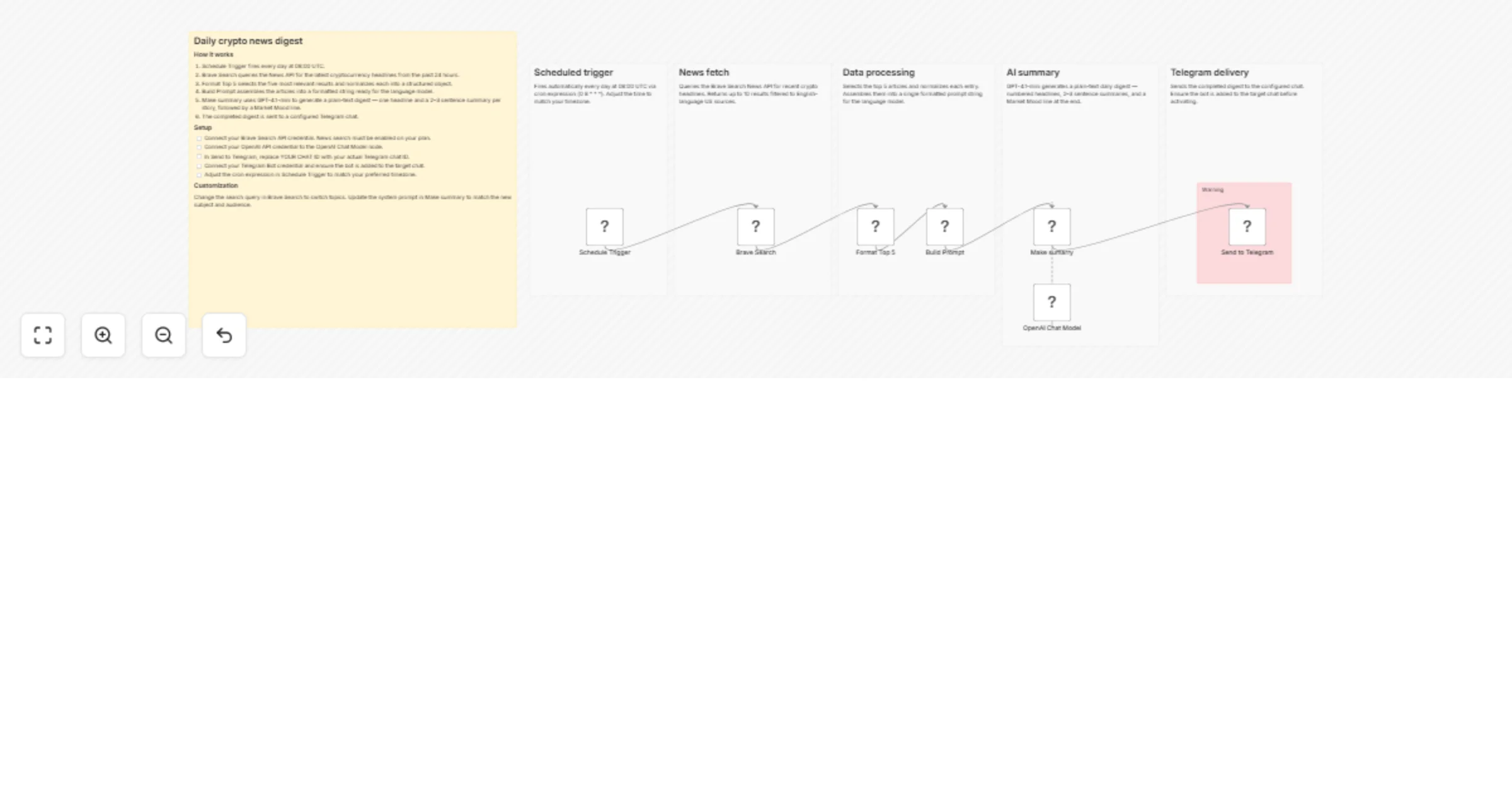
  1. Schedule Trigger fires automatically every day at 08:00 UTC
  2. Brave Search queries the News API for the latest crypto headlines from the past 24 hours
  3. Format Top 5 cleans and normalizes the raw results into structured article objects
  4. Build Prompt assembles the articles into a formatted input string for the language model
  5. Make Summary sends the prompt to OpenAI (gpt-4.1-mini), which generates a structured digest with a headline and 2–3 sentence summary per story, plus a final Market Mood line
  6. Send to Telegram delivers the completed digest to your configured chat or channel

What You Get

A clean, plain-text daily message in Telegram containing:

  • 5 headlines from the past 24 hours
  • A concise 2–3 sentence summary per story
  • A Market Mood line summarizing the overall sentiment of the day

Customize for Any News Topic

This workflow is built to be easily repurposed. To switch from crypto to any other topic, simply update the Query field in the Brave Search node.

Examples:

  • artificial intelligence AI news today
  • stock market nasdaq sp500 news
  • tech industry startup funding news
  • real estate housing market news US

If you change the topic, also update the system prompt inside the Make Summary node to reflect the new subject and audience.


Requirements

  • Brave Search API key (plan with News search enabled)
  • OpenAI API key
  • Telegram Bot token and target Chat ID

1.2 Logical Blocks

This catalog entry is organized from the workflow JSON. The node-level section below shows the executable blocks available for review before importing the template.

2. Block-by-Block Analysis

Block 1 - Schedule Trigger

Type / Role
n8n-nodes-base.scheduleTrigger - scheduleTrigger
Config choices
Version 1.2

Block 2 - Format Top 5

Type / Role
n8n-nodes-base.code - code
Config choices
Version 2

Block 3 - Build Prompt

Type / Role
n8n-nodes-base.code - code
Config choices
Version 2

Block 4 - Send to Telegram

Type / Role
n8n-nodes-base.telegram - telegram
Config choices
Version 1.2

Block 5 - OpenAI Chat Model

Type / Role
@n8n/n8n-nodes-langchain.lmChatOpenAi - lmChatOpenAi
Config choices
Version 1.3

Block 6 - Make sumarry

Type / Role
@n8n/n8n-nodes-langchain.chainLlm - chainLlm
Config choices
Version 1.9

Block 7 - Brave Search

Type / Role
@brave/n8n-nodes-brave-search.braveSearch - braveSearch
Config choices
Version 1

Block 8 - Sticky Note

Type / Role
n8n-nodes-base.stickyNote - stickyNote
Config choices
Version 1

Block 9 - Sticky Note1

Type / Role
n8n-nodes-base.stickyNote - stickyNote
Config choices
Version 1

Block 10 - Sticky Note2

Type / Role
n8n-nodes-base.stickyNote - stickyNote
Config choices
Version 1

Block 11 - Sticky Note3

Type / Role
n8n-nodes-base.stickyNote - stickyNote
Config choices
Version 1

Block 12 - Sticky Note4

Type / Role
n8n-nodes-base.stickyNote - stickyNote
Config choices
Version 1

Block 13 - Sticky Note5

Type / Role
n8n-nodes-base.stickyNote - stickyNote
Config choices
Version 1

Block 14 - Sticky Note6

Type / Role
n8n-nodes-base.stickyNote - stickyNote
Config choices
Version 1

3. Summary Table

Workflow Send a daily AI crypto news digest from Brave Search to Telegram with GPT-4.1-mini
Complexity intermediate
Nodes 14
Categories Crypto Trading, AI Summarization
Author LukaszB
Published 03 Apr 2026

4. Reproducing the Workflow from Scratch

  1. 1. Download the workflow JSON

    Use the JSON export at /data/workflows/14676/14676.json as the source template for this automation.

  2. 2. Import the template into n8n

    Open n8n, import the downloaded JSON, and review each node before activating the workflow.

  3. 3. Configure credentials and variables

    Replace placeholder credentials, API keys, webhook URLs, account IDs, and environment-specific values with your own settings.

  4. 4. Test with sample data

    Run the workflow manually or in a staging workspace, inspect node output, and confirm downstream systems receive the expected data.

  5. 5. Activate and monitor

    Enable the workflow only after testing, then monitor executions, errors, and rate limits during the first production runs.

5. General Notes & Resources

Review imported nodes carefully before activation. This catalog entry is intended to help you inspect the workflow structure, understand required services, and find related templates faster.

Node names, credentials, schedules, webhook paths, and external service limits may need adjustment for your workspace.

Frequently asked questions

What does Send a daily AI crypto news digest from Brave Search to Telegram with GPT-4.1-mini do?

Crypto News Digest — Daily Telegram Bot Automatically fetch the latest crypto headlines every morning and receive a clean AI generated summary straight to your Telegram — fully hands off once activ...

What do I need before importing this workflow?

Review the workflow JSON, configure any required credentials in n8n, and test the automation in a safe workspace before using it in production.

Can I customize this workflow?

Yes. Use the block-by-block analysis and the downloadable JSON to inspect each node, then adjust credentials, prompts, schedules, filters, or destinations for your Crypto Trading, AI Summarization use case.