Block 1 - Get many workflows1
- Type / Role
- n8n-nodes-base.n8n - n8n
- Config choices
- Version 1


 Early Deal
This workflow is provided as-is. Please review and test before using in production.
This template provides an automatic backup solution for all your n8n workflows, saving them directly to Google Drive. It’s designed for freelancers, agencies, and businesses that want to keep their...
n8n-nodes-base.n8n, n8n-nodes-base.googledrive, n8n-nodes-base.scheduletrigger, n8n-nodes-base.stickynote, n8n-nodes-base.movebinarydata
This workflow is cataloged by N8N Workflows and links back to its original n8n.io source page by Tony Ciencia.
Original n8n.io sourceThis template provides an automatic backup solution for all your n8n workflows, saving them directly to Google Drive. It’s designed for freelancers, agencies, and businesses that want to keep their automations safe, versioned, and always recoverable.
Why Backups Matter
Disaster recovery – Restore workflows quickly if your instance fails.
Version control – Track workflow changes over time.
Collaboration – Share workflow JSON files easily with teammates.
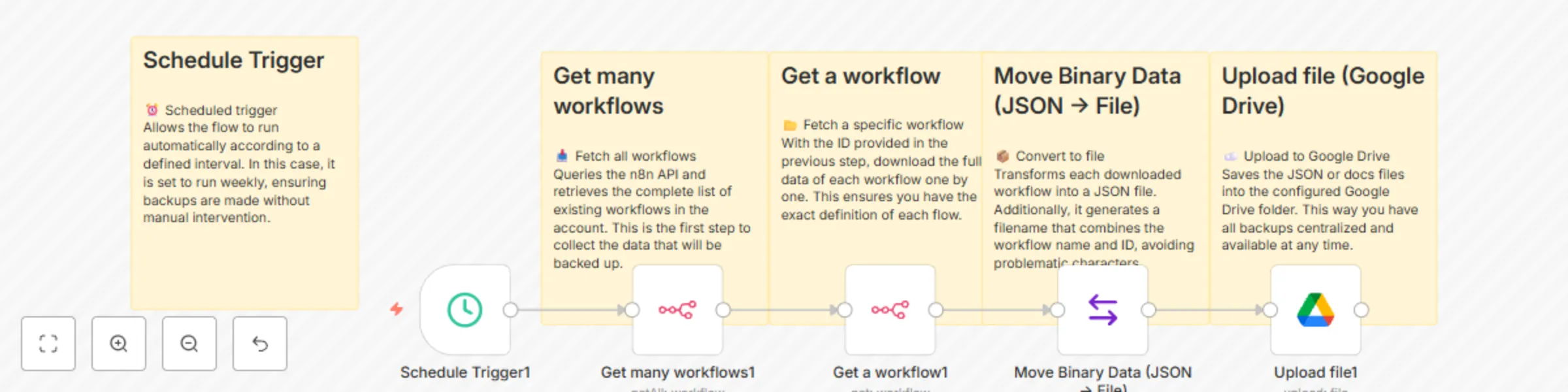
Fetches the complete list of workflows from your n8n instance via API.
Downloads each workflow in JSON format.
Converts the data into a file with a unique name (workflow name + ID).
Uploads all files to a chosen Google Drive folder.
Can be run manually or via an automatic schedule (daily, weekly, etc.).
Frequency → Set daily, weekly, or monthly backups.
File Naming → Adjust filename expression (e.g., {{workflowName}}-{{workflowId}}-{{date}}.json).
Folder Location → Store backups in separate Google Drive folders per project or client.
This template is ideal for:
Freelancers managing multiple client automations.
Agencies delivering automation services.
Teams that rely on n8n for mission-critical workflows.
It reduces risk, saves time, and ensures you never lose your work.
⏱ Estimated setup time: 5–10 minutes.
This catalog entry is organized from the workflow JSON. The node-level section below shows the executable blocks available for review before importing the template.
| Workflow | Scheduled n8n workflow backups to Google Drive using n8n API |
|---|---|
| Complexity | intermediate |
| Nodes | 10 |
| Categories | DevOps, Multimodal AI |
| Author | Tony Ciencia |
| Published | 21 Aug 2025 |
Use the JSON export at /data/workflows/7707/7707.json as the source template for this automation.
Open n8n, import the downloaded JSON, and review each node before activating the workflow.
Replace placeholder credentials, API keys, webhook URLs, account IDs, and environment-specific values with your own settings.
Run the workflow manually or in a staging workspace, inspect node output, and confirm downstream systems receive the expected data.
Enable the workflow only after testing, then monitor executions, errors, and rate limits during the first production runs.
Review imported nodes carefully before activation. This catalog entry is intended to help you inspect the workflow structure, understand required services, and find related templates faster.
Node names, credentials, schedules, webhook paths, and external service limits may need adjustment for your workspace.
This template provides an automatic backup solution for all your n8n workflows, saving them directly to Google Drive. It’s designed for freelancers, agencies, and businesses that want to keep their...
Review the workflow JSON, configure any required credentials in n8n, and test the automation in a safe workspace before using it in production.
Yes. Use the block-by-block analysis and the downloadable JSON to inspect each node, then adjust credentials, prompts, schedules, filters, or destinations for your DevOps, Multimodal AI use case.