
Save your workflows into a GitHub repository

Workflow preview
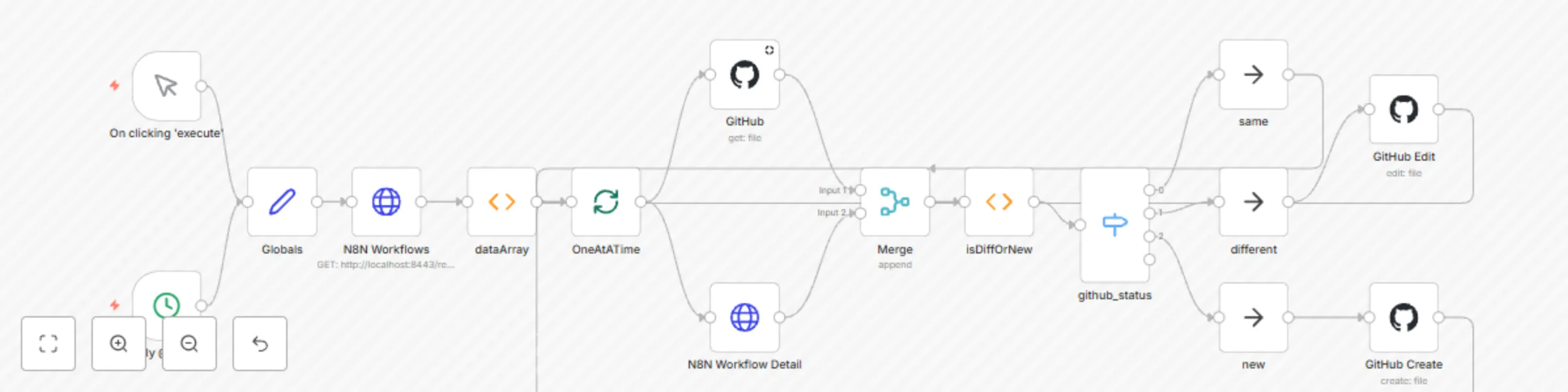
Workflow preview
100%
Save your workflows into a GitHub repository preview
Open on n8n.io

Important notice

This workflow is provided as-is. Please review and test before using in production.

1. Workflow Overview

Basics Provides a mechanism to save all your workflows into a github repository and path (of your choosing). These can then be shared through your entire org and used to track changes (if you make ...

Best for

  • DevOps automation workflows
  • advanced n8n builders looking for reusable templates

Tools used

n8n-nodes-base.manualtrigger, n8n-nodes-base.function, n8n-nodes-base.httprequest, n8n-nodes-base.github, n8n-nodes-base.merge, n8n-nodes-base.switch, n8n-nodes-base.noop, n8n-nodes-base.cron

Source and attribution

This workflow is cataloged by N8N Workflows and links back to its original n8n.io source page by Brian Burnett.

Original n8n.io source

1.1 Workflow description

Title
Save your workflows into a GitHub repository
Workflow name
Save your workflows into a GitHub repository

Basics

Provides a mechanism to save all your workflows into a github repository and path (of your choosing). These can then be shared through your entire org and used to track changes (if you make any sad 'oopsies'.

Flow

  1. Obtains and creates listing of currently configured workflows.
  2. Iterates through each workflow looking at the following
    1. Github source (if present)
    2. Actual workflow code (from N8N)
  3. Workflow code is sorted and compared for any changes
  4. If changed (or new) the workflows are saved / archived into github.

Configuration

Most of the configuration is done in the Globals node which houses the repo detail for github nodes. The only other dependency is that it by default looks for a GitHub credential, if you use something other than that precise wording you will need to change the credential used on the respective nodes. We gave it 'Manage' rights, but that was only so that it was able to override a requirement for checks to complete? Most would probably only need 'Write' privileges.

Background

Well, so we initially started using N8N just as a kubernetes-based service housed with its DB running inside the pod. Worked great for getting to know N8N and we jut kept all our workflows and credentials listed in a readme. Fast forward about a year...

We have migrated this into our 'production' toolsets and maintain a bunch of team worflows inside it (not company-wide, but LOTS of team fun). While trying to spin a copy of our production RDS database, the ++actual++ production database was deleted, and in doing so AWS was nice enough to wipe our snapshots too!! Yea!

Thankfully it only took us a few hours to get everything back up and running thanks to this, so I'm sharing it for everyone to benefit. We have used it to restore old workflows, changes, and now to test our full DR proceedures! (Ok, I might have taken that a bit far)

1.2 Logical Blocks

This catalog entry is organized from the workflow JSON. The node-level section below shows the executable blocks available for review before importing the template.

2. Block-by-Block Analysis

Block 1 - On clicking 'execute'

Type / Role
n8n-nodes-base.manualTrigger - manualTrigger
Config choices
Version 1

Block 2 - dataArray

Type / Role
n8n-nodes-base.function - function
Config choices
Version 1

Block 3 - N8N Workflows

Type / Role
n8n-nodes-base.httpRequest - httpRequest
Config choices
Version 1

Block 4 - GitHub

Type / Role
n8n-nodes-base.github - github
Config choices
Version 1

Block 5 - Merge

Type / Role
n8n-nodes-base.merge - merge
Config choices
Version 1

Block 6 - N8N Workflow Detail

Type / Role
n8n-nodes-base.httpRequest - httpRequest
Config choices
Version 1

Block 7 - github_status

Type / Role
n8n-nodes-base.switch - switch
Config choices
Version 1

Block 8 - same

Type / Role
n8n-nodes-base.noOp - noOp
Config choices
Version 1

Block 9 - different

Type / Role
n8n-nodes-base.noOp - noOp
Config choices
Version 1

Block 10 - new

Type / Role
n8n-nodes-base.noOp - noOp
Config choices
Version 1

Block 11 - GitHub Edit

Type / Role
n8n-nodes-base.github - github
Config choices
Version 1

Block 12 - GitHub Create

Type / Role
n8n-nodes-base.github - github
Config choices
Version 1

Block 13 - isDiffOrNew

Type / Role
n8n-nodes-base.function - function
Config choices
Version 1

Block 14 - Daily @ 20:00

Type / Role
n8n-nodes-base.cron - cron
Config choices
Version 1

Block 15 - OneAtATime

Type / Role
n8n-nodes-base.splitInBatches - splitInBatches
Config choices
Version 1

Block 16 - Globals

Type / Role
n8n-nodes-base.set - set
Config choices
Version 1

3. Summary Table

Workflow Save your workflows into a GitHub repository
Complexity advanced
Nodes 16
Categories DevOps
Author Brian Burnett
Published 09 Dec 2020

4. Reproducing the Workflow from Scratch

  1. 1. Download the workflow JSON

    Use the JSON export at /data/workflows/817/817.json as the source template for this automation.

  2. 2. Import the template into n8n

    Open n8n, import the downloaded JSON, and review each node before activating the workflow.

  3. 3. Configure credentials and variables

    Replace placeholder credentials, API keys, webhook URLs, account IDs, and environment-specific values with your own settings.

  4. 4. Test with sample data

    Run the workflow manually or in a staging workspace, inspect node output, and confirm downstream systems receive the expected data.

  5. 5. Activate and monitor

    Enable the workflow only after testing, then monitor executions, errors, and rate limits during the first production runs.

5. General Notes & Resources

Review imported nodes carefully before activation. This catalog entry is intended to help you inspect the workflow structure, understand required services, and find related templates faster.

Node names, credentials, schedules, webhook paths, and external service limits may need adjustment for your workspace.

Frequently asked questions

What does Save your workflows into a GitHub repository do?

Basics Provides a mechanism to save all your workflows into a github repository and path (of your choosing). These can then be shared through your entire org and used to track changes (if you make ...

What do I need before importing this workflow?

Review the workflow JSON, configure any required credentials in n8n, and test the automation in a safe workspace before using it in production.

Can I customize this workflow?

Yes. Use the block-by-block analysis and the downloadable JSON to inspect each node, then adjust credentials, prompts, schedules, filters, or destinations for your DevOps use case.



