Run multi-model research analysis and email reports with GPT-4, Claude and NVIDIA NIM

Workflow preview

Workflow preview
100%
Run multi-model research analysis and email reports with GPT-4, Claude and NVIDIA NIM preview
Open on n8n.io

Important notice

This workflow is provided as-is. Please review and test before using in production.

1. Workflow Overview

How It Works This workflow automates end to end research analysis by coordinating multiple AI models—including NVIDIA NIM (Llama), OpenAI GPT 4, and Claude to analyze uploaded documents, extract in...

Best for

  • Document Extraction automation workflows
  • AI RAG automation workflows
  • advanced n8n builders looking for reusable templates

Tools used

n8n-nodes-base.webhook, n8n-nodes-base.set, n8n-nodes-base.code, n8n-nodes-base.httprequest, n8n-nodes-base.merge, n8n-nodes-base.if, n8n-nodes-base.switch, n8n-nodes-base.wait

Source and attribution

This workflow is cataloged by N8N Workflows and links back to its original n8n.io source page by Cheng Siong Chin.

Original n8n.io source

1.1 Workflow description

Title
Run multi-model research analysis and email reports with GPT-4, Claude and NVIDIA NIM
Workflow name
Run multi-model research analysis and email reports with GPT-4, Claude and NVIDIA NIM

How It Works

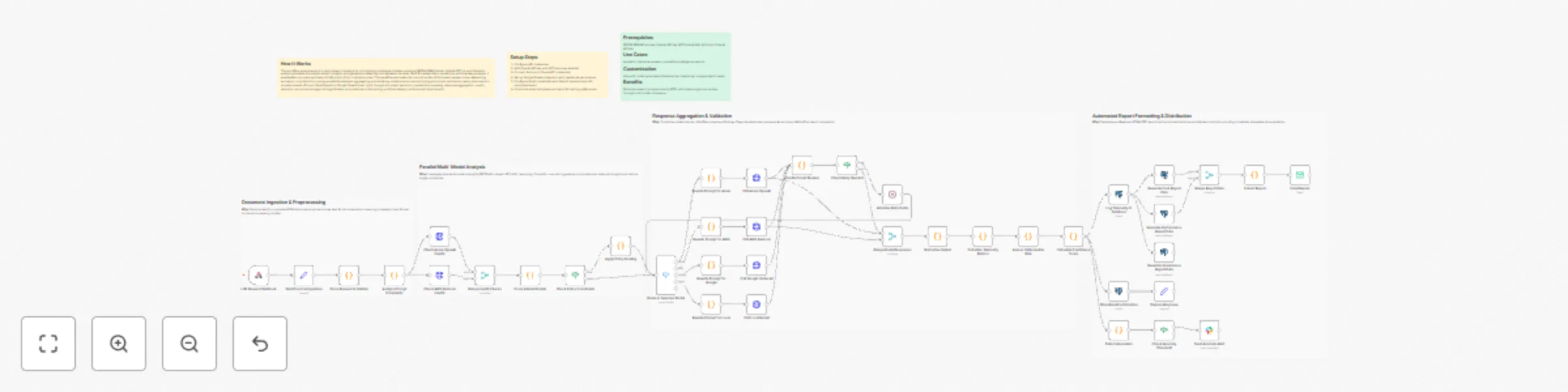
This workflow automates end-to-end research analysis by coordinating multiple AI models—including NVIDIA NIM (Llama), OpenAI GPT-4, and Claude to analyze uploaded documents, extract insights, and generate polished reports delivered via email. Built for researchers, academics, and business analysts, it enables fast, accurate synthesis of information from multiple sources. The workflow eliminates the manual burden of document review, cross-referencing, and report compilation by running parallel AI analyses, aggregating and validating model outputs, and producing structured, publication-ready documents in minutes instead of hours. Data flows from Google Sheets (user input) through document extraction, parallel AI processing, response aggregation, quality validation, structured storage in Google Sheets, automated report formatting, and final delivery via Gmail with attachments.

Setup Steps

  1. Configure API credentials
  2. Add OpenAI API key with GPT-4 access enabled
  3. Connect Anthropic Claude API credentials
  4. Set up Google Sheets integration with read/write permissions
  5. Configure Gmail credentials with OAuth2 authentication for automated email
  6. Customize email templates and report formatting preferences

Prerequisites

NVIDIA NIM API access, OpenAI API key (GPT-4 enabled), Anthropic Claude API key

Use Cases

Academic literature reviews, competitive intelligence reports

Customization

Adjust AI model parameters (temperature, tokens) per analysis depth needs

Benefits

Reduces research analysis time by 80%, eliminates single-source bias through multi-model consensus

1.2 Logical Blocks

This catalog entry is organized from the workflow JSON. The node-level section below shows the executable blocks available for review before importing the template.

2. Block-by-Block Analysis

Block 1 - LLM Request Webhook

Type / Role
n8n-nodes-base.webhook - webhook
Config choices
Version 2.1

Block 2 - Workflow Configuration

Type / Role
n8n-nodes-base.set - set
Config choices
Version 3.4

Block 3 - Parse Request & Validate

Type / Role
n8n-nodes-base.code - code
Config choices
Version 2

Block 4 - Analyze Prompt Complexity

Type / Role
n8n-nodes-base.code - code
Config choices
Version 2

Block 5 - Check Azure OpenAI Health

Type / Role
n8n-nodes-base.httpRequest - httpRequest
Config choices
Version 4.3

Block 6 - Check AWS Bedrock Health

Type / Role
n8n-nodes-base.httpRequest - httpRequest
Config choices
Version 4.3

Block 7 - Merge Health Checks

Type / Role
n8n-nodes-base.merge - merge
Config choices
Version 3.2

Block 8 - Score & Rank Models

Type / Role
n8n-nodes-base.code - code
Config choices
Version 2

Block 9 - Check Policy Constraints

Type / Role
n8n-nodes-base.if - if
Config choices
Version 2.3

Block 10 - Apply Policy Routing

Type / Role
n8n-nodes-base.code - code
Config choices
Version 2

Block 11 - Route to Selected Model

Type / Role
n8n-nodes-base.switch - switch
Config choices
Version 3.4

Block 12 - Rewrite Prompt for Azure

Type / Role
n8n-nodes-base.code - code
Config choices
Version 2

Block 13 - Rewrite Prompt for AWS

Type / Role
n8n-nodes-base.code - code
Config choices
Version 2

Block 14 - Rewrite Prompt for Google

Type / Role
n8n-nodes-base.code - code
Config choices
Version 2

Block 15 - Rewrite Prompt for Local

Type / Role
n8n-nodes-base.code - code
Config choices
Version 2

Block 16 - Call Azure OpenAI

Type / Role
n8n-nodes-base.httpRequest - httpRequest
Config choices
Version 4.3

Block 17 - Call AWS Bedrock

Type / Role
n8n-nodes-base.httpRequest - httpRequest
Config choices
Version 4.3

Block 18 - Call Google Vertex AI

Type / Role
n8n-nodes-base.httpRequest - httpRequest
Config choices
Version 4.3

Block 19 - Call Local Model

Type / Role
n8n-nodes-base.httpRequest - httpRequest
Config choices
Version 4.3

Block 20 - Handle Circuit Breaker

Type / Role
n8n-nodes-base.code - code
Config choices
Version 2

Block 21 - Check Retry Needed

Type / Role
n8n-nodes-base.if - if
Config choices
Version 2.3

Block 22 - Adaptive Retry Delay

Type / Role
n8n-nodes-base.wait - wait
Config choices
Version 1.1

Block 23 - Merge Model Responses

Type / Role
n8n-nodes-base.merge - merge
Config choices
Version 3.2

Block 24 - Normalize Output

Type / Role
n8n-nodes-base.code - code
Config choices
Version 2

Showing the first 24 of 46 workflow blocks. Download the JSON for the full node graph.

3. Summary Table

Workflow Run multi-model research analysis and email reports with GPT-4, Claude and NVIDIA NIM
Complexity advanced
Nodes 46
Categories Document Extraction, AI RAG
Author Cheng Siong Chin
Published 07 Jan 2026

4. Reproducing the Workflow from Scratch

  1. 1. Download the workflow JSON

    Use the JSON export at /data/workflows/12537/12537.json as the source template for this automation.

  2. 2. Import the template into n8n

    Open n8n, import the downloaded JSON, and review each node before activating the workflow.

  3. 3. Configure credentials and variables

    Replace placeholder credentials, API keys, webhook URLs, account IDs, and environment-specific values with your own settings.

  4. 4. Test with sample data

    Run the workflow manually or in a staging workspace, inspect node output, and confirm downstream systems receive the expected data.

  5. 5. Activate and monitor

    Enable the workflow only after testing, then monitor executions, errors, and rate limits during the first production runs.

5. General Notes & Resources

Review imported nodes carefully before activation. This catalog entry is intended to help you inspect the workflow structure, understand required services, and find related templates faster.

Node names, credentials, schedules, webhook paths, and external service limits may need adjustment for your workspace.

Frequently asked questions

What does Run multi-model research analysis and email reports with GPT-4, Claude and NVIDIA NIM do?

How It Works This workflow automates end to end research analysis by coordinating multiple AI models—including NVIDIA NIM (Llama), OpenAI GPT 4, and Claude to analyze uploaded documents, extract in...

What do I need before importing this workflow?

Review the workflow JSON, configure any required credentials in n8n, and test the automation in a safe workspace before using it in production.

Can I customize this workflow?

Yes. Use the block-by-block analysis and the downloadable JSON to inspect each node, then adjust credentials, prompts, schedules, filters, or destinations for your Document Extraction, AI RAG use case.