Rewrite viral LinkedIn posts in your voice with Google Gemini and Telegram approval

Workflow preview

Workflow preview
100%
Rewrite viral LinkedIn posts in your voice with Google Gemini and Telegram approval preview
Open on n8n.io

Important notice

This workflow is provided as-is. Please review and test before using in production.

1. Workflow Overview

Rewrite viral LinkedIn posts in your voice with AI and Telegram approval using Google Gemini Who's it for This workflow is designed for LinkedIn creators, personal brand builders, thought leaders, ...

Best for

  • Content Creation automation workflows
  • Multimodal AI automation workflows
  • advanced n8n builders looking for reusable templates

Tools used

n8n-nodes-base.stickynote, n8n-nodes-base.telegram, n8n-nodes-base.if, n8n-nodes-base.linkedin, n8n-nodes-base.code, @n8n/n8n-nodes-langchain.outputparserstructured, @n8n/n8n-nodes-langchain.lmchatgooglegemini, @n8n/n8n-nodes-langchain.agent

Source and attribution

This workflow is cataloged by N8N Workflows and links back to its original n8n.io source page by ConnectSafely.

Original n8n.io source

1.1 Workflow description

Title
Rewrite viral LinkedIn posts in your voice with Google Gemini and Telegram approval
Workflow name
Rewrite viral LinkedIn posts in your voice with Google Gemini and Telegram approval

Rewrite viral LinkedIn posts in your voice with AI and Telegram approval using Google Gemini

Who's it for

This workflow is designed for LinkedIn creators, personal brand builders, thought leaders, and content marketers who want to consistently create engaging content without starting from scratch. Perfect for professionals who admire viral posts from others but want to adapt those ideas to their own unique voice and style.

If you're struggling to maintain a consistent posting schedule, looking for content inspiration, or want to repurpose trending ideas while keeping your authentic voice, this automation handles the creative heavy lifting while giving you full control over what gets published.

How it works

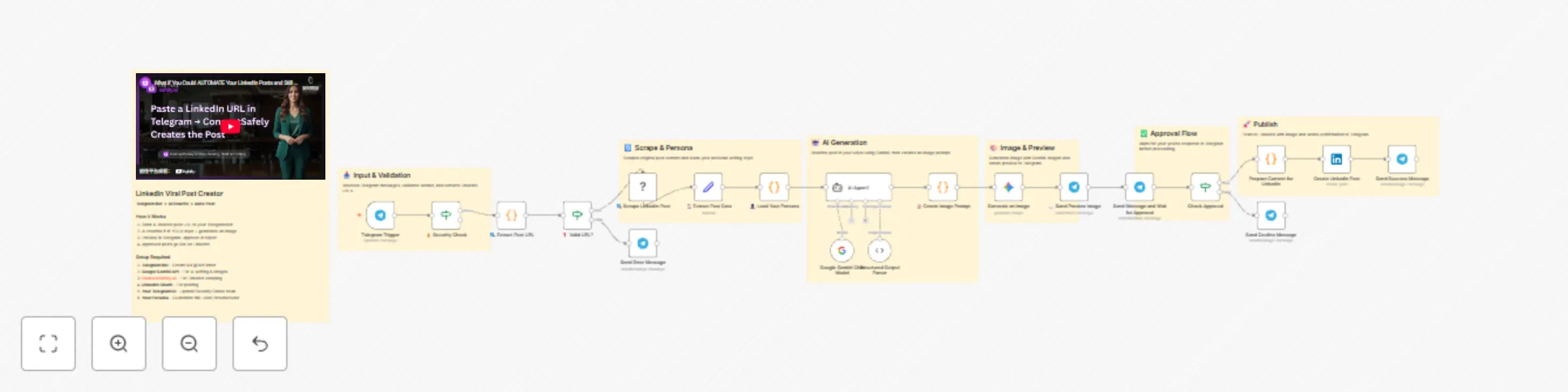
The workflow transforms viral LinkedIn posts into personalized content that matches your writing style, complete with AI-generated images, all controlled through Telegram.

The process flow:

  1. Send any LinkedIn post URL to your Telegram bot
  2. Security check validates your Telegram user ID
  3. ConnectSafely.ai scrapes the original post content and engagement metrics
  4. Your custom persona profile is loaded (tone, phrases, formatting preferences)
  5. Google Gemini AI rewrites the post to match YOUR voice
  6. Gemini generates a professional, on-brand image for the post
  7. Preview is sent to Telegram for your review
  8. Approve or reject with a simple reply
  9. On approval, the post goes live on LinkedIn automatically

Setup steps

Step 1: Create a Telegram Bot

  1. Open Telegram and search for @BotFather
  2. Send /newbot and follow the prompts to create your bot
  3. Save the API token provided by BotFather
  4. Get your Telegram User ID by messaging @userinfobot

Step 2: Configure Telegram Credentials in n8n

  1. Go to Credentials β†’ Add Credential β†’ Telegram API
  2. Paste your bot token from BotFather
  3. Save the credential
  4. Update all Telegram nodes to use this credential

Step 3: Set Up Security Check

  1. Open the πŸ”’ Security Check node
  2. Replace YOUR_TELEGRAM_USER_ID with your actual Telegram user ID
  3. This ensures only YOU can trigger the workflow

Step 4: Configure ConnectSafely.ai API

  1. Sign up at ConnectSafely.ai
  2. Navigate to Settings β†’ API Keys in your dashboard
  3. Generate a new API key
  4. In n8n, go to Credentials β†’ Add Credential β†’ ConnectSafely API
  5. Paste your API key and save
  6. Connect this credential to the πŸ” Scrape LinkedIn Post node

Step 5: Configure Google Gemini API

  1. Go to Google AI Studio
  2. Create or select a project
  3. Generate an API key
  4. In n8n, go to Credentials β†’ Add Credential β†’ Google Gemini (PaLM) API
  5. Paste your API key and save
  6. Connect this credential to both:
    • Google Gemini Chat Model node
    • Generate an image node

Step 6: Connect Your LinkedIn Account

  1. In n8n, go to Credentials β†’ Add Credential β†’ LinkedIn OAuth2 API
  2. Follow the OAuth flow to connect your LinkedIn account
  3. Connect this credential to the Create LinkedIn Post node
  4. Update the person parameter with your LinkedIn Person ID (URN)

Step 7: Customize Your Persona

  1. Open the πŸ‘€ Load Your Persona node
  2. Edit the PERSONA object to match YOUR writing style:
    • Update name with your name
    • Modify expertiseAreas with your topics
    • Adjust commonPhrases with phrases you actually use
    • Set preferredEmojis to your favorites
    • Customize styleNotes to capture your unique voice

Step 8: Activate the Workflow

  1. Save your workflow
  2. Toggle the workflow to Active
  3. Your Telegram bot is now ready to receive LinkedIn URLs

Customization

Persona Customization

The πŸ‘€ Load Your Persona node is where you define your unique voice. Key areas to customize:

Field Description Example
tone Overall communication style "Professional yet approachable, data-driven"
voice Perspective and personality "First-person, authentic, vulnerable"
formatting Structure preferences "Short paragraphs, emoji bullets, line breaks"
hooks Opening style "Start with contrarian takes or personal stories"
expertiseAreas Your niche topics ["SaaS growth", "Leadership", "Remote work"]
commonPhrases Signature expressions ["Here's the truth:", "I learned this the hard way:"]

Image Generation

The πŸ“ Create Image Prompt node generates the image prompt. Modify the style parameters to match your brand:

  • Current style: Modern, clean, corporate, vector art
  • Customize: Change to photography, illustrations, or abstract visuals

Post Length

In the persona configuration, adjust postLength:

  • "short" - Quick insights (under 500 characters)
  • "medium" - Standard posts (500-1500 characters)
  • "long" - Deep dives (1500-3000 characters)

AI Model Selection

The workflow uses gemini-2.5-pro for text. You can switch to other models in the Google Gemini Chat Model node based on your needs.


Requirements

Requirement Details
n8n Version 1.0+ recommended
Telegram Bot Created via @BotFather
ConnectSafely.ai Account API key required
Google AI Studio Account Gemini API key required
LinkedIn Account OAuth2 connected in n8n
Community Node n8n-nodes-connectsafely-ai (self-hosted only)

⚠️ Note: This workflow uses the ConnectSafely community node, which requires a self-hosted n8n instance.


Use cases

  • Content Repurposing: Transform competitor or industry leader posts into your own perspective
  • Consistent Posting: Maintain a regular posting schedule without content creation burnout
  • Style Consistency: Ensure every post matches your established personal brand
  • Trend Riding: Quickly create content around viral topics while they're still relevant
  • A/B Testing: Test different approaches by approving or rejecting variations

Troubleshooting

Common Issues & Solutions

Issue: Bot not responding to messages

  • Solution: Verify the Telegram webhook is active; check the Telegram Trigger node is properly configured

Issue: "Profile not found" from ConnectSafely.ai

  • Solution: Ensure the LinkedIn URL is complete and public. Some posts on private profiles can't be scraped

Issue: Image generation fails

  • Solution: Verify your Gemini API key has access to image generation models. Check quota limits in Google AI Studio

Issue: LinkedIn post fails to publish

  • Solution: Confirm your LinkedIn OAuth2 credentials are valid and haven't expired. Re-authorize if needed

Issue: AI generates posts that don't match your style

  • Solution: Be more specific in your persona configuration. Add more example phrases and detailed style notes

Issue: Security check blocks your messages

  • Solution: Double-check your Telegram User ID is correctly entered (must be a number, not username)

Documentation & Resources

Official Documentation

Support


Connect With Us

Stay updated with the latest automation tips, LinkedIn strategies, and platform updates:


Need Custom Workflows?

Looking to build sophisticated LinkedIn automation workflows tailored to your business needs?

Contact our team for custom automation development, strategy consulting, and enterprise solutions.

We specialize in:

  • Multi-channel engagement workflows
  • AI-powered personalization at scale
  • Lead scoring and qualification automation
  • CRM integration and data synchronization
  • Custom reporting and analytics pipelines

1.2 Logical Blocks

This catalog entry is organized from the workflow JSON. The node-level section below shows the executable blocks available for review before importing the template.

2. Block-by-Block Analysis

Block 1 - πŸ“‹ Workflow Overview

Type / Role
n8n-nodes-base.stickyNote - stickyNote
Config choices
Version 1

Block 2 - πŸ“₯ Input & Validation

Type / Role
n8n-nodes-base.stickyNote - stickyNote
Config choices
Version 1

Block 3 - πŸ”„ Scrape & Persona

Type / Role
n8n-nodes-base.stickyNote - stickyNote
Config choices
Version 1

Block 4 - πŸ€– AI Generation

Type / Role
n8n-nodes-base.stickyNote - stickyNote
Config choices
Version 1

Block 5 - 🎨 Image & Preview

Type / Role
n8n-nodes-base.stickyNote - stickyNote
Config choices
Version 1

Block 6 - βœ… Approval Flow

Type / Role
n8n-nodes-base.stickyNote - stickyNote
Config choices
Version 1

Block 7 - πŸš€ Publish

Type / Role
n8n-nodes-base.stickyNote - stickyNote
Config choices
Version 1

Block 8 - Send Success Message

Type / Role
n8n-nodes-base.telegram - telegram
Config choices
Version 1.2

Block 9 - Send Decline Message

Type / Role
n8n-nodes-base.telegram - telegram
Config choices
Version 1.2

Block 10 - Check Approval

Type / Role
n8n-nodes-base.if - if
Config choices
Version 2.2

Block 11 - Create LinkedIn Post

Type / Role
n8n-nodes-base.linkedIn - linkedIn
Config choices
Version 1

Block 12 - Send Message and Wait for Approval

Type / Role
n8n-nodes-base.telegram - telegram
Config choices
Version 1.2

Block 13 - πŸ“ Create Image Prompt

Type / Role
n8n-nodes-base.code - code
Config choices
Version 2

Block 14 - πŸ“¨ Send Preview Image

Type / Role
n8n-nodes-base.telegram - telegram
Config choices
Version 1.2

Block 15 - Structured Output Parser

Type / Role
@n8n/n8n-nodes-langchain.outputParserStructured - outputParserStructured
Config choices
Version 1.3

Block 16 - Google Gemini Chat Model

Type / Role
@n8n/n8n-nodes-langchain.lmChatGoogleGemini - lmChatGoogleGemini
Config choices
Version 1

Block 17 - AI Agent1

Type / Role
@n8n/n8n-nodes-langchain.agent - agent
Config choices
Version 2.2

Block 18 - Send Error Message

Type / Role
n8n-nodes-base.telegram - telegram
Config choices
Version 1.2

Block 19 - πŸ‘€ Load Your Persona

Type / Role
n8n-nodes-base.code - code
Config choices
Version 2

Block 20 - πŸ” Scrape LinkedIn Post

Type / Role
n8n-nodes-connectsafely-ai.connectSafelyLinkedIn - connectSafelyLinkedIn
Config choices
Version 1

Block 21 - ❓ Valid URL?

Type / Role
n8n-nodes-base.if - if
Config choices
Version 2.2

Block 22 - πŸ” Extract Post URL

Type / Role
n8n-nodes-base.code - code
Config choices
Version 2

Block 23 - Telegram Trigger

Type / Role
n8n-nodes-base.telegramTrigger - telegramTrigger
Config choices
Version 1.2

Block 24 - πŸ”’ Security Check

Type / Role
n8n-nodes-base.if - if
Config choices
Version 2.2

Showing the first 24 of 27 workflow blocks. Download the JSON for the full node graph.

3. Summary Table

Workflow Rewrite viral LinkedIn posts in your voice with Google Gemini and Telegram approval
Complexity advanced
Nodes 27
Categories Content Creation, Multimodal AI
Author ConnectSafely
Published 17 Dec 2025

4. Reproducing the Workflow from Scratch

  1. 1. Download the workflow JSON

    Use the JSON export at /data/workflows/11882/11882.json as the source template for this automation.

  2. 2. Import the template into n8n

    Open n8n, import the downloaded JSON, and review each node before activating the workflow.

  3. 3. Configure credentials and variables

    Replace placeholder credentials, API keys, webhook URLs, account IDs, and environment-specific values with your own settings.

  4. 4. Test with sample data

    Run the workflow manually or in a staging workspace, inspect node output, and confirm downstream systems receive the expected data.

  5. 5. Activate and monitor

    Enable the workflow only after testing, then monitor executions, errors, and rate limits during the first production runs.

5. General Notes & Resources

Review imported nodes carefully before activation. This catalog entry is intended to help you inspect the workflow structure, understand required services, and find related templates faster.

Node names, credentials, schedules, webhook paths, and external service limits may need adjustment for your workspace.

Frequently asked questions

What does Rewrite viral LinkedIn posts in your voice with Google Gemini and Telegram approval do?

Rewrite viral LinkedIn posts in your voice with AI and Telegram approval using Google Gemini Who's it for This workflow is designed for LinkedIn creators, personal brand builders, thought leaders, ...

What do I need before importing this workflow?

Review the workflow JSON, configure any required credentials in n8n, and test the automation in a safe workspace before using it in production.

Can I customize this workflow?

Yes. Use the block-by-block analysis and the downloadable JSON to inspect each node, then adjust credentials, prompts, schedules, filters, or destinations for your Content Creation, Multimodal AI use case.