Review GitHub pull requests with AI and log results to PostgreSQL and Slack

Workflow preview

Workflow preview
100%
Review GitHub pull requests with AI and log results to PostgreSQL and Slack preview
Open on n8n.io

1. Workflow Overview

Automatically detects new GitHub Pull Requests, analyzes changed code with AI, generates detailed review comments (quality, security, performance, best practices), posts suggestions back to the PR,...

Best for

  • Engineering automation workflows
  • AI Summarization automation workflows
  • advanced n8n builders looking for reusable templates

Tools used

n8n-nodes-base.stickynote, n8n-nodes-base.githubtrigger, n8n-nodes-base.httprequest, n8n-nodes-base.merge, n8n-nodes-base.code, n8n-nodes-base.switch, n8n-nodes-base.postgres

Source and attribution

This workflow is cataloged by N8N Workflows and links back to its original n8n.io source page by Oneclick AI Squad.

Original n8n.io source

1.1 Workflow description

Title
Review GitHub pull requests with AI and log results to PostgreSQL and Slack
Workflow name
Review GitHub pull requests with AI and log results to PostgreSQL and Slack

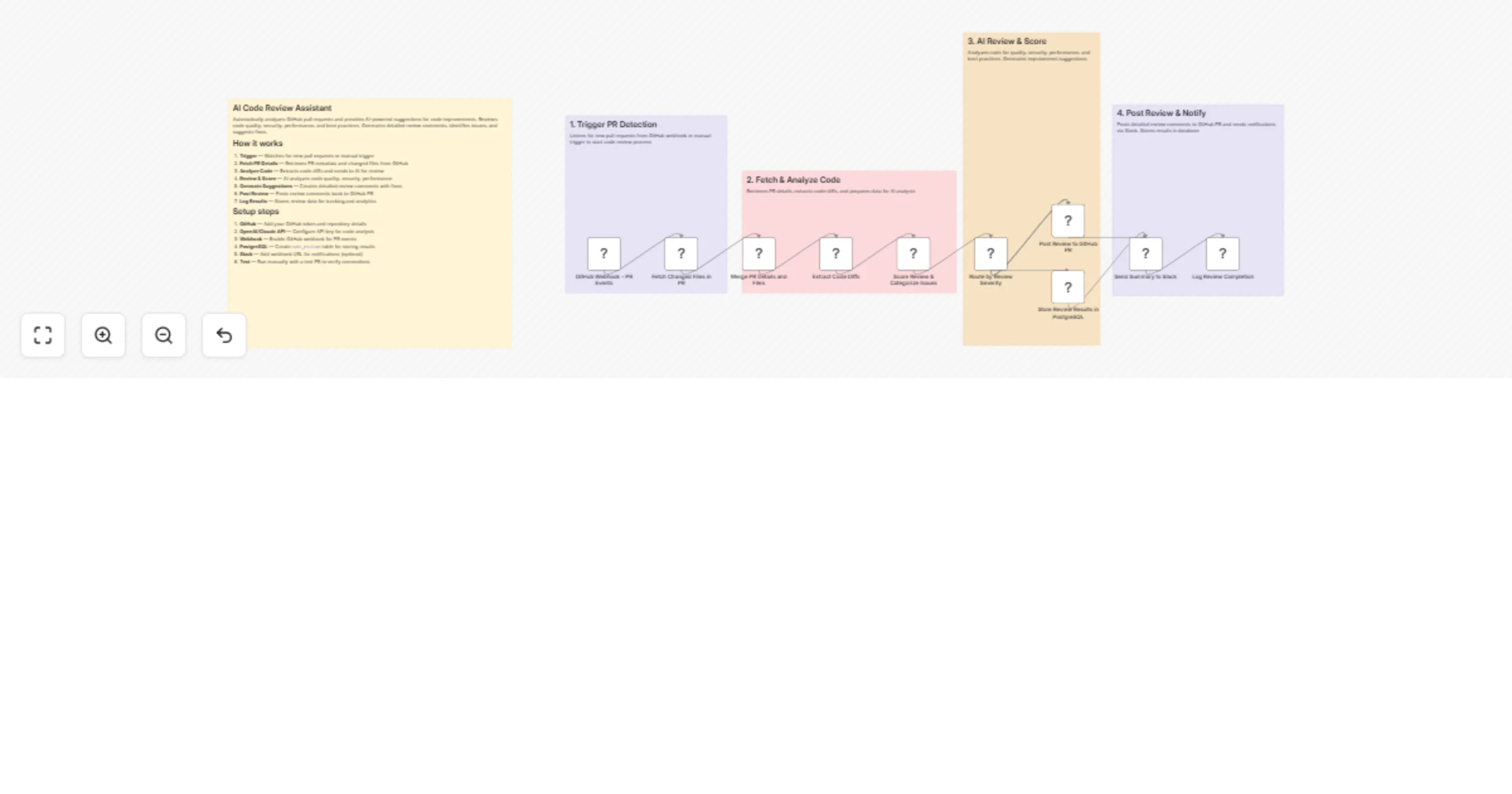
Automatically detects new GitHub Pull Requests, analyzes changed code with AI, generates detailed review comments (quality, security, performance, best practices), posts suggestions back to the PR, stores results in a database, and sends notifications.

Good to Know

  • Triggers automatically on new/updated GitHub Pull Requests via webhook (or manual test)
  • Fetches only changed files/diffs — no need to clone full repo
  • Uses AI (Grok, OpenAI, Claude, Gemini, etc.) to provide intelligent, context-aware feedback
  • Covers multiple dimensions: code quality, bugs, security vulnerabilities, performance issues, maintainability, style/best practices
  • Posts formatted review comments directly on the GitHub PR (with severity levels, suggestions, code snippets)
  • Stores review history & scores in PostgreSQL (or other DB) for auditing, metrics, team dashboards
  • Sends real-time notifications (Slack, Discord, email, etc.) for high-severity findings
  • Saves developers hours on initial reviews and catches issues early

How It Works

1. Trigger PR Detection

  • GitHub Webhook node — listens for pull_request events (opened, synchronize, reopened, ready_for_review)
  • Optional: Filter node to ignore drafts, dependabot PRs, or specific branches
  • Manual trigger available for testing

2. Fetch & Analyze Code

  • GitHub node — retrieves PR details (title, body, number, repo, base/head commits)
  • GitHub or HTTP Request — fetches list of changed files + diffs (using GitHub API /pulls/{number}/files and diff content)
  • Merge PR Details & Extract Diffs — combines metadata + code changes into structured format
  • Prepares payload: file paths, diff hunks, full file content if needed (truncated for large files)

3. AI Review & Score

  • Sends prepared diff data + context (language, repo conventions, custom guidelines) to AI model
  • Prompt engineering focuses on:
  • Code correctness & bugs
  • Security vulnerabilities (OWASP, secrets, injection risks)
  • Performance optimizations
  • Readability, maintainability, SOLID principles
  • Best practices & style (specific to language/framework)
  • Refactoring suggestions with examples
  • AI returns structured output: severity (low/medium/high/critical), category, comment text, suggested fix (with code block)
  • Optional: Score node — assigns overall PR quality score (0–100) based on findings

4. Post Review & Notify

  • Route by severity / issue count (e.g. critical → immediate Slack)
  • GitHub node — posts detailed review comments on the PR (as bot user)
  • Supports threaded replies, line-specific comments (if hunk positions available)
  • Adds label e.g. ai-reviewed, needs-changes
  • Store Results in PostgreSQL — logs full review (PR link, timestamp, AI output JSON, score, issues list)
  • Send Summary to Slack (or Discord/Email/Telegram) — concise message with key findings, link to PR, severity highlights
  • Log Completion — records successful execution for monitoring

Data Sources

  • GitHub — Pull Requests, diffs, comments, labels (via webhook + API)
  • AI Model — Grok (xAI), OpenAI GPT-4o / o1, Anthropic Claude, Google Gemini, or local LLM
  • Storage — PostgreSQL (recommended for structured querying), or Supabase, Airtable, Google Sheets
  • Notifications — Slack, Discord, Microsoft Teams, Email (SMTP), Telegram

How to Use

  1. Import the workflow JSON into your n8n instance
  2. Configure credentials:
  • GitHub OAuth / Personal Access Token (with repo scope)
  • AI provider API key (Grok/OpenAI/etc.)
  • PostgreSQL database connection
  • Slack/Discord/Email credentials
  1. Set up GitHub Webhook:
  • In repo Settings → Webhooks → Add webhook
  • Payload URL = your n8n webhook URL
  • Content type: application/json
  • Events: Pull requests
  1. Customize AI prompt — add repo-specific rules, coding standards, ignored patterns
  2. Tune filters — minimum severity to post, files to skip (e.g. lock files, generated code)
  3. Test — create/open a small PR or use Execute Workflow with sample payload
  4. Activate — turn on the workflow and monitor Executions + Logs

Requirements

  • n8n (self-hosted preferred for webhooks)
  • GitHub repo with admin access to add webhook & bot token
  • AI API access with sufficient token limit (large PRs = large prompts)
  • PostgreSQL database (or alternative) for persistent storage
  • Notification service account (Slack app, Discord bot, etc.)

Customizing This Workflow

  • Add custom best practices — load from Google Sheets/Notion/Airtable and inject into prompt
  • Support multi-file analysis — chunk very large PRs or summarize per-file first
  • Auto-approve low-risk PRs — add approval action if score > 90 and no critical issues
  • Security focus — integrate with tools like Semgrep/Trivy results
  • Comment on specific lines — use GitHub API position/hunk data for inline comments
  • Team routing — notify language-specific experts via Slack channels
  • Metrics dashboard — connect DB to Grafana/Metabase for review trends
  • Ignore patterns — skip vendor/, node_modules/, tests/, etc.
  • Multiple AI models — fallback or ensemble (e.g. Claude for reasoning + Grok for speed)

1.2 Logical Blocks

This catalog entry is organized from the workflow JSON. The node-level section below shows the executable blocks available for review before importing the template.

2. Block-by-Block Analysis

Block 1 - Sticky Note

Type / Role
n8n-nodes-base.stickyNote - stickyNote
Config choices
Version 1

Block 2 - Sticky Note1

Type / Role
n8n-nodes-base.stickyNote - stickyNote
Config choices
Version 1

Block 3 - Sticky Note2

Type / Role
n8n-nodes-base.stickyNote - stickyNote
Config choices
Version 1

Block 4 - Sticky Note3

Type / Role
n8n-nodes-base.stickyNote - stickyNote
Config choices
Version 1

Block 5 - Sticky Note4

Type / Role
n8n-nodes-base.stickyNote - stickyNote
Config choices
Version 1

Block 6 - GitHub Webhook - PR Events

Type / Role
n8n-nodes-base.githubTrigger - githubTrigger
Config choices
Version 1

Block 7 - Fetch Changed Files in PR

Type / Role
n8n-nodes-base.httpRequest - httpRequest
Config choices
Version 4.2

Block 8 - Merge PR Details and Files

Type / Role
n8n-nodes-base.merge - merge
Config choices
Version 3

Block 9 - Extract Code Diffs

Type / Role
n8n-nodes-base.code - code
Config choices
Version 2

Block 10 - Score Review & Categorize Issues

Type / Role
n8n-nodes-base.code - code
Config choices
Version 2

Block 11 - Route by Review Severity

Type / Role
n8n-nodes-base.switch - switch
Config choices
Version 3

Block 12 - Post Review to GitHub PR

Type / Role
n8n-nodes-base.httpRequest - httpRequest
Config choices
Version 4.2

Block 13 - Store Review Results in PostgreSQL

Type / Role
n8n-nodes-base.postgres - postgres
Config choices
Version 2.5

Block 14 - Send Summary to Slack

Type / Role
n8n-nodes-base.httpRequest - httpRequest
Config choices
Version 4.2

Block 15 - Log Review Completion

Type / Role
n8n-nodes-base.code - code
Config choices
Version 2

3. Summary Table

Workflow Review GitHub pull requests with AI and log results to PostgreSQL and Slack
Complexity advanced
Nodes 15
Categories Engineering, AI Summarization
Author Oneclick AI Squad
Published 24 Feb 2026

4. Reproducing the Workflow from Scratch

  1. 1. Download the workflow JSON

    Use the JSON export at /data/workflows/13652/13652.json as the source template for this automation.

  2. 2. Import the template into n8n

    Open n8n, import the downloaded JSON, and review each node before activating the workflow.

  3. 3. Configure credentials and variables

    Replace placeholder credentials, API keys, webhook URLs, account IDs, and environment-specific values with your own settings.

  4. 4. Test with sample data

    Run the workflow manually or in a staging workspace, inspect node output, and confirm downstream systems receive the expected data.

  5. 5. Activate and monitor

    Enable the workflow only after testing, then monitor executions, errors, and rate limits during the first production runs.

5. General Notes & Resources

Review imported nodes carefully before activation. This catalog entry is intended to help you inspect the workflow structure, understand required services, and find related templates faster.

Node names, credentials, schedules, webhook paths, and external service limits may need adjustment for your workspace.

Frequently asked questions

What does Review GitHub pull requests with AI and log results to PostgreSQL and Slack do?

Automatically detects new GitHub Pull Requests, analyzes changed code with AI, generates detailed review comments (quality, security, performance, best practices), posts suggestions back to the PR,...

What do I need before importing this workflow?

Review the workflow JSON, configure any required credentials in n8n, and test the automation in a safe workspace before using it in production.

Can I customize this workflow?

Yes. Use the block-by-block analysis and the downloadable JSON to inspect each node, then adjust credentials, prompts, schedules, filters, or destinations for your Engineering, AI Summarization use case.