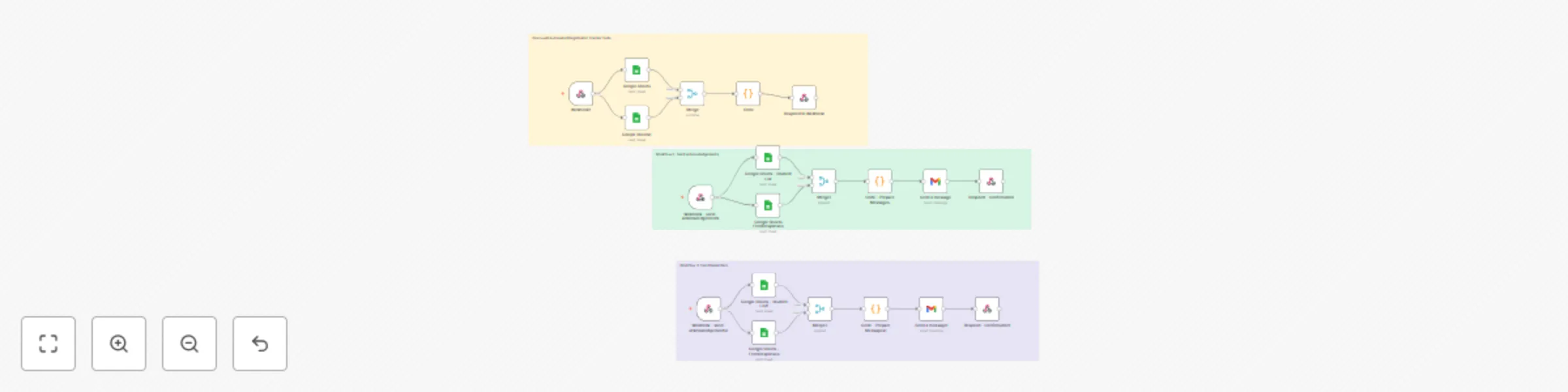
Real-time registration form tracking with Google Sheets and Gmail notifications

Workflow preview

Workflow preview
100%
Real-time registration form tracking with Google Sheets and Gmail notifications preview
Open on n8n.io

Important notice

This workflow is provided as-is. Please review and test before using in production.

1. Workflow Overview

Title: Gracewell Automated Registration Tracker Suite version: 1.0 tags: [education, automation, google sheets, gmail, dashboard, form tracking, workflow suite] category: Academic Automation Descri...

Best for

  • Miscellaneous automation workflows
  • advanced n8n builders looking for reusable templates

Tools used

n8n-nodes-base.googlesheets, n8n-nodes-base.code, n8n-nodes-base.merge, n8n-nodes-base.respondtowebhook, n8n-nodes-base.webhook, n8n-nodes-base.gmail, n8n-nodes-base.stickynote

Source and attribution

This workflow is cataloged by N8N Workflows and links back to its original n8n.io source page by Gracewell.

Original n8n.io source

1.1 Workflow description

Title
Real-time registration form tracking with Google Sheets and Gmail notifications
Workflow name
Real-time registration form tracking with Google Sheets and Gmail notifications

Title: Gracewell Automated Registration Tracker Suite

version: 1.0 tags: [education, automation, google-sheets, gmail, dashboard, form-tracking, workflow-suite]

category: Academic Automation


Description:

  • Automate the real-time tracking of Google Form submissions using Google Sheets and n8n.
  • This 3-workflow suite includes a live dashboard with submission statistics and two companion workflows
  • To send acknowledgement and reminder emails to students β€” all seamlessly connected through n8n webhooks.

πŸš€ Gracewell Automated Registration Tracker Suite

A fully automated, real-time monitoring system for student form submissions β€” built with Google Sheets, Gmail, and n8n.
The suite provides a live dashboard, auto-generated summary analytics, and instant messaging (email or WhatsApp) capabilities.


🧩 Workflow Suite Overview

Workflow Purpose Webhook Output
1️⃣ Live Dashboard Displays summary of submissions and includes trigger buttons /live-tracking HTML Dashboard
2️⃣ Send Acknowledgements Sends thank-you emails to completed respondents /send-acknowledgements HTML Confirmation Page
3️⃣ Send Reminders Sends personalized reminders to pending students /send-reminders HTML Confirmation Page

🧠 Who Is This For

  • Educators managing student registration or feedback
  • Department coordinators tracking submission completion
  • EdTech and training institutions handling digital enrolments
  • Universities automating exam registration or attendance forms

βš™οΈ Problem It Solves

Manual form tracking is slow, repetitive, and prone to error.
This workflow suite provides: βœ… Automated reconciliation of student vs. response data
βœ… Instant calculation of pending and completed submissions
βœ… One-click acknowledgement and reminder dispatch
βœ… Web-based dashboard with summary visualization


πŸ“Š Workflow 1: Live Tracking Dashboard

Steps

  1. Google Sheets – Student List β†’ Reads master student sheet
  2. Google Sheets – Form Responses β†’ Reads live form entries
  3. Code Node β†’ Compares Register Nos. and generates HTML dashboard
  4. Respond to Webhook β†’ Displays HTML with summary and control buttons

Output

A clean web dashboard showing:

  • Total, Submitted, Pending, Completion %
  • βœ… Completed list and ⚠️ Pending list
  • Two buttons:
    • Send Acknowledgements
    • Send Reminders

πŸ’Œ Workflow 2: Send Acknowledgements

Steps

  1. Webhook Trigger β†’ /send-acknowledgements
  2. Google Sheets – Student List & Form Responses
  3. Merge Node β†’ Combines matching rows
  4. Code Node β†’ Generates personalized thank-you emails
  5. Gmail Node β†’ Sends messages
  6. Respond Node β†’ Displays confirmation message

Email Template

> Subject: βœ… Thank You for Your Submission
> Body:
> Dear {{name}},
> Thank you for completing your form (Reg No: {{reg}}).
> We appreciate your prompt response.
> – Gracewell


⚠️ Workflow 3: Send Reminders

Steps

  1. Webhook Trigger β†’ /send-reminders
  2. Google Sheets – Student List & Form Responses
  3. Merge Node β†’ Aligns both data sets
  4. Code Node β†’ Identifies pending students
  5. Gmail Node β†’ Sends customized reminder
  6. Respond Node β†’ Confirms completion

Email Template

> Subject: ⚠️ Reminder: Please Complete Your Form
> Body:
> Dear {{name}},
> You haven’t yet completed your form (Reg No: {{reg}}).
> Please complete it at the earliest.
> – Gracewell


πŸ› οΈ Setup Instructions

Step 1 – Connect Accounts

  • Connect Google Sheets (OAuth2)
  • Connect Gmail for sending messages

Step 2 – Prepare Sheets

  • Student List Sheet:
    Columns β†’ Register No., Student Name, Contact, Email
  • Form Response Sheet:
    Columns β†’ Timestamp, Reg No, Email Address

Step 3 – Deploy URLs

Workflow Webhook Endpoint
Dashboard /live-tracking
Acknowledgements /send-acknowledgements
Reminders /send-reminders

🎨 Optional Customizations

  • Add institution name/logo to dashboard HTML
  • Include charts (Chart.js) for submission visualization
  • Auto-refresh every 60 seconds
  • Integrate WhatsApp messaging via Twilio or Gupshup
  • Log emails into a β€œMail Logs” sheet

🧩 Version Summary

Workflow Version Description
Live Dashboard v3 Interactive HTML dashboard with controls
Send Acknowledgements v1 Personalized thank-you email sender
Send Reminders v1 Automated reminder email sender

Need help customizing?

βœ‰οΈ Contact Me πŸ’Ό LinkedIn

✨ Credits

Developed by Dr. J. Jeffin Gracewell
Empowering education through intelligent automation πŸ’‘


We are open for and Customizing development

1.2 Logical Blocks

This catalog entry is organized from the workflow JSON. The node-level section below shows the executable blocks available for review before importing the template.

2. Block-by-Block Analysis

Block 1 - Google Sheets

Type / Role
n8n-nodes-base.googleSheets - googleSheets
Config choices
Version 4.5

Block 2 - Google Sheets1

Type / Role
n8n-nodes-base.googleSheets - googleSheets
Config choices
Version 4.5

Block 3 - Code

Type / Role
n8n-nodes-base.code - code
Config choices
Version 2

Block 4 - Merge

Type / Role
n8n-nodes-base.merge - merge
Config choices
Version 3.2

Block 5 - Respond to Webhook

Type / Role
n8n-nodes-base.respondToWebhook - respondToWebhook
Config choices
Version 1.4

Block 6 - Webhook1

Type / Role
n8n-nodes-base.webhook - webhook
Config choices
Version 2.1

Block 7 - Webhook - send-acknowledgements

Type / Role
n8n-nodes-base.webhook - webhook
Config choices
Version 2.1

Block 8 - Google Sheets - Student List

Type / Role
n8n-nodes-base.googleSheets - googleSheets
Config choices
Version 4.5

Block 9 - Code - Prepare Messages

Type / Role
n8n-nodes-base.code - code
Config choices
Version 2

Block 10 - Respond - Confirmation

Type / Role
n8n-nodes-base.respondToWebhook - respondToWebhook
Config choices
Version 1.4

Block 11 - Send a message

Type / Role
n8n-nodes-base.gmail - gmail
Config choices
Version 2.1

Block 12 - Google Sheets FormResponses

Type / Role
n8n-nodes-base.googleSheets - googleSheets
Config choices
Version 4.5

Block 13 - Merge1

Type / Role
n8n-nodes-base.merge - merge
Config choices
Version 3.2

Block 14 - Google Sheets - FormResponses

Type / Role
n8n-nodes-base.googleSheets - googleSheets
Config choices
Version 4.5

Block 15 - Webhook - send-acknowledgements1

Type / Role
n8n-nodes-base.webhook - webhook
Config choices
Version 2.1

Block 16 - Google Sheets - Student List1

Type / Role
n8n-nodes-base.googleSheets - googleSheets
Config choices
Version 4.5

Block 17 - Code - Prepare Messages1

Type / Role
n8n-nodes-base.code - code
Config choices
Version 2

Block 18 - Respond - Confirmation1

Type / Role
n8n-nodes-base.respondToWebhook - respondToWebhook
Config choices
Version 1.4

Block 19 - Send a message1

Type / Role
n8n-nodes-base.gmail - gmail
Config choices
Version 2.1

Block 20 - Merge2

Type / Role
n8n-nodes-base.merge - merge
Config choices
Version 3.2

Block 21 - Sticky Note

Type / Role
n8n-nodes-base.stickyNote - stickyNote
Config choices
Version 1

Block 22 - Sticky Note1

Type / Role
n8n-nodes-base.stickyNote - stickyNote
Config choices
Version 1

Block 23 - Sticky Note2

Type / Role
n8n-nodes-base.stickyNote - stickyNote
Config choices
Version 1

3. Summary Table

Workflow Real-time registration form tracking with Google Sheets and Gmail notifications
Complexity advanced
Nodes 23
Categories Miscellaneous
Author Gracewell
Published 13 Oct 2025

4. Reproducing the Workflow from Scratch

  1. 1. Download the workflow JSON

    Use the JSON export at /data/workflows/9580/9580.json as the source template for this automation.

  2. 2. Import the template into n8n

    Open n8n, import the downloaded JSON, and review each node before activating the workflow.

  3. 3. Configure credentials and variables

    Replace placeholder credentials, API keys, webhook URLs, account IDs, and environment-specific values with your own settings.

  4. 4. Test with sample data

    Run the workflow manually or in a staging workspace, inspect node output, and confirm downstream systems receive the expected data.

  5. 5. Activate and monitor

    Enable the workflow only after testing, then monitor executions, errors, and rate limits during the first production runs.

5. General Notes & Resources

Review imported nodes carefully before activation. This catalog entry is intended to help you inspect the workflow structure, understand required services, and find related templates faster.

Node names, credentials, schedules, webhook paths, and external service limits may need adjustment for your workspace.

Frequently asked questions

What does Real-time registration form tracking with Google Sheets and Gmail notifications do?

Title: Gracewell Automated Registration Tracker Suite version: 1.0 tags: [education, automation, google sheets, gmail, dashboard, form tracking, workflow suite] category: Academic Automation Descri...

What do I need before importing this workflow?

Review the workflow JSON, configure any required credentials in n8n, and test the automation in a safe workspace before using it in production.

Can I customize this workflow?

Yes. Use the block-by-block analysis and the downloadable JSON to inspect each node, then adjust credentials, prompts, schedules, filters, or destinations for your Miscellaneous use case.