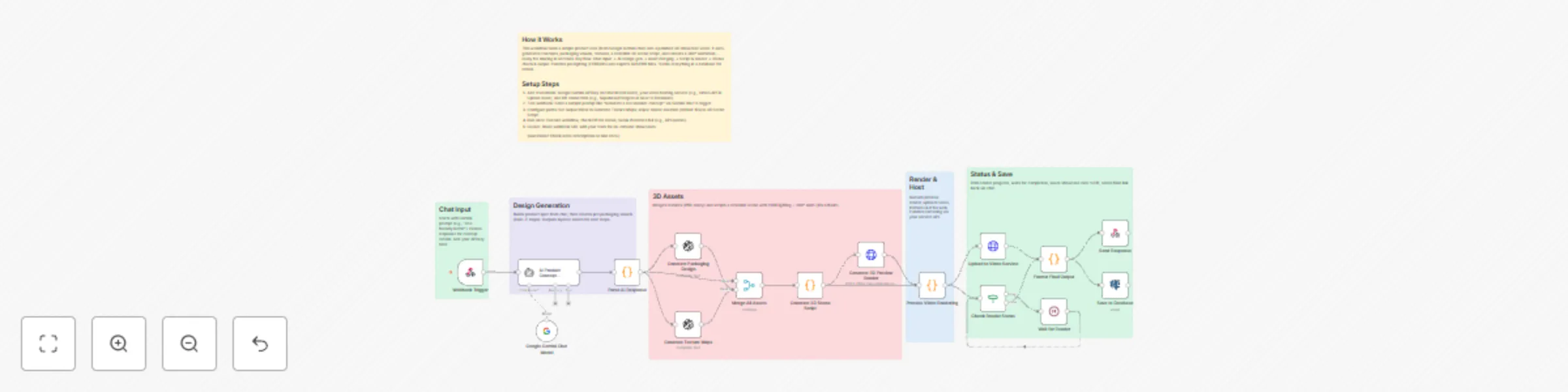
Product concept to 3D showcase with Claude AI & DALL-E packaging design

Workflow preview

Workflow preview
100%
Product concept to 3D showcase with Claude AI & DALL-E packaging design preview
Open on n8n.io

Important notice

This workflow is provided as-is. Please review and test before using in production.

1. Workflow Overview

This is an advanced n8n workflow for transforming product concepts into 3D showcase videos with AI packaging design and auto rotation rendering. Workflow Features: Core Capabilities: 1. AI Produ...

Best for

  • Content Creation automation workflows
  • Multimodal AI automation workflows
  • advanced n8n builders looking for reusable templates

Tools used

n8n-nodes-base.webhook, n8n-nodes-base.code, n8n-nodes-base.openai, n8n-nodes-base.httprequest, n8n-nodes-base.merge, n8n-nodes-base.if, n8n-nodes-base.wait, n8n-nodes-base.respondtowebhook

Source and attribution

This workflow is cataloged by N8N Workflows and links back to its original n8n.io source page by Oneclick AI Squad.

Original n8n.io source

1.1 Workflow description

Title
Product concept to 3D showcase with Claude AI & DALL-E packaging design
Workflow name
Product concept to 3D showcase with Claude AI & DALL-E packaging design

This is an advanced n8n workflow for transforming product concepts into 3D showcase videos with AI packaging design and auto-rotation rendering.

Workflow Features:

🎯 Core Capabilities:

  1. AI Product Concept Generation - Uses Claude Sonnet 4 to analyze product prompts and generate comprehensive 3D specifications

  2. Automated Packaging Design - DALL-E 3 generates professional packaging visuals

  3. Texture Map Generation - Creates PBR-ready texture maps for realistic materials

  4. 3D Scene Script Generation - Produces complete Blender Python scripts with:

    • Product geometry based on shape
    • Professional 3-point lighting (key, fill, rim)
    • 360° rotation animation (8 seconds)
    • Camera setup and render settings
  5. Preview Rendering - Generates photorealistic 3D preview images

  6. Video Processing - Handles encoding and upload to video hosting services

  7. Database Storage - Saves all showcase data for tracking

  8. Status Monitoring - Checks render progress with automatic retry logic

📋 Required Setup:

API Credentials needed:

  • Anthropic API (for Claude AI)
  • OpenAI API (for DALL-E image generation)
  • Replicate API (optional for additional rendering)
  • Video hosting service (托管平台 Stream or similar)
  • PostgreSQL database

🔧 How to Use:

  1. Import the JSON - Copy the artifact content and import directly into n8n
  2. Configure Credentials - Add your API keys in n8n credentials manager
  3. Activate Workflow - Enable the webhook trigger
  4. Send Request to webhook endpoint:
POST /product-showcase
{
  "productPrompt": "A premium organic energy drink in a sleek aluminum can with nature-inspired graphics"
}

📤 Output Includes:

  • Product specifications (dimensions, materials, colors)
  • Packaging design image URL
  • Texture map URLs
  • Downloadable Blender script
  • 3D preview render
  • Video showcase URL
  • Rendering metadata

1.2 Logical Blocks

This catalog entry is organized from the workflow JSON. The node-level section below shows the executable blocks available for review before importing the template.

2. Block-by-Block Analysis

Block 1 - Webhook Trigger

Type / Role
n8n-nodes-base.webhook - webhook
Config choices
Version 1

Block 2 - Parse AI Response

Type / Role
n8n-nodes-base.code - code
Config choices
Version 2

Block 3 - Generate Packaging Design

Type / Role
n8n-nodes-base.openAi - openAi
Config choices
Version 1

Block 4 - Generate Texture Maps

Type / Role
n8n-nodes-base.openAi - openAi
Config choices
Version 1

Block 5 - Generate 3D Scene Script

Type / Role
n8n-nodes-base.code - code
Config choices
Version 2

Block 6 - Generate 3D Preview Render

Type / Role
n8n-nodes-base.httpRequest - httpRequest
Config choices
Version 4.1

Block 7 - Process Video Rendering

Type / Role
n8n-nodes-base.code - code
Config choices
Version 2

Block 8 - Upload to Video Service

Type / Role
n8n-nodes-base.httpRequest - httpRequest
Config choices
Version 4.1

Block 9 - Merge All Assets

Type / Role
n8n-nodes-base.merge - merge
Config choices
Version 2.1

Block 10 - Check Render Status

Type / Role
n8n-nodes-base.if - if
Config choices
Version 1

Block 11 - Wait for Render

Type / Role
n8n-nodes-base.wait - wait
Config choices
Version 1

Block 12 - Format Final Output

Type / Role
n8n-nodes-base.code - code
Config choices
Version 2

Block 13 - Send Response

Type / Role
n8n-nodes-base.respondToWebhook - respondToWebhook
Config choices
Version 1

Block 14 - Save to Database

Type / Role
n8n-nodes-base.postgres - postgres
Config choices
Version 2.2

Block 15 - Sticky Note

Type / Role
n8n-nodes-base.stickyNote - stickyNote
Config choices
Version 1

Block 16 - Google Gemini Chat Model

Type / Role
@n8n/n8n-nodes-langchain.lmChatGoogleGemini - lmChatGoogleGemini
Config choices
Version 1

Block 17 - AI Product Concept Generator

Type / Role
@n8n/n8n-nodes-langchain.agent - agent
Config choices
Version 2.2

Block 18 - Sticky Note1

Type / Role
n8n-nodes-base.stickyNote - stickyNote
Config choices
Version 1

Block 19 - Sticky Note2

Type / Role
n8n-nodes-base.stickyNote - stickyNote
Config choices
Version 1

Block 20 - Sticky Note3

Type / Role
n8n-nodes-base.stickyNote - stickyNote
Config choices
Version 1

Block 21 - Sticky Note5

Type / Role
n8n-nodes-base.stickyNote - stickyNote
Config choices
Version 1

Block 22 - Sticky Note6

Type / Role
n8n-nodes-base.stickyNote - stickyNote
Config choices
Version 1

3. Summary Table

Workflow Product concept to 3D showcase with Claude AI & DALL-E packaging design
Complexity advanced
Nodes 22
Categories Content Creation, Multimodal AI
Author Oneclick AI Squad
Published 07 Nov 2025

4. Reproducing the Workflow from Scratch

  1. 1. Download the workflow JSON

    Use the JSON export at /data/workflows/10596/10596.json as the source template for this automation.

  2. 2. Import the template into n8n

    Open n8n, import the downloaded JSON, and review each node before activating the workflow.

  3. 3. Configure credentials and variables

    Replace placeholder credentials, API keys, webhook URLs, account IDs, and environment-specific values with your own settings.

  4. 4. Test with sample data

    Run the workflow manually or in a staging workspace, inspect node output, and confirm downstream systems receive the expected data.

  5. 5. Activate and monitor

    Enable the workflow only after testing, then monitor executions, errors, and rate limits during the first production runs.

5. General Notes & Resources

Review imported nodes carefully before activation. This catalog entry is intended to help you inspect the workflow structure, understand required services, and find related templates faster.

Node names, credentials, schedules, webhook paths, and external service limits may need adjustment for your workspace.

Frequently asked questions

What does Product concept to 3D showcase with Claude AI & DALL-E packaging design do?

This is an advanced n8n workflow for transforming product concepts into 3D showcase videos with AI packaging design and auto rotation rendering. Workflow Features: Core Capabilities: 1. AI Produ...

What do I need before importing this workflow?

Review the workflow JSON, configure any required credentials in n8n, and test the automation in a safe workspace before using it in production.

Can I customize this workflow?

Yes. Use the block-by-block analysis and the downloadable JSON to inspect each node, then adjust credentials, prompts, schedules, filters, or destinations for your Content Creation, Multimodal AI use case.