Block 1 - ⏰ Check for Disaster Alerts
- Type / Role
- n8n-nodes-base.scheduleTrigger - scheduleTrigger
- Config choices
- Version 1.2


 Early Deal
This workflow is provided as-is. Please review and test before using in production.
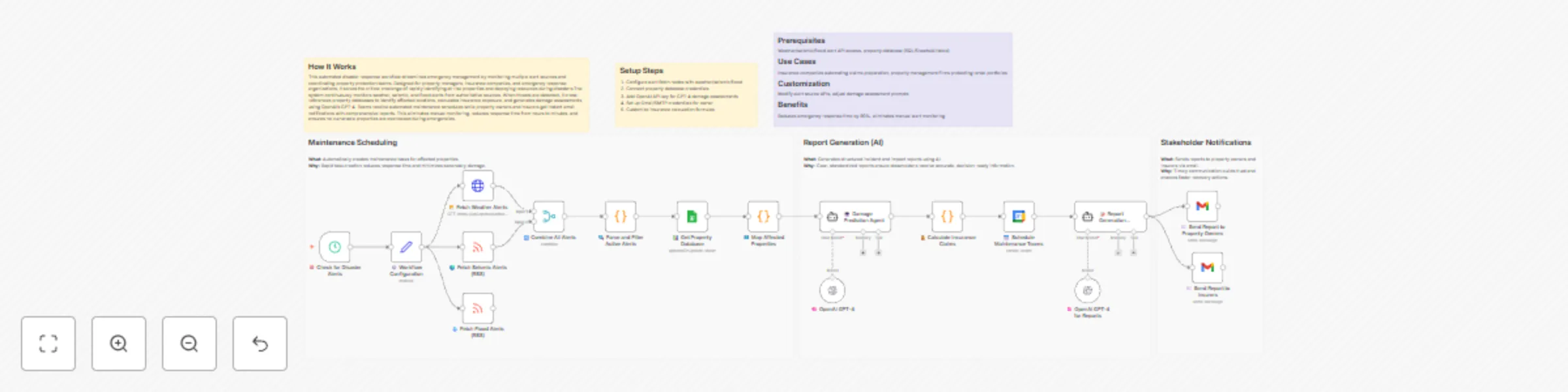
How It Works This automated disaster response workflow streamlines emergency management by monitoring multiple alert sources and coordinating property protection teams. Designed for property manage...
n8n-nodes-base.scheduletrigger, n8n-nodes-base.merge, n8n-nodes-base.googlesheets, n8n-nodes-base.googlecalendar, n8n-nodes-base.gmail, n8n-nodes-base.code, n8n-nodes-base.set, n8n-nodes-base.httprequest
This workflow is cataloged by N8N Workflows and links back to its original n8n.io source page by Cheng Siong Chin.
Original n8n.io sourceThis automated disaster response workflow streamlines emergency management by monitoring multiple alert sources and coordinating property protection teams. Designed for property managers, insurance companies, and emergency response organizations, it solves the critical challenge of rapidly identifying at-risk properties and deploying resources during disasters.The system continuously monitors weather, seismic, and flood alerts from authoritative sources. When threats are detected, it cross-references property databases to identify affected locations, calculates insurance exposure, and generates damage assessments using OpenAI's GPT-4. Teams receive automated maintenance schedules while property owners and insurers get instant email notifications with comprehensive reports. This eliminates manual monitoring, reduces response time from hours to minutes, and ensures no vulnerable properties are overlooked during emergencies.
Weather/seismic/flood alert API access, property database (SQL/Sheets/Airtable)
Insurance companies automating claims preparation, property management firms protecting rental portfolios
Modify alert source APIs, adjust damage assessment prompts
Reduces emergency response time by 90%, eliminates manual alert monitoring
This catalog entry is organized from the workflow JSON. The node-level section below shows the executable blocks available for review before importing the template.
| Workflow | Predict disaster damage and coordinate property response with GPT-4, Google Sheets, Calendar and Gmail |
|---|---|
| Complexity | advanced |
| Nodes | 23 |
| Categories | Miscellaneous, AI Summarization |
| Author | Cheng Siong Chin |
| Published | 27 Dec 2025 |
Use the JSON export at /data/workflows/12195/12195.json as the source template for this automation.
Open n8n, import the downloaded JSON, and review each node before activating the workflow.
Replace placeholder credentials, API keys, webhook URLs, account IDs, and environment-specific values with your own settings.
Run the workflow manually or in a staging workspace, inspect node output, and confirm downstream systems receive the expected data.
Enable the workflow only after testing, then monitor executions, errors, and rate limits during the first production runs.
Review imported nodes carefully before activation. This catalog entry is intended to help you inspect the workflow structure, understand required services, and find related templates faster.
Node names, credentials, schedules, webhook paths, and external service limits may need adjustment for your workspace.
How It Works This automated disaster response workflow streamlines emergency management by monitoring multiple alert sources and coordinating property protection teams. Designed for property manage...
Review the workflow JSON, configure any required credentials in n8n, and test the automation in a safe workspace before using it in production.
Yes. Use the block-by-block analysis and the downloadable JSON to inspect each node, then adjust credentials, prompts, schedules, filters, or destinations for your Miscellaneous, AI Summarization use case.