Podcast to X (Twitter) pipeline with OpenAI Whisper, GPT-4o & Slack approval

Workflow preview

Workflow preview
100%
Podcast to X (Twitter) pipeline with OpenAI Whisper, GPT-4o & Slack approval preview
Open on n8n.io

Important notice

This workflow is provided as-is. Please review and test before using in production.

1. Workflow Overview

Turn your favorite podcast episodes into engaging social media content automatically. This workflow fetches new episodes from an RSS feed, transcribes the audio using OpenAI Whisper, generates a co...

Best for

  • Content Creation automation workflows
  • Multimodal AI automation workflows
  • advanced n8n builders looking for reusable templates

Tools used

n8n-nodes-base.stickynote, n8n-nodes-base.scheduletrigger, @n8n/n8n-nodes-langchain.openai, n8n-nodes-base.slack, n8n-nodes-base.twitter, n8n-nodes-base.code, n8n-nodes-base.set, n8n-nodes-base.httprequest

Source and attribution

This workflow is cataloged by N8N Workflows and links back to its original n8n.io source page by Shun Nakayama.

Original n8n.io source

1.1 Workflow description

Title
Podcast to X (Twitter) pipeline with OpenAI Whisper, GPT-4o & Slack approval
Workflow name
Podcast to X (Twitter) pipeline with OpenAI Whisper, GPT-4o & Slack approval

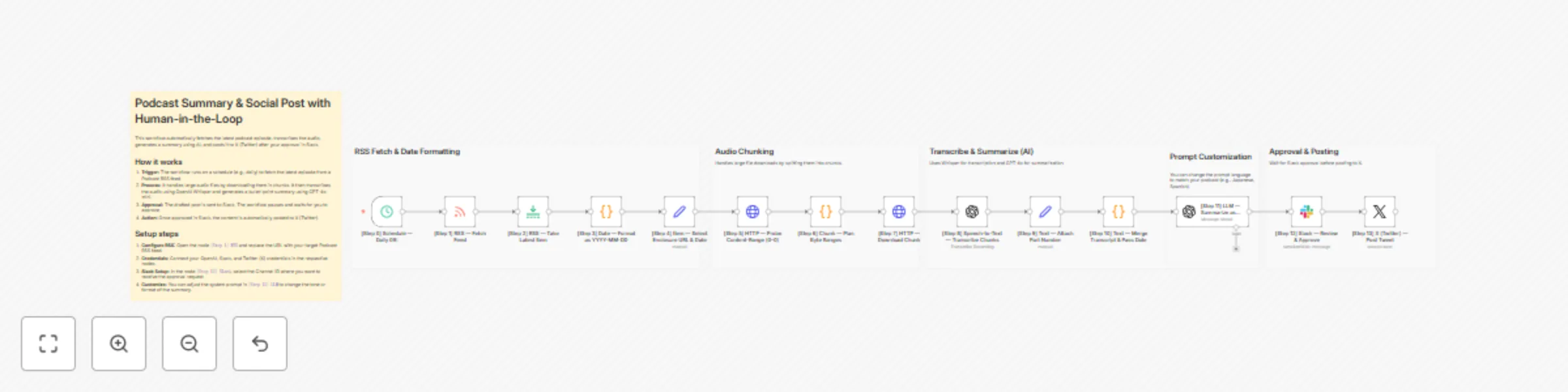
Turn your favorite podcast episodes into engaging social media content automatically. This workflow fetches new episodes from an RSS feed, transcribes the audio using OpenAI Whisper, generates a concise summary using GPT-4o, and drafts a tweet. It then sends the draft to Slack for your review before posting it to X (Twitter).

Who is this for

Content creators, social media managers, and podcast enthusiasts who want to share insights without manually listening to and typing out every episode.

Key Features

  • Large File Support: Includes a custom logic to download audio in chunks, ensuring stability even with long episodes (preventing timeouts).
  • Human-in-the-Loop: Nothing gets posted without your approval. You can review the AI-generated draft in Slack before it goes live.
  • High-Quality AI: Uses OpenAI's Whisper for accurate transcription and GPT-4o for intelligent summarization.

How it works

  1. Monitor: Checks the Podcast RSS feed daily for new episodes.
  2. Process: Downloads the audio (handling large files via chunking) and transcribes it.
  3. Draft: AI summarizes the transcript into bullet points and formats it for X (Twitter).
  4. Approve: Sends the draft to a Slack channel.
  5. Publish: Once approved by you, it posts the tweet to your X account.

Requirements

  • OpenAI API Key
  • Slack Account & App (Bot Token)
  • X (Twitter) Developer Account (OAuth2)

Setup instructions

  1. RSS Feed: The template defaults to "TED Talks Daily" for demonstration. Open the [Step 1] RSS node and replace the URL with your target podcast.
  2. Connect Credentials: Set up your credentials for OpenAI, Slack, and X (Twitter) in the respective nodes.
  3. Slack Channel: In the [Step 12] Slack node, select the Channel ID where you want to receive the approval request.

1.2 Logical Blocks

This catalog entry is organized from the workflow JSON. The node-level section below shows the executable blocks available for review before importing the template.

2. Block-by-Block Analysis

Block 1 - 付箋9

Type / Role
n8n-nodes-base.stickyNote - stickyNote
Config choices
Version 1

Block 2 - Sticky Note

Type / Role
n8n-nodes-base.stickyNote - stickyNote
Config choices
Version 1

Block 3 - Sticky Note1

Type / Role
n8n-nodes-base.stickyNote - stickyNote
Config choices
Version 1

Block 4 - Sticky Note2

Type / Role
n8n-nodes-base.stickyNote - stickyNote
Config choices
Version 1

Block 5 - [Step 0] Schedule — Daily 09:

Type / Role
n8n-nodes-base.scheduleTrigger - scheduleTrigger
Config choices
Version 1.2

Block 6 - Sticky Note3

Type / Role
n8n-nodes-base.stickyNote - stickyNote
Config choices
Version 1

Block 7 - Sticky Note4

Type / Role
n8n-nodes-base.stickyNote - stickyNote
Config choices
Version 1

Block 8 - [Step 11] LLM — Summarize as News Bullets

Type / Role
@n8n/n8n-nodes-langchain.openAi - openAi
Config choices
Version 1.8

Block 9 - [Step 12] Slack — Review & Approve

Type / Role
n8n-nodes-base.slack - slack
Config choices
Version 2.3

Block 10 - [Step 13] X (Twitter) — Post Tweet

Type / Role
n8n-nodes-base.twitter - twitter
Config choices
Version 2

Block 11 - [Step 10] Text — Merge Transcript & Pass Date

Type / Role
n8n-nodes-base.code - code
Config choices
Version 2

Block 12 - [Step 9] Text — Attach Part Number

Type / Role
n8n-nodes-base.set - set
Config choices
Version 3.4

Block 13 - [Step 8] Speech-to-Text — Transcribe Chunks

Type / Role
@n8n/n8n-nodes-langchain.openAi - openAi
Config choices
Version 1.8

Block 14 - [Step 7] HTTP — Download Chunk

Type / Role
n8n-nodes-base.httpRequest - httpRequest
Config choices
Version 4.2

Block 15 - [Step 6] Chunk — Plan Byte Ranges

Type / Role
n8n-nodes-base.code - code
Config choices
Version 2

Block 16 - [Step 5] HTTP — Probe Content-Range (0–0)

Type / Role
n8n-nodes-base.httpRequest - httpRequest
Config choices
Version 4.2

Block 17 - [Step 4] Item — Select Enclosure URL & Date

Type / Role
n8n-nodes-base.set - set
Config choices
Version 3.4

Block 18 - [Step 3] Date — Format as YYYY-MM-DD

Type / Role
n8n-nodes-base.code - code
Config choices
Version 2

Block 19 - [Step 2] RSS — Take Latest Item

Type / Role
n8n-nodes-base.limit - limit
Config choices
Version 1

Block 20 - [Step 1] RSS — Fetch Feed

Type / Role
n8n-nodes-base.rssFeedRead - rssFeedRead
Config choices
Version 1.2

3. Summary Table

Workflow Podcast to X (Twitter) pipeline with OpenAI Whisper, GPT-4o & Slack approval
Complexity advanced
Nodes 20
Categories Content Creation, Multimodal AI
Author Shun Nakayama
Published 15 Oct 2025

4. Reproducing the Workflow from Scratch

  1. 1. Download the workflow JSON

    Use the JSON export at /data/workflows/9710/9710.json as the source template for this automation.

  2. 2. Import the template into n8n

    Open n8n, import the downloaded JSON, and review each node before activating the workflow.

  3. 3. Configure credentials and variables

    Replace placeholder credentials, API keys, webhook URLs, account IDs, and environment-specific values with your own settings.

  4. 4. Test with sample data

    Run the workflow manually or in a staging workspace, inspect node output, and confirm downstream systems receive the expected data.

  5. 5. Activate and monitor

    Enable the workflow only after testing, then monitor executions, errors, and rate limits during the first production runs.

5. General Notes & Resources

Review imported nodes carefully before activation. This catalog entry is intended to help you inspect the workflow structure, understand required services, and find related templates faster.

Node names, credentials, schedules, webhook paths, and external service limits may need adjustment for your workspace.

Frequently asked questions

What does Podcast to X (Twitter) pipeline with OpenAI Whisper, GPT-4o & Slack approval do?

Turn your favorite podcast episodes into engaging social media content automatically. This workflow fetches new episodes from an RSS feed, transcribes the audio using OpenAI Whisper, generates a co...

What do I need before importing this workflow?

Review the workflow JSON, configure any required credentials in n8n, and test the automation in a safe workspace before using it in production.

Can I customize this workflow?

Yes. Use the block-by-block analysis and the downloadable JSON to inspect each node, then adjust credentials, prompts, schedules, filters, or destinations for your Content Creation, Multimodal AI use case.