Pharmacy inventory alerts for low stock & expiring medicine with Google Sheets

Workflow preview

Workflow preview
100%
Pharmacy inventory alerts for low stock & expiring medicine with Google Sheets preview
Open on n8n.io

Important notice

This workflow is provided as-is. Please review and test before using in production.

1. Workflow Overview

This n8n workflow monitors pharmacy inventory stored in a Google Sheet, checks daily for low stock or near expiry medicines, and sends alerts to the pharmacist via email, ensuring timely restocking...

Best for

  • Document Extraction automation workflows
  • Multimodal AI automation workflows
  • intermediate n8n builders looking for reusable templates

Tools used

n8n-nodes-base.cron, n8n-nodes-base.googlesheets, n8n-nodes-base.emailsend, n8n-nodes-base.stickynote, n8n-nodes-base.wait, n8n-nodes-base.code

Source and attribution

This workflow is cataloged by N8N Workflows and links back to its original n8n.io source page by Oneclick AI Squad.

Original n8n.io source

1.1 Workflow description

Title
Pharmacy inventory alerts for low stock & expiring medicine with Google Sheets
Workflow name
Pharmacy inventory alerts for low stock & expiring medicine with Google Sheets

This n8n workflow monitors pharmacy inventory stored in a Google Sheet, checks daily for low stock or near-expiry medicines, and sends alerts to the pharmacist via email, ensuring timely restocking and waste prevention.

Why Use It

This workflow automates inventory management for pharmacies, reducing the risk of stockouts or expired medicines, saving time, minimizing losses, and ensuring compliance with safety standards by providing proactive alerts.

How to Import It

  1. Download the Workflow JSON: Obtain the workflow file from the n8n template or create it based on this document.
  2. Import into n8n: In your n8n instance, go to "Workflows," click the three dots, select "Import from File," and upload the JSON.
  3. Configure Credentials: Set up Google Sheets, email (e.g., SMTP), and optional SMS (e.g., Twilio) credentials in n8n.
  4. Run the Workflow: Activate the scheduled trigger and test with a sample Google Sheet.

System Architecture

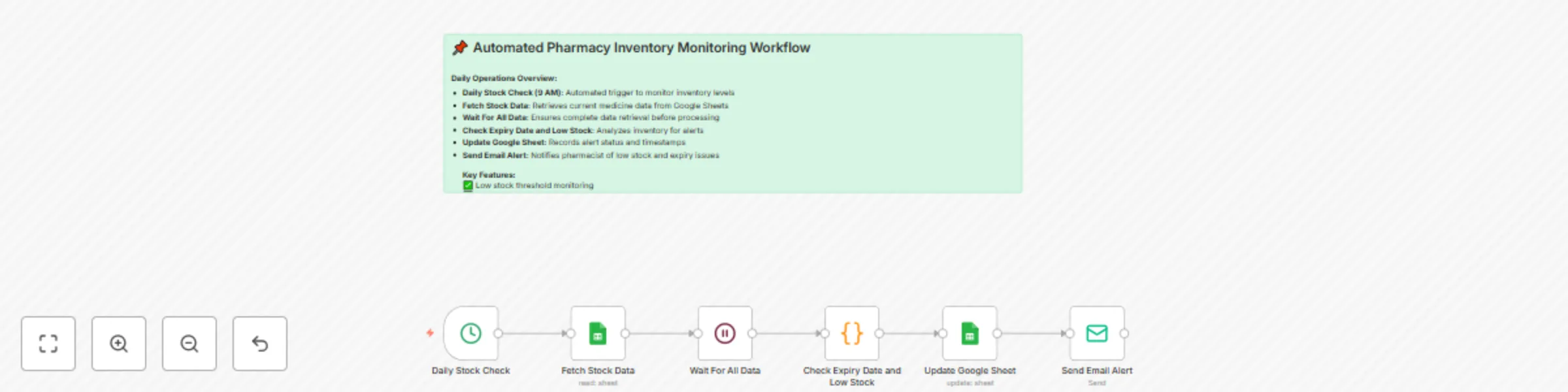
  • Daily Stock Check (9 AM): Automated trigger to monitor inventory levels
  • Fetch Stock Data: Retrieves current medicine data from Google Sheets
  • Wait For All Data: Ensures complete data retrieval before processing
  • Check Expiry Date and Low Stock: Analyzes inventory for alerts
  • Update Google Sheet: Records alert status and timestamps
  • Send Email Alert: Notifies pharmacist of low stock and expiry issues

Google Sheet File Structure

  • Sheet Name: PharmacyInventory
  • Range: A1:E20 (or adjust based on needs)
A B C D E
medicine_name stock_quantity expiry_date alert_status last_checked
Paracetamol 15 2025-09-15 Notified 2025-08-08
Aspirin 5 2025-08-20 Pending 2025-08-07
Ibuprofen 20 2026-01-10 - 2025-08-08
  • Columns:
    • medicine_name: Name of the medicine.
    • stock_quantity: Current stock level (e.g., number of units).
    • expiry_date: Expiry date of the medicine (e.g., YYYY-MM-DD).
    • alert_status: Status of the alert (e.g., Pending, Notified, - for no alert).
    • last_checked: Date of the last inventory check.

Customization Ideas

  • Adjust Thresholds: Change the low stock threshold (e.g., from 10 to 5) or expiry window (e.g., from 30 to 15 days).
  • Add SMS Alerts: Integrate Twilio or another SMS service for additional notifications.
  • Incorporate Barcode Scanning: Add a node to import inventory updates via barcode scanners.
  • Dashboard Integration: Connect to a dashboard (e.g., Google Data Studio) for real-time inventory tracking.
  • Automated Restock Orders: Add logic to generate purchase orders for low stock items.

Requirements to Run This Workflow

  • Google Sheets Account: For storing and managing inventory data.
  • Email Service: Gmail, SMTP, or similar for email alerts.
  • n8n Instance: With Google Sheets and email connectors configured.
  • Cron Service: For scheduling the daily trigger.
  • Internet Connection: To access Google Sheets and email APIs.
  • Optional SMS Service: Twilio or similar for SMS alerts (requires additional credentials).

Want a tailored workflow for your business? Our experts can craft it quickly Contact our team

1.2 Logical Blocks

This catalog entry is organized from the workflow JSON. The node-level section below shows the executable blocks available for review before importing the template.

2. Block-by-Block Analysis

Block 1 - Daily Stock Check

Type / Role
n8n-nodes-base.cron - cron
Config choices
Version 1

Block 2 - Fetch Stock Data

Type / Role
n8n-nodes-base.googleSheets - googleSheets
Config choices
Version 2

Block 3 - Update Google Sheet

Type / Role
n8n-nodes-base.googleSheets - googleSheets
Config choices
Version 2

Block 4 - Send Email Alert

Type / Role
n8n-nodes-base.emailSend - emailSend
Config choices
Version 2.1

Block 5 - Sticky Note

Type / Role
n8n-nodes-base.stickyNote - stickyNote
Config choices
Version 1

Block 6 - Wait For All Data

Type / Role
n8n-nodes-base.wait - wait
Config choices
Version 1.1

Block 7 - Check Expiry Date and Low Stock

Type / Role
n8n-nodes-base.code - code
Config choices
Version 2

3. Summary Table

Workflow Pharmacy inventory alerts for low stock & expiring medicine with Google Sheets
Complexity intermediate
Nodes 7
Categories Document Extraction, Multimodal AI
Author Oneclick AI Squad
Published 08 Aug 2025

4. Reproducing the Workflow from Scratch

  1. 1. Download the workflow JSON

    Use the JSON export at /data/workflows/7177/7177.json as the source template for this automation.

  2. 2. Import the template into n8n

    Open n8n, import the downloaded JSON, and review each node before activating the workflow.

  3. 3. Configure credentials and variables

    Replace placeholder credentials, API keys, webhook URLs, account IDs, and environment-specific values with your own settings.

  4. 4. Test with sample data

    Run the workflow manually or in a staging workspace, inspect node output, and confirm downstream systems receive the expected data.

  5. 5. Activate and monitor

    Enable the workflow only after testing, then monitor executions, errors, and rate limits during the first production runs.

5. General Notes & Resources

Review imported nodes carefully before activation. This catalog entry is intended to help you inspect the workflow structure, understand required services, and find related templates faster.

Node names, credentials, schedules, webhook paths, and external service limits may need adjustment for your workspace.

Frequently asked questions

What does Pharmacy inventory alerts for low stock & expiring medicine with Google Sheets do?

This n8n workflow monitors pharmacy inventory stored in a Google Sheet, checks daily for low stock or near expiry medicines, and sends alerts to the pharmacist via email, ensuring timely restocking...

What do I need before importing this workflow?

Review the workflow JSON, configure any required credentials in n8n, and test the automation in a safe workspace before using it in production.

Can I customize this workflow?

Yes. Use the block-by-block analysis and the downloadable JSON to inspect each node, then adjust credentials, prompts, schedules, filters, or destinations for your Document Extraction, Multimodal AI use case.