Block 1 - Webhook Trigger
- Type / Role
- n8n-nodes-base.webhook - webhook
- Config choices
- Version 2


 Early Deal
This workflow is provided as-is. Please review and test before using in production.
Automated Email Verification & Digital Health Card Generator Overview Transform your clinic's patient check in process with this fully automated pre registration system. When patients submit their ...
n8n-nodes-base.webhook, n8n-nodes-base.code, n8n-nodes-base.if, n8n-nodes-base.httprequest, n8n-nodes-base.googledrive, n8n-nodes-base.gmail, n8n-nodes-base.slack, n8n-nodes-base.googlesheets
This workflow is cataloged by N8N Workflows and links back to its original n8n.io source page by Jitesh Dugar.
Original n8n.io sourceAutomated Email Verification & Digital Health Card Generator
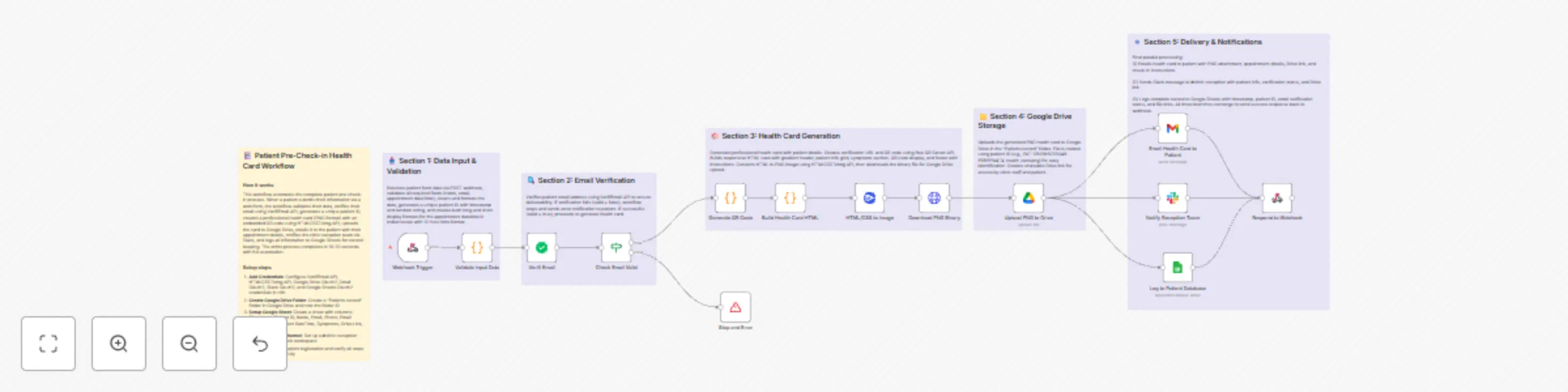
Transform your clinic's patient check-in process with this fully automated pre-registration system. When patients submit their appointment information through your website, this workflow instantly verifies their email, generates a professional digital health card with a scannable QR code, stores it securely in Google Drive, and sends personalized notifications to both the patient and your reception team—all in under 20 seconds.
This comprehensive automation handles the entire patient pre-check-in journey:
Receives Patient Data - Webhook captures form submissions from your website or app with patient details (name, email, phone, appointment date/time, symptoms, age, gender)
Validates & Cleans Data - Automatically validates required fields, cleans input data, and generates a unique patient ID with timestamp for tracking
Verifies Email Address - Uses VerifiEmail API to ensure email deliverability by checking RFC compliance, MX records, and filtering out disposable/spoof emails
Generates QR Code - Creates a unique verification URL and scannable QR code for instant patient identification at reception
Builds Professional Health Card - Generates a beautiful, responsive HTML health card featuring:
Converts to PNG Image - Uses HTMLCSSToImg API to convert the HTML card into a high-quality PNG image (900x1200px)
Stores in Google Drive - Uploads the health card to an organized "Patients record" folder with patient ID-based naming for easy retrieval
Emails Patient - Sends a beautifully formatted email to the patient containing:
Notifies Reception Team - Sends real-time Slack message to clinic reception with patient details, verification status, and Drive link
Logs to Database - Records complete patient information, timestamps, verification status, and file links in Google Sheets for tracking and analytics
Returns Success Response - Sends JSON response back to the website form with patient ID, confirmation, and Drive link
✅ Email Verification - VerifiEmail API integration prevents failed deliveries and fake emails
✅ Unique Patient IDs - Timestamp-based IDs ensure no duplicates (format: PAT-{timestamp}-{random})
✅ QR Code Generation - Free QR Server API creates scannable codes for instant check-in
✅ Professional Design - Modern, gradient-styled health cards with responsive layout
✅ Multi-format Output - PNG image format for easy viewing on any device
✅ Cloud Storage - Secure Google Drive storage with organized folder structure
✅ Multi-channel Notifications - Email to patient + Slack to staff for complete coverage
✅ Comprehensive Logging - Google Sheets database for analytics and record-keeping
✅ Error Handling - Graceful failure for invalid emails with user notification
✅ Webhook Response - Real-time feedback to website form for seamless UX
✅ Indian Locale Support - Date/time formatting in Indian format with 12-hour time
✅ Mobile Responsive - Health cards look great on both desktop and mobile devices
🏥 Medical Clinics & Healthcare Providers - Streamline patient pre-registration and reduce waiting times
🦷 Dental Practices - Digital check-in for appointments with patient history
💉 Diagnostic Centers - Pre-appointment verification for lab tests and scans
👨⚕️ Specialist Doctors - Organized patient records with symptoms documentation
🏃 Physiotherapy Clinics - Track patient visits and treatment history
💆 Wellness Centers & Spas - Appointment management with customer details
🐕 Veterinary Clinics - Pet owner pre-registration system
📋 Any Appointment-Based Business - Adaptable to salons, consultancies, or service providers
💰 Reduced No-Shows - Email verification ensures valid contact information
⏱️ Time Savings - Eliminates manual data entry at reception
📊 Better Analytics - Automated logging provides insights into patient flow
✨ Professional Image - Modern, branded health cards improve patient experience
🔒 Secure Records - Cloud storage with organized folder structure
📱 Contactless Check-in - QR codes enable touch-free reception process
🎯 Improved Communication - Multi-channel notifications keep everyone informed
🚀 Scalable System - Handles high volumes without additional staff
VerifiEmail API - Email verification service
HTMLCSSToImg API - HTML to image conversion
Google Drive - Cloud file storage
Gmail - Email delivery
Slack - Team notifications
Google Sheets - Database logging
Change Health Card Design:
<img> tag in headerAdjust Email Template:
Modify Slack Message:
Add PDF Generation:
Add SMS Notifications:
Multi-language Support:
Email Verification Fails:
Image Generation Fails:
Google Drive Upload Fails:
Email Not Sending:
Slack Message Not Posting:
Google Sheets Not Logging:
Expected Performance:
Volume Handling:
✅ Data Privacy - Patient data transmitted securely via HTTPS
✅ Access Control - OAuth2 authentication for all Google services
✅ Secure Storage - Files stored in private Google Drive folders
✅ Audit Trail - Complete logging in Google Sheets with timestamps
✅ Email Verification - Prevents data leakage to invalid addresses
✅ No Data Storage in n8n - Patient data passes through, not stored
healthcare, medical, clinic, patient-management, appointment, email-verification, qr-code, google-drive, gmail, slack, automation, workflow, pre-checkin, health-card, verifi-email, htmlcsstoimg, medical-records, patient-portal, healthcare-automation, clinic-management
Healthcare & Medical
Patient Management & Appointment Systems
MIT License - Free to use, modify, and distribute with attribution
This catalog entry is organized from the workflow JSON. The node-level section below shows the executable blocks available for review before importing the template.
| Workflow | Patient pre-registration system with email verification & QR health cards using Google Drive |
|---|---|
| Complexity | advanced |
| Nodes | 20 |
| Categories | Document Extraction |
| Author | Jitesh Dugar |
| Published | 12 Nov 2025 |
Use the JSON export at /data/workflows/10771/10771.json as the source template for this automation.
Open n8n, import the downloaded JSON, and review each node before activating the workflow.
Replace placeholder credentials, API keys, webhook URLs, account IDs, and environment-specific values with your own settings.
Run the workflow manually or in a staging workspace, inspect node output, and confirm downstream systems receive the expected data.
Enable the workflow only after testing, then monitor executions, errors, and rate limits during the first production runs.
Review imported nodes carefully before activation. This catalog entry is intended to help you inspect the workflow structure, understand required services, and find related templates faster.
Node names, credentials, schedules, webhook paths, and external service limits may need adjustment for your workspace.
Automated Email Verification & Digital Health Card Generator Overview Transform your clinic's patient check in process with this fully automated pre registration system. When patients submit their ...
Review the workflow JSON, configure any required credentials in n8n, and test the automation in a safe workspace before using it in production.
Yes. Use the block-by-block analysis and the downloadable JSON to inspect each node, then adjust credentials, prompts, schedules, filters, or destinations for your Document Extraction use case.