Optimize Instagram hashtags with GPT-4o & real engagement data via Graph API

Workflow preview

Workflow preview
100%
Optimize Instagram hashtags with GPT-4o & real engagement data via Graph API preview
Open on n8n.io

Important notice

This workflow is provided as-is. Please review and test before using in production.

1. Workflow Overview

Instagram Hashtag Generator Workflow This workflow automatically generates optimal hashtags for your Instagram posts by analyzing captions and fetching real time engagement data. Key Features 100% ...

Best for

  • Content Creation automation workflows
  • AI Summarization automation workflows
  • advanced n8n builders looking for reusable templates

Tools used

n8n-nodes-base.manualtrigger, n8n-nodes-base.set, @n8n/n8n-nodes-langchain.lmchatopenai, @n8n/n8n-nodes-langchain.chainllm, n8n-nodes-base.code, n8n-nodes-base.googlesheets, n8n-nodes-base.splitinbatches, n8n-nodes-base.if

Source and attribution

This workflow is cataloged by N8N Workflows and links back to its original n8n.io source page by Shun Nakayama.

Original n8n.io source

1.1 Workflow description

Title
Optimize Instagram hashtags with GPT-4o & real engagement data via Graph API
Workflow name
Optimize Instagram hashtags with GPT-4o & real engagement data via Graph API

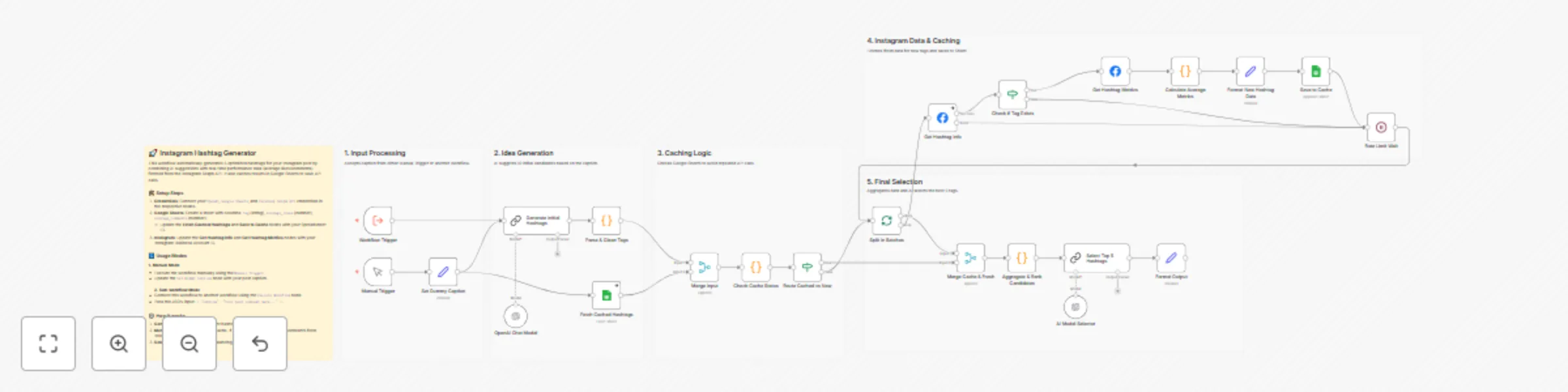
Instagram Hashtag Generator Workflow

This workflow automatically generates optimal hashtags for your Instagram posts by analyzing captions and fetching real-time engagement data.

Key Features

  • 100% Official API & Free: Uses ONLY the official Instagram Graph API. No expensive third-party tools or risky scraping methods are required.
  • Safe & Reliable: Relying on the official API ensures compliance and long-term stability.
  • Smart Caching: Includes a Google Sheets caching mechanism to maximize the value of the official API's rate limits (30 searches/7 days).

Workflow Overview

  1. Caption Input: Set your caption manually or via a workflow trigger.
  2. AI Suggestions: GPT-4o-mini analyzes the caption and suggests 10 relevant hashtags, balancing popular (big words) and niche keywords.
  3. Official API Search (Instagram Graph API):
    • Fetches Hashtag IDs using the ig_hashtag_search endpoint.
    • Retrieves engagement metrics (Average Likes, Average Comments) using the ID.
  4. Selection & Sorting:
    • Sorts candidates by engagement metrics.
    • Selects the top 5 most effective hashtags that balance relevance and engagement.
  5. Output: Returns the final list of hashtags as text.

Setup Steps

  1. Import to n8n:

    • Copy the content of workflow_hashtag_generator.json and paste it into your n8n canvas, or import the file directly.
  2. Credentials:

    • OpenAI account: Connect your OpenAI credentials.
    • Facebook Graph account: Connect your Facebook Graph API credentials.
  3. Configuration:

    • Instagram Business ID: Update the YOUR_INSTAGRAM_BUSINESS_ACCOUNT_ID placeholder in the Get Hashtag Info and Get Hashtag Metrics nodes with your actual Business Account ID.
    • Google Spreadsheet ID: Update the YOUR_SPREADSHEET_ID placeholder in the Fetch Cached Hashtags and Save to Cache nodes.
  4. Adjustments:

    • Filter Logic: You can adjust the sorting or filtering logic in the Aggregate & Rank Candidates node's JavaScript code (e.g., exclude tags with fewer than 1000 posts) if needed.

Important Notes on API Limits

The official Instagram Hashtag Search API (ig_hashtag_search) allows for 30 unique hashtag queries per rolling 7-day period.

  • Why this is fine: This workflow caches results in Google Sheets. Once a tag is fetched, it doesn't need to be queried again for a while, allowing you to build up a large database of tags over time without hitting the limit.
  • Recommendation: Use mock data during initial testing to save your API quota.

1.2 Logical Blocks

This catalog entry is organized from the workflow JSON. The node-level section below shows the executable blocks available for review before importing the template.

2. Block-by-Block Analysis

Block 1 - Manual Trigger

Type / Role
n8n-nodes-base.manualTrigger - manualTrigger
Config choices
Version 1

Block 2 - Set Dummy Caption

Type / Role
n8n-nodes-base.set - set
Config choices
Version 3.4

Block 3 - OpenAI Chat Model

Type / Role
@n8n/n8n-nodes-langchain.lmChatOpenAi - lmChatOpenAi
Config choices
Version 1.3

Block 4 - Generate Initial Hashtags

Type / Role
@n8n/n8n-nodes-langchain.chainLlm - chainLlm
Config choices
Version 1.4

Block 5 - Parse & Clean Tags

Type / Role
n8n-nodes-base.code - code
Config choices
Version 2

Block 6 - Fetch Cached Hashtags

Type / Role
n8n-nodes-base.googleSheets - googleSheets
Config choices
Version 4

Block 7 - Split In Batches

Type / Role
n8n-nodes-base.splitInBatches - splitInBatches
Config choices
Version 3

Block 8 - Check if Tag Exists

Type / Role
n8n-nodes-base.if - if
Config choices
Version 2.2

Block 9 - Save to Cache

Type / Role
n8n-nodes-base.googleSheets - googleSheets
Config choices
Version 4

Block 10 - Rate Limit Wait

Type / Role
n8n-nodes-base.wait - wait
Config choices
Version 1

Block 11 - Merge Cache & Fresh

Type / Role
n8n-nodes-base.merge - merge
Config choices
Version 2.1

Block 12 - Aggregate & Rank Candidates

Type / Role
n8n-nodes-base.code - code
Config choices
Version 2

Block 13 - Format New Hashtag Data

Type / Role
n8n-nodes-base.set - set
Config choices
Version 3.4

Block 14 - Check Cache Status

Type / Role
n8n-nodes-base.code - code
Config choices
Version 2

Block 15 - Merge Input

Type / Role
n8n-nodes-base.merge - merge
Config choices
Version 2.1

Block 16 - Route Cached vs New

Type / Role
n8n-nodes-base.if - if
Config choices
Version 2.2

Block 17 - Get Hashtag Info

Type / Role
n8n-nodes-base.facebookGraphApi - facebookGraphApi
Config choices
Version 1

Block 18 - Get Hashtag Metrics

Type / Role
n8n-nodes-base.facebookGraphApi - facebookGraphApi
Config choices
Version 1

Block 19 - Calculate Average Metrics

Type / Role
n8n-nodes-base.code - code
Config choices
Version 2

Block 20 - AI Model Selector

Type / Role
@n8n/n8n-nodes-langchain.lmChatOpenAi - lmChatOpenAi
Config choices
Version 1

Block 21 - Select Top 5 Hashtags

Type / Role
@n8n/n8n-nodes-langchain.chainLlm - chainLlm
Config choices
Version 1.4

Block 22 - Format Output

Type / Role
n8n-nodes-base.set - set
Config choices
Version 3.4

Block 23 - Workflow Trigger

Type / Role
n8n-nodes-base.executeWorkflowTrigger - executeWorkflowTrigger
Config choices
Version 1.1

Block 24 - Sticky Note1

Type / Role
n8n-nodes-base.stickyNote - stickyNote
Config choices
Version 1

Showing the first 24 of 29 workflow blocks. Download the JSON for the full node graph.

3. Summary Table

Workflow Optimize Instagram hashtags with GPT-4o & real engagement data via Graph API
Complexity advanced
Nodes 29
Categories Content Creation, AI Summarization
Author Shun Nakayama
Published 21 Dec 2025

4. Reproducing the Workflow from Scratch

  1. 1. Download the workflow JSON

    Use the JSON export at /data/workflows/11994/11994.json as the source template for this automation.

  2. 2. Import the template into n8n

    Open n8n, import the downloaded JSON, and review each node before activating the workflow.

  3. 3. Configure credentials and variables

    Replace placeholder credentials, API keys, webhook URLs, account IDs, and environment-specific values with your own settings.

  4. 4. Test with sample data

    Run the workflow manually or in a staging workspace, inspect node output, and confirm downstream systems receive the expected data.

  5. 5. Activate and monitor

    Enable the workflow only after testing, then monitor executions, errors, and rate limits during the first production runs.

5. General Notes & Resources

Review imported nodes carefully before activation. This catalog entry is intended to help you inspect the workflow structure, understand required services, and find related templates faster.

Node names, credentials, schedules, webhook paths, and external service limits may need adjustment for your workspace.

Frequently asked questions

What does Optimize Instagram hashtags with GPT-4o & real engagement data via Graph API do?

Instagram Hashtag Generator Workflow This workflow automatically generates optimal hashtags for your Instagram posts by analyzing captions and fetching real time engagement data. Key Features 100% ...

What do I need before importing this workflow?

Review the workflow JSON, configure any required credentials in n8n, and test the automation in a safe workspace before using it in production.

Can I customize this workflow?

Yes. Use the block-by-block analysis and the downloadable JSON to inspect each node, then adjust credentials, prompts, schedules, filters, or destinations for your Content Creation, AI Summarization use case.