Notify users when features ship with Semantic Search from Tally to Gmail

Workflow preview

Workflow preview
100%
Notify users when features ship with Semantic Search from Tally to Gmail preview
Open on n8n.io

Important notice

This workflow is provided as-is. Please review and test before using in production.

1. Workflow Overview

Who is this for? This workflow is for Product Managers, Indie Hackers, and Customer Success teams who collect feature requests but struggle to notify specific users when those features actually shi...

Best for

  • CRM automation workflows
  • AI RAG automation workflows
  • advanced n8n builders looking for reusable templates

Tools used

n8n-nodes-tallyforms.tallytrigger, n8n-nodes-base.set, @n8n/n8n-nodes-langchain.vectorstoresupabase, @n8n/n8n-nodes-langchain.embeddingsopenai, @n8n/n8n-nodes-langchain.documentdefaultdataloader, n8n-nodes-base.stickynote, n8n-nodes-base.manualtrigger, n8n-nodes-base.rssfeedreadtrigger

Source and attribution

This workflow is cataloged by N8N Workflows and links back to its original n8n.io source page by Ehsan.

Original n8n.io source

1.1 Workflow description

Title
Notify users when features ship with Semantic Search from Tally to Gmail
Workflow name
Notify users when features ship with Semantic Search from Tally to Gmail

Who is this for?

This workflow is for Product Managers, Indie Hackers, and Customer Success teams who collect feature requests but struggle to notify specific users when those features actually ship. It helps you turn old feedback into customer loyalty and potential upsells.

What it does

This workflow creates a "Semantic Memory" of user requests. Instead of relying on exact keyword tags, it uses Vector Embeddings to understand the meaning of a request.

For example, if a user asks for "Night theme," and months later you release "Dark Mode," this workflow understands they are the same thing, finds that user, and drafts a personal email to them.

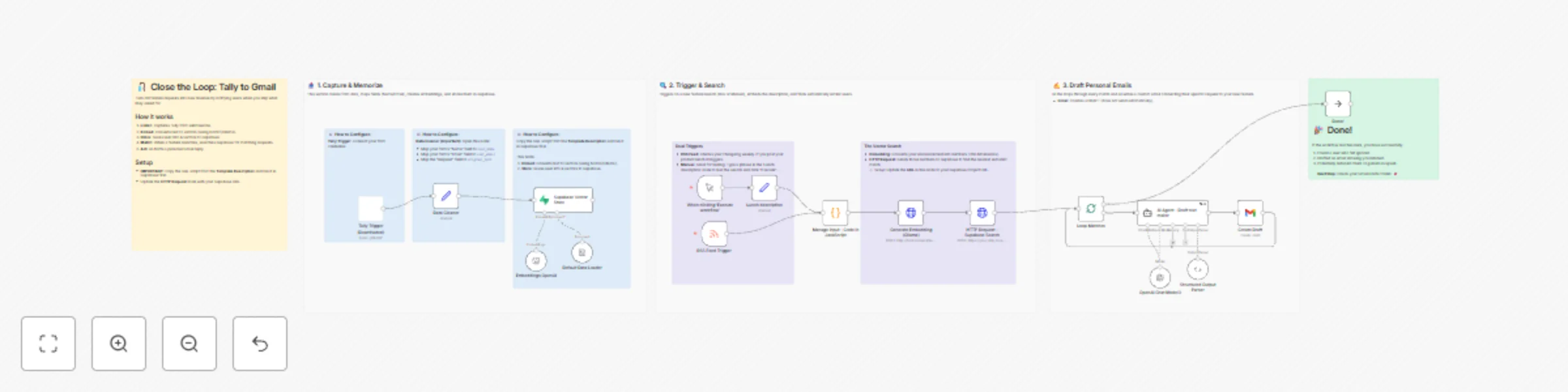
How it works

  1. Listen: Receives new requests via Tally Forms, vectorizes the text using Nomic Embed Text (via Ollama or OpenAI), and stores them in Supabase.
  2. Watch: Monitors your Changelog (RSS) or waits for a manual trigger when you ship a new feature.
  3. Match: Performs a Vector Similarity Search in Supabase to find users who requested semantically similar features in the past.
  4. Notify: An AI Agent drafts a hyper-personalized email connecting the user's specific past request to the new feature, saving it as a Gmail Draft (for safety).

Requirements

  • Supabase Project: You need a project with the vector extension enabled.
  • AI Model: This template is pre-configured for Ollama (Local) to keep it free, but works perfectly with OpenAI.
  • Tally Forms & Gmail: For input and output.

Setup steps

  1. Database Setup (Crucial): Copy the SQL script provided in the workflow's Red Sticky Note and run it in your Supabase SQL Editor. This creates the necessary tables and the vector search function.
  2. Credentials: Add your credentials for Tally, Supabase, and Gmail.
  3. URL Config: Update the HTTP Request node with your specific Supabase Project URL.

SQL Script

Open your Supabase SQL Editor and paste this script to set up the tables and search function:

-- 1. Enable Vector Extension
create extension if not exists vector;

-- 2. Create Request Table (Smart Columns)
create table feature_requests (
  id bigint generated by default as identity primary key,
  content text,
  metadata jsonb,
  embedding vector(768), -- 768 for Nomic, 1536 for OpenAI
  created_at timestamp with time zone default timezone('utc'::text, now()),
  user_email text generated always as (metadata->>'user_email') stored,
  user_name text generated always as (metadata->>'user_name') stored
);

-- 3. Create Search Function
create or replace function match_feature_requests (
  query_embedding vector(768),
  match_threshold float,
  match_count int
)
returns table (
  id bigint,
  user_email text,
  user_name text,
  content text,
  similarity float
)
language plpgsql
as $$
begin
  return query
  select
    feature_requests.id,
    feature_requests.user_email,
    feature_requests.user_name,
    feature_requests.content,
    1 - (feature_requests.embedding <=> query_embedding) as similarity
  from feature_requests
  where 1 - (feature_requests.embedding <=> query_embedding) > match_threshold
  order by feature_requests.embedding <=> query_embedding
  limit match_count;
end;
$$;

⚠️ Dimension Warning: This SQL is set up for 768 dimensions (compatible with the local nomic-embed-text model included in the template).

If you decide to switch the Embeddings node to use OpenAI's text-embedding-3-small, you must change all instances of 768 to 1536 in the SQL script above before running it.

How to customize

  • Change Input: Swap the Tally node for Typeform, Intercom, or Google Sheets.
  • Change AI: The template includes notes on how to swap the local Ollama nodes for OpenAI nodes if you prefer cloud hosting.
  • Change Output: Swap Gmail for Slack, SendGrid, or HubSpot to notify your sales team instead of the user directly.

1.2 Logical Blocks

This catalog entry is organized from the workflow JSON. The node-level section below shows the executable blocks available for review before importing the template.

2. Block-by-Block Analysis

Block 1 - Tally Trigger

Type / Role
n8n-nodes-tallyforms.tallyTrigger - tallyTrigger
Config choices
Version 1

Block 2 - Data Cleaner

Type / Role
n8n-nodes-base.set - set
Config choices
Version 3.4

Block 3 - Supabase Vector Store

Type / Role
@n8n/n8n-nodes-langchain.vectorStoreSupabase - vectorStoreSupabase
Config choices
Version 1.3

Block 4 - Embeddings OpenAI

Type / Role
@n8n/n8n-nodes-langchain.embeddingsOpenAi - embeddingsOpenAi
Config choices
Version 1.2

Block 5 - Default Data Loader

Type / Role
@n8n/n8n-nodes-langchain.documentDefaultDataLoader - documentDefaultDataLoader
Config choices
Version 1.1

Block 6 - Sticky Note4

Type / Role
n8n-nodes-base.stickyNote - stickyNote
Config choices
Version 1

Block 7 - When clicking ‘Execute workflow’

Type / Role
n8n-nodes-base.manualTrigger - manualTrigger
Config choices
Version 1

Block 8 - RSS Feed Trigger

Type / Role
n8n-nodes-base.rssFeedReadTrigger - rssFeedReadTrigger
Config choices
Version 1

Block 9 - Generate Embedding (Ollama)

Type / Role
n8n-nodes-base.httpRequest - httpRequest
Config choices
Version 4.1

Block 10 - Loop Matches

Type / Role
n8n-nodes-base.splitInBatches - splitInBatches
Config choices
Version 3

Block 11 - Create Draft

Type / Role
n8n-nodes-base.gmail - gmail
Config choices
Version 2.1

Block 12 - Done!

Type / Role
n8n-nodes-base.noOp - noOp
Config choices
Version 1

Block 13 - Structured Output Parser

Type / Role
@n8n/n8n-nodes-langchain.outputParserStructured - outputParserStructured
Config choices
Version 1.3

Block 14 - OpenAI Chat Model3

Type / Role
@n8n/n8n-nodes-langchain.lmChatOpenAi - lmChatOpenAi
Config choices
Version 1.2

Block 15 - Sticky Note5

Type / Role
n8n-nodes-base.stickyNote - stickyNote
Config choices
Version 1

Block 16 - Sticky Note6

Type / Role
n8n-nodes-base.stickyNote - stickyNote
Config choices
Version 1

Block 17 - Sticky Note8

Type / Role
n8n-nodes-base.stickyNote - stickyNote
Config choices
Version 1

Block 18 - Sticky Note9

Type / Role
n8n-nodes-base.stickyNote - stickyNote
Config choices
Version 1

Block 19 - Lunch description

Type / Role
n8n-nodes-base.set - set
Config choices
Version 3.4

Block 20 - Manage input - Code in JavaScript

Type / Role
n8n-nodes-base.code - code
Config choices
Version 2

Block 21 - HTTP Request - Supabase Search

Type / Role
n8n-nodes-base.httpRequest - httpRequest
Config choices
Version 4.3

Block 22 - AI Agent - Draft text maker

Type / Role
@n8n/n8n-nodes-langchain.agent - agent
Config choices
Version 2.2

Block 23 - Sticky Note

Type / Role
n8n-nodes-base.stickyNote - stickyNote
Config choices
Version 1

Block 24 - Sticky Note1

Type / Role
n8n-nodes-base.stickyNote - stickyNote
Config choices
Version 1

Showing the first 24 of 27 workflow blocks. Download the JSON for the full node graph.

3. Summary Table

Workflow Notify users when features ship with Semantic Search from Tally to Gmail
Complexity advanced
Nodes 27
Categories CRM, AI RAG
Author Ehsan
Published 30 Nov 2025

4. Reproducing the Workflow from Scratch

  1. 1. Download the workflow JSON

    Use the JSON export at /data/workflows/11369/11369.json as the source template for this automation.

  2. 2. Import the template into n8n

    Open n8n, import the downloaded JSON, and review each node before activating the workflow.

  3. 3. Configure credentials and variables

    Replace placeholder credentials, API keys, webhook URLs, account IDs, and environment-specific values with your own settings.

  4. 4. Test with sample data

    Run the workflow manually or in a staging workspace, inspect node output, and confirm downstream systems receive the expected data.

  5. 5. Activate and monitor

    Enable the workflow only after testing, then monitor executions, errors, and rate limits during the first production runs.

5. General Notes & Resources

Review imported nodes carefully before activation. This catalog entry is intended to help you inspect the workflow structure, understand required services, and find related templates faster.

Node names, credentials, schedules, webhook paths, and external service limits may need adjustment for your workspace.

Frequently asked questions

What does Notify users when features ship with Semantic Search from Tally to Gmail do?

Who is this for? This workflow is for Product Managers, Indie Hackers, and Customer Success teams who collect feature requests but struggle to notify specific users when those features actually shi...

What do I need before importing this workflow?

Review the workflow JSON, configure any required credentials in n8n, and test the automation in a safe workspace before using it in production.

Can I customize this workflow?

Yes. Use the block-by-block analysis and the downloadable JSON to inspect each node, then adjust credentials, prompts, schedules, filters, or destinations for your CRM, AI RAG use case.