Block 1 - Schedule Trigger
- Type / Role
- n8n-nodes-base.scheduleTrigger - scheduleTrigger
- Config choices
- Version 1.2


 Early Deal
This workflow is provided as-is. Please review and test before using in production.
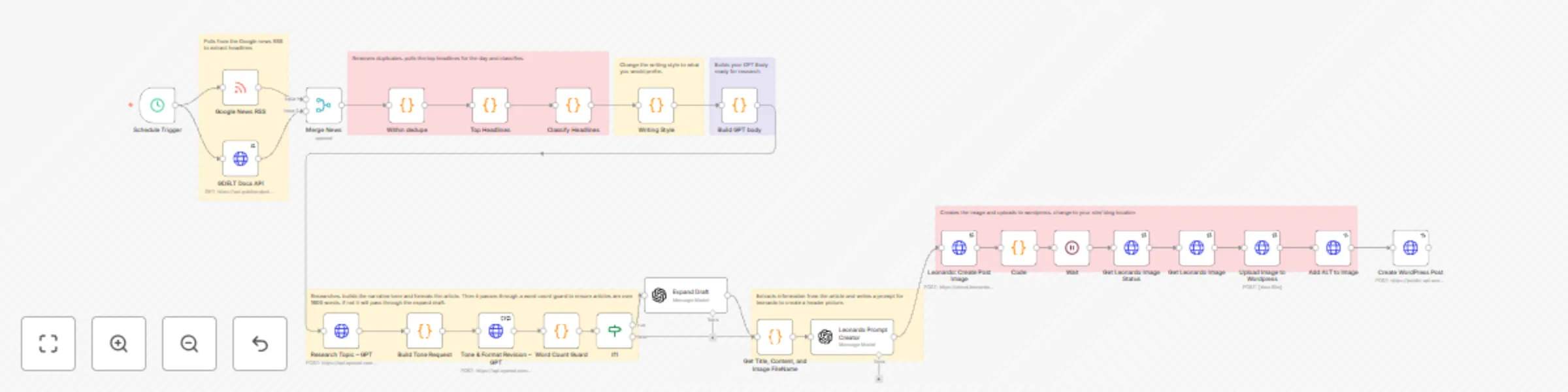
This workflow automates the end to end process of generating and publishing blog posts from live news headlines. Fetch Headlines – Collects the latest top stories from Google News and GDELT, merges...
n8n-nodes-base.scheduletrigger, n8n-nodes-base.httprequest, n8n-nodes-base.wait, n8n-nodes-base.code, n8n-nodes-base.rssfeedread, n8n-nodes-base.merge, n8n-nodes-base.if, @n8n/n8n-nodes-langchain.openai
This workflow is cataloged by N8N Workflows and links back to its original n8n.io source page by Dean Gallop.
Original n8n.io sourceThis workflow automates the end-to-end process of generating and publishing blog posts from live news headlines.
Fetch Headlines – Collects the latest top stories from Google News and GDELT, merges them, and removes duplicates.
Headline Selection & Classification – Picks top headlines, checks relevance, and applies style rules.
Draft Generation – Uses GPT to create an initial blog article in a natural, human tone.
Tone & Expansion – Refines the draft for clarity, length, and style (customized to your own writing voice).
Image Generation – Sends the article topic to Leonardo AI, waits for the image to finish rendering, and retrieves the final asset.
Publish to WordPress – Uploads the generated image, assigns alt-text, creates a WordPress post with the article and image, and logs the publication to Google Sheets for tracking.
Purpose
Designed for hands-off content automation, this workflow continuously produces SEO-ready blog posts enriched with AI-generated images and publishes them directly to WordPress. It’s ideal for:
Running an automated blog that reacts to trending news.
Keeping websites updated with fresh, styled content without manual effort.
Creating a repeatable content engine that combines research, writing, and media assets in one pipeline.
Setup Instructions: Add Your Credentials
Go to Credentials in n8n and create:
OpenAI (for article generation)
Leonardo AI (for image generation)
WordPress (to publish posts)
(Optional) Google Sheets (to log published articles)
Attach these credentials to the matching nodes in the workflow.
Check the WordPress Node
Update the WordPress site URL to your own blog.
Make sure the category, tags, and status (publish/draft) are set the way you want.
This catalog entry is organized from the workflow JSON. The node-level section below shows the executable blocks available for review before importing the template.
Showing the first 24 of 32 workflow blocks. Download the JSON for the full node graph.
| Workflow | News-to-blog automation with GPT, Leonardo AI & WordPress publishing |
|---|---|
| Complexity | advanced |
| Nodes | 32 |
| Categories | Content Creation, Multimodal AI |
| Author | Dean Gallop |
| Published | 24 Aug 2025 |
Use the JSON export at /data/workflows/7790/7790.json as the source template for this automation.
Open n8n, import the downloaded JSON, and review each node before activating the workflow.
Replace placeholder credentials, API keys, webhook URLs, account IDs, and environment-specific values with your own settings.
Run the workflow manually or in a staging workspace, inspect node output, and confirm downstream systems receive the expected data.
Enable the workflow only after testing, then monitor executions, errors, and rate limits during the first production runs.
Review imported nodes carefully before activation. This catalog entry is intended to help you inspect the workflow structure, understand required services, and find related templates faster.
Node names, credentials, schedules, webhook paths, and external service limits may need adjustment for your workspace.
This workflow automates the end to end process of generating and publishing blog posts from live news headlines. Fetch Headlines – Collects the latest top stories from Google News and GDELT, merges...
Review the workflow JSON, configure any required credentials in n8n, and test the automation in a safe workspace before using it in production.
Yes. Use the block-by-block analysis and the downloadable JSON to inspect each node, then adjust credentials, prompts, schedules, filters, or destinations for your Content Creation, Multimodal AI use case.