Multi-channel event countdown manager with Telegram, Slack and Email

Workflow preview

Workflow preview
100%
Multi-channel event countdown manager with Telegram, Slack and Email preview
Open on n8n.io

Important notice

This workflow is provided as-is. Please review and test before using in production.

1. Workflow Overview

This n8n workflow automates the creation and countdown notifications for events like product launches or birthdays via a Telegram bot, ensuring timely group alerts through multi channel routing (e....

Best for

  • Personal Productivity automation workflows
  • advanced n8n builders looking for reusable templates

Tools used

n8n-nodes-base.scheduletrigger, n8n-nodes-base.code, n8n-nodes-base.if, n8n-nodes-base.httprequest, n8n-nodes-base.emailsend, n8n-nodes-base.webhook, n8n-nodes-base.respondtowebhook, n8n-nodes-base.stickynote

Source and attribution

This workflow is cataloged by N8N Workflows and links back to its original n8n.io source page by Oneclick AI Squad.

Original n8n.io source

1.1 Workflow description

Title
Multi-channel event countdown manager with Telegram, Slack and Email
Workflow name
Multi-channel event countdown manager with Telegram, Slack and Email

This n8n workflow automates the creation and countdown notifications for events like product launches or birthdays via a Telegram bot, ensuring timely group alerts through multi-channel routing (e.g., Slack or email). It processes incoming event data from webhooks, stores it persistently, and triggers scheduled reminders to keep teams or groups informed.

Key Features

  • Handles event creation or updates via webhook from Telegram chats or external sources.
  • Fetches and processes upcoming events on a customizable schedule for countdown notifications.
  • Routes alerts dynamically to channels like Slack or email based on event settings.
  • Validates incoming data, formats messages for optimal delivery, and confirms responses to initiators.

Workflow Process

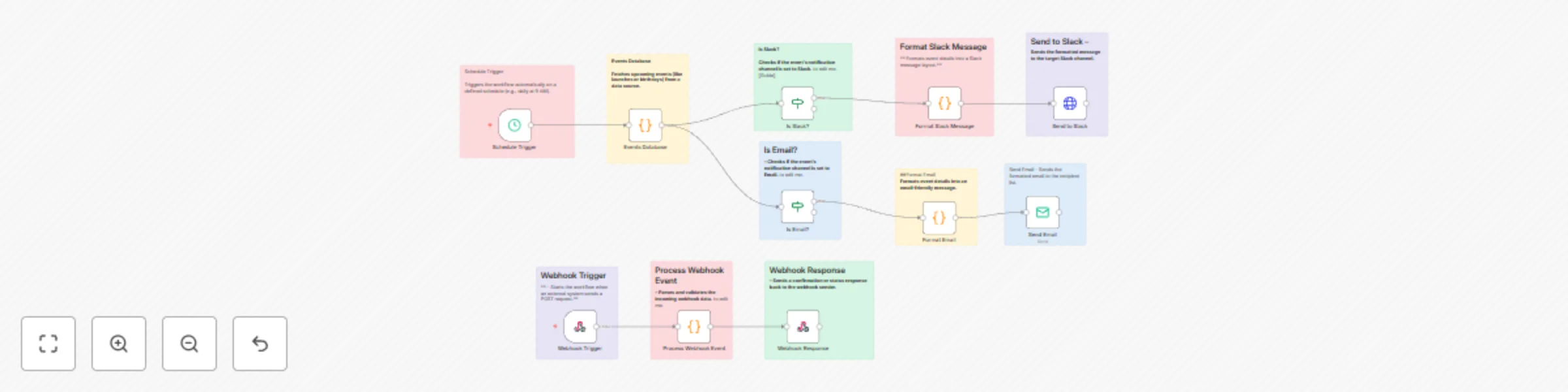
  • The Webhook Trigger node starts the workflow when an external system (e.g., Telegram bot) sends a POST request with event details like date, description, and notification preferences.
  • The Process Webhook Event node parses and validates incoming webhook data, ensuring required fields (e.g., event date, channel) are present before proceeding.
  • The Events Database node fetches upcoming events (e.g., launches or birthdays) from a data source, either triggered by the webhook for updates or scheduled for notifications.
  • The Webhook Response node sends a confirmation or status response back to the webhook sender (e.g., Telegram bot) in JSON format.
  • The Schedule Trigger node runs the workflow automatically on a defined schedule (e.g., daily at 9AM) to check for countdown-eligible events.
  • The Is Slack? node checks if the event's notification channel is set to Slack; if true, it routes to Slack-specific formatting.
  • The Format Slack Message node formats the event countdown message in a Slack-friendly layout (e.g., with mentions or embeds).
  • The Send to Slack node sends the formatted message to the target Slack channel for group notifications.
  • The Is Email? node checks if the event's notification channel is set to email (fallback from Slack check); if true, it routes to email-specific formatting.
  • The Format Email node formats the event countdown message in an email-friendly detail (e.g., with HTML for readability).
  • The Send Email node sends the formatted email to the recipient list (e.g., group organizers or participants).

Setup Instructions

  • Import the workflow into n8n and configure the Webhook Trigger with your Telegram bot's webhook URL for event creation requests.
  • Set up database credentials in the Events Database node (e.g., connect to PostgreSQL or Airtable for event storage).
  • Configure channel integrations: Slack app token for Send to Slack, SMTP credentials for Send Email, and ensure Schedule Trigger aligns with your countdown frequency (e.g., hourly for real-time alerts).
  • Test by sending a sample POST request to the webhook with event data and manually triggering the schedule to verify notifications.
  • Monitor executions in the n8n dashboard and refine validation logic in Process Webhook Event for custom event fields.

Prerequisites

  • Telegram bot with webhook setup for incoming event creation messages.
  • Database service (e.g., PostgreSQL or Google Sheets) for storing and querying events.
  • Slack workspace and email provider (e.g., Gmail SMTP) for notifications.
  • n8n instance with webhook and cron scheduling enabled.
  • Basic API setup for Telegram bot token and channel routing.

Modification Options

  • Add a Telegram-specific check node (e.g., "Is Telegram?") branching from Events Database to integrate direct bot messaging.
  • Customize the Schedule Trigger for dynamic timing, like event-specific intervals for countdowns (e.g., daily leading up to the date).
  • Extend Format Slack Message or Format Email with dynamic templates, such as embedding countdown timers or images.
  • Integrate additional channels (e.g., Discord) by duplicating the Is Slack? / Is Email? logic.
  • Enhance Process Webhook Event to support recurring events or auto-populate recipient lists from Telegram group data.

Explore More AI Workflows: Get in touch with us for custom n8n automation!

1.2 Logical Blocks

This catalog entry is organized from the workflow JSON. The node-level section below shows the executable blocks available for review before importing the template.

2. Block-by-Block Analysis

Block 1 - Schedule Trigger

Type / Role
n8n-nodes-base.scheduleTrigger - scheduleTrigger
Config choices
Version 1.2

Block 2 - Events Database

Type / Role
n8n-nodes-base.code - code
Config choices
Version 2

Block 3 - Is Slack?

Type / Role
n8n-nodes-base.if - if
Config choices
Version 2

Block 4 - Is Email?

Type / Role
n8n-nodes-base.if - if
Config choices
Version 2

Block 5 - Format Slack Message

Type / Role
n8n-nodes-base.code - code
Config choices
Version 2

Block 6 - Send to Slack

Type / Role
n8n-nodes-base.httpRequest - httpRequest
Config choices
Version 4.2

Block 7 - Format Email

Type / Role
n8n-nodes-base.code - code
Config choices
Version 2

Block 8 - Send Email

Type / Role
n8n-nodes-base.emailSend - emailSend
Config choices
Version 2.1

Block 9 - Webhook Trigger

Type / Role
n8n-nodes-base.webhook - webhook
Config choices
Version 2

Block 10 - Process Webhook Event

Type / Role
n8n-nodes-base.code - code
Config choices
Version 2

Block 11 - Webhook Response

Type / Role
n8n-nodes-base.respondToWebhook - respondToWebhook
Config choices
Version 1.1

Block 12 - Sticky Note

Type / Role
n8n-nodes-base.stickyNote - stickyNote
Config choices
Version 1

Block 13 - Sticky Note1

Type / Role
n8n-nodes-base.stickyNote - stickyNote
Config choices
Version 1

Block 14 - Sticky Note2

Type / Role
n8n-nodes-base.stickyNote - stickyNote
Config choices
Version 1

Block 15 - Sticky Note3

Type / Role
n8n-nodes-base.stickyNote - stickyNote
Config choices
Version 1

Block 16 - Sticky Note4

Type / Role
n8n-nodes-base.stickyNote - stickyNote
Config choices
Version 1

Block 17 - Sticky Note5

Type / Role
n8n-nodes-base.stickyNote - stickyNote
Config choices
Version 1

Block 18 - Sticky Note6

Type / Role
n8n-nodes-base.stickyNote - stickyNote
Config choices
Version 1

Block 19 - Sticky Note7

Type / Role
n8n-nodes-base.stickyNote - stickyNote
Config choices
Version 1

Block 20 - Sticky Note8

Type / Role
n8n-nodes-base.stickyNote - stickyNote
Config choices
Version 1

Block 21 - Sticky Note9

Type / Role
n8n-nodes-base.stickyNote - stickyNote
Config choices
Version 1

Block 22 - Sticky Note10

Type / Role
n8n-nodes-base.stickyNote - stickyNote
Config choices
Version 1

3. Summary Table

Workflow Multi-channel event countdown manager with Telegram, Slack and Email
Complexity advanced
Nodes 22
Categories Personal Productivity
Author Oneclick AI Squad
Published 30 Oct 2025

4. Reproducing the Workflow from Scratch

  1. 1. Download the workflow JSON

    Use the JSON export at /data/workflows/10346/10346.json as the source template for this automation.

  2. 2. Import the template into n8n

    Open n8n, import the downloaded JSON, and review each node before activating the workflow.

  3. 3. Configure credentials and variables

    Replace placeholder credentials, API keys, webhook URLs, account IDs, and environment-specific values with your own settings.

  4. 4. Test with sample data

    Run the workflow manually or in a staging workspace, inspect node output, and confirm downstream systems receive the expected data.

  5. 5. Activate and monitor

    Enable the workflow only after testing, then monitor executions, errors, and rate limits during the first production runs.

5. General Notes & Resources

Review imported nodes carefully before activation. This catalog entry is intended to help you inspect the workflow structure, understand required services, and find related templates faster.

Node names, credentials, schedules, webhook paths, and external service limits may need adjustment for your workspace.

Frequently asked questions

What does Multi-channel event countdown manager with Telegram, Slack and Email do?

This n8n workflow automates the creation and countdown notifications for events like product launches or birthdays via a Telegram bot, ensuring timely group alerts through multi channel routing (e....

What do I need before importing this workflow?

Review the workflow JSON, configure any required credentials in n8n, and test the automation in a safe workspace before using it in production.

Can I customize this workflow?

Yes. Use the block-by-block analysis and the downloadable JSON to inspect each node, then adjust credentials, prompts, schedules, filters, or destinations for your Personal Productivity use case.