Morning briefing podcast: generate daily summaries with Gemini AI, weather, and calendar

Workflow preview

Workflow preview
100%
Morning briefing podcast: generate daily summaries with Gemini AI, weather, and calendar preview
Open on n8n.io

Important notice

This workflow is provided as-is. Please review and test before using in production.

1. Workflow Overview

What it does Instead of manually checking separate apps for your calendar, weather, and news each morning, this workflow consolidates the most important information into a single, convenient audio ...

Best for

  • Content Creation automation workflows
  • Multimodal AI automation workflows
  • advanced n8n builders looking for reusable templates

Tools used

n8n-nodes-base.manualtrigger, n8n-nodes-base.set, n8n-nodes-base.splitout, n8n-nodes-base.httprequest, n8n-nodes-base.merge, n8n-nodes-base.stickynote, n8n-nodes-base.googlecalendar, @n8n/n8n-nodes-langchain.agent

Source and attribution

This workflow is cataloged by N8N Workflows and links back to its original n8n.io source page by Atta.

Original n8n.io source

1.1 Workflow description

Title
Morning briefing podcast: generate daily summaries with Gemini AI, weather, and calendar
Workflow name
Morning briefing podcast: generate daily summaries with Gemini AI, weather, and calendar

What it does

Instead of manually checking separate apps for your calendar, weather, and news each morning, this workflow consolidates the most important information into a single, convenient audio briefing. The "Good Morning Podcast" is designed to be a 3-minute summary of your day ahead, delivered directly to you. It's multi-lingual and customizable, allowing you to start your day informed and efficiently.

How it works

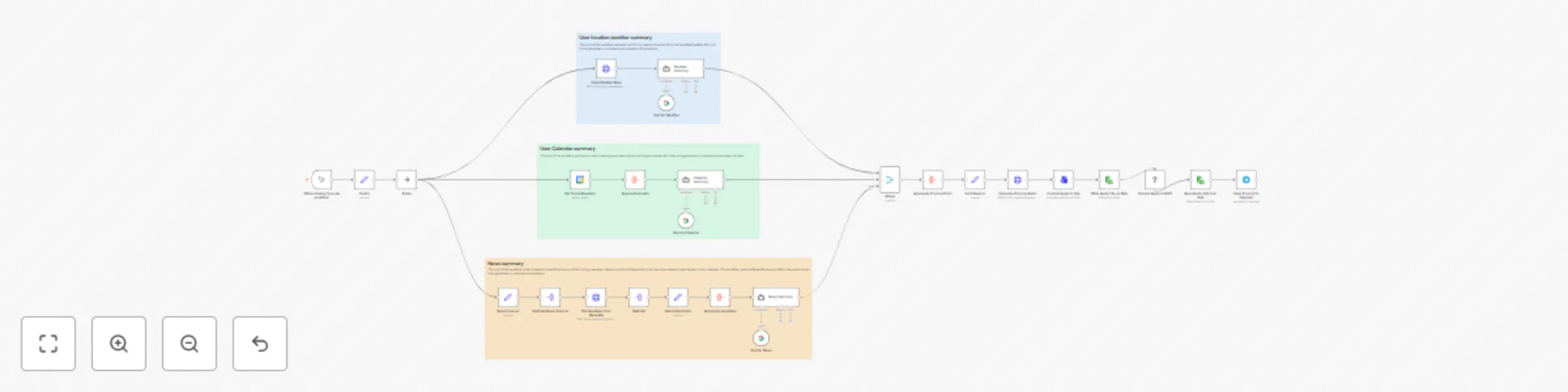
The workflow executes in three parallel branches before merging the data to generate the final audio file.

  1. Weather Summary: It starts by taking a user-provided city and fetching the current 15-hour forecast from the OpenWeatherMap. It formats this information into a concise weather report.
  2. Calendar Summary: It securely connects to your Google Calendar to retrieve all of today's scheduled meetings and events. It then formats the schedule into a clear, readable summary.
  3. News Summary: It connects to the NewsAPI to perform two tasks: it fetches the top general headlines and also searches for articles based on user-defined keywords (e.g., "AI", "automation", "space exploration"). The collected headlines are then summarized using a Google Gemini node to create a brief news digest.
  4. Audio Generation and Delivery: All three text summaries (weather, calendar, and news) are merged into a single script. The workflow uses Google's Text-to-Speech (TTS) to generate the raw multi-speaker audio. A dedicated FFmpeg node then processes and converts this audio into the final MP3 format. The completed podcast is then sent directly to you via a Telegram Bot.

Setup Instructions

To get this workflow running, you will need to configure credentials for each of the external services and set your initial parameters.

⚠️ Important Prerequisite Install FFmpeg: The workflow requires the FFmpeg software package to be installed on the machine running your n8n instance (local or server). Please ensure it is installed and accessible in your system's PATH before running this workflow.

Required Credentials

  1. OpenWeatherMap:
    • Sign up for a free account at OpenWeatherMap and get your API key.
    • Add the API key to your n8n OpenWeatherMap credentials.
  2. Google Calendar & Google AI (Gemini/TTS):
    • You will need Google OAuth2 credentials for the Google Calendar node.
    • You will also need credentials for the Google AI services (Gemini and Text-to-Speech). Follow the n8n documentation to create and add these credentials.
  3. NewsAPI:
    • Get a free API key from NewsAPI.org.
    • Add the API key to your n8n NewsAPI credentials.
  4. Telegram:
    • Create a new bot by talking to the BotFather in your Telegram app.
    • Copy the Bot Token it provides and add it to your n8n Telegram credentials.
    • Send a message to your new bot and get your Chat ID from the Telegram Trigger node or another method. You will need this for the Telegram send node.

Workflow Inputs

In the first node (or when you run the workflow manually), you must provide the following initial data:

  • name: Your first name for a personalized greeting.
  • city: The city for your local weather forecast (e.g., "Amsterdam").
  • language: The language for the entire podcast output (e.g., "en-US", "nl-NL", "fa-IR").
  • news_keywords: A comma-separated list of topics you are interested in for the news summary (e.g., "n8n,AI,technology").

How to Adapt the Template

This workflow is highly customizable. Here are several ways you can adapt it to fit your needs:

Triggers

  • Automate It: The default trigger is manual. Change it to a Schedule Trigger to have your podcast automatically generated and sent to you at the same time every morning (e.g., 7:00 AM).

Content Sources

  • Weather: In the "User Weather Map" node, you can change the forecast type or switch the units from metric to imperial.
  • Calendar: In the "Get Today Meetings" node, you can select a different calendar from your Google account (e.g., a shared work calendar instead of your personal one).
  • News:
    • In the "Get Headlines From News Sources" node, change the country or category to get different top headlines.
    • In the "Get Links From Keywords" node, update your keywords to track different topics.
    • In the "Aggregate Headlines" (Gemini) node, you can modify the prompt to change the tone or length of the AI-generated news summary.

Audio Generation

  • Voice & Language: The language is a starting parameter, but you can go deeper into the Google TTS nodes (Generate Virtual Parts, etc.) to select specific voices, genders, and speaking rates to create a unique podcast host style.
  • Scripting: Modify the Set and Merge nodes that construct the final script. You can easily change the greeting, the transition phrases between sections, or the sign-off message.

Delivery

  • Platform: Don't use Telegram? Swap the Telegram node for a Slack node, Discord node, or even an Email node to send the MP3 file to your preferred platform.
  • Message: Customize the text message that is sent along with the audio file in the final node.

1.2 Logical Blocks

This catalog entry is organized from the workflow JSON. The node-level section below shows the executable blocks available for review before importing the template.

2. Block-by-Block Analysis

Block 1 - When clicking ‘Execute workflow’

Type / Role
n8n-nodes-base.manualTrigger - manualTrigger
Config choices
Version 1

Block 2 - News Sources

Type / Role
n8n-nodes-base.set - set
Config choices
Version 3.4

Block 3 - Split Out News Sources

Type / Role
n8n-nodes-base.splitOut - splitOut
Config choices
Version 1

Block 4 - Get Headlines from NewsApi

Type / Role
n8n-nodes-base.httpRequest - httpRequest
Config choices
Version 4.2

Block 5 - Split Out

Type / Role
n8n-nodes-base.splitOut - splitOut
Config choices
Version 1

Block 6 - Config

Type / Role
n8n-nodes-base.set - set
Config choices
Version 3.4

Block 7 - Merge

Type / Role
n8n-nodes-base.merge - merge
Config choices
Version 3.2

Block 8 - Sticky Note

Type / Role
n8n-nodes-base.stickyNote - stickyNote
Config choices
Version 1

Block 9 - Get Today Meetings

Type / Role
n8n-nodes-base.googleCalendar - googleCalendar
Config choices
Version 1.3

Block 10 - Calendar Summary

Type / Role
@n8n/n8n-nodes-langchain.agent - agent
Config choices
Version 2.2

Block 11 - Gemini_Calendar

Type / Role
@n8n/n8n-nodes-langchain.lmChatGoogleGemini - lmChatGoogleGemini
Config choices
Version 1

Block 12 - Gemini_Weather

Type / Role
@n8n/n8n-nodes-langchain.lmChatGoogleGemini - lmChatGoogleGemini
Config choices
Version 1

Block 13 - Weather Summary

Type / Role
@n8n/n8n-nodes-langchain.agent - agent
Config choices
Version 2.2

Block 14 - Open Weather Map

Type / Role
n8n-nodes-base.httpRequest - httpRequest
Config choices
Version 4.2

Block 15 - Get Useful Fields

Type / Role
n8n-nodes-base.set - set
Config choices
Version 3.4

Block 16 - Aggregate Headlines

Type / Role
n8n-nodes-base.aggregate - aggregate
Config choices
Version 1

Block 17 - News Summary

Type / Role
@n8n/n8n-nodes-langchain.agent - agent
Config choices
Version 2.2

Block 18 - Gemini_News

Type / Role
@n8n/n8n-nodes-langchain.lmChatGoogleGemini - lmChatGoogleGemini
Config choices
Version 1

Block 19 - Sticky Note1

Type / Role
n8n-nodes-base.stickyNote - stickyNote
Config choices
Version 1

Block 20 - Sticky Note2

Type / Role
n8n-nodes-base.stickyNote - stickyNote
Config choices
Version 1

Block 21 - Aggregate Podcast Parts

Type / Role
n8n-nodes-base.aggregate - aggregate
Config choices
Version 1

Block 22 - Generate Podcast Audio

Type / Role
n8n-nodes-base.httpRequest - httpRequest
Config choices
Version 4.2

Block 23 - Set Filename

Type / Role
n8n-nodes-base.set - set
Config choices
Version 3.4

Block 24 - Convert Audio to File

Type / Role
n8n-nodes-base.convertToFile - convertToFile
Config choices
Version 1.1

Showing the first 24 of 30 workflow blocks. Download the JSON for the full node graph.

3. Summary Table

Workflow Morning briefing podcast: generate daily summaries with Gemini AI, weather, and calendar
Complexity advanced
Nodes 30
Categories Content Creation, Multimodal AI
Author Atta
Published 02 Sept 2025

4. Reproducing the Workflow from Scratch

  1. 1. Download the workflow JSON

    Use the JSON export at /data/workflows/8143/8143.json as the source template for this automation.

  2. 2. Import the template into n8n

    Open n8n, import the downloaded JSON, and review each node before activating the workflow.

  3. 3. Configure credentials and variables

    Replace placeholder credentials, API keys, webhook URLs, account IDs, and environment-specific values with your own settings.

  4. 4. Test with sample data

    Run the workflow manually or in a staging workspace, inspect node output, and confirm downstream systems receive the expected data.

  5. 5. Activate and monitor

    Enable the workflow only after testing, then monitor executions, errors, and rate limits during the first production runs.

5. General Notes & Resources

Review imported nodes carefully before activation. This catalog entry is intended to help you inspect the workflow structure, understand required services, and find related templates faster.

Node names, credentials, schedules, webhook paths, and external service limits may need adjustment for your workspace.

Frequently asked questions

What does Morning briefing podcast: generate daily summaries with Gemini AI, weather, and calendar do?

What it does Instead of manually checking separate apps for your calendar, weather, and news each morning, this workflow consolidates the most important information into a single, convenient audio ...

What do I need before importing this workflow?

Review the workflow JSON, configure any required credentials in n8n, and test the automation in a safe workspace before using it in production.

Can I customize this workflow?

Yes. Use the block-by-block analysis and the downloadable JSON to inspect each node, then adjust credentials, prompts, schedules, filters, or destinations for your Content Creation, Multimodal AI use case.