Monitor USDT ERC-20 wallet balance with Etherscan and Telegram notifications

Workflow preview

Workflow preview
100%
Monitor USDT ERC-20 wallet balance with Etherscan and Telegram notifications preview
Open on n8n.io

Important notice

This workflow is provided as-is. Please review and test before using in production.

1. Workflow Overview

Overview This n8n workflow is specifically designed to monitor the USDT ERC 20 balance within a specific wallet. It uses Etherscan's public blockchai...

Best for

  • Crypto Trading automation workflows
  • intermediate n8n builders looking for reusable templates

Tools used

n8n-nodes-base.if, n8n-nodes-base.telegram, n8n-nodes-base.set, n8n-nodes-base.code, n8n-nodes-base.stickynote, n8n-nodes-base.cron, n8n-nodes-base.httprequest

Source and attribution

This workflow is cataloged by N8N Workflows and links back to its original n8n.io source page by FORK SOFTWARE TECHNOLOGIES INC..

Original n8n.io source

1.1 Workflow description

Title
Monitor USDT ERC-20 wallet balance with Etherscan and Telegram notifications
Workflow name
Monitor USDT ERC-20 wallet balance with Etherscan and Telegram notifications

Overview

This n8n workflow is specifically designed to monitor the USDT ERC-20 balance within a specific wallet. It uses Etherscan's public blockchain database, which does not require API authentication, to periodically check and process transaction data. This workflow is ideal for users who need an automated solution to track ERC-20 wallet transactions.

Features

  • Automatic Monitoring: Executes every 5 minutes to capture new transactions.
  • Customizable Filters: Customize tracking based on parameters like transaction duration and wallet addresses.
  • Data Aggregation: Compiles transaction data into a single, structured list.
  • Formatted Outputs: Presents processed data in an organized format.
  • Telegram Tracking: Tracks wallet balances via Telegram notifications using the bot.

Requirements

  • n8n Setup: Requires a self-hosted or cloud-based n8n instance.
  • Basic Understanding: Basic knowledge of n8n workflows and nodes.

Installation and Configuration

  1. Import Workflow: Load the provided JSON workflow into your n8n instance.

  2. Configure the User Data Node:

    • Enter your ERC-20 Wallet Address in the 'Your Wallet Address' field.
    • Enter your Etherscan API Key in the “Your Etherscan API Key” field.
    • Enter your USDT ERC-20 Contract Address in the "Your ERC-20 USDT Contract Address" field (0xdAC17F958D2ee523a2206206994597C13D831ec7). You can also monitor another token by entering a different contract address.
  3. Configure the Telegram Node:

    • Go to Telegram and search for "BotFather".
    • Select /newbot from the BotFather menu to create your bot.
    • Get the API key BotFather provides.
    • Go to Telegram and search for "Get My ChatID".
    • Start the conversation and get your ChatID.
    • Use this information to configure the Telegram Node.
  4. Schedule Trigger Node: By default, the workflow is triggered every 5 minutes. Adjust this according to your needs.

  5. Test the Workflow: Execute the workflow manually to ensure everything is working as expected.

How It Works

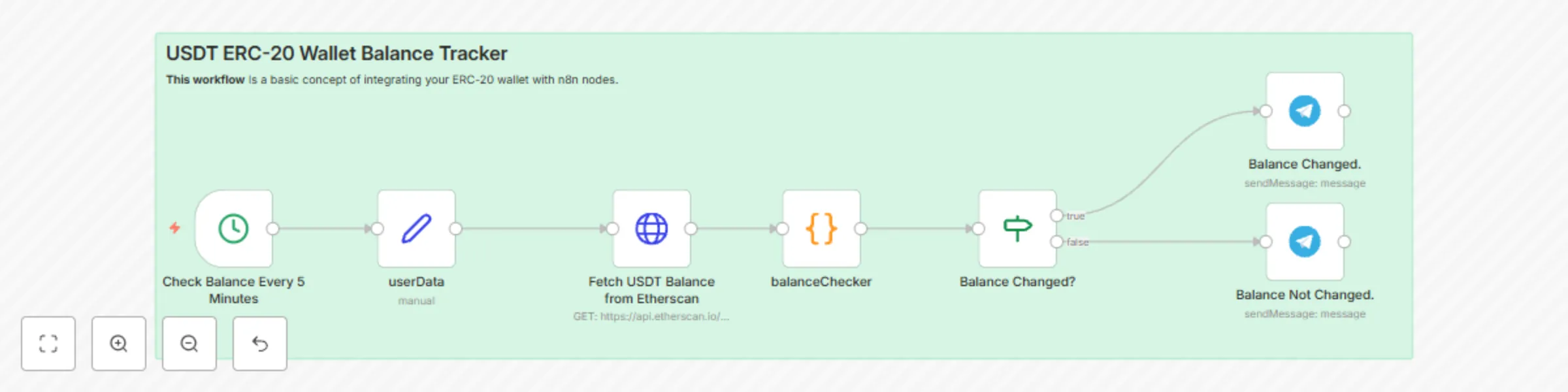
  1. Schedule Trigger: Starts the workflow at predetermined intervals.
  2. Edit Fields: Sets the wallet address, Etherscan API key, and USDT ERC-20 token address.
  3. Edit Telegram Settings: Create a bot via BotFather. Configure the API key and Telegram Chat ID.
  4. Etherscan Data Import: Collects transaction data from the ERC-20 wallet using Etherscan's public database.
  5. Final Results: Organizes and formats the transaction data for review.
  6. Telegram Bot Message Sending: If there is a balance change, it sends a formatted message about the balance change. If there is no balance change, it sends a message that your balance has not changed. You can configure it to avoid sending a message when there is no change.

1.2 Logical Blocks

This catalog entry is organized from the workflow JSON. The node-level section below shows the executable blocks available for review before importing the template.

2. Block-by-Block Analysis

Block 1 - Balance Changed?

Type / Role
n8n-nodes-base.if - if
Config choices
Version 1

Block 2 - Balance Changed.

Type / Role
n8n-nodes-base.telegram - telegram
Config choices
Version 1

Block 3 - Balance Not Changed.

Type / Role
n8n-nodes-base.telegram - telegram
Config choices
Version 1

Block 4 - userData

Type / Role
n8n-nodes-base.set - set
Config choices
Version 3.4

Block 5 - balanceChecker

Type / Role
n8n-nodes-base.code - code
Config choices
Version 2

Block 6 - Sticky Note

Type / Role
n8n-nodes-base.stickyNote - stickyNote
Config choices
Version 1

Block 7 - Check Balance Every 5 Minutes

Type / Role
n8n-nodes-base.cron - cron
Config choices
Version 1

Block 8 - Fetch USDT Balance from Etherscan

Type / Role
n8n-nodes-base.httpRequest - httpRequest
Config choices
Version 3

3. Summary Table

Workflow Monitor USDT ERC-20 wallet balance with Etherscan and Telegram notifications
Complexity intermediate
Nodes 8
Categories Crypto Trading
Author FORK SOFTWARE TECHNOLOGIES INC.
Published 26 Mar 2025

4. Reproducing the Workflow from Scratch

  1. 1. Download the workflow JSON

    Use the JSON export at /data/workflows/3330/3330.json as the source template for this automation.

  2. 2. Import the template into n8n

    Open n8n, import the downloaded JSON, and review each node before activating the workflow.

  3. 3. Configure credentials and variables

    Replace placeholder credentials, API keys, webhook URLs, account IDs, and environment-specific values with your own settings.

  4. 4. Test with sample data

    Run the workflow manually or in a staging workspace, inspect node output, and confirm downstream systems receive the expected data.

  5. 5. Activate and monitor

    Enable the workflow only after testing, then monitor executions, errors, and rate limits during the first production runs.

5. General Notes & Resources

Review imported nodes carefully before activation. This catalog entry is intended to help you inspect the workflow structure, understand required services, and find related templates faster.

Node names, credentials, schedules, webhook paths, and external service limits may need adjustment for your workspace.

Frequently asked questions

What does Monitor USDT ERC-20 wallet balance with Etherscan and Telegram notifications do?

Overview This n8n workflow is specifically designed to monitor the USDT ERC 20 balance within a specific wallet. It uses Etherscan's public blockchai...

What do I need before importing this workflow?

Review the workflow JSON, configure any required credentials in n8n, and test the automation in a safe workspace before using it in production.

Can I customize this workflow?

Yes. Use the block-by-block analysis and the downloadable JSON to inspect each node, then adjust credentials, prompts, schedules, filters, or destinations for your Crypto Trading use case.