Block 1 - Daily Inventory Check
- Type / Role
- n8n-nodes-base.scheduleTrigger - scheduleTrigger
- Config choices
- Version 1.2


 Early Deal
This workflow is provided as-is. Please review and test before using in production.
Inventory Low Stock Alerts E commerce Automation This n8n template automatically monitors your Shopify inventory levels and sends alerts when products fall below your defined threshold. Prevent sto...
n8n-nodes-base.scheduletrigger, n8n-nodes-base.shopify, n8n-nodes-base.code, n8n-nodes-base.if, n8n-nodes-base.set, n8n-nodes-base.slack, n8n-nodes-base.stickynote
This workflow is cataloged by N8N Workflows and links back to its original n8n.io source page by David Olusola.
Original n8n.io sourceE-commerce Automation This n8n template automatically monitors your Shopify inventory levels and sends alerts when products fall below your defined threshold. Prevent stockouts and maintain sales revenue with proactive inventory management. Good to know
Default threshold is 10 units but easily customizable in the Code node Monitors all product variants individually Runs daily at 9 AM but schedule is fully adjustable Only sends alerts when action is needed (no empty notifications)
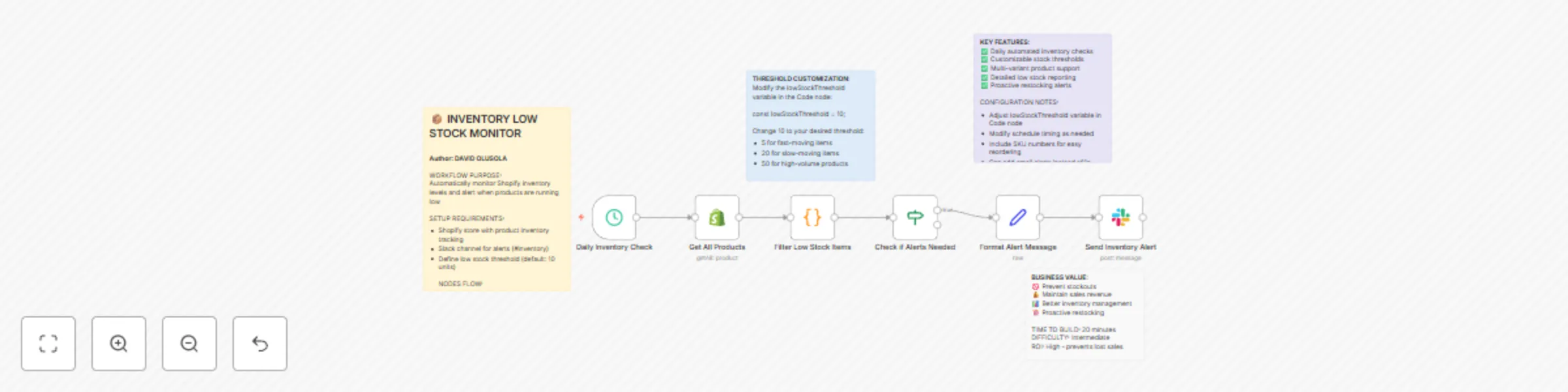
The schedule runs daily at 9 AM and connects to Shopify to download all products and variants. The workflow loops through every product and variant, checking inventory quantity for each item. It compares current stock against your threshold (default: 10 units) and identifies items below threshold. If any low stock items are found, it creates a comprehensive list and formats an alert message. The formatted report is sent to your Slack team so they can take immediate restocking action.
Set up Shopify credentials in n8n: API Key, Password, Shop Subdomain, and Shared Secret The schedule trigger runs daily at 9 AM but feel free to adjust timing based on your business needs
Modify "lowStockThreshold" variable in the Code node (default is set to 10 units) Set up Slack credentials and create a dedicated #inventory channel for alerts Ensure your Shopify products have inventory tracking enabled in product settings
Test the workflow manually to verify it correctly identifies low-stock items
"🚨 Low Stock Alert!
T-Shirt Blue (Medium): 3 left Coffee Mug (White): 7 left Phone Case (Black): 2 left"
Business logic: Stock above threshold equals no alert. Stock at or below threshold equals alert sent. Stock at zero equals out of stock which is critical.
Add email alerts for critical out-of-stock items Set different thresholds for different product categories Include supplier contact information in alerts
This catalog entry is organized from the workflow JSON. The node-level section below shows the executable blocks available for review before importing the template.
| Workflow | Monitor Shopify inventory & send low stock alerts to Slack |
|---|---|
| Complexity | intermediate |
| Nodes | 10 |
| Categories | Miscellaneous |
| Author | David Olusola |
| Published | 18 Jul 2025 |
Use the JSON export at /data/workflows/6110/6110.json as the source template for this automation.
Open n8n, import the downloaded JSON, and review each node before activating the workflow.
Replace placeholder credentials, API keys, webhook URLs, account IDs, and environment-specific values with your own settings.
Run the workflow manually or in a staging workspace, inspect node output, and confirm downstream systems receive the expected data.
Enable the workflow only after testing, then monitor executions, errors, and rate limits during the first production runs.
Review imported nodes carefully before activation. This catalog entry is intended to help you inspect the workflow structure, understand required services, and find related templates faster.
Node names, credentials, schedules, webhook paths, and external service limits may need adjustment for your workspace.
Inventory Low Stock Alerts E commerce Automation This n8n template automatically monitors your Shopify inventory levels and sends alerts when products fall below your defined threshold. Prevent sto...
Review the workflow JSON, configure any required credentials in n8n, and test the automation in a safe workspace before using it in production.
Yes. Use the block-by-block analysis and the downloadable JSON to inspect each node, then adjust credentials, prompts, schedules, filters, or destinations for your Miscellaneous use case.