Block 1 - Sticky Note
- Type / Role
- n8n-nodes-base.stickyNote - stickyNote
- Config choices
- Version 1
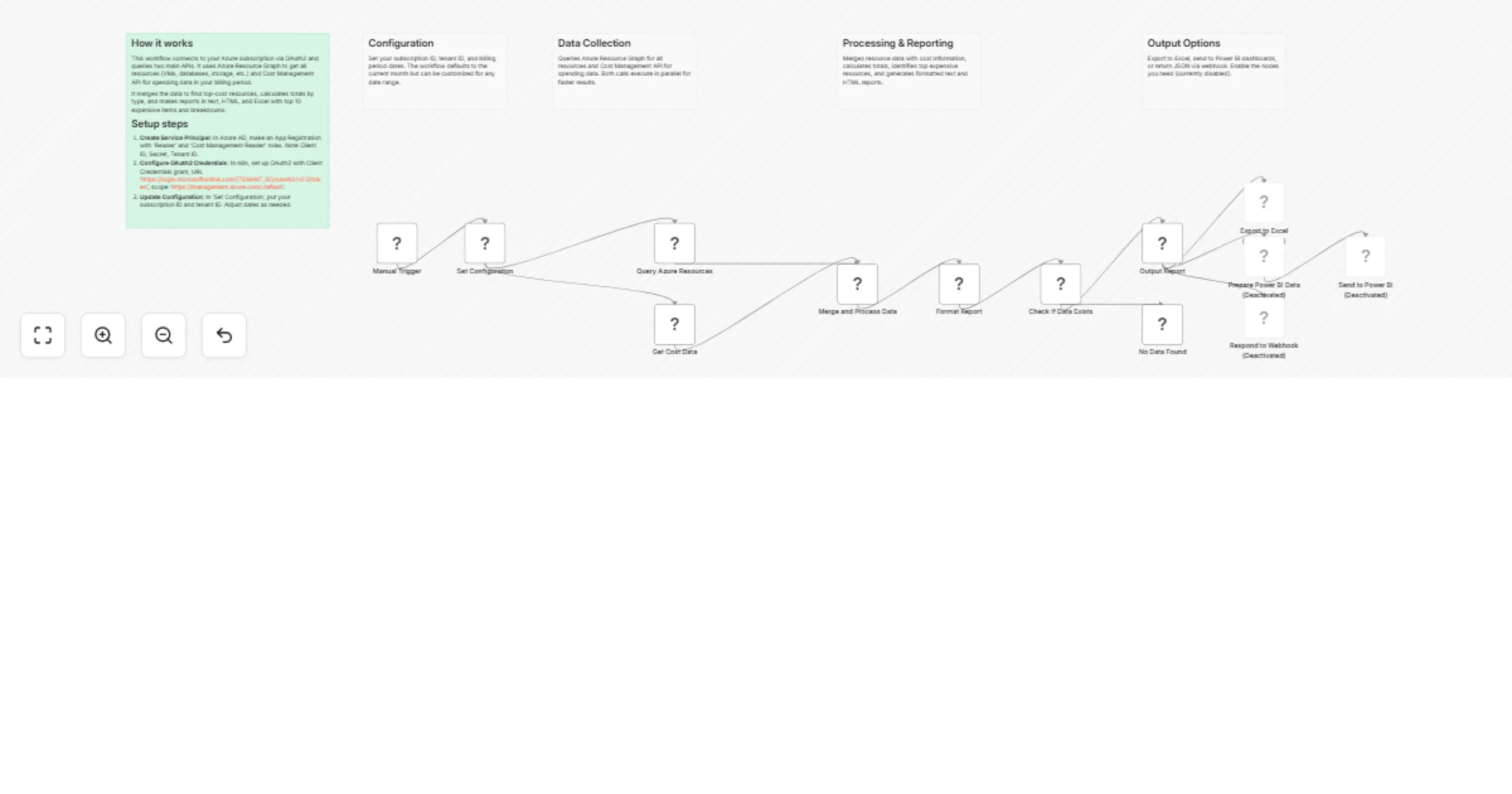


 Early Deal
Monitor Azure subscription resources with cost and usage tracking Template Name Monitor Azure subscription resources with cost and usage tracking Description Automatically connect to your Azure sub...
n8n-nodes-base.stickynote, n8n-nodes-base.manualtrigger, n8n-nodes-base.set, n8n-nodes-base.httprequest, n8n-nodes-base.code, n8n-nodes-base.if, n8n-nodes-base.spreadsheetfile, n8n-nodes-base.respondtowebhook
This workflow is cataloged by N8N Workflows and links back to its original n8n.io source page by kartik ramachandran.
Original n8n.io sourceMonitor Azure subscription resources with cost and usage tracking
Automatically connect to your Azure subscription to retrieve all resources and track costs. Generates formatted reports with total spending, top expensive resources, and cost breakdown by type.
DevOps Engineers, Cloud Architects, Finance Teams, IT Managers, and organizations implementing FinOps practices.
1. Create Azure Service Principal
Azure CLI:
az ad sp create-for-rbac --name "n8n-cost-monitor" --role "Reader" --scopes /subscriptions/{sub-id}
az role assignment create --assignee {client-id} --role "Cost Management Reader" --scope /subscriptions/{sub-id}
Or use Azure Portal: Azure AD → App registrations → New registration → Assign roles
2. Configure n8n OAuth2 Credential
https://login.microsoftonline.com/{TENANT_ID}/oauth2/v2.0/tokenhttps://management.azure.com/.default3. Update Workflow Configuration
subscriptionId and tenantIdtimeRange (see options below)Time Range Options:
currentMonth - Current billing month (default)lastMonth - Previous full monthlast30Days - Last 30 dayslast90Days - Last 90 days (3 months)last6Months - Last 6 monthsyearToDate - From Jan 1 to todaylastYear - Full previous year (365 days)custom - Manually set startDate and endDate4. Enable Output Options (Optional)
5. Schedule (Optional)
Replace Manual Trigger with Schedule Trigger (daily: 0 9 * * *)
The workflow includes three disabled output nodes. To enable them:
The Excel export node is pre-configured but disabled. To use it:
// Already configured to export:
- All resources with their costs
- Formatted as Excel (.xlsx)
- Filename includes current date
- Headers included automatically
To customize:
Step 1: Create Power BI Streaming Dataset
{
 "summary": {
 "totalCost": "string",
 "resourceCount": "number",
 "period": "string"
 },
 "resources": [
 {
 "resourceName": "string",
 "resourceType": "string",
 "cost": "string"
 }
 ],
 "timestamp": "datetime",
 "reportType": "string"
}
Step 2: Configure n8n Workflow
Step 3: Create Power BI Dashboard
To use the workflow as an API endpoint:
Step 1: Change Trigger
Step 2: Enable Response Node
**Response Format:**

```json
{
 "status": "success",
 "data": {

### Enable Output Options

Right-click disabled nodes → Enable → Configure settings

### Filter Resources

Modify query in "Query Azure Resources" node:

```kusto
Resources
| where resourceGroup contains 'production'
| project name, type, location, resourceGroup, tags, id
Set timeRange in "Set Configuration" node:
timeRange: "last30Days" // Last 30 days
timeRange: "last90Days" // Last quarter
timeRange: "last6Months" // Last 6 months
timeRange: "yearToDate" // YTD from Jan 1
timeRange: "lastYear" // Previous 365 days
timeRange: "custom" // Use custom dates
For custom periods, set timeRange to "custom" and manually update:
startDate: "2026-01-01"
endDate: "2026-01-31"
{{ parseFloat($json.summary.totalCost) > 1000 }}
"Authentication failed"
"No resources returned"
"No cost data available"
In "Set Configuration" node:
// Last 7 days
startDate: {{ $now.minus({days: 7}).format('yyyy-MM-dd') }}
endDate: {{ $now.format('yyyy-MM-dd') }}
Add IF node after "Format Report":
{{ parseFloat($json.summary.totalCost) > 1000 }2. **Microsoft.Sql/servers/databases** - 3 resources - $345.67
...

---
_Generated by n8n on 1/19/2026, 10:30:00 AM_
Includes styled HTML with:
| Column | Type | Description |
|---|---|---|
| resourceName | String | Name of the Azure resource |
| resourceType | String | Full resource type (e.g., Microsoft.Compute/virtualMachines) |
| resourceGroup | String | Resource group name |
| location | String | Azure region (e.g., eastus, westus2) |
| sku | Object | SKU information (name, tier) |
| tags | Object | All resource tags |
| cost | Number | Total cost for the period |
| costDetails | Array | Detailed daily cost breakdown |
Recommended Power BI measures:
Total Cost = SUM('CostData'[cost])
Avg Cost Per Resource = DIVIDE([Total Cost], COUNT('CostData'[resourceName]))
Cost Variance = [Total Cost] - CALCULATE([Total Cost], DATEADD('CostData'[timestamp], -1, MONTH))
Top 5 Expensive Resources = TOPN(5, 'CostData', 'CostData'[cost], DESC)
import requests
import pandas as pd

# Call the n8n webhook
url = "https://your-n8n-instance.com/webhook/azure-cost-report"
response = requests.get(url)
data = response.json()

# Convert to DataFrame
resources_df = pd.DataFrame(data['data']['summary']['allResources'])

# Analyze costs
print(f"Total Cost: ${data['data']['totalCost']}")
print(f"Most expensive resource: {resources_df.iloc[0]['resourceName']}")

# Export to local Excel
resources_df.to_excel('azure_costs.xlsx', index=False)
# Call the webhook
$url = "https://your-n8n-instance.com/webhook/azure-cost-report"
$response = Invoke-RestMethod -Uri $url -Method Get

# Display summary
Write-Host "Total Cost: $($response.data.totalCost)" -ForegroundColor Green
Write-Host "Resource Count: $($response.data.resourceCount)"

# Export to CSV
$response.data.summary.allResources |
 Export-Csv -Path "azure-costs.csv" -NoTypeInformation

# Send alert if cost exceeds threshold
if ([decimal]$response.data.totalCost -gt 1000) {
 Send-MailMessage -To "[email protected]" `
 -Subject "Azure Cost Alert" `
 -Body "Current costs: $($response.data.totalCost)" `
 -SmtpServer "smtp.company.com"
}
const axios = require('axios');

**"Authentication failed"**: Verify Tenant ID, Client ID, Secret, and Service Principal roles

**"No resources returned"**: Check Subscription ID and Reader role assignment

**"No cost data"**: Cost data takes 24-48 hours to appear. Verify Cost Management Reader role.

**"Rate limiting (429)"**: Add Wait node between API calls or reduce query frequency

## Resources

- [Azure Resource Graph](https://learn.microsoft.com/azure/governance/resource-graph/)
- [Cost Management API](https://learn.microsoft.com/rest/api/cost-management/)
- [n8n Documentation](https://docs.n8n.io/---

**Category**: Cloud Management, DevOps, FinOps
**Difficulty**: Intermediate
**Setup Time**: 10-15 minutes
**n8n Version**: 1.0+
This catalog entry is organized from the workflow JSON. The node-level section below shows the executable blocks available for review before importing the template.
| Workflow | Monitor Azure subscription resources with cost and usage tracking and reports |
|---|---|
| Complexity | advanced |
| Nodes | 18 |
| Categories | DevOps |
| Author | kartik ramachandran |
| Published | 18 Jan 2026 |
Use the JSON export at /data/workflows/12802/12802.json as the source template for this automation.
Open n8n, import the downloaded JSON, and review each node before activating the workflow.
Replace placeholder credentials, API keys, webhook URLs, account IDs, and environment-specific values with your own settings.
Run the workflow manually or in a staging workspace, inspect node output, and confirm downstream systems receive the expected data.
Enable the workflow only after testing, then monitor executions, errors, and rate limits during the first production runs.
Review imported nodes carefully before activation. This catalog entry is intended to help you inspect the workflow structure, understand required services, and find related templates faster.
Node names, credentials, schedules, webhook paths, and external service limits may need adjustment for your workspace.
Monitor Azure subscription resources with cost and usage tracking Template Name Monitor Azure subscription resources with cost and usage tracking Description Automatically connect to your Azure sub...
Review the workflow JSON, configure any required credentials in n8n, and test the automation in a safe workspace before using it in production.
Yes. Use the block-by-block analysis and the downloadable JSON to inspect each node, then adjust credentials, prompts, schedules, filters, or destinations for your DevOps use case.