Block 1 - OpenRouter Chat Model
- Type / Role
- @n8n/n8n-nodes-langchain.lmChatOpenRouter - lmChatOpenRouter
- Config choices
- Version 1


 Early Deal
This workflow is provided as-is. Please review and test before using in production.
Who's it for This template is for home cooks, small restaurant owners, or anyone who wants to streamline their meal planning, ingredient cost tracking, leftover management, nutritional analysis, an...
@n8n/n8n-nodes-langchain.lmchatopenrouter, @n8n/n8n-nodes-langchain.outputparserstructured, n8n-nodes-base.googlesheets, n8n-nodes-base.webhook, n8n-nodes-base.twitter, @n8n/n8n-nodes-langchain.agent, n8n-nodes-base.stickynote
This workflow is cataloged by N8N Workflows and links back to its original n8n.io source page by takuma.
Original n8n.io sourceThis template is for home cooks, small restaurant owners, or anyone who wants to streamline their meal planning, ingredient cost tracking, leftover management, nutritional analysis, and social media promotion. It's ideal for those looking to optimize their kitchen operations, reduce food waste, maintain a healthy diet, and efficiently share their culinary creations.
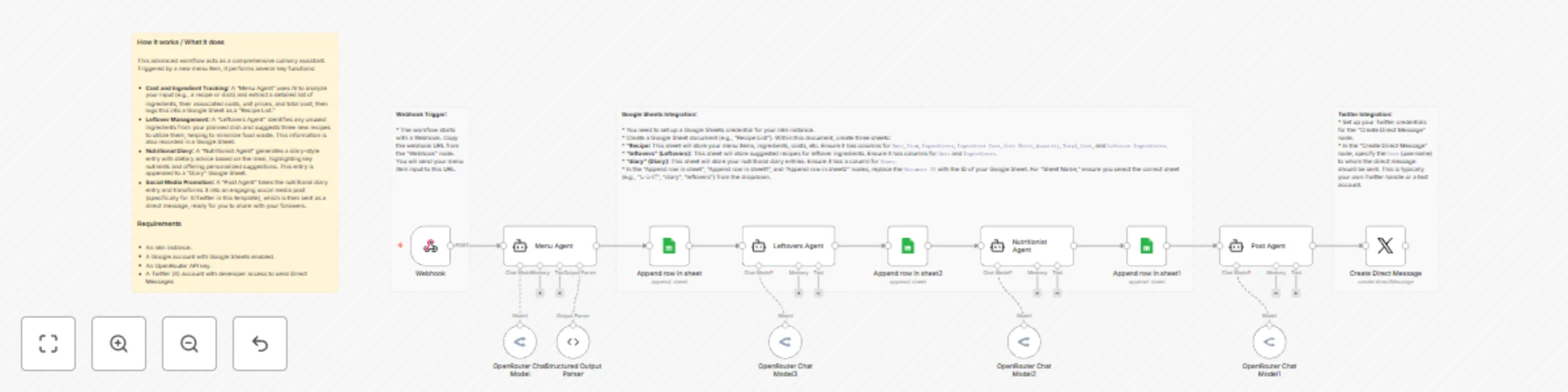
This advanced workflow acts as a comprehensive culinary assistant. Triggered by a new menu item, it performs several key functions:
Date, Item, Ingredients, Ingredient Cost, Unit Price, Quantity, Total, Cost, and Leftover Ingredients.Date and Ingredients.Diary.Document ID with the ID of your Google Sheet. For "Sheet Name," ensure you select the correct sheet (e.g., "レシピ", "diary", "leftovers") from the dropdown.User (username) to whom the direct message should be sent. This is typically your own Twitter handle or a test account.System Message in each AI Agent node (Menu Agent, Leftovers Agent, Nutritionist Agent, Post Agent) to refine their behavior and the kind of output they generate. For example, you could ask the Nutritionist Agent to focus on specific dietary needs.This catalog entry is organized from the workflow JSON. The node-level section below shows the executable blocks available for review before importing the template.
| Workflow | Meal planner: cost tracking, leftover recipes & nutrition diary in Google Sheets |
|---|---|
| Complexity | advanced |
| Nodes | 18 |
| Categories | Personal Productivity, Multimodal AI |
| Author | takuma |
| Published | 18 Nov 2025 |
Use the JSON export at /data/workflows/10967/10967.json as the source template for this automation.
Open n8n, import the downloaded JSON, and review each node before activating the workflow.
Replace placeholder credentials, API keys, webhook URLs, account IDs, and environment-specific values with your own settings.
Run the workflow manually or in a staging workspace, inspect node output, and confirm downstream systems receive the expected data.
Enable the workflow only after testing, then monitor executions, errors, and rate limits during the first production runs.
Review imported nodes carefully before activation. This catalog entry is intended to help you inspect the workflow structure, understand required services, and find related templates faster.
Node names, credentials, schedules, webhook paths, and external service limits may need adjustment for your workspace.
Who's it for This template is for home cooks, small restaurant owners, or anyone who wants to streamline their meal planning, ingredient cost tracking, leftover management, nutritional analysis, an...
Review the workflow JSON, configure any required credentials in n8n, and test the automation in a safe workspace before using it in production.
Yes. Use the block-by-block analysis and the downloadable JSON to inspect each node, then adjust credentials, prompts, schedules, filters, or destinations for your Personal Productivity, Multimodal AI use case.