Lookup IP geolocation details with IP-API.com via webhook

Workflow preview

Workflow preview
100%
Lookup IP geolocation details with IP-API.com via webhook preview
Open on n8n.io

Important notice

This workflow is provided as-is. Please review and test before using in production.

1. Workflow Overview

This n8n template enables you to instantly retrieve detailed geolocation information for any given IP address by simply sending a webhook request. Leverage the power of IP API.com to gain insights ...

Best for

  • Engineering automation workflows
  • intermediate n8n builders looking for reusable templates

Tools used

n8n-nodes-base.stickynote, n8n-nodes-base.httprequest, n8n-nodes-base.webhook, n8n-nodes-base.respondtowebhook

Source and attribution

This workflow is cataloged by N8N Workflows and links back to its original n8n.io source page by ist00dent.

Original n8n.io source

1.1 Workflow description

Title
Lookup IP geolocation details with IP-API.com via webhook
Workflow name
Lookup IP geolocation details with IP-API.com via webhook

This n8n template enables you to instantly retrieve detailed geolocation information for any given IP address by simply sending a webhook request. Leverage the power of IP-API.com to gain insights into user locations, personalize experiences, or enhance security protocols within your automated workflows.


πŸ”§ How it works

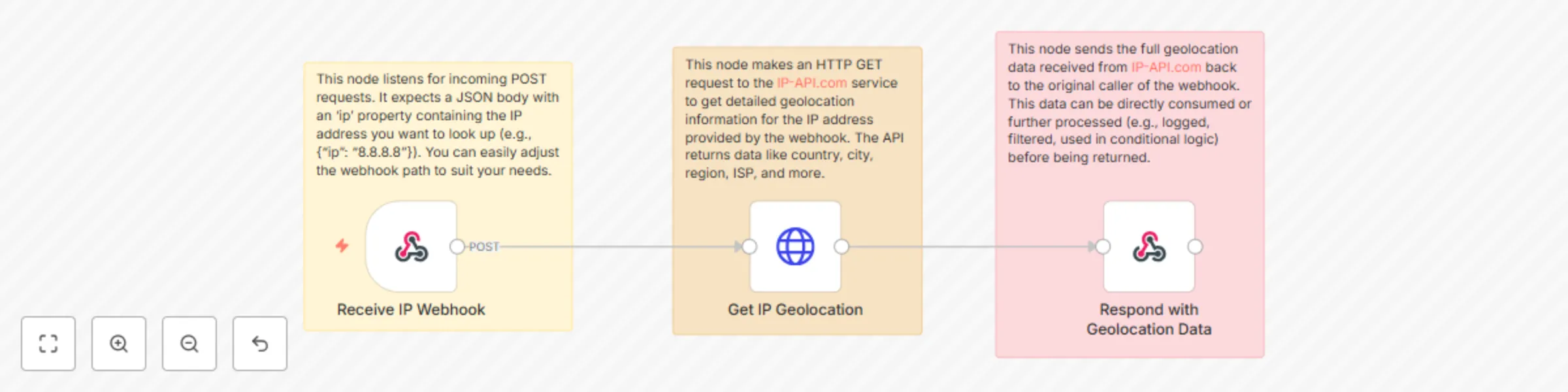
  • Receive IP Webhook: This node acts as the entry point, listening for incoming POST requests. It expects a JSON body containing an ip property with the IP address you wish to look up.
  • Get IP Geolocation: This node makes an HTTP GET request to the IP-API.com service, passing the IP address from your webhook. The API responds with a comprehensive JSON object detailing the IP's location (country, city, region), ISP, organization, and more.
  • Respond with Geolocation Data: This node sends the full geolocation data received from IP-API.com back to the service that initiated the webhook.

πŸ‘€ Who is it for?

This workflow is ideal for:

  • Marketing & Sales Teams: Personalize website content, offers, or ads based on a visitor's geographic location. Tailor email campaigns by region.
  • Customer Support: Quickly identify a customer's location to provide more localized or relevant assistance.
  • Security & Fraud Detection: Analyze incoming connection IPs to identify suspicious activity, block known malicious regions, or flag potential fraud.
  • Analytics & Reporting: Augment your analytics data with geographical insights about your users or traffic.
  • Developers & Integrators: Easily add IP lookup functionality to custom applications, internal tools, or monitoring systems.
  • Content Delivery Networks (CDNs): Route users to the closest servers for faster content delivery (though advanced CDNs usually handle this automatically).

πŸ“‘ Data Structure

When you trigger the webhook, send a POST request with a JSON body structured as follows:

{
  "ip": "8.8.8.8" // Replace with the IP address you want to look up
}

The workflow will return a JSON response similar to this (data will vary based on IP):

{
  "status": "success",
  "country": "United States",
  "countryCode": "US",
  "region": "VA",
  "regionName": "Virginia",
  "city": "Ashburn",
  "zip": "20149",
  "lat": 39.0437,
  "lon": -77.4875,
  "timezone": "America/New_York",
  "isp": "Google LLC",
  "org": "Google Public DNS",
  "as": "AS15169 Google LLC",
  "query": "8.8.8.8"
}

βš™οΈ Setup Instructions

  • Import Workflow: In your n8n editor, click "Import from JSON" and paste the provided workflow JSON.
  • Configure Webhook Path:
    • Double-click the Receive IP Webhook node.
    • In the 'Path' field, set a unique and descriptive path (e.g., /ip-lookup).
  • Activate Workflow: Save and activate the workflow.

πŸ“ Tips

This workflow, while simple, is a powerful building block. Here's how you can make it even more useful:

  • Conditional Logic: Add IF nodes after "Get IP Geolocation" to create conditional branches. For example:
    • If countryCode is 'CN' or 'RU', send an alert to your security team.
    • If city is 'New York', route the request to a specific sales representative.
  • Data Enrichment: Integrate this workflow into larger automation. For instance:
    • When a new sign-up occurs, pass their IP address to this workflow, then save the returned geolocation data (country, city, ISP) alongside their user profile in your CRM or database.
    • For e-commerce, use the location data to pre-fill shipping fields or suggest local currency/language.
  • Logging & Analytics: Store the lookup results in a spreadsheet (Google Sheets), database (PostgreSQL, Airtable), or logging service. This can help you track where your users are coming from over time.
  • Rate Limiting: IP-API.com has rate limits for its free tier. If you anticipate high usage, consider adding a Delay node or implementing a caching mechanism with a Cache node to avoid hitting limits. For heavy use, you might need to upgrade to a paid plan.
  • Dynamic Response: Instead of returning the full JSON, you could use a Function node to extract only specific pieces of information (e.g., just the country and city) and return a more concise response.
  • Input Validation: For robust production use, add a Function node after the webhook to validate that the incoming ip value is indeed a valid IP address. If it's not, you can return an error message to the caller.

1.2 Logical Blocks

This catalog entry is organized from the workflow JSON. The node-level section below shows the executable blocks available for review before importing the template.

2. Block-by-Block Analysis

Block 1 - Note for Webhook Trigger

Type / Role
n8n-nodes-base.stickyNote - stickyNote
Config choices
Version 1

Block 2 - Note for IP Lookup

Type / Role
n8n-nodes-base.stickyNote - stickyNote
Config choices
Version 1

Block 3 - Note for Webhook Response

Type / Role
n8n-nodes-base.stickyNote - stickyNote
Config choices
Version 1

Block 4 - Get IP Geolocation

Type / Role
n8n-nodes-base.httpRequest - httpRequest
Config choices
Version 4.2

Block 5 - Receive IP Webhook

Type / Role
n8n-nodes-base.webhook - webhook
Config choices
Version 2

Block 6 - Respond with Geolocation Data

Type / Role
n8n-nodes-base.respondToWebhook - respondToWebhook
Config choices
Version 1.2

3. Summary Table

Workflow Lookup IP geolocation details with IP-API.com via webhook
Complexity intermediate
Nodes 6
Categories Engineering
Author ist00dent
Published 02 Jun 2025

4. Reproducing the Workflow from Scratch

  1. 1. Download the workflow JSON

    Use the JSON export at /data/workflows/4599/4599.json as the source template for this automation.

  2. 2. Import the template into n8n

    Open n8n, import the downloaded JSON, and review each node before activating the workflow.

  3. 3. Configure credentials and variables

    Replace placeholder credentials, API keys, webhook URLs, account IDs, and environment-specific values with your own settings.

  4. 4. Test with sample data

    Run the workflow manually or in a staging workspace, inspect node output, and confirm downstream systems receive the expected data.

  5. 5. Activate and monitor

    Enable the workflow only after testing, then monitor executions, errors, and rate limits during the first production runs.

5. General Notes & Resources

Review imported nodes carefully before activation. This catalog entry is intended to help you inspect the workflow structure, understand required services, and find related templates faster.

Node names, credentials, schedules, webhook paths, and external service limits may need adjustment for your workspace.

Frequently asked questions

What does Lookup IP geolocation details with IP-API.com via webhook do?

This n8n template enables you to instantly retrieve detailed geolocation information for any given IP address by simply sending a webhook request. Leverage the power of IP API.com to gain insights ...

What do I need before importing this workflow?

Review the workflow JSON, configure any required credentials in n8n, and test the automation in a safe workspace before using it in production.

Can I customize this workflow?

Yes. Use the block-by-block analysis and the downloadable JSON to inspect each node, then adjust credentials, prompts, schedules, filters, or destinations for your Engineering use case.