Block 1 - AI Agent
- Type / Role
- @n8n/n8n-nodes-langchain.agent - agent
- Config choices
- Version 2


 Early Deal
This workflow is provided as-is. Please review and test before using in production.
Who's it for This workflow is designed for users who want to implement iterative AI powered content improvement processes. It's ideal for content creators, marketers, product managers, and anyone w...
@n8n/n8n-nodes-langchain.agent, n8n-nodes-base.splitinbatches, n8n-nodes-base.if, n8n-nodes-base.set, n8n-nodes-base.code, @n8n/n8n-nodes-langchain.lmchatopenai, @n8n/n8n-nodes-langchain.outputparserstructured, n8n-nodes-base.manualtrigger
This workflow is cataloged by N8N Workflows and links back to its original n8n.io source page by Sebastian/OptiLever.
Original n8n.io sourceThis workflow is designed for users who want to implement iterative AI-powered content improvement processes. It's ideal for content creators, marketers, product managers, and anyone who needs to refine ideas through multiple rounds of critique and enhancement until they meet quality standards.
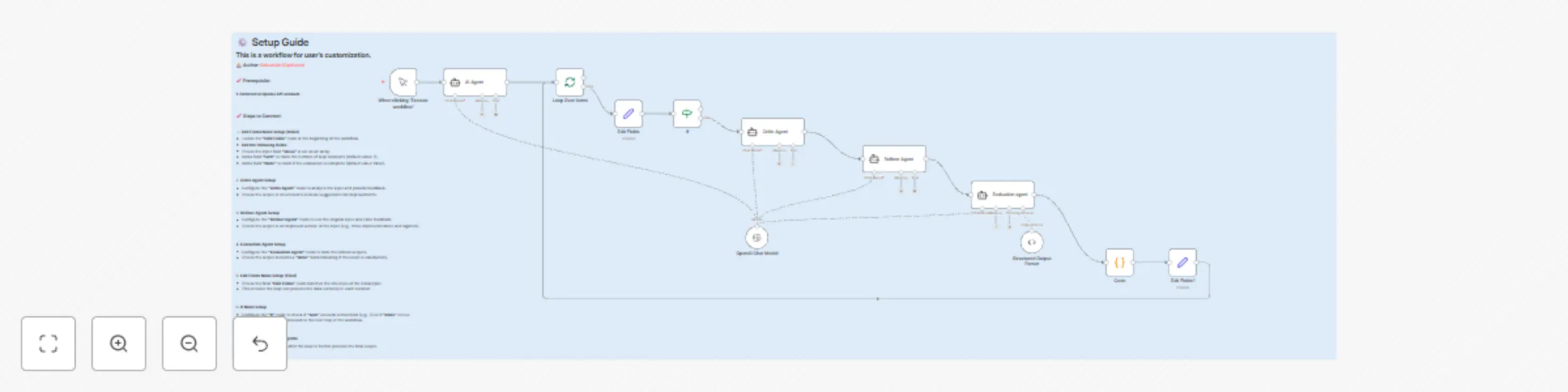
The workflow creates a sophisticated feedback loop using three specialized AI agents that work together to continuously improve content. Starting with an initial input (like a product description), the system generates ideas and then enters a reasoning loop where:
A Critic Agent analyzes the current output and identifies flaws or areas for improvement A Refiner Agent takes the original input plus the critic's feedback to create enhanced versions An Evaluator Agent assesses the refined output and determines if it meets the quality threshold
The loop continues until either the evaluator determines the output is satisfactory or a maximum number of iterations is reached (configurable, default is 5 turns).
n8n workflow environment Access to AI/LLM nodes (OpenAI, Anthropic, etc.) Basic understanding of JSON data structures Configured AI model credentials
How to customize the workflow Customize the system prompts for each agent based on your specific use case. The critic should focus on your quality criteria, the refiner should understand your improvement goals, and the evaluator should have clear success metrics. Adjust the maximum iteration count in the code node and IF condition based on your complexity needs and token budget considerations.
This catalog entry is organized from the workflow JSON. The node-level section below shows the executable blocks available for review before importing the template.
| Workflow | Iterative content refinement with GPT-4 multi-agent feedback system |
|---|---|
| Complexity | intermediate |
| Nodes | 13 |
| Categories | Content Creation, Multimodal AI |
| Author | Sebastian/OptiLever |
| Published | 02 Jul 2025 |
Use the JSON export at /data/workflows/5597/5597.json as the source template for this automation.
Open n8n, import the downloaded JSON, and review each node before activating the workflow.
Replace placeholder credentials, API keys, webhook URLs, account IDs, and environment-specific values with your own settings.
Run the workflow manually or in a staging workspace, inspect node output, and confirm downstream systems receive the expected data.
Enable the workflow only after testing, then monitor executions, errors, and rate limits during the first production runs.
Review imported nodes carefully before activation. This catalog entry is intended to help you inspect the workflow structure, understand required services, and find related templates faster.
Node names, credentials, schedules, webhook paths, and external service limits may need adjustment for your workspace.
Who's it for This workflow is designed for users who want to implement iterative AI powered content improvement processes. It's ideal for content creators, marketers, product managers, and anyone w...
Review the workflow JSON, configure any required credentials in n8n, and test the automation in a safe workspace before using it in production.
Yes. Use the block-by-block analysis and the downloadable JSON to inspect each node, then adjust credentials, prompts, schedules, filters, or destinations for your Content Creation, Multimodal AI use case.