Block 1 - Webhook - Submit Health Data
- Type / Role
- n8n-nodes-base.webhook - webhook
- Config choices
- Version 2


 Early Deal
This workflow is provided as-is. Please review and test before using in production.
Introduction Automates patient health monitoring by analyzing submitted health data via AI, determining alert necessity, and notifying family and doctors when critical conditions detected. How It W...
n8n-nodes-base.webhook, n8n-nodes-base.set, @n8n/n8n-nodes-langchain.agent, @n8n/n8n-nodes-langchain.outputparserstructured, n8n-nodes-base.if, n8n-nodes-base.emailsend, n8n-nodes-base.merge, n8n-nodes-base.respondtowebhook
This workflow is cataloged by N8N Workflows and links back to its original n8n.io source page by Cheng Siong Chin.
Original n8n.io sourceAutomates patient health monitoring by analyzing submitted health data via AI, determining alert necessity, and notifying family and doctors when critical conditions detected.
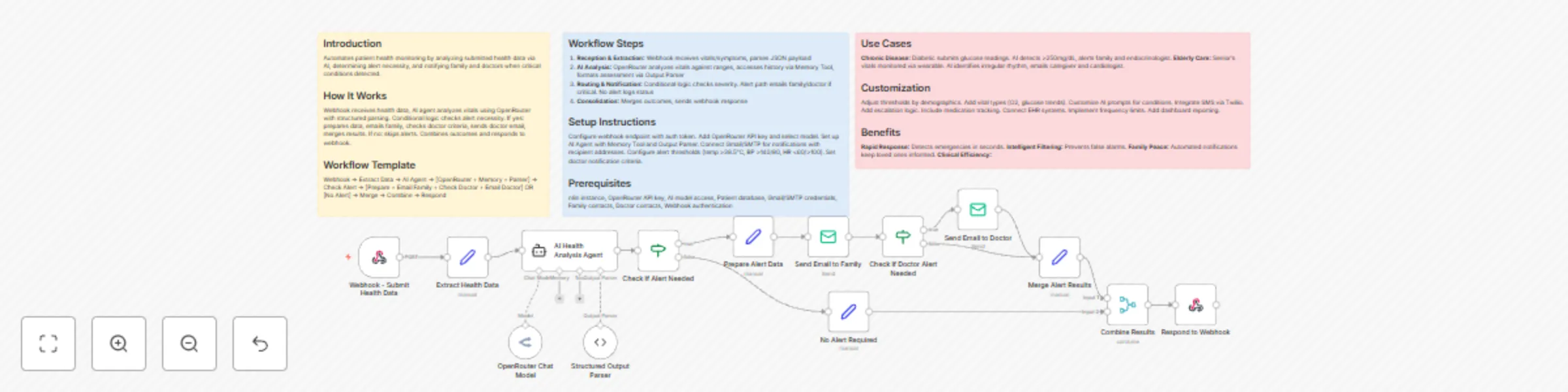
Webhook receives health data, AI agent analyzes vitals using OpenRouter with structured parsing. Conditional logic checks alert necessity. If yes: prepares data, emails family, checks doctor criteria, sends doctor email, merges results. If no: skips alerts. Combines outcomes and responds to webhook.
Webhook → Extract Data → AI Agent → [OpenRouter + Memory + Parser] → Check Alert → [Prepare + Email Family + Check Doctor + Email Doctor] OR [No Alert] → Merge → Combine → Respond
Configure webhook endpoint with auth token. Add OpenRouter API key and select model. Set up AI Agent with Memory Tool and Output Parser. Connect Gmail/SMTP for notifications with recipient addresses. Configure alert thresholds (temp >38.5°C, BP >140/90, HR <60/>100). Set doctor notification criteria.
n8n instance, OpenRouter API key, AI model access, Patient database, Gmail/SMTP credentials, Family contacts, Doctor contacts, Webhook authentication
Chronic Disease: Diabetic submits glucose readings. AI detects >250mg/dL, alerts family and endocrinologist. Elderly Care: Senior's vitals monitored via wearable. AI identifies irregular rhythm, emails caregiver and cardiologist.
Adjust thresholds by demographics. Add vital types (O2, glucose trends). Customize AI prompts for conditions. Integrate SMS via Twilio. Add escalation logic. Include medication tracking. Connect EHR systems. Implement frequency limits. Add dashboard reporting.
Rapid Response: Detects emergencies in seconds. Intelligent Filtering: Prevents false alarms. Family Peace: Automated notifications keep loved ones informed. Clinical Efficiency:
This catalog entry is organized from the workflow JSON. The node-level section below shows the executable blocks available for review before importing the template.
| Workflow | Health monitoring system with Grok-3 AI analysis and family/doctor email alerts |
|---|---|
| Complexity | advanced |
| Nodes | 17 |
| Categories | Personal Productivity, AI Summarization |
| Author | Cheng Siong Chin |
| Published | 05 Nov 2025 |
Use the JSON export at /data/workflows/10525/10525.json as the source template for this automation.
Open n8n, import the downloaded JSON, and review each node before activating the workflow.
Replace placeholder credentials, API keys, webhook URLs, account IDs, and environment-specific values with your own settings.
Run the workflow manually or in a staging workspace, inspect node output, and confirm downstream systems receive the expected data.
Enable the workflow only after testing, then monitor executions, errors, and rate limits during the first production runs.
Review imported nodes carefully before activation. This catalog entry is intended to help you inspect the workflow structure, understand required services, and find related templates faster.
Node names, credentials, schedules, webhook paths, and external service limits may need adjustment for your workspace.
Introduction Automates patient health monitoring by analyzing submitted health data via AI, determining alert necessity, and notifying family and doctors when critical conditions detected. How It W...
Review the workflow JSON, configure any required credentials in n8n, and test the automation in a safe workspace before using it in production.
Yes. Use the block-by-block analysis and the downloadable JSON to inspect each node, then adjust credentials, prompts, schedules, filters, or destinations for your Personal Productivity, AI Summarization use case.