Block 1 - On clicking 'execute'
- Type / Role
- n8n-nodes-base.manualTrigger - manualTrigger
- Config choices
- Version 1


 Early Deal
This workflow is provided as-is. Please review and test before using in production.
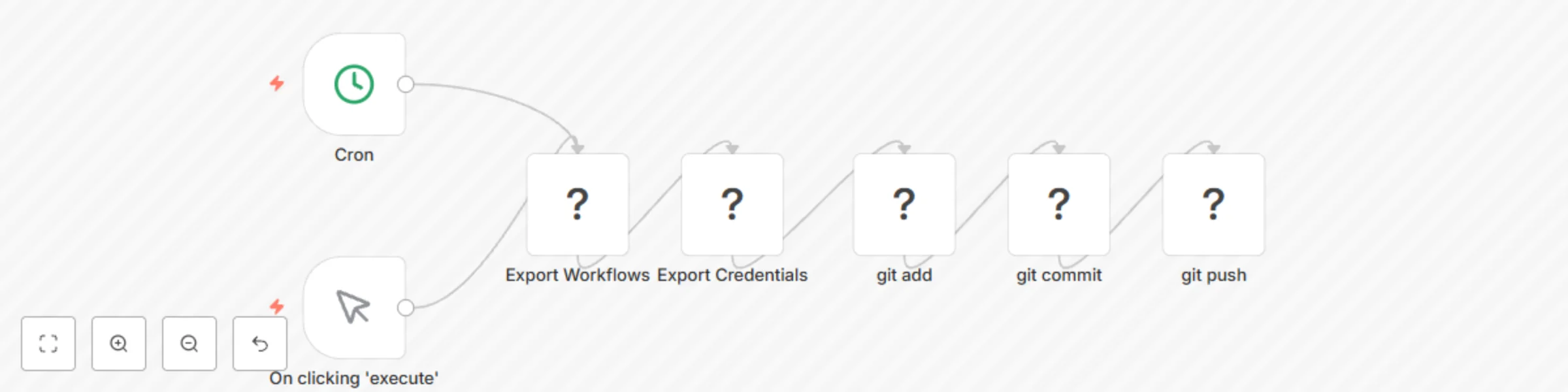
This creates a git backup of the workflows and credentials. It uses the n8n export command with git diff, so you can run as many times as you want, but only when there are changes they will create ...
n8n-nodes-base.manualtrigger, n8n-nodes-base.executecommand, n8n-nodes-base.cron
This workflow is cataloged by N8N Workflows and links back to its original n8n.io source page by Allan Daemon.
Original n8n.io sourceThis creates a git backup of the workflows and credentials.
It uses the n8n export command with git diff, so you can run as many times as you want, but only when there are changes they will create a commit.
You need some access to the server.
Create a repository in some remote place to host your project, like Github, Gitlab, or your favorite private repo.
Clone the repository in the server in a place that the n8n has access. In the example, it's the ., and the repository name is repo. Change it in the commands and in the workflow commands (you can set it as a variable in the wokflow). Checkout to another branch if you won't use the master one.
cd .
git clone repository
Or you could git init and then add the remote (git remote add origin YOUR_REPO_URL), whatever pleases you more.
As the server, check if everything is ok for beeing able to commit. Very likely you'll need to setup the user email and name. Try to create a commit, and push it to upstream, and everything you need (like config a user to comit) will appear in way. I strong suggest testing with exporting the commands to garantee it will work too.
cd ./repo

git commit -c "Initial commmit" --allow-empty
-u is the same as --set-upstream
git push -u origin master
Testing to push to upstream with the first exported data
npx n8n export:workflow --backup --output ./repo/workflows/
npx n8n export:credentials --backup --output repo/credentials/

cd ./repo
git add .
git commit -c "manual backup: first export"
git push
After that, if everything is ok, the workflow should work just fine.
Adjust the path in used in the workflow. See the the git -C PATH command is the same as cd PATH; git ....
Also, adjust the cron to run as you need. As I said in the beginning, you can run it even for every minute, but it will create commits only when there are changes.
The default for exporting the credentials is to do them encrypted. You can add the flag --decrypted to the n8n export:credentials command if you need to save them in plain. But as general rule, it's better to save the encryption key, that you only need to do that once, and them export it safely encrypted.
This catalog entry is organized from the workflow JSON. The node-level section below shows the executable blocks available for review before importing the template.
| Workflow | Git backup of workflows and credentials |
|---|---|
| Complexity | intermediate |
| Nodes | 7 |
| Categories | DevOps |
| Author | Allan Daemon |
| Published | 22 Apr 2021 |
Use the JSON export at /data/workflows/1053/1053.json as the source template for this automation.
Open n8n, import the downloaded JSON, and review each node before activating the workflow.
Replace placeholder credentials, API keys, webhook URLs, account IDs, and environment-specific values with your own settings.
Run the workflow manually or in a staging workspace, inspect node output, and confirm downstream systems receive the expected data.
Enable the workflow only after testing, then monitor executions, errors, and rate limits during the first production runs.
Review imported nodes carefully before activation. This catalog entry is intended to help you inspect the workflow structure, understand required services, and find related templates faster.
Node names, credentials, schedules, webhook paths, and external service limits may need adjustment for your workspace.
This creates a git backup of the workflows and credentials. It uses the n8n export command with git diff, so you can run as many times as you want, but only when there are changes they will create ...
Review the workflow JSON, configure any required credentials in n8n, and test the automation in a safe workspace before using it in production.
Yes. Use the block-by-block analysis and the downloadable JSON to inspect each node, then adjust credentials, prompts, schedules, filters, or destinations for your DevOps use case.