Block 1 - ⏰ Daily Schedule Trigger
- Type / Role
- n8n-nodes-base.scheduleTrigger - scheduleTrigger
- Config choices
- Version 1.3


 Early Deal
Improve your chess automatically — get a personalized AI coaching report delivered. This workflow connects to the free Chess.com public API, fetches your most recent game, and sends it to an AI lan...
n8n-nodes-base.scheduletrigger, n8n-nodes-base.manualtrigger, n8n-nodes-base.stickynote, n8n-nodes-base.code, n8n-nodes-base.httprequest, n8n-nodes-base.splitinbatches, n8n-nodes-base.set, @n8n/n8n-nodes-langchain.agent
This workflow is cataloged by N8N Workflows and links back to its original n8n.io source page by Ucartz Online.
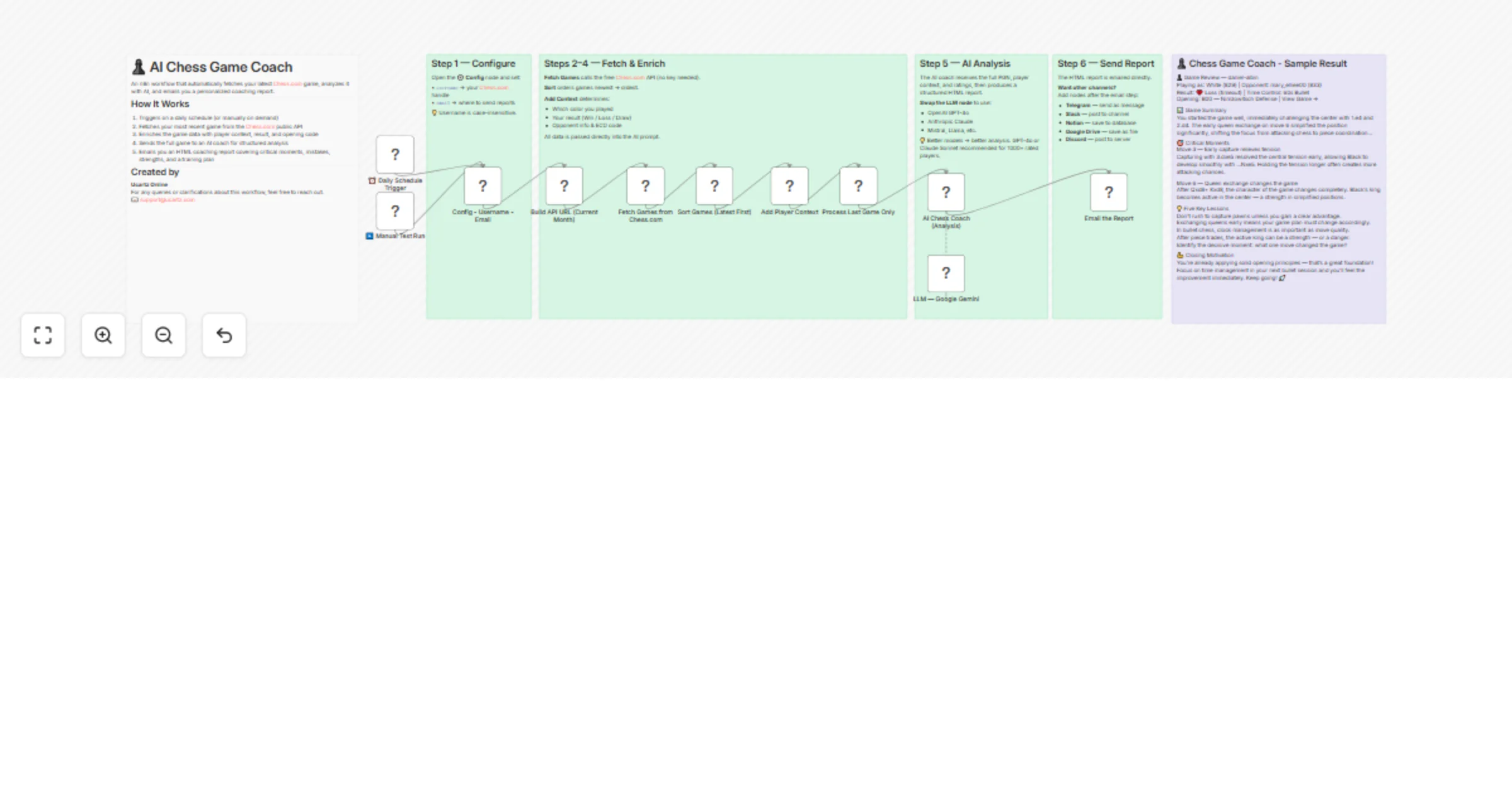
Original n8n.io sourceImprove your chess automatically — get a personalized AI coaching report delivered. This workflow connects to the free Chess.com public API, fetches your most recent game, and sends it to an AI language model that acts as your personal chess coach. Within minutes, you receive a structured HTML email covering everything from critical turning points to a personalized training plan.
🔧 How It Works
Trigger — Runs on a daily schedule or manually on demand Config Node — Set your Chess.com username and email address (one-time setup) Fetch Games — Pulls your current month's games from Chess.com's public API (no API key required) Sort & Enrich — Identifies your color, result (Win/Loss/Draw), opponent details, ratings, and ECO opening code AI Analysis — Sends the full PGN and game context to your chosen LLM with a structured coaching prompt Email Report — Delivers a clean HTML coaching report directly to your inbox via Gmail
📊 What's in the Coaching Report
Game Summary — Opening, middlegame, and endgame narrative Critical Moments — 3–5 turning points with explanations of what happened and what should have been played Mistake Categories — Tactical oversights, positional errors, opening issues, endgame technique, time management What Went Well — Genuine strengths recognized and reinforced Five Key Lessons — Specific, memorable takeaways tied to your actual game Training Plan — Targeted drills and study resources based on your weaknesses Closing Motivation — Encouraging next step to keep you improving
⚙️ Setup (Under 5 Minutes)
Import the workflow into n8n Open the Config node and enter your Chess.com username and target email address Connect your Gmail OAuth2 credential Connect your preferred LLM credential (Google Gemini is pre-wired; swap for OpenAI or Claude if preferred) Activate the workflow — done!
🤖 Supported AI Models The quality of the results depends on the model you choose. You can start with the free Gemini models and compare the output with your expected results.
The LLM node is plug-and-play, allowing you to switch between different models with a single click.
Google Gemini 2.5 Flash (pre-configured) OpenAI GPT-4o — Best overall chess analysis quality Anthropic Claude Sonnet — Excellent at explanations and coaching tone Mistral / Llama — Self-hosted options for privacy-conscious users
💡 Stronger models produce better analysis. GPT-4o or Claude Sonnet are recommended for players rated 1000+.
📬 Extend the Workflow After the email step, you can easily add nodes to also send the report via:
Telegram — instant mobile notifications Slack — post to a personal or team channel Notion — build a game review database Google Drive — archive reports as files Discord — share with your chess study group
✅ Requirements
n8n (self-hosted or cloud) A Chess.com account with at least one game this month Gmail OAuth2 credential Any supported LLM API credential (Google Gemini, OpenAI, Anthropic, etc.)
This catalog entry is organized from the workflow JSON. The node-level section below shows the executable blocks available for review before importing the template.
| Workflow | Get chess.com game reviews by email using Google Gemini or other LLMs |
|---|---|
| Complexity | advanced |
| Nodes | 17 |
| Categories | Personal Productivity, AI Summarization |
| Author | Ucartz Online |
| Published | 18 Mar 2026 |
Use the JSON export at /data/workflows/14165/14165.json as the source template for this automation.
Open n8n, import the downloaded JSON, and review each node before activating the workflow.
Replace placeholder credentials, API keys, webhook URLs, account IDs, and environment-specific values with your own settings.
Run the workflow manually or in a staging workspace, inspect node output, and confirm downstream systems receive the expected data.
Enable the workflow only after testing, then monitor executions, errors, and rate limits during the first production runs.
Review imported nodes carefully before activation. This catalog entry is intended to help you inspect the workflow structure, understand required services, and find related templates faster.
Node names, credentials, schedules, webhook paths, and external service limits may need adjustment for your workspace.
Improve your chess automatically — get a personalized AI coaching report delivered. This workflow connects to the free Chess.com public API, fetches your most recent game, and sends it to an AI lan...
Review the workflow JSON, configure any required credentials in n8n, and test the automation in a safe workspace before using it in production.
Yes. Use the block-by-block analysis and the downloadable JSON to inspect each node, then adjust credentials, prompts, schedules, filters, or destinations for your Personal Productivity, AI Summarization use case.