Get a summary of each podcast in your YouTube playlist daily automatically free
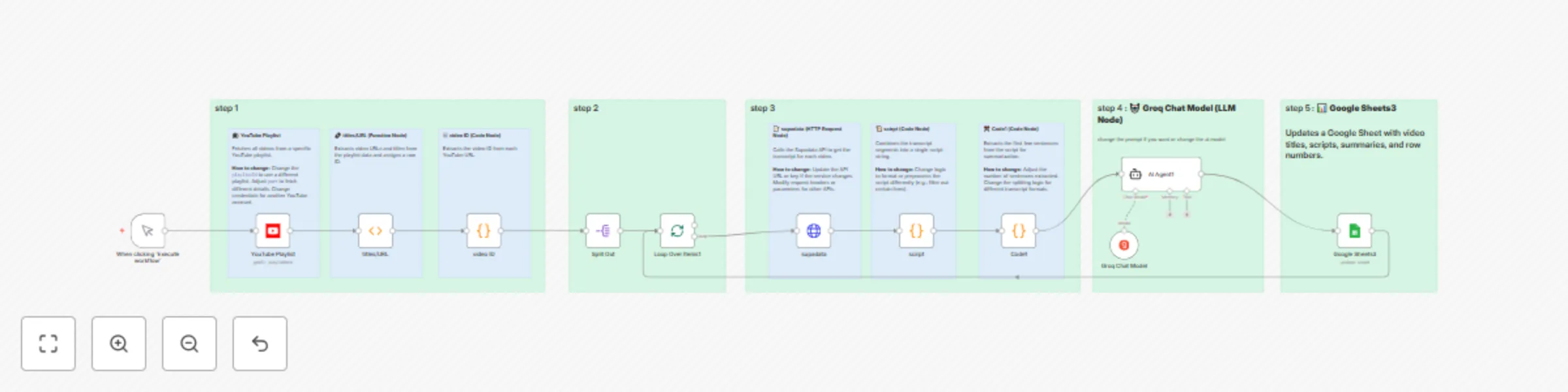
Workflow preview


 Early Deal
DISCOUNT 20%

Important notice
This workflow is provided as-is. Please review and test before using in production.
Overview
Understand the workflow better.
Good to know:
This workflow automatically transcribes your favorite podcasts or videos saved in a YouTube playlist and generates a comprehensive, AI-powered summary—so you can quickly understand the main topics and insights without having to watch or listen to the entire episode.
👤 Who is this for?
Podcast fans who want to save time and get the key points from episodes
Busy professionals who follow educational or industry videos and need quick takeaways
Content creators or researchers who organize and review large amounts of video/audio material
Anyone who wants to efficiently capture and summarize information from YouTube playlists
❓ What problem is this workflow solving?
This workflow solves the challenge of information overload from long-form podcasts and videos. It:
Automatically transcribes each video or podcast episode in your chosen YouTube playlist
Uses AI to create a clear, well-structured summary of the content
Lets you learn and extract valuable information without watching or listening to the entire recording
Organizes everything in a Google Sheets document for easy tracking and future reference
✅ What this workflow does:
📺 Fetches all videos from a specified YouTube playlist
🔗 Extracts video titles, URLs, and IDs
📝 Retrieves and combines transcripts for each video or podcast episode
📜 Processes transcript data for clarity
🤖 Uses AI to generate a detailed, sectioned summary that covers all main topics and insights
📊 Automatically logs video titles, transcripts, summaries, and row numbers to a Google Sheets spreadsheet
⚙️ How it works:
🟢 Trigger: Start the workflow manually or on a schedule
📺 Fetch videos from your chosen YouTube playlist
🔗 Extract and organize video details (title, URL, ID)
📝 Retrieve the transcript for each video or podcast episode
📜 Combine transcript segments into a single script
✂️ Extract the first sentences for focused summarization
🤖 AI agent creates a comprehensive summary of the episode or video
📊 Save all data—title, transcript, summary, and row number—to Google Sheets
🛠️ How to use:
Set up YouTube OAuth2 credentials in n8n
Configure Google Sheets OAuth2 credentials
Set up API credentials for transcript and AI processing
Create and link your Google Sheets document
Input your playlist ID and adjust any filters as needed
Activate the workflow
📝 Requirements:
n8n instance (cloud or self-hosted) YouTube account with OAuth2 access Google Sheets account Access to transcript and AI APIs Basic n8n workflow knowledge
🟢 Customizing this workflow:
Change the YouTube playlist ID to target your preferred podcasts or video series
Adjust the transcript retrieval process for other APIs or formats
Customize the AI prompt for different summary styles or focus areas
Add or remove fields in the Google Sheets output
Change the workflow trigger or polling frequency
Switch to a different AI model if desired
This workflow is designed to help you quickly learn from podcasts and videos you care about—without spending hours consuming the full content.