Generate YouTube video summaries with SearchAPI transcripts and LLM

Workflow preview

Workflow preview
100%
Generate YouTube video summaries with SearchAPI transcripts and LLM preview
Open on n8n.io

Important notice

This workflow is provided as-is. Please review and test before using in production.

1. Workflow Overview

Summarize YouTube Videos using SearchApi & LLM Who is this for? This workflow is ideal for content creators , students , digital marketers , educators , and researchers who want to quickly summa...

Best for

  • Content Creation automation workflows
  • AI Summarization automation workflows
  • intermediate n8n builders looking for reusable templates

Tools used

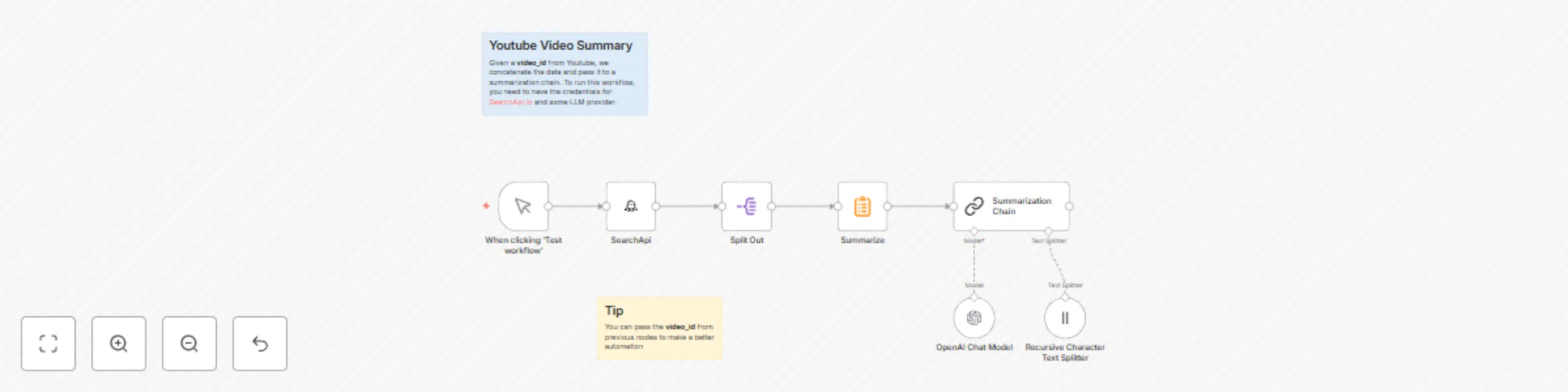
n8n-nodes-base.manualtrigger, @n8n/n8n-nodes-langchain.chainsummarization, @n8n/n8n-nodes-langchain.textsplitterrecursivecharactertextsplitter, n8n-nodes-base.splitout, n8n-nodes-base.summarize, n8n-nodes-base.stickynote, @searchapi/n8n-nodes-searchapi.searchapi, @n8n/n8n-nodes-langchain.lmchatopenai

Source and attribution

This workflow is cataloged by N8N Workflows and links back to its original n8n.io source page by Pedro Santos.

Original n8n.io source

1.1 Workflow description

Title
Generate YouTube video summaries with SearchAPI transcripts and LLM
Workflow name
Generate YouTube video summaries with SearchAPI transcripts and LLM

🎥 Summarize YouTube Videos using SearchApi & LLM

Who is this for?

This workflow is ideal for content creators, students, digital marketers, educators, and researchers who want to quickly summarize YouTube videos.

What problem does this workflow solve?

Manually extracting important information from lengthy YouTube videos can be tedious and prone to errors. This workflow streamlines the process by automatically fetching video transcripts using SearchApi.io and producing concise, informative summaries through a summarization chain powered by any LLM provider. This allows users to quickly access crucial information without the need for manual transcription or detailed viewing.

What this workflow does

  • Fetches the complete transcript of a YouTube video using SearchApi.
  • Combines the retrieved transcript into a single, continuous text.
  • Utilizes a Summarization Chain with an LLM (e.g., OpenRouter models) to create a concise summary of the video content.

Setup

  1. Install the SearchApi community node:

    • Open Settings → Community Nodes inside your self‑hosted n8n instance.
    • Fill npm Package Name with @searchapi/n8n-nodes-searchapi.
    • Accept the risk prompt, and hit Install.
    • It should now appear as a node when you search for it.
  2. API Configuration:

    • Set up your SearchApi.io credentials in n8n.
    • Add your preferred LLM provider credentials (e.g., OpenRouter API).
  3. Input Requirements:

    • Provide the YouTube video ID (e.g., wBuULAoJxok).
  4. Connect LLM Integration:

    • Configure the summarization chain with your chosen model and parameters for text splitting.

How to customize this workflow to meet your needs

  • Adjust the summarization model or modify text-splitter parameters to accommodate different lengths and complexities of video transcripts.
  • Integrate additional nodes to export summaries directly into your preferred tools, such as Google Drive, Slack, or email.
  • Customize prompt templates in the summarization chain to obtain various summary styles (bullet points, paragraphs, etc.).
  • Modify the trigger to suit your workflow.

Example Usage

  1. Input: YouTube video ID (wBuULAoJxok).
  2. Output: A concise, actionable summary that highlights key ideas, recommendations, and insights from the video.

1.2 Logical Blocks

This catalog entry is organized from the workflow JSON. The node-level section below shows the executable blocks available for review before importing the template.

2. Block-by-Block Analysis

Block 1 - When clicking ‘Test workflow’

Type / Role
n8n-nodes-base.manualTrigger - manualTrigger
Config choices
Version 1

Block 2 - Summarization Chain

Type / Role
@n8n/n8n-nodes-langchain.chainSummarization - chainSummarization
Config choices
Version 2

Block 3 - Recursive Character Text Splitter

Type / Role
@n8n/n8n-nodes-langchain.textSplitterRecursiveCharacterTextSplitter - textSplitterRecursiveCharacterTextSplitter
Config choices
Version 1

Block 4 - Split Out

Type / Role
n8n-nodes-base.splitOut - splitOut
Config choices
Version 1

Block 5 - Summarize

Type / Role
n8n-nodes-base.summarize - summarize
Config choices
Version 1.1

Block 6 - Sticky Note

Type / Role
n8n-nodes-base.stickyNote - stickyNote
Config choices
Version 1

Block 7 - Sticky Note1

Type / Role
n8n-nodes-base.stickyNote - stickyNote
Config choices
Version 1

Block 8 - SearchApi

Type / Role
@searchapi/n8n-nodes-searchapi.searchApi - searchApi
Config choices
Version 1

Block 9 - OpenAI Chat Model

Type / Role
@n8n/n8n-nodes-langchain.lmChatOpenAi - lmChatOpenAi
Config choices
Version 1.2

3. Summary Table

Workflow Generate YouTube video summaries with SearchAPI transcripts and LLM
Complexity intermediate
Nodes 9
Categories Content Creation, AI Summarization
Author Pedro Santos
Published 02 May 2025

4. Reproducing the Workflow from Scratch

  1. 1. Download the workflow JSON

    Use the JSON export at /data/workflows/3828/3828.json as the source template for this automation.

  2. 2. Import the template into n8n

    Open n8n, import the downloaded JSON, and review each node before activating the workflow.

  3. 3. Configure credentials and variables

    Replace placeholder credentials, API keys, webhook URLs, account IDs, and environment-specific values with your own settings.

  4. 4. Test with sample data

    Run the workflow manually or in a staging workspace, inspect node output, and confirm downstream systems receive the expected data.

  5. 5. Activate and monitor

    Enable the workflow only after testing, then monitor executions, errors, and rate limits during the first production runs.

5. General Notes & Resources

Review imported nodes carefully before activation. This catalog entry is intended to help you inspect the workflow structure, understand required services, and find related templates faster.

Node names, credentials, schedules, webhook paths, and external service limits may need adjustment for your workspace.

Frequently asked questions

What does Generate YouTube video summaries with SearchAPI transcripts and LLM do?

Summarize YouTube Videos using SearchApi & LLM Who is this for? This workflow is ideal for content creators , students , digital marketers , educators , and researchers who want to quickly summa...

What do I need before importing this workflow?

Review the workflow JSON, configure any required credentials in n8n, and test the automation in a safe workspace before using it in production.

Can I customize this workflow?

Yes. Use the block-by-block analysis and the downloadable JSON to inspect each node, then adjust credentials, prompts, schedules, filters, or destinations for your Content Creation, AI Summarization use case.