Generate weekly document digests from Google Docs with GPT-4 and email delivery

Workflow preview

Workflow preview
100%
Generate weekly document digests from Google Docs with GPT-4 and email delivery preview
Open on n8n.io

Important notice

This workflow is provided as-is. Please review and test before using in production.

1. Workflow Overview

AI Summarize Weekly Google Docs Updates → Send Email This workflow automatically reviews selected Google Docs every week, checks for updates, and generates a professional weekly summary email us...

Best for

  • Document Extraction automation workflows
  • AI Summarization automation workflows
  • intermediate n8n builders looking for reusable templates

Tools used

n8n-nodes-base.stickynote, n8n-nodes-base.cron, n8n-nodes-base.code, n8n-nodes-base.googledocs, n8n-nodes-base.googledrive, n8n-nodes-base.openai, n8n-nodes-base.gmail

Source and attribution

This workflow is cataloged by N8N Workflows and links back to its original n8n.io source page by David Olusola.

Original n8n.io source

1.1 Workflow description

Title
Generate weekly document digests from Google Docs with GPT-4 and email delivery
Workflow name
Generate weekly document digests from Google Docs with GPT-4 and email delivery

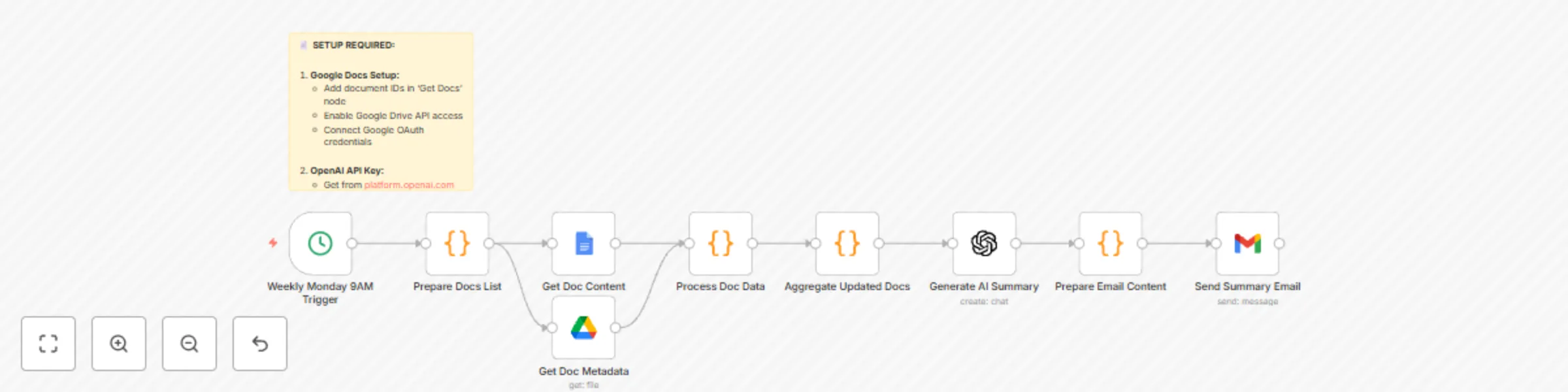
📄 AI Summarize Weekly Google Docs Updates → Send Email

This workflow automatically reviews selected Google Docs every week, checks for updates, and generates a professional weekly summary email using AI. It’s perfect for keeping your team or leadership informed without manually digging through multiple documents.


⚙️ How It Works

  1. Weekly Monday 9AM Trigger

    • A Cron node runs every Monday at 9 AM (adjustable).
    • Ensures summaries arrive at the start of the workweek.
  2. Prepare Docs List

    • A Code node defines which Google Docs to monitor.
    • Includes doc IDs, names, and categories (e.g., Projects, Meetings, Updates).
    • Sets a 7-day date range for updates.
  3. Fetch Google Docs & Metadata

    • Retrieves document content and metadata (last modified, user, version).
    • Filters only docs that have been updated in the past week.
  4. Process Doc Data

    • Extracts plain text content from Google Docs.
    • Cleans and normalizes text for summarization.
    • Collects key details: word count, modified by, last updated date.
  5. Aggregate Updated Docs

    • Gathers all updated docs into one combined content block.
    • Prepares context for the AI model to create a weekly digest.
  6. Generate AI Summary

    • Uses GPT-4 to generate a business-style weekly summary.
    • Includes:
      • Executive summary
      • Key updates by document
      • Important changes
      • Action items
      • Next week’s focus
  7. Prepare Email Content

    • Formats the AI response into both plain text and HTML email.
    • Adds a list of updated documents with last modified info.
  8. Send Summary Email

    • Sends the final summary to the configured team emails via Gmail.
    • Subject line includes the date range for easy reference.

🛠️ Setup Steps

1. Google Docs Setup

  • Add document IDs in the Prepare Docs List node.
  • Enable the Google Drive API in your Google account.
  • Connect Google OAuth credentials in n8n.

2. OpenAI API Key

  • Get your key from platform.openai.com.
  • Add it to your n8n credentials.
  • Uses GPT-4 for high-quality summaries.

3. Email Recipients

  • Update the Gmail node with your team’s email addresses.
  • Customize the subject line and template if needed.

4. Schedule

  • Default: Every Monday at 9 AM.
  • Adjust the Cron node if you prefer a different time.

📧 Example Output

Subject: 📄 Weekly Document Updates Summary – 08/22/2025 – 08/29/2025

Body (excerpt):
Dear Team, Here's your weekly document updates summary:

Executive Summary:

Project Status Doc updated with new timelines. Meeting Notes highlight three key decisions from leadership. Team Updates document includes two new hires and onboarding tasks. Key Updates by Document: • Project Status Doc (Projects) - Updated by Alice on 08/27 • Meeting Notes (Meetings) - Updated by Bob on 08/28 • Team Updates (Updates) - Updated by Sarah on 08/29 Action Items:

Confirm revised project deadlines. Follow up on onboarding checklist. This summary was automatically generated by your n8n workflow.


⚡ With this workflow, you’ll never miss important document changes — your team gets a clear, AI-generated weekly digest straight in their inbox.

1.2 Logical Blocks

This catalog entry is organized from the workflow JSON. The node-level section below shows the executable blocks available for review before importing the template.

2. Block-by-Block Analysis

Block 1 - Setup Instructions

Type / Role
n8n-nodes-base.stickyNote - stickyNote
Config choices
Version 1

Block 2 - Weekly Monday 9AM Trigger

Type / Role
n8n-nodes-base.cron - cron
Config choices
Version 1

Block 3 - Prepare Docs List

Type / Role
n8n-nodes-base.code - code
Config choices
Version 2

Block 4 - Get Doc Content

Type / Role
n8n-nodes-base.googleDocs - googleDocs
Config choices
Version 2

Block 5 - Get Doc Metadata

Type / Role
n8n-nodes-base.googleDrive - googleDrive
Config choices
Version 3

Block 6 - Process Doc Data

Type / Role
n8n-nodes-base.code - code
Config choices
Version 2

Block 7 - Aggregate Updated Docs

Type / Role
n8n-nodes-base.code - code
Config choices
Version 2

Block 8 - Generate AI Summary

Type / Role
n8n-nodes-base.openAi - openAi
Config choices
Version 1

Block 9 - Prepare Email Content

Type / Role
n8n-nodes-base.code - code
Config choices
Version 2

Block 10 - Send Summary Email

Type / Role
n8n-nodes-base.gmail - gmail
Config choices
Version 2.1

3. Summary Table

Workflow Generate weekly document digests from Google Docs with GPT-4 and email delivery
Complexity intermediate
Nodes 10
Categories Document Extraction, AI Summarization
Author David Olusola
Published 29 Aug 2025

4. Reproducing the Workflow from Scratch

  1. 1. Download the workflow JSON

    Use the JSON export at /data/workflows/8039/8039.json as the source template for this automation.

  2. 2. Import the template into n8n

    Open n8n, import the downloaded JSON, and review each node before activating the workflow.

  3. 3. Configure credentials and variables

    Replace placeholder credentials, API keys, webhook URLs, account IDs, and environment-specific values with your own settings.

  4. 4. Test with sample data

    Run the workflow manually or in a staging workspace, inspect node output, and confirm downstream systems receive the expected data.

  5. 5. Activate and monitor

    Enable the workflow only after testing, then monitor executions, errors, and rate limits during the first production runs.

5. General Notes & Resources

Review imported nodes carefully before activation. This catalog entry is intended to help you inspect the workflow structure, understand required services, and find related templates faster.

Node names, credentials, schedules, webhook paths, and external service limits may need adjustment for your workspace.

Frequently asked questions

What does Generate weekly document digests from Google Docs with GPT-4 and email delivery do?

AI Summarize Weekly Google Docs Updates → Send Email This workflow automatically reviews selected Google Docs every week, checks for updates, and generates a professional weekly summary email us...

What do I need before importing this workflow?

Review the workflow JSON, configure any required credentials in n8n, and test the automation in a safe workspace before using it in production.

Can I customize this workflow?

Yes. Use the block-by-block analysis and the downloadable JSON to inspect each node, then adjust credentials, prompts, schedules, filters, or destinations for your Document Extraction, AI Summarization use case.