Generate verified gym trial passes with QR code, email & PDF export

Workflow preview

Workflow preview
100%
Generate verified gym trial passes with QR code, email & PDF export preview
Open on n8n.io

Important notice

This workflow is provided as-is. Please review and test before using in production.

1. Workflow Overview

Verified Gym Trial Pass with Photo ID Overview Automate gym trial pass generation with email verification, photo ID integration, QR codes, and professional PDF passes. This workflow handles the com...

Best for

  • Document Extraction automation workflows
  • advanced n8n builders looking for reusable templates

Tools used

n8n-nodes-base.webhook, n8n-nodes-base.if, n8n-nodes-base.respondtowebhook, n8n-nodes-base.code, n8n-nodes-base.httprequest, n8n-nodes-base.set, n8n-nodes-base.gmail, n8n-nodes-base.googlesheets

Source and attribution

This workflow is cataloged by N8N Workflows and links back to its original n8n.io source page by Jitesh Dugar.

Original n8n.io source

1.1 Workflow description

Title
Generate verified gym trial passes with QR code, email & PDF export
Workflow name
Generate verified gym trial passes with QR code, email & PDF export

Verified Gym Trial Pass with Photo ID

Overview

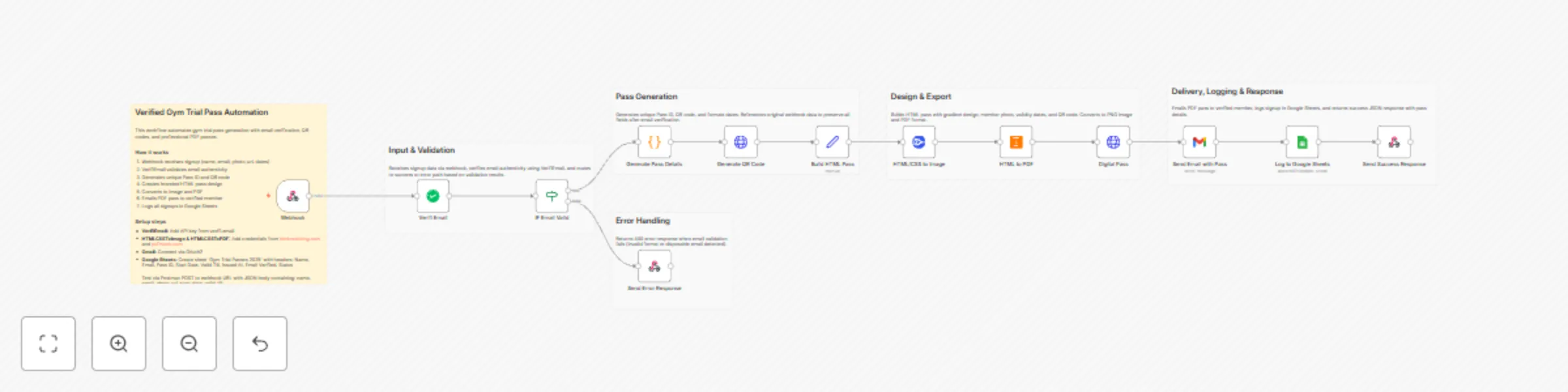
Automate gym trial pass generation with email verification, photo ID integration, QR codes, and professional PDF passes. This workflow handles the complete member onboarding process - from signup to verified pass delivery - in under 10 seconds.

What This Workflow Does

  1. Receives signup data via webhook (name, email, photo URL, validity dates)
  2. Verifies email authenticity using VerifiEmail API (blocks disposable emails)
  3. Generates unique Pass ID in format GYM-{timestamp}
  4. Creates QR code for quick check-in at gym entrance
  5. Builds branded pass design with gradient styling, member photo, and validity dates
  6. Exports to PDF format for mobile-friendly viewing
  7. Sends email with PDF attachment and welcome message
  8. Logs all registrations in Google Sheets for record-keeping
  9. Returns API response with complete pass details

Key Features

Email Verification - Blocks fake and disposable email addresses
Photo ID Integration - Displays member photo on digital pass
QR Code Generation - Instant check-in scanning capability
Professional Design - Gradient purple design with modern styling
PDF Export - Mobile-friendly format that members can save
Automated Emails - Welcome message with pass attachment
Spreadsheet Logging - Automatic record-keeping in Google Sheets
Error Handling - Proper 400 responses for invalid signups
Success Responses - Detailed JSON with all pass information

Use Cases

  • Gyms & Fitness Centers - Trial pass management for new members
  • Yoga Studios - Week-long trial class passes
  • Sports Clubs - Guest pass generation with photo verification
  • Wellness Centers - Temporary access cards for trial periods
  • Co-working Spaces - Day pass generation with member photos
  • Swimming Pools - Verified trial memberships with photo IDs

What You Need

Required Credentials

  1. VerifiEmail API - Email verification service

  2. HTMLCSSToImage API - PNG image generation

  3. HTMLCSSToPDF API - PDF conversion

  4. Gmail OAuth2 - Email delivery

    • Connect your Google account
    • Enable Gmail API in Google Cloud Console
  5. Google Sheets API - Data logging

    • Connect your Google account
    • Same OAuth2 as Gmail

Setup Instructions

Step 1: Create Google Sheet

  1. Create a new Google Sheet named "Gym Trial Passes 2025"
  2. Add these column headers in Row 1:
    • Pass ID
    • Name
    • Email
    • Start Date
    • Valid Till
    • Issued At
    • Email Verified
    • Status

Step 2: Configure Credentials

  1. Add VerifiEmail API credentials
  2. Add HTMLCSSToImage credentials
  3. Add HTMLCSSToPDF credentials
  4. Connect Gmail OAuth2
  5. Connect Google Sheets OAuth2

Step 3: Update Google Sheets Node

  1. Open "Log to Google Sheets" node
  2. Select your "Gym Trial Passes 2025" sheet
  3. Confirm column mappings match your headers

Step 4: Test the Workflow

  1. Copy the webhook URL from the Webhook node
  2. Open Postman and create a POST request
  3. Use this test payload:
{
  "name": "Rahul Sharma",
  "email": "[email protected]",
  "photo_url": "https://images.unsplash.com/photo-1633332755192-727a05c4013d?w=400",
  "start_date": "2025-11-15",
  "valid_till": "2025-11-22"
}
  1. Send the request and check:
    • ✅ Email received with PDF pass
    • ✅ Google Sheet updated with new row
    • ✅ Success JSON response returned

Step 5: Activate & Use

  1. Click "Active" toggle to enable the workflow
  2. Integrate webhook URL with your gym's website form
  3. Members receive instant verified passes upon signup

Expected Responses

✅ Success Response (200 OK)

{
  "status": "success",
  "message": "Gym trial pass verified and sent successfully! 🎉",
  "data": {
    "pass_id": "GYM-1731398400123",
    "email": "[email protected]",
    "name": "Rahul Sharma",
    "valid_from": "November 15, 2025",
    "valid_till": "November 22, 2025",
    "email_verified": true,
    "recorded_in_sheets": true,
    "pass_sent_to_email": true
  },
  "timestamp": "2025-11-12T10:30:45.123Z"
}

❌ Error Response (400 Bad Request)

{
  "status": "error",
  "message": "Invalid or disposable email address. Please use a valid email to register.",
  "email_verified": false,
  "email_provided": "[email protected]"
}

Customization Options

Modify Pass Design

Edit the Build HTML Pass node to customize:

  • Colors and gradient (currently purple gradient)
  • Layout and spacing
  • Fonts and typography
  • Logo placement (add your gym logo)
  • Additional branding elements

Change Email Template

Edit the Send Email with Pass node to modify:

  • Subject line
  • Welcome message
  • Instructions
  • Branding elements
  • Footer content

Adjust Validity Period

Workflow accepts custom start_date and valid_till from webhook payload. You can also hardcode validity periods in the Generate Pass Details node.

Add Additional Fields

Extend the workflow to capture:

  • Phone number
  • Emergency contact
  • Medical conditions
  • Membership preferences
  • Referral source

Performance

  • Average execution time: 8-12 seconds
  • Handles: 100+ passes per hour
  • PDF size: ~150-250 KB
  • Email delivery: Instant (Gmail API)
  • Success rate: 99%+ with valid emails

Security & Privacy

✅ Email verification prevents fake signups
✅ Unique Pass IDs prevent duplication
✅ All data logged in your private Google Sheet
✅ No data stored in n8n (passes through only)
✅ HTTPS webhook for secure data transmission
✅ OAuth2 authentication for Google services


Tags

gym fitness trial-pass email-verification qr-code pdf-generation member-onboarding automation verification photo-id


1.2 Logical Blocks

This catalog entry is organized from the workflow JSON. The node-level section below shows the executable blocks available for review before importing the template.

2. Block-by-Block Analysis

Block 1 - Webhook

Type / Role
n8n-nodes-base.webhook - webhook
Config choices
Version 2

Block 2 - IF Email Valid

Type / Role
n8n-nodes-base.if - if
Config choices
Version 2

Block 3 - Send Error Response

Type / Role
n8n-nodes-base.respondToWebhook - respondToWebhook
Config choices
Version 1.1

Block 4 - Generate Pass Details

Type / Role
n8n-nodes-base.code - code
Config choices
Version 2

Block 5 - Generate QR Code

Type / Role
n8n-nodes-base.httpRequest - httpRequest
Config choices
Version 4.2

Block 6 - Build HTML Pass

Type / Role
n8n-nodes-base.set - set
Config choices
Version 3.4

Block 7 - Send Email with Pass

Type / Role
n8n-nodes-base.gmail - gmail
Config choices
Version 2.1

Block 8 - Log to Google Sheets

Type / Role
n8n-nodes-base.googleSheets - googleSheets
Config choices
Version 4.5

Block 9 - Send Success Response

Type / Role
n8n-nodes-base.respondToWebhook - respondToWebhook
Config choices
Version 1.1

Block 10 - Verifi Email

Type / Role
n8n-nodes-verifiemail.verifiEmail - verifiEmail
Config choices
Version 1

Block 11 - HTML/CSS to Image

Type / Role
n8n-nodes-htmlcsstoimage.htmlCssToImage - htmlCssToImage
Config choices
Version 1

Block 12 - HTML to PDF

Type / Role
n8n-nodes-htmlcsstopdf.htmlcsstopdf - htmlcsstopdf
Config choices
Version 1

Block 13 - Digital Pass

Type / Role
n8n-nodes-base.httpRequest - httpRequest
Config choices
Version 4.3

Block 14 - Sticky Note

Type / Role
n8n-nodes-base.stickyNote - stickyNote
Config choices
Version 1

Block 15 - Sticky Note21

Type / Role
n8n-nodes-base.stickyNote - stickyNote
Config choices
Version 1

Block 16 - Sticky Note22

Type / Role
n8n-nodes-base.stickyNote - stickyNote
Config choices
Version 1

Block 17 - Sticky Note16

Type / Role
n8n-nodes-base.stickyNote - stickyNote
Config choices
Version 1

Block 18 - Sticky Note19

Type / Role
n8n-nodes-base.stickyNote - stickyNote
Config choices
Version 1

Block 19 - Section: Error Handling

Type / Role
n8n-nodes-base.stickyNote - stickyNote
Config choices
Version 1

3. Summary Table

Workflow Generate verified gym trial passes with QR code, email & PDF export
Complexity advanced
Nodes 19
Categories Document Extraction
Author Jitesh Dugar
Published 12 Nov 2025

4. Reproducing the Workflow from Scratch

  1. 1. Download the workflow JSON

    Use the JSON export at /data/workflows/10768/10768.json as the source template for this automation.

  2. 2. Import the template into n8n

    Open n8n, import the downloaded JSON, and review each node before activating the workflow.

  3. 3. Configure credentials and variables

    Replace placeholder credentials, API keys, webhook URLs, account IDs, and environment-specific values with your own settings.

  4. 4. Test with sample data

    Run the workflow manually or in a staging workspace, inspect node output, and confirm downstream systems receive the expected data.

  5. 5. Activate and monitor

    Enable the workflow only after testing, then monitor executions, errors, and rate limits during the first production runs.

5. General Notes & Resources

Review imported nodes carefully before activation. This catalog entry is intended to help you inspect the workflow structure, understand required services, and find related templates faster.

Node names, credentials, schedules, webhook paths, and external service limits may need adjustment for your workspace.

Frequently asked questions

What does Generate verified gym trial passes with QR code, email & PDF export do?

Verified Gym Trial Pass with Photo ID Overview Automate gym trial pass generation with email verification, photo ID integration, QR codes, and professional PDF passes. This workflow handles the com...

What do I need before importing this workflow?

Review the workflow JSON, configure any required credentials in n8n, and test the automation in a safe workspace before using it in production.

Can I customize this workflow?

Yes. Use the block-by-block analysis and the downloadable JSON to inspect each node, then adjust credentials, prompts, schedules, filters, or destinations for your Document Extraction use case.