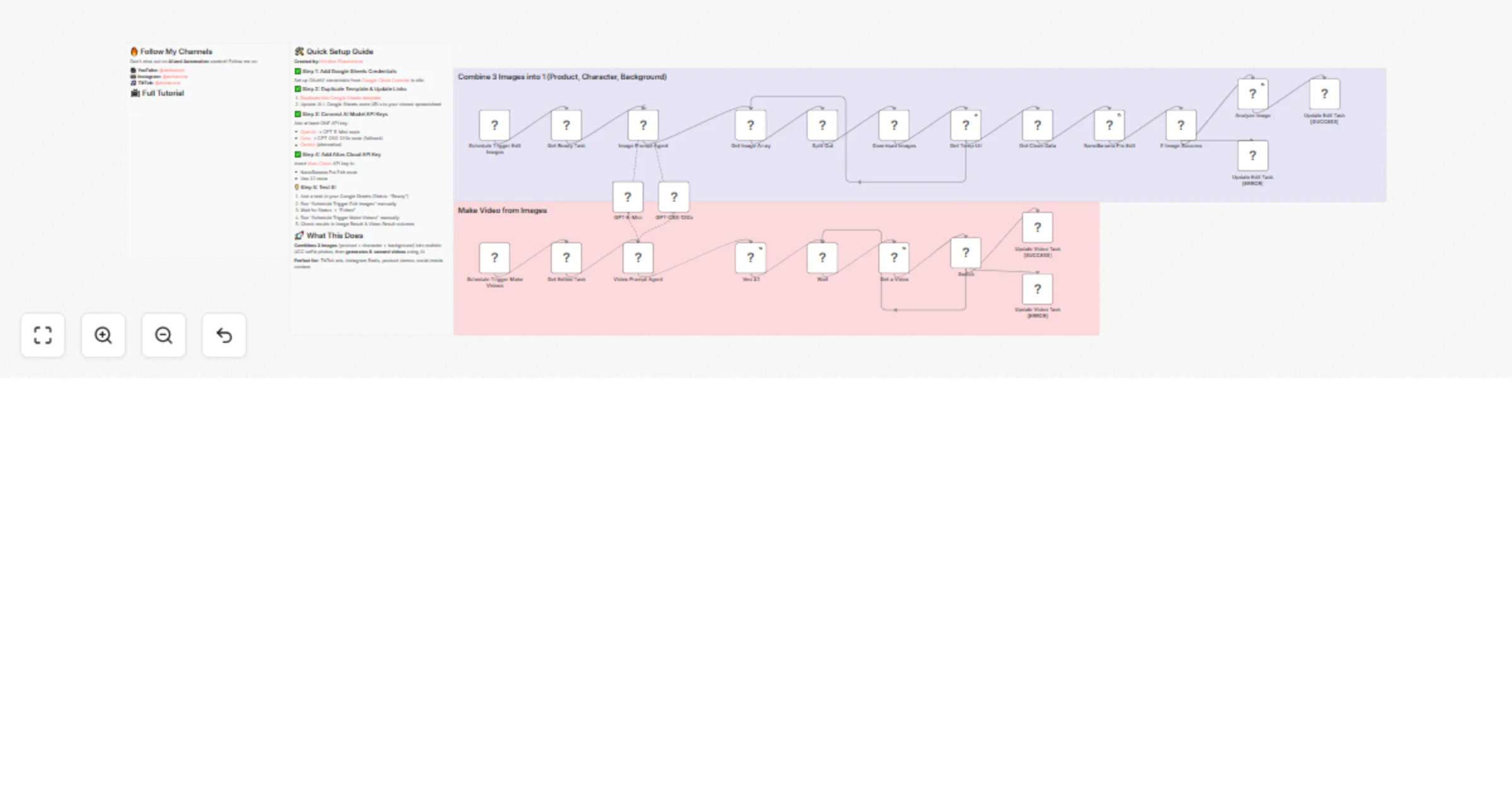
Generate UGC-style AI videos with Google Sheets, NanoBanana Pro and Veo 3.1

Workflow preview

Workflow preview
100%
Generate UGC-style AI videos with Google Sheets, NanoBanana Pro and Veo 3.1 preview
Open on n8n.io

1. Workflow Overview

AI Powered UGC Video Generator Automatically create consistent, professional UGC (User Generated Content) videos at scale using cutting edge AI models. This workflow combines three reference ima...

Best for

  • Content Creation automation workflows
  • Multimodal AI automation workflows
  • advanced n8n builders looking for reusable templates

Tools used

n8n-nodes-base.code, n8n-nodes-base.httprequest, n8n-nodes-base.splitout, @n8n/n8n-nodes-langchain.agent, n8n-nodes-base.if, n8n-nodes-base.googlesheets, n8n-nodes-base.scheduletrigger, @n8n/n8n-nodes-langchain.openai

Source and attribution

This workflow is cataloged by N8N Workflows and links back to its original n8n.io source page by Kristian Ekachandra.

Original n8n.io source

1.1 Workflow description

Title
Generate UGC-style AI videos with Google Sheets, NanoBanana Pro and Veo 3.1
Workflow name
Generate UGC-style AI videos with Google Sheets, NanoBanana Pro and Veo 3.1

🎬 AI-Powered UGC Video Generator

Automatically create consistent, professional UGC (User-Generated Content) videos at scale using cutting-edge AI models. This workflow combines three reference images into hyper-realistic selfie-style photos, then transforms them into engaging 8-second videos perfect for TikTok, Instagram Reels, and social media ads.


✨ What This Workflow Does

Part 1: Image Generation

  • Combines 3 reference images (product + character + background) using NanoBanana Pro
  • AI agent generates optimized prompts for realistic UGC selfie photos
  • Analyzes output quality before proceeding to video generation

Part 2: Video Creation

  • Transforms static images into dynamic 8-second videos using Google Veo 3.1
  • AI agent creates natural dialogue and scene descriptions
  • Batch processes multiple tasks automatically via Google Sheets

🎯 Perfect For

  • E-commerce brands creating product demonstration videos
  • Marketing agencies producing social media ad content at scale
  • Content creators generating consistent UGC-style videos
  • A/B testing multiple video variations quickly
  • Dropshippers needing authentic product videos without filming

πŸš€ Key Features

βœ… Consistent Characters - Same person, style, and aesthetic across all videos βœ… Batch Processing - Manage multiple tasks via Google Sheets βœ… Multi-Model Support - Primary + fallback AI models for reliability βœ… Smart Error Handling - Automatic retries and status tracking βœ… Dual Workflow - Separate pipelines for image and video generation βœ… Quality Analysis - AI checks image quality before video creation


πŸ› οΈ Required APIs

Essential:

Choose at least ONE:


πŸ“‹ How It Works

Image Generation Pipeline:

  1. Reads tasks from Google Sheets (Status: "Ready")
  2. AI agent generates optimized image prompt
  3. Downloads and uploads 3 reference images to temp storage
  4. NanoBanana Pro combines images into realistic UGC selfie
  5. Analyzes output image quality
  6. Updates sheet with results (Status: "Edited")

Video Generation Pipeline:

  1. Reads edited tasks from Google Sheets (Status: "Edited")
  2. AI agent generates video prompt with natural dialogue
  3. Veo 3.1 transforms image into 8-second video
  4. Polls generation status every 10 seconds
  5. Updates sheet with final video (Status: "Finished")

πŸ’‘ Pro Tips

  • Use high-quality reference images (minimum 1024x1024px)
  • Keep character photos consistent (same person, similar lighting)
  • Write clear scene descriptions for better results
  • Test with 1 task first before running large batches
  • Monitor API quotas to avoid rate limits

πŸ“Ί Full Tutorial

Complete setup walkthrough available on YouTube: Watch Tutorial


πŸŽ“ What You'll Learn

  • Setting up multi-step AI automation workflows
  • Integrating multiple AI models (OpenAI, Groq, Gemini)
  • Using NanoBanana Pro for advanced image editing
  • Generating videos with Google Veo 3.1
  • Managing batch processes via Google Sheets
  • Implementing fallback models for reliability
  • Handling errors and status tracking

πŸ“Š Google Sheets Template Structure

The workflow includes a pre-built template with these columns:

  • Task ID - Unique identifier
  • Product Photo - Product image URL
  • Character - Person reference image URL
  • Background - Scene background URL
  • Product Name - Name of the product
  • Product Description - Details about the product
  • Target Market - Audience for the video
  • Video Scene - Scene description for video
  • Status - Workflow status (Ready β†’ Edited β†’ Finished)
  • Image Prompt - Generated prompt for image
  • Image Result - Output image URL
  • Analyze Image - Quality analysis results
  • Video Prompt - Generated prompt for video
  • Video Result - Final video URL
  • Error Message - Error details if failed

πŸ”„ Status Flow

Ready β†’ Edited β†’ Finished
 ↓ ↓ ↓
Error Error Error

βš™οΈ Customization Options

Adjust Image Style:

  • Modify the Image Prompt Agent system message
  • Change composition (close-up, medium shot, wide)
  • Adjust lighting (natural, studio, dramatic)

Modify Video Output:

  • Edit Video Prompt Agent for different styles
  • Change duration (default: 8 seconds)
  • Customize dialogue language (default: Indonesian)
  • Adjust camera angles and movements

Add More AI Models:

  • Connect additional providers as fallbacks
  • Models are tried in order until success
  • Supports OpenAI, Anthropic, Groq, Gemini

πŸ” Security Notes

  • Never commit API keys to version control
  • Use environment variables in production
  • Don't share your Google Sheets publicly
  • Rotate API keys regularly
  • Set billing alerts on all platforms

πŸ“ž Support & Updates

Created by: Kristian Ekachandra

Follow for more AI automation workflows:


🏷️ Tags

ai-video ugc content-creation video-generation batch-processing google-sheets openai groq nanobanana-pro veo-3.1 marketing social-media tiktok instagram-reels automation

1.2 Logical Blocks

This catalog entry is organized from the workflow JSON. The node-level section below shows the executable blocks available for review before importing the template.

2. Block-by-Block Analysis

Block 1 - Get Image Array

Type / Role
n8n-nodes-base.code - code
Config choices
Version 2

Block 2 - NanoBanana Pro Edit

Type / Role
n8n-nodes-base.httpRequest - httpRequest
Config choices
Version 4.3

Block 3 - Split Out

Type / Role
n8n-nodes-base.splitOut - splitOut
Config choices
Version 1

Block 4 - Download Images

Type / Role
n8n-nodes-base.httpRequest - httpRequest
Config choices
Version 4.3

Block 5 - Get Temp Url

Type / Role
n8n-nodes-base.httpRequest - httpRequest
Config choices
Version 4.3

Block 6 - Image Prompt Agent

Type / Role
@n8n/n8n-nodes-langchain.agent - agent
Config choices
Version 3.1

Block 7 - Get Clean Data

Type / Role
n8n-nodes-base.code - code
Config choices
Version 2

Block 8 - If Image Success

Type / Role
n8n-nodes-base.if - if
Config choices
Version 2.3

Block 9 - Update Edit Task [SUCCESS]

Type / Role
n8n-nodes-base.googleSheets - googleSheets
Config choices
Version 4.7

Block 10 - Update Edit Task [ERROR]

Type / Role
n8n-nodes-base.googleSheets - googleSheets
Config choices
Version 4.7

Block 11 - Video Prompt Agent

Type / Role
@n8n/n8n-nodes-langchain.agent - agent
Config choices
Version 3.1

Block 12 - Get Ready Task

Type / Role
n8n-nodes-base.googleSheets - googleSheets
Config choices
Version 4.7

Block 13 - Schedule Trigger Make Videos

Type / Role
n8n-nodes-base.scheduleTrigger - scheduleTrigger
Config choices
Version 1.3

Block 14 - Schedule Trigger Edit Images

Type / Role
n8n-nodes-base.scheduleTrigger - scheduleTrigger
Config choices
Version 1.3

Block 15 - Get Edited Task

Type / Role
n8n-nodes-base.googleSheets - googleSheets
Config choices
Version 4.7

Block 16 - Analyze image

Type / Role
@n8n/n8n-nodes-langchain.openAi - openAi
Config choices
Version 2.1

Block 17 - Veo 3.1

Type / Role
n8n-nodes-base.httpRequest - httpRequest
Config choices
Version 4.3

Block 18 - Wait

Type / Role
n8n-nodes-base.wait - wait
Config choices
Version 1.1

Block 19 - Get a Video

Type / Role
n8n-nodes-base.httpRequest - httpRequest
Config choices
Version 4.3

Block 20 - Switch

Type / Role
n8n-nodes-base.switch - switch
Config choices
Version 3.4

Block 21 - Update Video Task [ERROR]

Type / Role
n8n-nodes-base.googleSheets - googleSheets
Config choices
Version 4.7

Block 22 - Update Video Task [SUCCESS]

Type / Role
n8n-nodes-base.googleSheets - googleSheets
Config choices
Version 4.7

Block 23 - Sticky Note1

Type / Role
n8n-nodes-base.stickyNote - stickyNote
Config choices
Version 1

Block 24 - Sticky Note2

Type / Role
n8n-nodes-base.stickyNote - stickyNote
Config choices
Version 1

Showing the first 24 of 28 workflow blocks. Download the JSON for the full node graph.

3. Summary Table

Workflow Generate UGC-style AI videos with Google Sheets, NanoBanana Pro and Veo 3.1
Complexity advanced
Nodes 28
Categories Content Creation, Multimodal AI
Author Kristian Ekachandra
Published 16 Jan 2026

4. Reproducing the Workflow from Scratch

  1. 1. Download the workflow JSON

    Use the JSON export at /data/workflows/12752/12752.json as the source template for this automation.

  2. 2. Import the template into n8n

    Open n8n, import the downloaded JSON, and review each node before activating the workflow.

  3. 3. Configure credentials and variables

    Replace placeholder credentials, API keys, webhook URLs, account IDs, and environment-specific values with your own settings.

  4. 4. Test with sample data

    Run the workflow manually or in a staging workspace, inspect node output, and confirm downstream systems receive the expected data.

  5. 5. Activate and monitor

    Enable the workflow only after testing, then monitor executions, errors, and rate limits during the first production runs.

5. General Notes & Resources

Review imported nodes carefully before activation. This catalog entry is intended to help you inspect the workflow structure, understand required services, and find related templates faster.

Node names, credentials, schedules, webhook paths, and external service limits may need adjustment for your workspace.

Frequently asked questions

What does Generate UGC-style AI videos with Google Sheets, NanoBanana Pro and Veo 3.1 do?

AI Powered UGC Video Generator Automatically create consistent, professional UGC (User Generated Content) videos at scale using cutting edge AI models. This workflow combines three reference ima...

What do I need before importing this workflow?

Review the workflow JSON, configure any required credentials in n8n, and test the automation in a safe workspace before using it in production.

Can I customize this workflow?

Yes. Use the block-by-block analysis and the downloadable JSON to inspect each node, then adjust credentials, prompts, schedules, filters, or destinations for your Content Creation, Multimodal AI use case.