Generate scalable e-commerce product images with GPT-4 and NanoBanana Pro

Workflow preview

Workflow preview
100%
Generate scalable e-commerce product images with GPT-4 and NanoBanana Pro preview
Open on n8n.io

Important notice

This workflow is provided as-is. Please review and test before using in production.

1. Workflow Overview

AI Image Generation Workflow – Scalable E commerce Product Images This workflow automates the creation of high quality, AI generated product images using NanoBanana Pro . It analyzes multiple re...

Best for

  • Content Creation automation workflows
  • Multimodal AI automation workflows
  • advanced n8n builders looking for reusable templates

Tools used

n8n-nodes-base.formtrigger, n8n-nodes-base.if, n8n-nodes-base.set, n8n-nodes-base.code, n8n-nodes-base.googledrive, @n8n/n8n-nodes-langchain.openai, n8n-nodes-base.merge, @n8n/n8n-nodes-langchain.lmchatopenai

Source and attribution

This workflow is cataloged by N8N Workflows and links back to its original n8n.io source page by Dr. Firas.

Original n8n.io source

1.1 Workflow description

Title
Generate scalable e-commerce product images with GPT-4 and NanoBanana Pro
Workflow name
Generate scalable e-commerce product images with GPT-4 and NanoBanana Pro

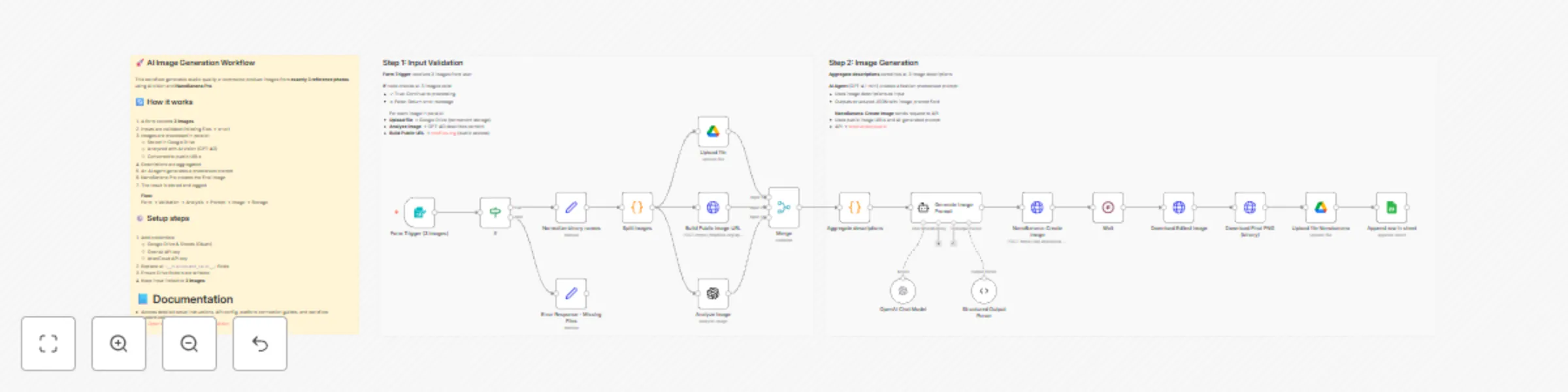
🚀 AI Image Generation Workflow – Scalable E-commerce Product Images

This workflow automates the creation of high-quality, AI-generated product images using NanoBanana Pro.
It analyzes multiple reference images, generates a professional photoshoot-style prompt, creates a new image, and stores the final result with a public URL for reuse.


📄 Documentation: Notion Guide

👤 Who is this for?

This workflow is designed for:

  • E-commerce store owners
  • Digital marketers and growth teams
  • Creative agencies
  • Automation builders using n8n
  • Anyone who wants to generate scalable, consistent product images from existing photos

No advanced coding skills are required.


❓ What problem does this workflow solve? / Use case

Creating professional product images at scale is expensive, slow, and inconsistent.

This workflow solves:

  • Manual photoshoot costs
  • Inconsistent visual branding
  • Time wasted on prompt writing
  • Difficulty generating AI-ready public image URLs
  • Repetitive image upload and storage steps

Typical use case:
Transform 3 reference photos (model + product) into a studio-quality fashion image automatically.


⚙️ What this workflow does

  1. Collects exactly 3 images via a form upload
  2. Validates inputs to ensure all required images are present
  3. Splits images into individual processing paths
  4. Uploads original images to Google Drive (permanent storage)
  5. Generates public, crawlable image URLs
  6. Analyzes each image using AI vision (GPT-4O)
  7. Aggregates image descriptions into a structured context
  8. Generates a professional photoshoot prompt using an AI agent
  9. Creates a new image via NanoBanana Pro
  10. Polls the API until the image generation is completed
  11. Downloads the final image as a binary file
  12. Uploads the final image to Google Drive
  13. Logs results (images + descriptions) into Google Sheets

🛠️ Setup

Required credentials

  • Google Drive (OAuth)
  • Google Sheets (OAuth)
  • OpenAI API key
  • AtlasCloud API key

Required configuration

  1. Replace all <__PLACEHOLDER_VALUE__> fields:
    • Google Drive folder IDs
    • Google Sheets document ID and sheet name
    • AtlasCloud API key
  2. Ensure Google Drive folders have write permissions
  3. Confirm tmpfiles.org is reachable from your environment

Important notes

  • The workflow expects exactly 3 images
  • The final image is downloaded as binary before upload
  • Public URLs are normalized to https://tmpfiles.org/dl/... for maximum AI compatibility

🎥 Watch This Tutorial


👋 Need help or want to customize this?

📩 Contact: LinkedIn
📺 YouTube: @DRFIRASS
🚀 Workshops: Mes Ateliers n8n

Need help customizing?

Contact me for consulting and support : Linkedin / Youtube / 🚀 Mes Ateliers n8n

1.2 Logical Blocks

This catalog entry is organized from the workflow JSON. The node-level section below shows the executable blocks available for review before importing the template.

2. Block-by-Block Analysis

Block 1 - Form Trigger (3 images)

Type / Role
n8n-nodes-base.formTrigger - formTrigger
Config choices
Version 2.4

Block 2 - If

Type / Role
n8n-nodes-base.if - if
Config choices
Version 2.3

Block 3 - Error Response - Missing Files

Type / Role
n8n-nodes-base.set - set
Config choices
Version 3.4

Block 4 - Normalize binary names

Type / Role
n8n-nodes-base.set - set
Config choices
Version 3.4

Block 5 - Split images

Type / Role
n8n-nodes-base.code - code
Config choices
Version 2

Block 6 - Upload file

Type / Role
n8n-nodes-base.googleDrive - googleDrive
Config choices
Version 3

Block 7 - Analyze image

Type / Role
@n8n/n8n-nodes-langchain.openAi - openAi
Config choices
Version 2.1

Block 8 - Merge

Type / Role
n8n-nodes-base.merge - merge
Config choices
Version 3.2

Block 9 - Aggregate descriptions

Type / Role
n8n-nodes-base.code - code
Config choices
Version 2

Block 10 - OpenAI Chat Model

Type / Role
@n8n/n8n-nodes-langchain.lmChatOpenAi - lmChatOpenAi
Config choices
Version 1.3

Block 11 - Structured Output Parser

Type / Role
@n8n/n8n-nodes-langchain.outputParserStructured - outputParserStructured
Config choices
Version 1.3

Block 12 - NanoBanana: Create Image

Type / Role
n8n-nodes-base.httpRequest - httpRequest
Config choices
Version 4.3

Block 13 - Build Public Image URL

Type / Role
n8n-nodes-base.httpRequest - httpRequest
Config choices
Version 4.3

Block 14 - Wait

Type / Role
n8n-nodes-base.wait - wait
Config choices
Version 1.1

Block 15 - Download Edited Image

Type / Role
n8n-nodes-base.httpRequest - httpRequest
Config choices
Version 4.3

Block 16 - Append row in sheet

Type / Role
n8n-nodes-base.googleSheets - googleSheets
Config choices
Version 4.7

Block 17 - Download Final PNG (binary)

Type / Role
n8n-nodes-base.httpRequest - httpRequest
Config choices
Version 4.3

Block 18 - Upload file Nanobanana

Type / Role
n8n-nodes-base.googleDrive - googleDrive
Config choices
Version 3

Block 19 - Note - Workflow Overview

Type / Role
n8n-nodes-base.stickyNote - stickyNote
Config choices
Version 1

Block 20 - Generate Image Prompt

Type / Role
@n8n/n8n-nodes-langchain.agent - agent
Config choices
Version 3.1

Block 21 - Sticky Note

Type / Role
n8n-nodes-base.stickyNote - stickyNote
Config choices
Version 1

Block 22 - Note - Workflow Overview1

Type / Role
n8n-nodes-base.stickyNote - stickyNote
Config choices
Version 1

3. Summary Table

Workflow Generate scalable e-commerce product images with GPT-4 and NanoBanana Pro
Complexity advanced
Nodes 22
Categories Content Creation, Multimodal AI
Author Dr. Firas
Published 12 Jan 2026

4. Reproducing the Workflow from Scratch

  1. 1. Download the workflow JSON

    Use the JSON export at /data/workflows/12645/12645.json as the source template for this automation.

  2. 2. Import the template into n8n

    Open n8n, import the downloaded JSON, and review each node before activating the workflow.

  3. 3. Configure credentials and variables

    Replace placeholder credentials, API keys, webhook URLs, account IDs, and environment-specific values with your own settings.

  4. 4. Test with sample data

    Run the workflow manually or in a staging workspace, inspect node output, and confirm downstream systems receive the expected data.

  5. 5. Activate and monitor

    Enable the workflow only after testing, then monitor executions, errors, and rate limits during the first production runs.

5. General Notes & Resources

Review imported nodes carefully before activation. This catalog entry is intended to help you inspect the workflow structure, understand required services, and find related templates faster.

Node names, credentials, schedules, webhook paths, and external service limits may need adjustment for your workspace.

Frequently asked questions

What does Generate scalable e-commerce product images with GPT-4 and NanoBanana Pro do?

AI Image Generation Workflow – Scalable E commerce Product Images This workflow automates the creation of high quality, AI generated product images using NanoBanana Pro . It analyzes multiple re...

What do I need before importing this workflow?

Review the workflow JSON, configure any required credentials in n8n, and test the automation in a safe workspace before using it in production.

Can I customize this workflow?

Yes. Use the block-by-block analysis and the downloadable JSON to inspect each node, then adjust credentials, prompts, schedules, filters, or destinations for your Content Creation, Multimodal AI use case.